



LinkedIn is the biggest professional networking platform in the world.
With 1.2 billion members across more than 200 countries, it is a valuable source of candidates and their professional related information.
But there are also things to take into account while recruiting on LinkedIn, like the high competitiveness amongst recruiters, outdated data, and the fact that almost everything useful on the platform is metered: searches, InMails, job posts.
In this guide you’ll learn about what LinkedIn recruiting is, how you can get started, what to keep in mind and how you can set up a longer term strategy for recruiting on LinkedIn.
What LinkedIn recruiting is about
LinkedIn is the biggest professional social networking platform in the world, owned by Microsoft, which bought LinkedIn in 2016 for a staggering 26.2 billion dollars.
Neither LinkedIn nor Microsoft reports revenue per product, so treat any precise “X% of LinkedIn’s revenue comes from recruiting” figure you read as an estimate. What Microsoft does disclose is the total: LinkedIn revenue grew $1.4 billion, or 9%, in fiscal 2025, with Talent Solutions named as one of four business lines alongside Marketing Solutions, Premium Subscriptions and Sales Solutions.
Why that matters to you as a recruiter: recruiting is a large, deliberately opaque business for LinkedIn, and the opacity extends to what you get quoted. There is no list price on the site for either Recruiter product, and pricing varies by geography, company size and industry.
LinkedIn Talent Solutions have several underlying products, like LinkedIn Recruiter (access to search filters), LinkedIn Jobs (job board) and LinkedIn Recruitment Marketing (job advertisements).
These are recruiting products that LinkedIn offers and what they give you:
1. LinkedIn Recruiter: finding people
The LinkedIn Recruiter seat is one of the premium accounts of LinkedIn. As a company you pay per individual user that uses access to LinkedIn Recruiter.
For small and medium businesses there is the LinkedIn Recruiter Lite plan that is less costly than the full LinkedIn Recruiter functionality.
LinkedIn publishes no price for either product. The Recruiter Lite page offers a “Try now for $0” button and no number at all, and full Recruiter is quoted per contract. These are the latest indications we see in the market (averages, rounded off, and they move by geography):
- Recruiter Lite: about $1,680 per year for a single license, or roughly $170 per month paying month to month
- Recruiter Professional Services: $6,000 to $10,000 per seat per year (the staffing and agency version)
- Recruiter Corporate: $10,800 to $12,960 per seat per year
The gap between Lite and Corporate is the whole commercial story of LinkedIn recruiting: you are paying roughly six to eight times more for the same underlying index of people, and what the money actually buys is not better candidates but a higher ceiling on how many of them you are allowed to touch. Here’s a full blog on how pricing works for LinkedIn Recruiter.
What you pay for is access to search filters and unlimited search on the platform.
Below is what's included in the plans, taken from LinkedIn’s own product pages.
LinkedIn Recruiter (corporate and professional services):
- InMails: 100 to 150 InMails per month per seat, depending on the seat
- Search: 40+ search filters
- Collaboration: Multi user account is available (collaborative environment)
- Reports: Jobs and InMail reporting, plus insights into your Recruiter pipeline, usage, and performance summaries
LinkedIn Recruiter Lite:
- InMails: 30 per license every month
- Search: 20+ search filters
- Collaboration: multi user account not available
- Reports: not included
The InMail cap is the number that actually governs your week, so it is worth knowing the one rule that softens it. LinkedIn credits an InMail back to you if the recipient accepts, declines, or replies within 90 days. Only silence costs you a credit. That inverts the instinct most recruiters have: blasting 30 generic InMails to a broad list burns all 30, while 30 well targeted ones to people who will at least answer “no thanks” can cost you almost nothing and refill the pool. On LinkedIn, a bad message is literally more expensive than a good one.
Even so, 30 a month is 30 a month, and reply-backs only stretch it if your targeting is already good. So the other way to reach candidates you find on LinkedIn is to look up their email with a contact finder like Apollo and message them directly, instead of spending a limited InMail on every profile. If you need phone numbers as well, or you recruit mostly in Europe where Apollo’s coverage thins out, Lusha is the other common choice, though its paid plans start at $49.90 per user per month, so it is a harder sell for a solo recruiter than a free tier is. Both work the same way in practice: a browser extension on the profile you are already looking at.
Apollo.io
That swap is only worth making if the emails are actually there, so it is worth knowing what the free tier really is. Apollo splits its free tier into more than one kind of credit, and the difference decides whether this workflow is viable for you. Email credits are the ones you spend revealing a candidate’s address, and on the free plan they are nominally unlimited, capped in practice under the fair use policy at 10,000 a month from a verified corporate domain and only 100 a month if you signed up with a Gmail address. The separate general pool is 900 credits per seat per year, released monthly, and that is what governs exports rather than lookups. Paid Basic is $49 per seat per month billed annually ($65 month to month). So sign up on your work domain: against Recruiter Lite’s 30 InMails, the free email allowance is not the bottleneck, and a personal-email signup very much is. The honest caveat is coverage rather than cost: Apollo is a B2B sales database built around work emails, so it is strongest on US corporate and tech profiles and thinnest on exactly the passive, non-corporate candidates LinkedIn is otherwise good at surfacing. Run a handful of your own target profiles through it before you build a workflow on top of it.
2. LinkedIn Jobs: posting jobs
You can post jobs that you have on the LinkedIn job board. Posting a job works the same as on any other job board.
You get one job post for free, but “free” has more conditions on it than most people expect, and they are worth reading before you build a hiring plan on top of it. Per LinkedIn’s own help page, you can have only one free job post active at a time, it stays active for up to 14 days and is then paused, it closes automatically at 30 days if you don’t promote it, and it carries an application limit that typically lands somewhere between 10 and 30 applications depending on the role.
That last limit is the one that bites. A free post on a popular role can hit its application cap in a couple of days and simply stop collecting, which reads to a hiring manager like “the job board isn’t working” when what actually happened is that the post filled its quota. If you are hiring for more than one role, only one of them can be free at any moment.
After that you pay a daily budget for your job post that you can set yourself, for example if you set a daily budget of $10,- that will cost you $300,- for a 30-day listing.
Paid job posts get placed on top of the search results of candidates and therefore can expect some more views and potentially more applicants.
3. LinkedIn Recruitment Marketing: advertising jobs and employer brand
You can pay for promoting your job post or your employer brand as an advertisement to LinkedIn users.
This works the same as the LinkedIn ads that you see yourself on your LinkedIn timeline and in banners for instance.
Prices of advertisements are dependent on the amount of views and how popular your advertisement target group is.
If you target the most sought after software developers, you are likely to pay more than when you are targeting less in demand positions.
How to start recruiting on LinkedIn
If you’re just starting out with recruiting on LinkedIn, you might want to know a couple of things to get started.
LinkedIn as a platform is a valuable source of candidates, but it can be also quite expensive and very competitive.
You’re not the only recruiter on there which can make winning candidates for you hard, so it helps to know your way around on the platform.
First thing to understand: how searches on LinkedIn work
We all know you can find people on LinkedIn using the search bar and filters. But how LinkedIn provides the matching results of your search, is dependent on how you use LinkedIn and what service you are using.
There’s a difference in the user interface between a regular LinkedIn account and the LinkedIn Recruiter account.
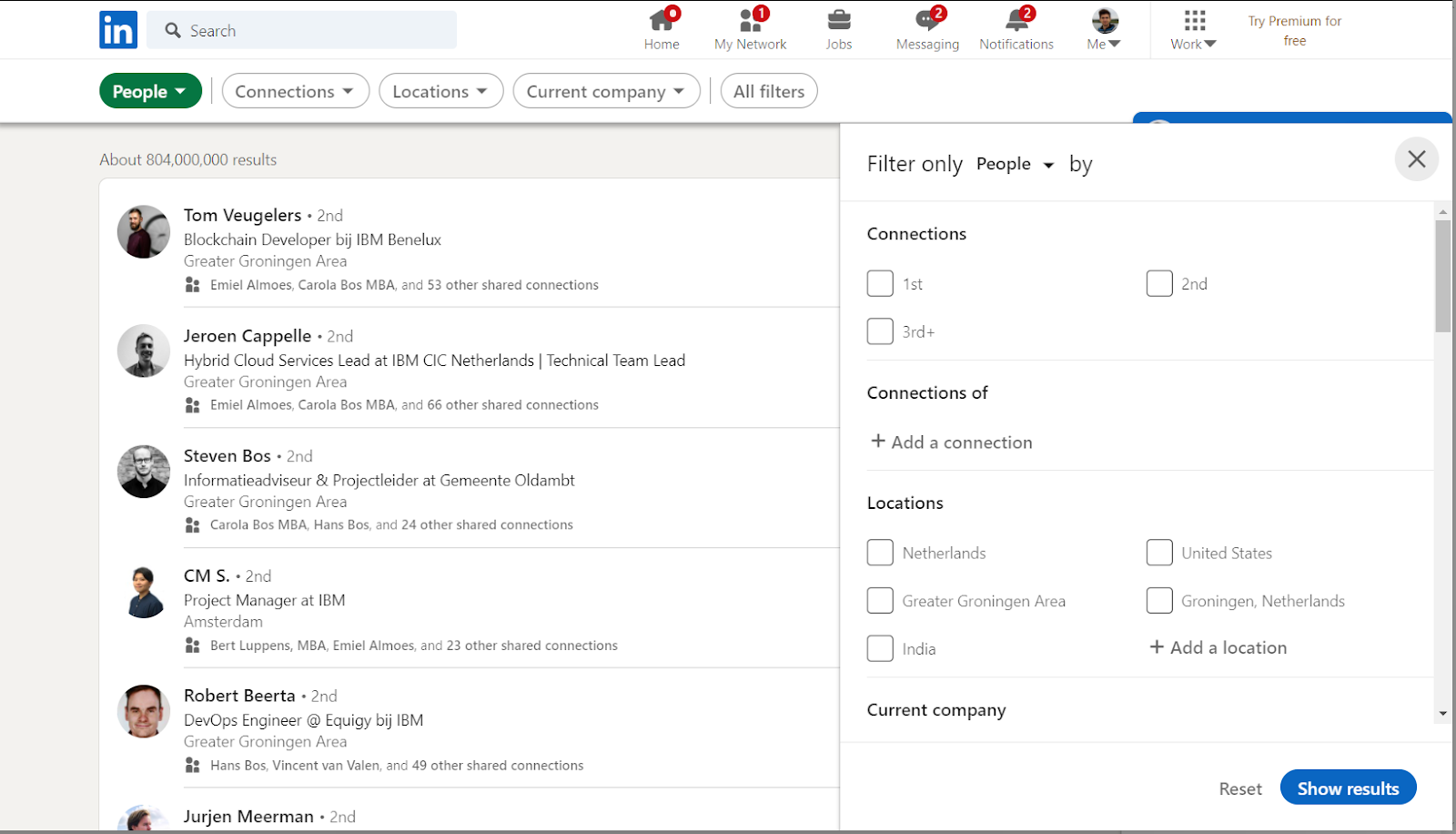
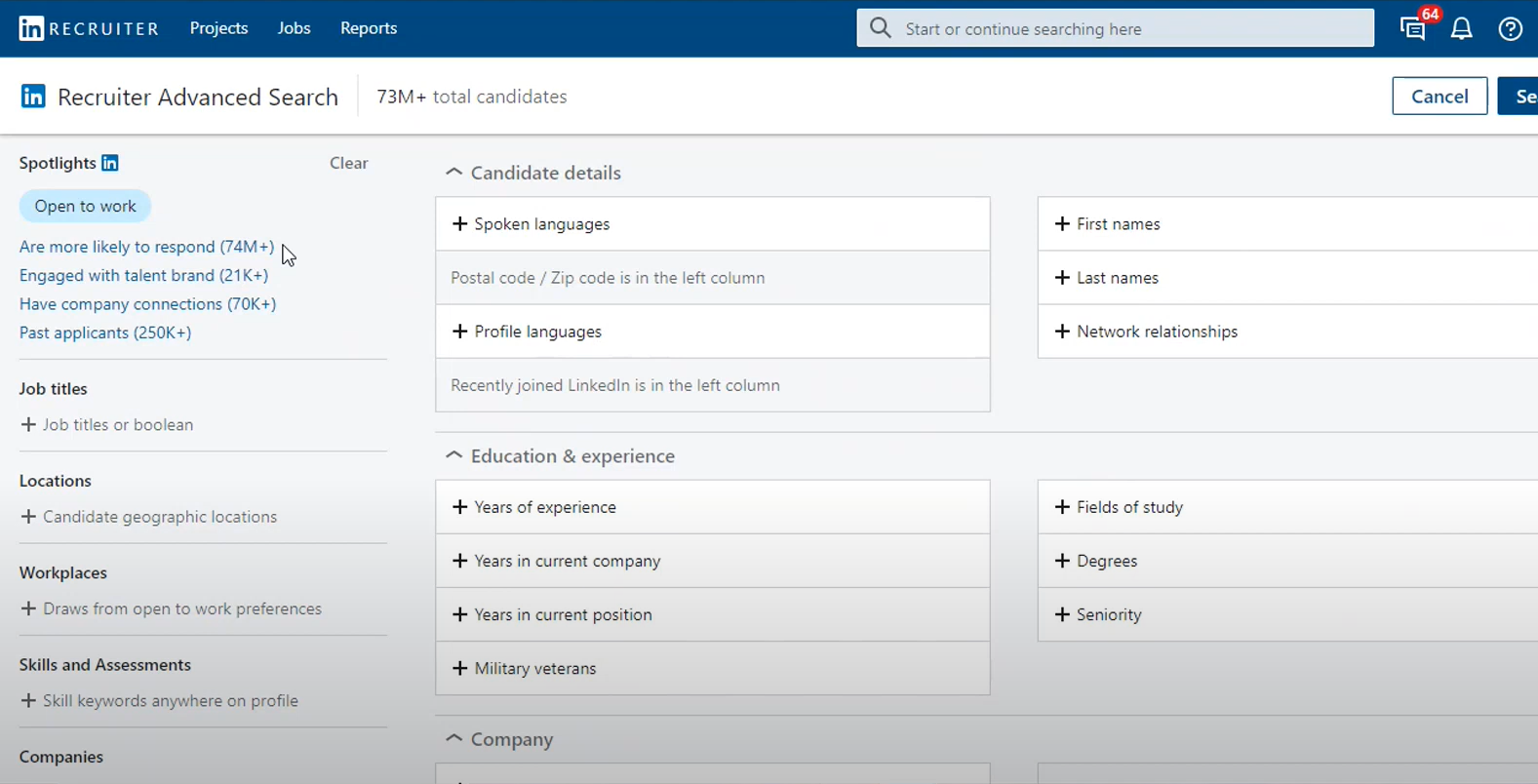
The LinkedIn Recruiter functionality allows for some additional search filters, but if you would use the same search criteria the resulting matches will be similar to the regular LinkedIn search.
Searches on as well the regular LinkedIn account as on LinkedIn Recruiter work partly with search filters and partly with (Boolean) search operators.
The use of search filters speak for itself with mostly a selection of options you can include in your search to target it towards for example a specific location, education or language.
Search operators can be used in the general search bar which allow you to determine what to include in your search and what not.
If you would insert the following search string in the search bar you would get engineers who have DevOps and AWS on their profile, and have at least one of the keywords API, Cloud or CI/CD on their profile:
(DevOps AND AWS) AND (API OR Cloud OR CI/CD)
Write that middle AND out explicitly, even though it looks redundant. LinkedIn documents AND, OR and NOT (in capitals), quotation marks and parentheses. It does not document an implicit AND between two bracketed groups, so a string that leans on one is relying on undefined behaviour that can quietly widen your results without telling you.
Three more things LinkedIn says outright about Boolean that save a lot of wasted evenings. Wildcards like develop* do not work, and neither do braces, brackets or angle brackets, so you have to spell out (developer OR development OR developing) by hand. The + and - operators “may appear to work in some cases” but are not officially supported, which is worse than not working at all, because a string that half works is a string you will trust. And stop words such as “by”, “in” and “with” are dropped inside quoted phrases, so an exact-match search for a title containing one of them is not as exact as it looks.
There's a lot more you can do with search operators so if you want to learn more on how to build a targeted search with operators, you can check out this article: Complete boolean guide.
The commercial use limit: the wall free accounts hit
Before you decide whether you need to pay LinkedIn anything at all, you should know about the limit that decides it for you. Free accounts get a monthly ceiling on profile searching and viewing called the commercial use limit, and LinkedIn triggers it when your “activity on LinkedIn indicates that you’re likely using LinkedIn for commercial use, like hiring or prospecting”. In other words, it is aimed precisely at the person reading this guide.
Two details make it more disruptive than a normal quota. LinkedIn states plainly that it is “not able to display the exact number of searches or views you have left”, and that it “cannot lift the limit upon request”. So you don’t get a warning, you get a wall, usually in the middle of a search you were halfway through. It resets at midnight PST on the 1st of each calendar month, which means an unlucky recruiter can lose the last week of a month entirely.
This is the real reason most recruiters end up paying: not the extra filters, but the ability to keep searching. Recruiter Lite, Sales Navigator and Premium Business all raise the ceiling, so if you are hitting the wall every month, the cheapest paid tier that removes it is usually the correct purchase, not the one with the best feature list.
What to keep in mind while recruiting on LinkedIn
The single most important thing to internalise is that you are not early. Every recruiter in your market has the same search filters pointed at the same 1.2 billion profiles, and the strongest candidates for your role are, by definition, the ones everybody else’s search also returns. A senior engineer in a hot market can receive several InMails a week. Your message is not competing with silence, it is competing with a queue.
That reframes what “good” means on LinkedIn. Volume is the losing strategy, and not just for taste reasons: it is mechanically expensive, because an ignored InMail is the only kind that permanently costs you a credit. The recruiters who do well on the platform tend to run narrower searches, write messages that could only have been sent to that one person, and accept a smaller top of funnel in exchange for a reply rate that makes the seat pay for itself.
The second thing to keep in mind is that LinkedIn data is self-reported and therefore decays. Nobody updates their profile the day they leave a job, and plenty of people never update it at all. A profile is a claim about someone’s past, not a verified record of their present, and treating a two-year-stale title as current is how you end up writing a personalised message about a role the candidate left in 2024. Where it matters, cross-check against something outside LinkedIn before you reference it in an opener.
Third, be careful with automation. LinkedIn’s User Agreement prohibits members from “develop[ing], support[ing] or us[ing] software, devices, scripts, robots or any other means or processes (such as crawlers, browser plugins and add-ons or any other technology) to scrape or copy the Services”. Plenty of tools in this category are sold openly and plenty of recruiters use them, but the risk is asymmetric and lands on the account, not the vendor: you can lose the network you spent years building, and there is no appeal worth the name. Whatever you decide, decide it knowingly rather than because a tool’s landing page implied it was fine.
Setting up a longer term LinkedIn strategy
The strategic problem with LinkedIn is that everything you build on it, you rent. Your searches, your InMail allowance, and the ability to see who is in your results all switch off the day you stop paying, and the connections you made are not exportable in any form that preserves what mattered about them. A LinkedIn strategy that consists only of “buy a Recruiter seat” is a strategy that resets every renewal.
So the durable version has three parts, in this order. First, use LinkedIn for what it is genuinely best at, which is discovery: figuring out who exists, where they work, and what the market for a skill actually looks like. Nothing else has the coverage. Second, move the relationship off the platform as early as it is polite to do so, into email or your ATS, because that is the part you own and the part that survives a cancelled subscription. Third, keep a record of everyone you talked to and why they said no, because in recruiting the candidate who declines this year is frequently the hire two years later, and that history is worth more than any search filter.
That order also tells you where to spend money. Paying LinkedIn for discovery is usually defensible, because the index is genuinely unmatched and there is no real substitute. Paying LinkedIn for messaging is where the maths gets bad, because you are buying a metered channel at a high unit price when the same person is generally reachable by email at a fraction of the cost. Splitting those two jobs across two tools, discovery on LinkedIn and contact plus outreach elsewhere, is what most experienced sourcing teams converge on, and it is why the contact-finder step earlier in this guide is not a hack but the normal shape of the workflow.
Tooling has started to compress that stack. Sourcing platforms now search across LinkedIn-style profile data and other public sources at once, and a few, including HeroHunt.ai, run the discovery and the outreach as one automated flow rather than two tools bolted together. Worth knowing about, but it does not change the underlying logic: the durable asset is the relationship and the record of it, not the seat.
HeroHunt.ai
The practical version of the strategy above: discovery and outreach are two different jobs, and only one of them has to happen inside LinkedIn. HeroHunt.ai is built around that split. It searches over a billion public profiles rather than a seat-metered index, so the commercial use limit described earlier in this guide does not govern how much searching you can do, and it runs the email outreach in the same flow instead of handing you a list to move into a second tool. The honest caveat: it is our own product, and it is a sourcing and outreach tool, not an ATS. If your actual problem is tracking candidates through interview stages and keeping the hiring manager informed, this is the wrong purchase and an applicant tracking system is the right one.
Written by Yuma Heymans (@yumahey), who built HeroHunt.ai after years of running LinkedIn sourcing the hard way. HeroHunt.ai is now used by 15,000+ recruiters to source from over a billion profiles and reach out automatically.