


The insider's guide to bending a go-to-market data engine into a candidate-sourcing machine, with the real 2026 costs, workflows, and limits.
Clay hit a $5 billion valuation in January 2026, and almost none of that money came from recruiting - Clay. It came from sales teams at OpenAI, Anthropic, Canva, and Rippling using Clay to enrich leads and automate outbound. Yet the fastest-growing corner of the Clay community right now is not sales at all. It is recruiters, sourcers, and staffing agencies quietly rebuilding their entire candidate pipeline inside a spreadsheet that was never designed for them.
Here is the tension this guide exists to resolve: Clay is a general-purpose engine, not a recruiting product. It has no applicant tracking system, no candidate pipeline, no interview scheduling, and no native way to message anyone. What it has instead is the most powerful contact-data and AI-research layer on the market, plus the flexibility to wire that layer into almost any workflow you can imagine. For a certain kind of technical, ops-minded recruiter, that trade is a superpower. For everyone else, it is a fast way to burn credits and abandon the tool in sixty days.
This guide breaks down exactly how recruiters use Clay in 2026: the waterfall-enrichment mechanics that make it worth the effort, the step-by-step sourcing workflow from a LinkedIn search to your ATS, the real credit math after Clay's disruptive March 2026 pricing overhaul, the compliance landmines around scraping candidate data, and the honest map of where Clay breaks and where a purpose-built AI recruiter does the job better. Everything here is drawn from late-2025 and 2026 sources, because Clay changes its product and its prices faster than most tools change their logo.
Written by Yuma Heymans (@yumahey), who built HeroHunt.ai and has spent the last five years watching talent teams try to bend general-purpose data tools into sourcing engines, which mostly means watching the credit meter spin before the workflow ever works.
HeroHunt.ai
If your underlying goal is simply to find qualified people who are not applying and reach them, the more direct comparison to Clay is a purpose-built AI recruiter rather than a data toolkit you assemble yourself. HeroHunt.ai is our own product, so weigh this the way you would weigh any vendor writing about its own market. The structural difference worth testing is who does the work. Clay hands you tables, 150-plus providers, and two kinds of credits, then expects a RevOps-minded operator to wire the pipeline together and watch the meter. HeroHunt runs the loop for you: it searches roughly a billion public profiles, screens them against your actual role brief with language models, and drafts outreach across LinkedIn, email, and WhatsApp, and it is free to start and priced per open role rather than per seat or per credit. The honest caveat: it is not an infinitely programmable data engine. If what you want is a custom waterfall blending fifteen niche providers, or an enrichment nobody sells off the shelf, Clay's flexibility wins and HeroHunt will feel opinionated by comparison. Run both on the same live role for a week and compare the shortlists, not the demos.
Contents
- What Clay Actually Is (and Why Recruiters Repurpose It)
- The 2026 Sourcing Landscape: Where Clay Fits
- Inside Clay: Tables, Columns, and the Data Pipeline
- Waterfall Enrichment: The Core of Clay for Sourcing
- Claygent and AI Columns: Research and Screening at Scale
- The End-to-End Sourcing Workflow, Step by Step
- Sourcing on Signals, Not Keywords
- How Clay Recruits With Clay: The Insider Motions
- What Clay Costs in 2026: The Dual-Meter Model
- The Credit-Burn Problem and How to Control It
- Where Clay Breaks for Recruiting
- Compliance: GDPR, CCPA, and the Scraping Line
- Clay vs Purpose-Built AI Recruiters
- Who Should Use Clay, and Who Should Not
- The Future: Agents, MCP, and the Next 18 Months
- The Decision, in Six Questions
1. What Clay Actually Is (and Why Recruiters Repurpose It)
Clay is a data-enrichment and workflow-automation platform shaped like a spreadsheet, built for go-to-market teams and then borrowed by recruiters. That one sentence explains almost everything about why it is both so powerful and so awkward for sourcing. Every row in a Clay table is a person or a company, every column is a piece of data you either supplied or asked Clay to find, and the whole thing behaves less like a database and more like a programmable assembly line for contact information. The company describes its own core use cases as outbound prospecting, CRM enrichment, and account-based marketing - Clay. Recruiting appears on its site only as a template built on that same machinery, not as a dedicated product.
The reason recruiters bother is that the machinery is genuinely exceptional at the one task that sits underneath all sourcing: turning a name and a LinkedIn URL into a verified way to reach that person. A sales team wants the mobile number of a VP of Engineering so an SDR can pitch them software. A recruiter wants the same VP's personal email so they can pitch them a job. The underlying data problem is identical, and Clay solved it for the side of the market that had the bigger budgets first. What recruiters are really adopting when they adopt Clay is a contact-data and research engine that happens to have been marketed at sales.
That framing matters because it sets your expectations correctly from day one. Clay will not manage your candidates, track your pipeline, schedule your interviews, or remember who you talked to last week. It is what one practitioner guide calls the enrichment and activation layer, not the system of record - Effi Flo. If you come to it expecting a recruiting suite, you will be disappointed and confused. If you come to it expecting a build-your-own sourcing engine that plugs into the recruiting tools you already own, you will understand why the people who love it will not shut up about it.
A concrete before-and-after makes the repurposing tangible. Picture a sourcer who used to live in LinkedIn Recruiter, running a search, copying likely candidates into a spreadsheet, then pasting each name into a separate email-finder, a separate note-taking doc, and a separate outreach tool. In Clay that entire manual chain collapses into one table, where the search result, the verified personal email, an AI summary of the candidate's background, and a drafted first message all sit in adjacent columns and populate automatically. Nothing in that description is a recruiting feature. It is the same enrichment-and-automation loop a sales team runs on prospects, pointed at candidates instead. The recruiters who thrive with Clay are the ones who see that equivalence clearly and stop waiting for the tool to know anything about hiring.
Clay's own scale is the strongest evidence that the engine works. The company reached roughly $100 million in annual recurring revenue by December 2025 and served 14,000 customers, with enterprise net revenue retention above 200 percent, meaning existing customers more than doubled their spend year over year - Clay. Even OpenAI has published a case study on using Clay for agentic prospecting - OpenAI. None of that was built on recruiting, but all of it is available to recruiters willing to learn the tool.
2. The 2026 Sourcing Landscape: Where Clay Fits
Clay sits in a category of one: it is the only horizontal data engine that a meaningful number of recruiters have adopted as a vertical sourcing tool. Everything else in the 2026 sourcing market was built specifically for hiring, which makes the comparison less about features and more about philosophy. The purpose-built tools decide for you how sourcing should work. Clay decides nothing and lets you build whatever you want, which is either liberating or exhausting depending on who is holding the keyboard.
The vertical incumbents are the search platforms that added an AI layer on top of a pre-indexed candidate database. SeekOut raised a Series C at a $1.2 billion valuation back in January 2022, then cut roughly 30 percent of its staff in May 2024, a reminder that a big valuation is not a guarantee of momentum - GeekWire. hireEZ has raised around $76 million and advertises 750 million-plus candidate profiles with an agentic-AI positioning - Tracxn. Gem bundles a CRM and ATS with what it now markets as unlimited AI agents on its higher plans - Pin. And LinkedIn Recruiter remains the default, running from about $1,680 a year for Recruiter Lite up to $10,800 to $15,000 per seat for Corporate, with its new AI Hiring Assistant sold as a paid add-on - Pin.
The challengers are the agent-first startups designed around autonomy from day one, and they are where the venture money is flowing in 2026. Juicebox, whose PeopleGPT product searches 800 million-plus profiles through natural-language prompts instead of Boolean strings, raised an $80 million Series B at an $850 million valuation in March 2026, tripling its revenue since a Sequoia-led Series A only six months earlier - Hunt Scanlon. Newer entrants like Tezi, which raised a $9 million seed to build a fully autonomous recruiter named Max, push the idea further toward software that sources, screens, and schedules with no human in the loop - FinSMEs. HeroHunt.ai belongs to this camp too, running an autonomous AI Recruiter over a billion-plus profiles.
The reason these camps matter for a Clay decision is that they represent three different bets about who should do the sourcing work. The incumbents bet on a recruiter searching a fixed index faster. The challengers bet on software doing the searching. Clay, uniquely, bets on you being the builder, which is why it is the only tool here whose value scales with the skill of its operator rather than the size of a database. That is also why its contracts run higher than the vertical tools despite a cheaper entry price: a team that succeeds with Clay tends to expand its usage aggressively, which is the mechanism behind Clay's enterprise net revenue retention above 200 percent. Success with Clay looks like spending more on Clay, which is a feature for the company and a warning for your budget.
The tools also differ sharply on what they cost once a real contract is signed, and the negotiated numbers tell a more honest story than the pricing pages. The chart below compares median annual contract values pulled from procurement data, which is the closest thing this market has to a public price.
Median annual contract value, sourcing tools (2026)
Those figures come from aggregators like Vendr and Pin rather than the vendors themselves, so treat them as directional - Vendr. The striking part is that Clay, the tool that was never built for recruiting, carries the highest median contract of the group, which is a clue that its costs behave differently from a per-seat recruiting platform. The demand behind all of these numbers is real: 52 percent of talent leaders told Korn Ferry they plan to add autonomous AI agents to their recruiting teams in 2026 - Korn Ferry. Clay is one way to buy into that trend, but it is the only one that asks you to build the agent yourself.
3. Inside Clay: Tables, Columns, and the Data Pipeline
The single most important thing to understand about Clay is that a table is a data pipeline disguised as a spreadsheet. You start with rows, which are your candidates, and you add columns, which are enrichment steps that run per row and write their results back into the cell. Columns execute left to right in dependency order, so a table you build carefully behaves like a sequence of operations: import the person, find their company, find their email, verify the email, score the fit, draft the message - Clay University. Once you internalize that mental model, everything else about the tool starts to make sense.
Adding an enrichment is deliberately simple on the surface. You click Add Enrichment, pick a provider or an action, and map that column's inputs to the columns you already have, and Clay runs it across every row - Clay University. The depth is hidden in the options. Any column can be set to run conditionally, for example only firing when an earlier column came back empty, which is the single most important cost-control lever in the entire product because it stops you paying twice for data you already have - Scalelist. Columns come in the usual data types (text, URL, number, date, email, checkbox, select), and you can spin a new column out of any enriched result to break a rich response into its parts.
There are structural limits worth knowing before you design a big sourcing table. Clay caps tables at 100 columns by default and 40 enrichment columns, and it caps dedicated phone or email waterfall tables at 60 rows of that type, which nudges high-volume users toward splitting work across multiple tables - Clay University. To keep related tables organized, Clay introduced Workbooks, a container that groups several tables into one workspace with an overview of how sources, enrichments, and destinations connect - Clay. For a recruiter running several roles at once, a workbook per role or per client is the natural organizing unit.
The provider marketplace is what turns this spreadsheet into a sourcing weapon. A single data point, say a person's funding-stage or seniority, can be sourced from a whole stack of competing providers, and Clay lets you choose which ones to try and in what order. The screenshot below shows that provider stack for one data point, which is the raw material every waterfall is built from.
One data point, many providers: the marketplace behind every waterfall

Notice that the value here is not any single provider but the choice among them. A purpose-built sourcing tool decides which data vendor you get. Clay hands you the marketplace and lets you sequence it, which is exactly the flexibility that makes the tool powerful and exactly the responsibility that makes it hard. Data enters the pipeline from several places too: a native Find People search, a Find Companies source that blends more than 100 providers, a LinkedIn Sales Navigator import, the Clay Chrome extension, a CSV upload, a HubSpot or Salesforce sync, inbound webhooks, or a raw HTTP API call to any external service - Clay University. That range of inputs is why a recruiter can start from almost any list they already have.
The HTTP API column is the escape hatch that makes Clay feel bottomless, and it is worth calling out for recruiters specifically. Because a column can call any external REST endpoint with saved authentication, a technical sourcer can wire Clay into services that have no official integration at all: an internal candidate database, a niche developer-community API, an equity-or-funding data source, or their own ATS. This is precisely how teams connect Clay to Ashby or Greenhouse despite the absence of a native connector, and it is why the tool's ceiling is set by the operator's imagination rather than by a menu of integrations. The flip side is that this power lives behind exactly the kind of configuration a non-technical recruiter will never touch, which is the recurring theme of the whole tool: the ceiling is high and the floor requires an engineer.
4. Waterfall Enrichment: The Core of Clay for Sourcing
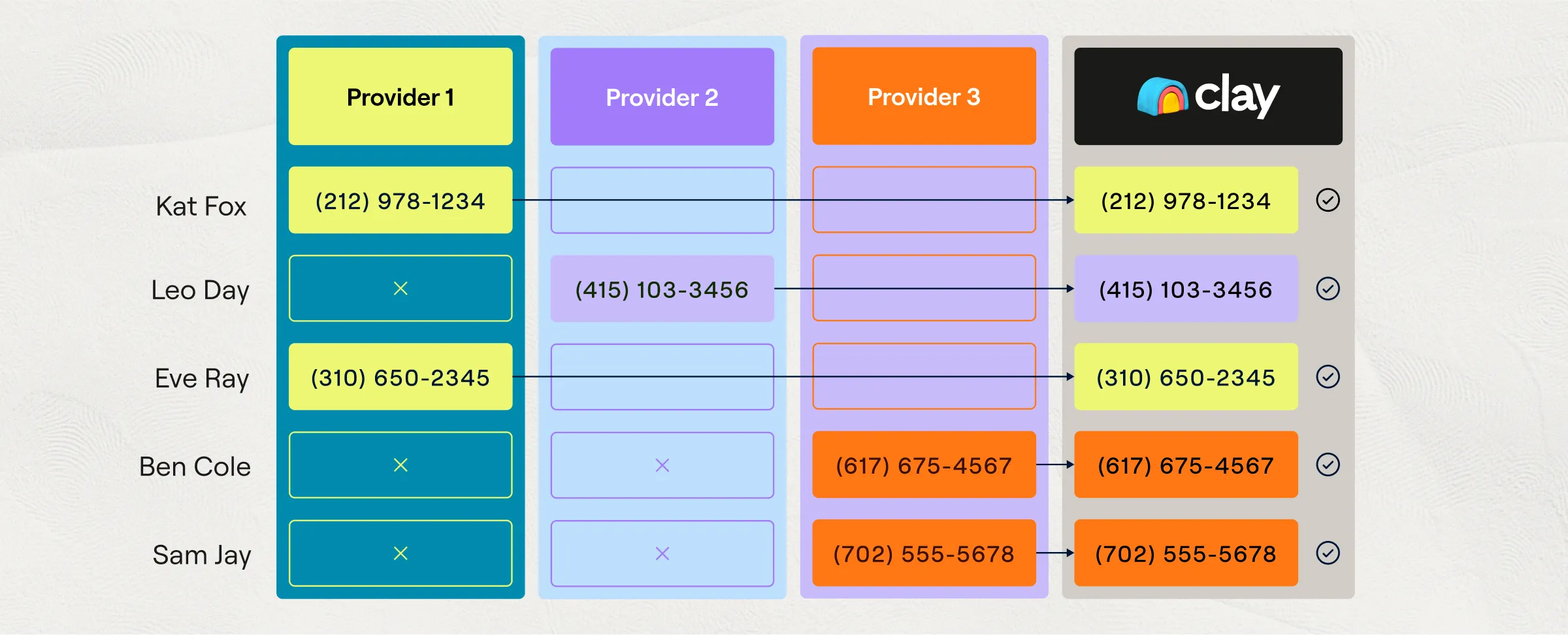
If you learn only one Clay concept, learn the waterfall, because it is the feature that justifies the entire tool for sourcing. A waterfall runs a single data point through multiple providers in a priority sequence: it asks Provider A for the candidate's email, and if A has no match it tries B, then C, and so on until one returns a valid result. Crucially, you only pay when a provider actually finds a match, so failed lookups down the chain cost you nothing - Clay. This is the mechanism that separates Clay from buying a single data vendor's subscription.
The impact on coverage is large and measurable. Any individual contact-data provider typically finds a valid email or phone for around 30 percent of a list, because each vendor has blind spots. Chaining several providers in a waterfall pushes that coverage above 80 percent, which for a recruiter is the difference between reaching a quarter of your shortlist and reaching most of it - Clay. Clay advertises access to 150-plus data providers under one subscription, including names a recruiter will recognize like Apollo, Hunter, Lusha, Datagma, Prospeo, LeadMagic, and People Data Labs - Apollo.io. You are effectively renting the whole market and paying only for the hits.
The image below shows a waterfall in action, with each contact run across providers in sequence until a verified result comes back. It is the clearest single picture of what you are actually buying when you buy Clay for sourcing.
Waterfall enrichment: providers tried in order until one returns a verified match
Building a good waterfall is where craft comes in, and the counterintuitive rule is the one recruiters get wrong most often. Put your highest-accuracy provider first, not your cheapest - Effi Flo. Because the waterfall stops at the first match, whichever provider you place first will supply most of your data, so leading with a cheap, low-quality vendor to save credits means most of your emails come from your worst source. Clay separates waterfalls by data type: work-email waterfalls chain providers like Prospeo, DropContact, Hunter, and Apollo; personal-email waterfalls use providers like Nimbler and Retention.com; and mobile-number waterfalls rely on People Data Labs, ContactOut, and Selligence - Clay.
For a walkthrough of building a people-enrichment waterfall with validated emails, Clay's own university series is the clearest primary source, and the lesson below maps almost directly onto candidate enrichment.
Clay 101 | Lesson 6: Enrich People Using Waterfalls
The economics of the waterfall are also its trap, which is why the next sections spend so much time on cost. Phone numbers are dramatically more expensive than emails: through some providers a mobile lookup costs ten to thirty times what an email costs, so a recruiter who adds a phone waterfall to a large list can multiply their bill without noticing - Saleshandy. The waterfall is the reason Clay works for sourcing and the reason Clay bills can spiral. Both things are true at once, and the good operators simply respect the second one.
5. Claygent and AI Columns: Research and Screening at Scale
Waterfalls solve contact data, but they do not tell you whether a candidate is any good. That is the job of Claygent, Clay's AI web-research agent, and it is the second pillar of Clay for recruiting. Claygent takes a natural-language instruction, actually visits and reads websites, and writes a structured answer back into a table column: is this company hiring, what is this person's tech stack, did this candidate found a company, what did this engineer post on X last month. Clay's own page reports Claygent has run more than five billion times, and the agent has surpassed a billion tasks in total - Clay. For a recruiter, it turns a column of names into a column of judgments.
The recruiting applications are exactly the tasks a human sourcer does by hand and hates. You can point Claygent at each candidate's LinkedIn and ask it to summarize their career progression, infer seniority, check whether they have shipped a specific kind of product, or flag anything genuinely extraordinary in their background - Databar. You can then add a second AI column that scores each candidate against your role brief and writes a one-line rationale, so instead of reading 400 profiles you read 400 scores with reasons attached. The screenshot below shows Claygent filling research columns per row, which is the shape every screening workflow takes.
Claygent turning a column of names into a column of judgments

Under the hood, Claygent comes in tiers priced by depth, and understanding them is essential to controlling cost. Clay's bundled models run from Helium at one credit for simple, high-volume tasks, to Neon at two credits for semi-complex work, to Argon at three credits for deep multi-step research - Clay Community. Separately, Clay's AI columns let you call external models directly (GPT-4o, Claude, and Gemini among them), and roughly 80 percent of Clay's AI models use fixed per-row pricing so you can predict the cost - Clay University. Every AI enrichment consumes one Action plus the model's Data Credits, a distinction that becomes very important in the pricing section.
Claygent's limitation is the same as every AI research tool's limitation, and recruiters should say it out loud. Claygent only knows what is on the public web, so it degrades on candidates with a thin online footprint and can confidently misread messy or ambiguous pages - Databar. It is superb at scaling the research you would do anyway on people who are discoverable, and it is unreliable on the quiet, off-grid candidates who are often the most interesting. Treat its output as a fast first pass that a human confirms, not as a verdict, and it earns its keep.
A concrete screening setup shows how the pieces combine. Suppose you are hiring a senior backend engineer and you have imported 300 candidates. You add one Claygent column that reads each candidate's LinkedIn and GitHub and answers a specific question, for example whether they have shipped and maintained a production system at meaningful scale, returning a short evidence-backed note rather than a bare yes or no. You add a second AI column that consumes that note plus the structured profile and outputs a 1-to-5 fit score against your written brief, with a one-line reason. Now you sort the table by score and read the top 40 rows with their rationales instead of skimming 300 profiles cold. The judgment is still yours, but the reading has been done for you, and the credits you spent bought back most of an afternoon. That is the honest value of AI screening in Clay: not a decision, but a very good pre-read that a keyword filter could never produce.
6. The End-to-End Sourcing Workflow, Step by Step
The whole point of Clay is that these pieces snap together into one pipeline that takes a search and returns outreach-ready candidates, so it helps to see the full sequence before dissecting it. The canonical recruiting workflow starts in LinkedIn Sales Navigator, flows through import and enrichment and scoring inside Clay, and ends by pushing candidates into your ATS or an email sequencer. The diagram below shows the complete path that most Clay-for-recruiting practitioners converge on.
The first move is building a tight search in Sales Navigator and importing it. You run a people search with your filters, copy the results URL, and in Clay create a Find People table using the External List import method, then paste the URL - Clay Community. A common mistake is pasting a company search URL instead of a people search URL, which imports the wrong object entirely. An alternative ingest path is the Clay Chrome extension, which scrapes a Sales Navigator results page as you scroll, and one documented walkthrough collected 191 rows across eight pages this way - Gold Penguin. Either way, you now have a table of candidates with LinkedIn URLs.
The middle of the pipeline is enrichment and filtering, and this is where discipline pays off. You add an Enrich Person from LinkedIn Profile column to pull structured history, backfill any missing company domains with a conditional Get Domain enrichment that only runs when the domain is empty, then attach your email and phone waterfalls - Gold Penguin. Before anything leaves Clay, the single most important quality gate is email validation. Practitioners add a mandatory validation step and block export unless the status returns deliverable, because raw waterfall output is not safe to send as is - Vanderbuild. Skipping that gate is how sourcing teams quietly wreck their sending domain.
The end of the pipeline is scoring, personalization, and handoff, and here Clay stops short of doing the actual outreach. You score candidates against the role with an AI column, use Claygent to draft a personalized opening line that references a specific enriched detail, and then push the finished candidates outward. Clay has no native email sending of its own: it exports to sequencers like Smartlead, Instantly, Outreach, or Salesloft, or to an ATS by webhook - Effi Flo. Practitioner stacks routinely name Ashby, Greenhouse, Bullhorn, and Lever as the ATS destinations, connected through Clay's HTTP API or webhooks since Clay ships no native integration for those systems - Clay University. The workflow is powerful, but that final gap is a preview of Clay's biggest recruiting weakness.
It is worth walking through where this pipeline goes wrong in practice, because the failure is rarely dramatic. The most common quiet disaster is skipping the validation gate under time pressure: a recruiter builds the waterfall, sees emails populating, and pushes the list to a sequencer before adding the deliverability check. The waterfall returns a mix of verified, catch-all, and guessed addresses, the sequencer sends to all of them, and a week later the sending domain's reputation has dropped enough that even the good emails start landing in spam. The second common failure is a runaway enrichment: a conditional column configured slightly wrong re-runs a paid provider on every row instead of only the empty ones, and the credit balance is gone before anyone checks the dashboard. Neither failure announces itself. Both are why disciplined operators test every table on ten rows before running it on a thousand.
7. Sourcing on Signals, Not Keywords
The workflow above describes a one-time list, but the most valuable way to use Clay for recruiting is continuous, and it is built on signals. A signal is a change in the world that predicts someone is reachable or ready to move: a promotion, a funding round at their employer, a leadership departure above them, a shift in their company's tech stack, or the single most reliable one, a recent job change. Instead of running the same static keyword search every month, you set Clay to watch for these events and surface people the moment they become relevant. This is the difference between fishing in a pond and being told when the fish arrive.
Clay makes job changes a native, selectable signal. Its Monitor for Job Changes capability watches a set of profiles and automatically builds a table of people who have moved, complete with their LinkedIn URL, new company, previous company, and start date - Clay University. For a recruiter, a candidate who just started a new job three weeks ago is usually the worst target, but a candidate whose skip-level manager just left, or whose company just went through a layoff, is often the best. Because any of Clay's enrichments or Claygent queries can be turned into a recurring signal, you can monitor for almost anything, including website and tech-stack changes that suggest a team is scaling - Clay.
The practitioner signal set for recruiting has stabilized around a handful of high-value triggers that are worth watching together. The most useful in practice are the ones that indicate either supply (a candidate is likely available) or demand at a target (a company is likely to lose people you can catch on the way out).
- Recent job changes across a watched list of ideal-profile people
- Funding events and headcount growth at target companies
- Leadership departures that destabilize a team you want to poach from
- Promotions relative to tenure, used as a proxy for performance
- Tech-stack or GitHub activity, used for technical roles
The reason this approach outperforms keyword search is that it changes what you are competing on. When you run the same Boolean string as every other recruiter, you reach the same over-messaged people at the same time. When you source on signals, you reach the right person during the narrow window when they are actually receptive, before the signal is obvious to everyone else - Freedom Recruiter. One documented agency play is to monitor for managers of recently departed employees and reach them within weeks, on the theory that a team that just lost someone is both hiring and vulnerable - Effi Flo. Signals are where Clay's flexibility pays its highest dividend, because no purpose-built tool lets you invent a custom trigger this freely.
8. How Clay Recruits With Clay: The Insider Motions
The best available case study for Clay-in-recruiting is Clay itself, which scaled from 80 to more than 400 employees on exactly the system this guide describes, run by a Talent Science function led by Danielle Poreh - Clay. Because Clay published its own internal playbook, we get an unusually candid look at how a data-obsessed company sources talent, and the motions generalize well beyond Clay's own hiring. There are three, and each one exploits data that a normal recruiter cannot easily touch.
The first motion is sourcing on non-obvious signals, and it is the most creative. Rather than searching for a job title, Clay's team layers unusual proxies for quality and readiness: an account executive who publicly lists strong quota attainment is signaling both skill and that they are ready to be poached, an SDR at a company with no open AE roles is someone who cannot get promoted where they are, and a Division I athlete or a solutions engineer who posts technical content on X becomes a proxy for a specific kind of drive - Clay. None of these are searchable fields in a recruiting database. They are enrichments and Claygent judgments layered onto a list, which is precisely the kind of thing Clay makes possible and a keyword tool does not.
The second motion is prioritizing high-volume inbound, which is the opposite problem and just as data-driven. When Clay hit 800 applicants in a single week for one role, the team did not read resumes top to bottom; they enriched every applicant and ranked them on signals like the growth stage of the companies they worked at during their tenure, an entrepreneurial background, or extraordinary achievements surfaced by AI web search - Clay. A related sub-motion re-engages the ATS: Clay resurfaces strong past applicants (the silver medalists and the people who applied at the wrong seniority) and triggers outreach when a tracked signal, like a funding round or an executive departure, makes them newly relevant. This is enrichment applied to a database you already own, which is often the highest-ROI use of the whole tool.
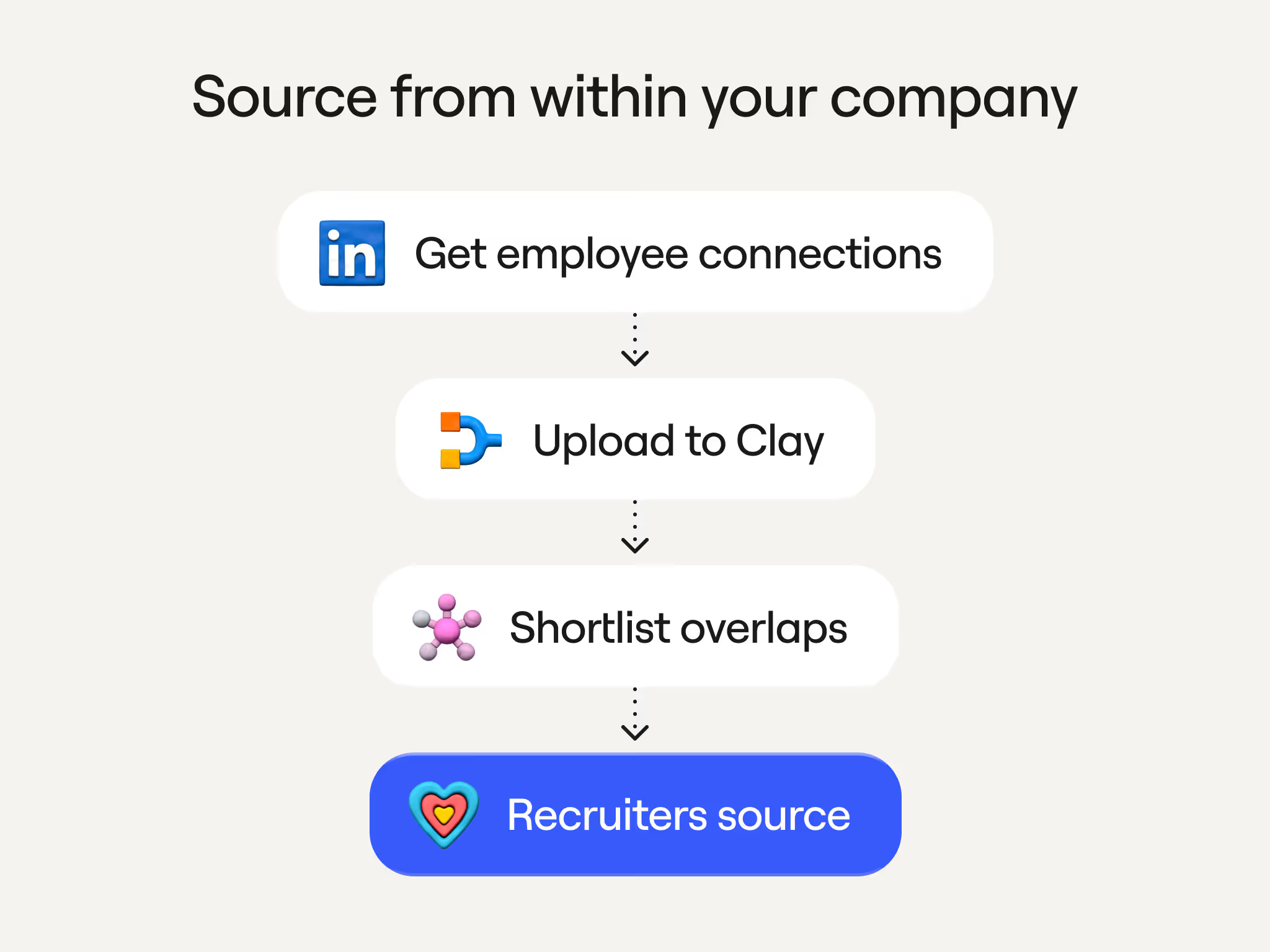
The third motion is the warm-intro engine, and it is the most impressive number in Clay's playbook: 47 percent of the company's hires in one quarter came from an employee-referral workflow built in Clay - Clay. Employees export their LinkedIn connections into Clay, the system filters for people who overlapped with that employee at previous companies, matches them against open roles, and then drafts a message the employee approves in Slack before any intro is requested. The screenshot below shows this referral workflow built in Clay tables.
The warm-intro engine that drove nearly half of Clay's hires in a quarter
What ties all three motions together is that they are impossible without a programmable data layer, which is why Clay's own recruiters use Clay rather than a recruiting suite. It is also why this playbook is so hard to copy: it took a dedicated, technical talent team to build, and the same motions in the hands of a solo recruiter with no ops support would collapse under their own complexity. The insider knowledge here is not the workflow, it is the fact that the workflow requires an operator.
The referral motion in particular is worth dwelling on, because it is the most transferable and the most defensible on compliance grounds. Unlike cold enrichment of strangers, a warm-intro workflow operates on data your own employees already have a relationship with, and the outreach goes to the employee for approval rather than to the candidate directly, which sidesteps much of the privacy friction that dogs cold sourcing. It is also, on Clay's own numbers, the single highest-yield motion they run. The catch is the same as everywhere else in this guide: someone has to build the connection-overlap logic, wire up the Slack approval step, and maintain it as employees come and go. A recruiter who wants this outcome without the build is describing, almost exactly, what a purpose-built referral or sourcing product ships out of the box, which is the recurring choice this whole guide keeps surfacing.
9. What Clay Costs in 2026: The Dual-Meter Model
Clay's pricing is the part every recruiter must understand before touching the tool, because in March 2026 Clay rebuilt it from the ground up and made it more complex, not less. On March 11, 2026, Clay retired its old Starter, Explorer, and Pro tiers and replaced them with a Free, Launch, Growth, and Enterprise ladder, and it split billing into two separate meters - Revnu. Understanding those two meters is the whole game.
The two currencies are Data Credits and Actions, and they measure different things. Data Credits pay for the third-party data itself, the emails, phones, and firmographics that Clay's 150-plus providers supply, and they start at about $0.05 each with volume discounts - Cleanlist. Actions pay for the platform work Clay does on your behalf: routing a request, calling a provider, running an AI prompt, firing a webhook, or pushing to your CRM, and each Action costs a fraction of a cent - Michael Saruggia. The practical effect is that every enrichment now bills you twice, once for the data and once for the work of fetching it, which is more accurate and much harder to forecast. The one genuinely candidate-friendly change: if an enrichment returns no result, you are charged neither Data Credits nor Actions.
The current self-serve plans, with their monthly credit allotments, look like this. All plans include unlimited user seats, so you scale by usage rather than headcount, which is unusual and important for a team.
| Plan | Monthly (billed monthly) | Billed annually | Data Credits / mo | Actions / mo |
|---|---|---|---|---|
| Free | $0 | $0 | 100 | 500 |
| Launch | $185 | ~$167 | 2,500 | 15,000 |
| Growth | $495 | ~$446 | 6,000 | 40,000 |
| Enterprise | Custom (~$30k/yr floor) | Custom | 100,000+ | 200,000+ |
Those figures are corroborated across multiple 2026 breakdowns, though Clay's own JavaScript pricing page rendered the Launch allotment slightly differently in one capture, so treat the exact credit numbers as close but not gospel - Amplemarket. The old Starter ($149), Explorer ($349), and Pro ($800) plans still exist for grandfathered customers, but the window to switch between them closed on April 10, 2026, so they are no longer a buyable option - Vendr.
The rollout was not smooth, and the backlash is instructive for anyone budgeting around Clay. The entry price rose about 24 percent (Starter's $149 to Launch's $185) and the API-equipped tier rose about 42 percent ($349 Explorer to $495 Growth), while HTTP API calls that were effectively free on the old Explorer plan now each cost one metered Action - Revnu. One widely shared complaint came from a user who said a single custom API call to his own database now required him to spend $500 to stay in the right tier. Clay's defense is that it also cut marketplace data costs by 50 to 90 percent and that 90 percent of customers will not hit their Actions limit - Michael Saruggia. Whether the new model is cheaper or more expensive for you depends entirely on your ratio of data lookups to platform actions, which is exactly why you must model it before you commit.
Modeling it is less painful than it sounds if you reduce it to one honest number: your fully-loaded cost per contacted candidate. Take a realistic monthly target, say 400 candidates you actually want to reach, multiply by roughly 20 Data Credits each for a full enrichment, and you land near 8,000 credits, which already exceeds the Growth plan's 6,000 and pushes you into overage or an Enterprise conversation. Add the Actions those enrichments consume, the subscription itself, and the external sequencer and validator you must run alongside, and the true cost of reaching those 400 people is rarely the sticker price of the plan. The teams that stay happy with Clay are the ones that did this arithmetic before signing and sized their plan to their real volume, not the ones who bought Launch because it looked cheap and discovered in week two that it covered a single day of sourcing.
10. The Credit-Burn Problem and How to Control It
The reason Clay earns a reputation as a money pit is that the credit cost of real recruiting work is both high and unpredictable, and the plan allotments run out faster than anyone expects. A full contact enrichment (name, email, phone, company, and an AI-scored fit) runs roughly 15 to 30 Data Credits per record, and a multi-provider waterfall alone consumes 10 to 25 credits per row - Amplemarket. Do the division and the Launch plan's 2,500 monthly credits cover only about 83 to 166 fully enriched candidates, which is a single afternoon of sourcing for a busy desk. The chart below turns each plan's credit allotment into the number of fully enriched candidates it actually buys.
Fully enriched candidates per month included in each plan
Those numbers assume a mid-range 20 credits per candidate, and they explain why the horror stories are so consistent. One documented case describes a 500-row table with a single Claygent research step at 25 credits per row burning 12,500 credits in one run, five times the entire monthly Launch allotment - The Stack Architects. Another widely repeated cautionary tale is a user who spent roughly $3,000 in credits in their first month because a heavy Claygent workflow compounded faster than they realized - Landbase. The blunt reality, per one operator review, is that most teams underestimate their consumption by three to five times in month one - Grou.
The gap between the advertised price and the real bill is the number that surprises finance teams. One 2026 analysis modeled a 25-user deployment and found a real all-in cost of $75,000 to $120,000 a year against the $5,940 to $30,000 the pricing page implies, with the gap coming from credit overages and the four or five add-on tools a serious Clay workflow requires - Amplemarket. Negotiated enterprise contracts bear this out: Vendr data shows a median annual Clay contract of about $40,500, ranging up to nearly $118,000 - Vendr.
Controlling the burn is possible, and the good operators treat it as a discipline rather than an afterthought. The highest-leverage tactics are structural, and each one directly attacks a specific way credits leak.
- Conditional columns so an enrichment only fires when the data is missing
- Bring your own API keys for LLMs and providers, which bypasses Clay Data Credits entirely and can cut AI-enrichment cost by 80 to 95 percent
- Cheaper Claygent tiers (Helium over Argon) for simple, high-volume tasks
- Tight input lists so you never enrich a row you would not contact
Bringing your own key deserves special emphasis because it is the biggest lever and the least used. When you connect your own OpenAI, Anthropic, or Apollo key, you pay that provider directly at their rates instead of spending Clay Data Credits, though Clay still charges one Action per step - Clay University. For a team running heavy AI research, that switch alone can be the difference between a sustainable tool and a runaway bill. The pattern across every review is the same: Clay pays off handsomely for disciplined, high-volume operators and punishes casual, low-volume users who let the meter run - Saleshandy.
There is a deeper lesson in the credit model that is easy to miss: it taxes iteration, which is the exact behavior good sourcing requires. Every time you refine a search, re-enrich a list with a better provider order, or re-run a Claygent prompt you have improved, the meter runs again. A community-aggregated view of the complaint puts it sharply, arguing that the credit model taxes the exact motion that makes outbound work, so spend climbs every time you iterate - Yalc. For a recruiter, that means the natural loop of trying a search, seeing who comes back, and adjusting is not free the way it is in a flat-priced tool, and the temptation is to under-iterate to save credits, which quietly lowers the quality of your sourcing. The operators who win with Clay budget explicitly for iteration instead of treating every re-run as waste.
11. Where Clay Breaks for Recruiting
Every honest assessment of Clay for recruiting has to hold two facts together: the engine is exceptional, and it was not built for this job. The failure modes are not bugs, they are the predictable consequences of using a sales tool for hiring, and knowing them in advance is the difference between a tool that transforms your desk and one that sits half-configured and unused. There are four that matter most.
The first is the learning curve, which is steeper than any demo admits. One operator who ran Clay in production for 18 months put it bluntly: non-RevOps people try to use it and fail within two weeks, onboarding a new team member takes two to three weeks, and the tool is built for power users - Grou. Reviews are polarized precisely along this line: technical and ops-minded users rate it highly, while people expecting a plug-and-play sourcing tool leave frustrated - Reachstream. The most damning detail is that teams without technical support often abandon Clay within 60 days, burning credits the whole way, which means the learning curve and the cost problem compound each other.
The second is that Clay is an enrichment layer, not a system of record, and it never pretends otherwise. It does not replace your ATS, it does not match candidates against a job requirement out of the box, and it does not manage a pipeline, screening stages, interviews, or offers - Effi Flo. It also cannot send email itself, so it pushes candidates to an external sequencer, and one integration guide warns that a blank personalization variable does not stop the send, meaning a misconfigured workflow will happily email a candidate with a visible hole where their name should be - Genflows. Everything downstream of enrichment is a tool you have to bring, integrate, and pay for separately.
The third is data quality and deliverability, which is subtle and dangerous. Clay owns none of its data, so accuracy depends entirely on which providers you chain, and Clay itself cannot guarantee freshness or compliance - Cognism. Push unverified emails straight into a sequencer and you raise your bounce rate, and a bounce rate above 3 percent is one of the fastest ways to get your sending domain blacklisted by Google and Outlook - Cleanlist. This is why the validation gate from the workflow section is not optional. The tool that finds the emails will also help you torch your domain if you trust its output blindly.
The fourth is scale and reliability at the top end. The same operator review notes that Clay tables above 50,000 rows get slow, workflows time out, and rows can fail silently when providers hit rate limits, which means the highest-volume sourcing operations run into walls - Grou. None of these four issues makes Clay a bad tool. They make it a specific tool, one that rewards a technical operator running considered, mid-volume workflows and quietly punishes almost everyone else.
12. Compliance: GDPR, CCPA, and the Scraping Line
The compliance dimension of Clay-for-recruiting gets almost no attention and deserves a great deal, because the tool makes it trivially easy to collect personal data that candidates never gave you. When you run a waterfall to find a candidate's personal email and mobile number, you are enriching contact data the person did not submit to you, and that act sits squarely inside modern privacy law - Cognism. Clay provides data processing agreements and standard contractual clauses, but its own position is that compliance depends on how you use the tool and which providers you enable, which pushes the legal responsibility squarely onto the recruiter.
Under GDPR, sourcing a candidate for a specific, relevant role can rest on a legitimate-interest basis, but that basis is narrower than most recruiters assume. You still generally need to inform the person how you obtained and will process their data, and marketing-style or newsletter contact requires actual consent - Recruitly. Scraping social profiles is defensible mainly when those profiles are genuinely public and the person could reasonably expect to be contacted about opportunities, which makes an enriched personal email (not a public professional one) far shakier ground than a work email - Pin. Clay's fire-and-forget enrichment does none of the required data-minimization, disclosure, or deletion-request handling for you.
The United States has caught up in ways that matter specifically for 2026. Under California's CCPA and CPRA, the full set of consumer rights now extends to job applicants and candidate data, and effective January 1, 2026, covered employers must conduct a privacy risk assessment before many activities involving applicant personal information - Littler. Using a third-party enrichment tool on candidates also means you must contractually bind those vendors to your obligations and prohibit them from selling or further sharing the data - SHRM. These are not theoretical risks for a large employer or a staffing firm operating at volume.
The account-level risk is more immediate and more likely to bite a working recruiter. Clay's LinkedIn enrichment paths lean on browser extensions and Sales Navigator, and any tool that borrows your LinkedIn session through a Chrome extension or reads your cookie is among the fastest ways to get an account restricted - Datablist. In 2026, LinkedIn uses browser fingerprinting, rate-based heuristics, and IP-reputation scoring to detect scraping, and cookie-based extensions have a safe ceiling of only about 60 to 80 profiles a day before ban risk climbs sharply - Vayne. Because Clay has no native LinkedIn messaging, the outreach itself happens in yet another tool, widening the surface where an account can get flagged. The compliant way to run Clay for recruiting exists, but it requires deliberate choices about providers, volume, and disclosure that the tool will never make for you.
The practical compliance posture that works looks unglamorous but defensible. You restrict enrichment to business contact data wherever possible, reserving personal-email and mobile waterfalls for roles and situations where a legitimate-interest case is genuinely strong. You keep a record of where each candidate's data came from and why you contacted them, so an access or deletion request can be honored inside the roughly 30-day window the law expects. You vet the specific providers you enable rather than switching on all 150, since the weakest vendor in your waterfall sets your exposure. And you keep any LinkedIn automation slow and human-paced, well under the daily ceilings that trip modern detection, because a banned sourcing account is a more immediate loss than a regulatory one. None of this is Clay's job, which is precisely the point: the tool hands you the capability and leaves the accountability entirely with you.
13. Clay vs Purpose-Built AI Recruiters
The right way to decide between Clay and a purpose-built AI recruiter is to ask what you are actually buying: a toolkit or an outcome. Clay sells you the most flexible data-and-automation engine on the market and expects you to assemble the sourcing workflow. A purpose-built AI recruiter sells you the workflow itself, already assembled, and hides the machinery. Neither is universally better, but they are genuinely different products, and choosing the wrong one for your team is the most expensive mistake in this category.
Clay's advantages are real and specific. Because you build the pipeline, you can source on signals no vertical tool exposes, blend fifteen niche data providers into one waterfall, and invent enrichments that do not exist anywhere else, which is exactly how Clay's own team pulls off its most creative sourcing motions. The cost of that power is everything in section 11: the learning curve, the operator dependency, the credit unpredictability, and the fact that you still have to bring your own ATS, sequencer, and validation. Clay is the right answer when the constraint on your sourcing is imagination and you have the technical talent to act on it.
The purpose-built tools invert every one of those trade-offs. Juicebox lets a recruiter search 800 million-plus profiles in plain English rather than building tables - TechCrunch. hireEZ and SeekOut wrap their candidate databases in an agentic layer aimed at recruiters, not ops engineers. And HeroHunt.ai runs the full loop autonomously: its AI Recruiter searches a billion-plus profiles, screens each candidate against your role brief with language models, and handles first-touch outreach and follow-up across LinkedIn, email, and WhatsApp, priced per open role rather than per seat or per credit. The trade you make going this direction is flexibility: an autonomous recruiter is opinionated by design, so if you want a bespoke data pipeline it will feel like a closed box. The compact comparison below frames the choice.
| Approach | What you get | Who runs it | Cost shape | Best for |
|---|---|---|---|---|
| Clay | A programmable data + research engine | You (needs a RevOps-minded operator) | Usage-metered (Data Credits + Actions) | Technical teams inventing custom sourcing |
| hireEZ / SeekOut | Candidate database + AI search layer | Recruiter | Per seat (~$13k to $27k/yr) | Teams wanting search over a big index |
| Juicebox | Natural-language people search | Recruiter | Per seat | Fast prompt-based sourcing |
| HeroHunt.ai | Autonomous AI Recruiter (source, screen, reach) | The software | Per open role, free to start | Teams that want the job done, not built |
The honest synthesis is that Clay and an autonomous recruiter are not really competitors so much as answers to different questions. If your team already lives in spreadsheets and has an operator who enjoys building data logic, Clay will do things no closed tool can. If your team wants to describe a role and get back screened, contacted candidates without hiring a data engineer to run the tool, a purpose-built AI recruiter is the shorter path, and the two can even coexist, with Clay handling exotic enrichment and a vertical tool handling the everyday loop.
The hybrid stack is more common in sophisticated teams than the either-or framing suggests. A talent team might run a purpose-built AI recruiter as the daily engine for the bulk of its roles, where speed and low operator effort matter most, and reserve Clay for the two or three hard, unusual searches a quarter where a custom signal or an exotic data blend is the only way to find the person. In that split, Clay stops being the system everyone has to learn and becomes a specialist instrument one operator owns, which is exactly the shape that suits it. The mistake is forcing a single tool to be both the everyday workhorse and the specialist instrument, because the workhorse should be simple enough for the whole team while the specialist instrument is, by its nature, not.
14. Who Should Use Clay, and Who Should Not
After all the mechanics and caveats, the buying decision comes down to an honest read of your own team, and Clay's own community has converged on a fairly precise answer. The tool rewards a specific profile and punishes its opposite, and the reviews that matter are the ones that tell you which one you are before you spend the money.
Clay is the right tool for a technical, high-volume sourcing operation with a dedicated operator. If someone on your team genuinely enjoys building workflows and debugging data logic, if you are sourcing at enough volume to justify a learning curve measured in weeks, and if you want to do things no vertical tool allows, Clay will pay for itself many times over. Staffing agencies and RevOps-for-recruiting specialists are the archetypal winners here, and several have built entire service businesses on running Clay for clients, including certified partners who sell Clay-for-recruiters courses and done-for-you builds - UnlockClay. The common thread among the people who love Clay is that they treat it as a platform to develop on, not a product to use.
Clay is the wrong tool for several clearly identifiable situations, and the same operator review that praised it lists them without flinching. Skip Clay if you are a solo founder or a team under about $1 million in revenue, if you have no dedicated RevOps or ops-minded builder, or if you need more than roughly 50,000 enrichments a month, because that is where tables slow down and workflows start failing silently - Grou. It is also the wrong tool if compliance defensibility is paramount and you cannot vet every underlying provider, or if what you actually need is a system of record. In those cases, forcing Clay into the role turns it into the money pit the reviews warn about.
For the large middle ground, the pragmatic move is to try before you commit and to try it properly. Start on the Free plan, build one real sourcing table for a live role, and watch two things: how fast your credits deplete and whether anyone on the team actually enjoys the building. Those two signals predict your Clay experience better than any feature list, because they measure the two things that break Clay deployments. If the credits vanish and the building feels like a chore, that is not a configuration problem you will fix later, it is the answer.
15. The Future: Agents, MCP, and the Next 18 Months
Clay is not standing still, and the direction it is moving tells you where the whole sourcing category is heading. Through the summer of 2026, Clay announced a cadence of weekly major releases centered almost entirely on agents: an Agent Plugin with CLI and API access, an MCP integration for prospecting, dedicated Account Research Agents, an upgraded Sequencer 2.0, and Account Execution Agents - Clay Community. Clay's Model Context Protocol support, launched in January 2026, lets external AI assistants drive Clay's data engine directly, which is the clearest signal of the endgame: Clay wants to be the data layer that other agents call, not just a table a human clicks through.
That ambition points at a genuine convergence between Clay's world and the purpose-built recruiters. Clay is adding autonomy on top of its engine, moving from a tool you operate toward a set of agents that operate the tool for you. The vertical AI recruiters are coming from the other direction, adding depth and data to their already-autonomous loops. In eighteen months, the difference between building a sourcing agent in Clay and buying one off the shelf may narrow to a question of how much control you want over the plumbing, rather than a difference in what the software can do.
For recruiters, the practical implication is that the operator-dependency problem that defines Clay today is exactly what these agent releases are trying to dissolve. If Clay's agents can genuinely plan and run a sourcing workflow from a brief, the two-to-three-week learning curve that abandons so many teams today could shrink toward the plug-and-play experience the vertical tools already offer - Databar. That is a promise, not a delivered fact, and Clay has a habit of shipping power before it ships approachability. But the trajectory is unmistakable, and it is the same trajectory pulling the entire industry: from tools that make recruiters faster toward agents that do the sourcing themselves.
The macro backdrop makes this more than a product roadmap. With a majority of talent leaders planning to add autonomous agents in 2026 and adoption of AI in hiring climbing fast, the market is rewarding whoever can turn a role brief into contacted candidates with the least human effort - Korn Ferry. Clay is racing to add the autonomy that would let it compete on that axis directly. Whether it gets there before the purpose-built recruiters get to Clay's depth is the most interesting open question in sourcing.
For a team that wants the sourcing job done rather than a pipeline to build and babysit, HeroHunt.ai runs search, screening, and first-touch outreach autonomously across a billion-plus profiles, free to start and metered on open roles instead of credits or seats.
16. The Decision, in Six Questions
Clay for recruiting is one of those tools that is transformative for the right team and a slow, expensive disappointment for the wrong one, and the entire preceding guide compresses into a short diagnostic. Rather than a generic recommendation, run your own situation through six questions and let the answers decide, because your team's shape matters far more than any feature.
Do you have a technical, ops-minded operator who will genuinely enjoy building and maintaining data workflows? If not, stop here, because everything else about Clay depends on that person existing. Are you sourcing at enough volume, and with enough budget tolerance, to absorb a two-to-three-week learning curve and a credit meter that most teams underestimate three to five times in month one? Do you need to source on custom signals and blended data that no vertical tool exposes, which is the one thing Clay does that nothing else can? Those three questions decide whether Clay belongs in your stack at all.
The next three decide whether you can run it safely. Do you already own the surrounding tools, an ATS, a sequencer, and an email validator, since Clay is only the enrichment layer and will not replace any of them? Can you handle the compliance burden of enriching candidate contact data under GDPR and the 2026 CCPA rules, including vetting your providers and honoring candidate rights? And finally, would a purpose-built AI recruiter simply do this job for you at lower total effort, letting you describe a role and receive screened, contacted candidates without hiring an operator to run a tool? If Clay survives all six questions, it will be one of the most powerful things in your sourcing arsenal. If it fails even two, the honest move is to source with something built for the job and spend your energy on candidates instead of columns.
The larger truth is that Clay proved something important for recruiting even for the teams that should not use it: that the future of sourcing is a programmable pipeline of search, enrichment, AI screening, and automated outreach. The only real question is whether you want to build that pipeline yourself in a spreadsheet or buy it as a finished product. Clay is the best answer for the builders. For everyone else, the same capabilities now come assembled, and the smart move is to let the software do the assembling.
This guide reflects the Clay and AI-sourcing landscape as of August 2026. Pricing and features change frequently in this market (Clay overhauled its entire pricing model in March 2026 alone), so verify current details on the vendors' own pages before buying.