


It’s no secret that the recruitment world is heading toward an automation boom. Bullhorn, looking at its own global customer base, reported that staffing firms using automation had a 64% higher fill rate and submitted 33% more candidates per recruiter. That is a vendor reading its own users rather than an independent trial, so treat the number as a direction of travel, not a law of physics.
As explained in our previous blog, mastering ChatGPT can significantly enhance your recruitment process.
The main mechanism a recruiter can use to entice potential candidates for a job is a well-written captivating job description.
Here we’ll break down the steps in crafting a winning job description with the help of our new best friend, ChatGPT.
We’ll be ‘recruiting’ a Senior Frontend Developer for ‘company’ XYZ Browser, a privacy-first web browser that doesn’t store data or show ads. They’re hiring a Frontend Developer for their new Chrome extension product.
Our input:
"We’re going to write a winning job description for a private web browser company that will entice candidates to apply for the role. The role has come about specifically for the new Chrome extension product and involves building the new Chrome extension for XYZ browser. Generate a job description for a Senior Frontend Developer who is proficient in React, Webpack, Flux, and Redux. Knowledge in building and deploying Chrome Extensions is a plus but not essential. The job consists of responsibilities such as: implementing privacy-centric features within the Chrome extension, utilizing Chrome extension APIs to seamlessly integrate the extension with XYZ browser, developing functionality for users to customize privacy settings and preferences, leading a team of developers, designing and implementing software solutions, and collaborating with cross-functional teams to build out XYZ’s new Chrome extension for our web browser. The role is based in Amsterdam, working a hybrid model of 3 days in the office, and offers compensation of €100,000 per year. There are stock options in additional compensation that are to be discussed and a career path towards a CTO. Specify the qualifications and requirements for the Frontend Developer position. Include details on the desired educational background, minimum years of experience, and any certifications or specialized skills required. The company is a start-up but is a diverse group of people who have excellent experience in building tech products that have scaled significantly. We’re a start-up based in Amsterdam, we have a great company culture and have drinks after work on Fridays and many other social team-building events. Integrate our company's culture and values into the job description. Emphasize aspects such as innovation, collaboration, and a commitment to diversity and inclusion for the Frontend Developer role. Review the language in the job description and make it more inclusive. Provide suggestions to eliminate any potential biases and ensure that the description appeals to a diverse pool of candidates. Review the job description and provide feedback on its clarity and conciseness. Ensure that the information is presented in a straightforward manner and is easily comprehensible for potential candidates.”
For better results when prompting, you should consider the following tips:
- Be specific: Specify the information that you want to receive, not just the information that you input into your prompt.
- Give it feedback: Don’t be afraid to tell the AI exactly what you were expecting and how the draft missed. Be precise about the correction, and understand what it actually does: inside one conversation the model can see everything you have already said, so your corrections stick and the drafts genuinely improve. It does not quietly absorb your style forever. Open a brand new chat and the correction is gone, unless you have stored it in ChatGPT’s saved memory, your custom instructions, or a project’s instructions (more on projects below).
- Break it down into steps: Sometimes, the AI can be overwhelmed with all the information you put into it and like a child, learns better when you break it down into small steps. If you are prompting a large paragraph, of say 600 words, break it down and prompt in 4-6 steps. Example: Step 1: Generate the job title, Step 2: Write about the job responsibilities, Step 3: Highlight the compensation
The steps to write a job description with ChatGPT
There are several steps we’ll walk through to have a winning job description in the end:
- Step 1: Define the position clearly
- Step 2: Key responsibilities and duties
- Step 3: Specify qualifications and requirements
- Step 4: Put the pay range in writing
- Step 5: Incorporate company culture and values
- Step 6: Optimize language for inclusivity
- Step 7: Check for clarity
- Step 8: Refine and iterate
Step 1: Define the position clearly
Start by providing the AI with a clear understanding of the position you are hiring for.
Specify:
- Job Title: ‘Senior React Frontend Developer’
- The type of company: Give it as much information as you can about the type of company. Talk about the product if it is a tech product. For example, ‘A privacy web browser with a Chrome extension’.
- Key Responsibilities: ‘Leading a team of developers, designing and implementing solutions and collaborating with cross-functional teams to produce the new Chrome extension product’
Step 2: Key responsibilities and duties
Don’t worry, most recruiters aren’t equipped with extensive technical knowledge and have to learn the ins and outs of the job. So if you’re not exactly sure of the responsibilities of a Frontend, Backend, or DevOps developer, you can ask ChatGPT.
Start a new thread, and prompt: What would some key responsibilities be for a frontend developer if they were to work at a privacy web browser company and are in charge of creating the new Chrome extension product?
The result:
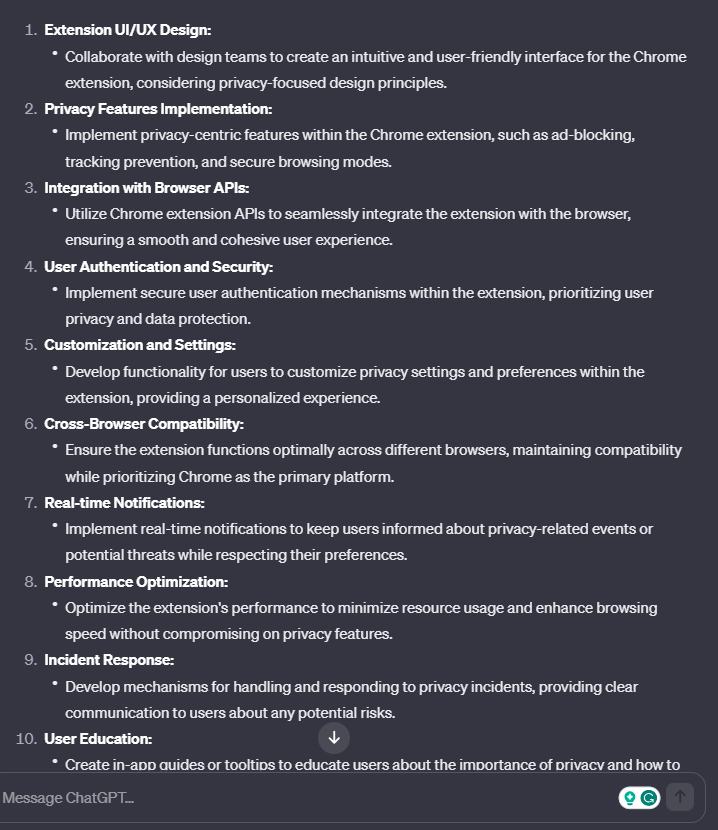
You can then copy excerpts from this thread and feed them back into the original Job Description thread, giving the AI more to work with, or copy some of the excerpts to put into your edit and iteration of the final piece.
Step 3: Specify qualifications and requirements
Ask ChatGPT to outline the qualifications and requirements for the role, including the educational background, years of experience required, and any specific certifications.
Example: "Specify the qualifications and requirements for the Senior Frontend Developer position. Include details on the desired educational background, minimum years of experience, and any certifications or specialized skills required."
Step 4: Put the pay range in writing
This is the step that has changed most since this guide was first published, and it is the one ChatGPT will never remind you about.
The EU Pay Transparency Directive (2023/970) requires employers to give applicants the initial pay or its range, set on objective and gender-neutral criteria, in the published vacancy notice or otherwise before the job interview. It also stops you asking candidates about their pay history. The transposition deadline was 7 June 2026, and most member states missed it. The Netherlands, where our example role sits, only submitted its implementing bill to parliament on 21 May 2026, with entry into force expected 1 January 2027. So your national law may not have caught up yet, but it is coming, and the ranges you publish now are the ones your candidates will hold you to.
In the US this is already live. Illinois has required pay scale and benefits in every posting from employers with 15 or more staff since 1 January 2025, joining Colorado, California, Washington, New York, Maryland, Minnesota and Vermont.
So put the number in the prompt, and ask for the reasoning to be shown:
Example: "The base salary range for this role is €90,000 to €110,000, plus stock options to be discussed. Put the range in the job description and state plainly what moves a candidate toward the top of it: years of React experience, prior browser or extension work, and team-lead experience. Do not include any wording that asks the candidate for their current or previous salary."
Two warnings. ChatGPT does not know your pay bands, and if you ask it to suggest a range it will produce a confident, plausible, invented one. Get the number from your own comp data. And a range wide enough to be meaningless (€60,000 to €140,000) satisfies nobody: the directive asks for a range built on objective criteria, not a placeholder.
Step 5: Incorporate company culture and values
In Glassdoor’s Mission & Culture Survey of more than 5,000 adults across the US, UK, France and Germany, 77% said they would consider a company’s culture before applying for a job there, and 56% said culture matters more than salary for job satisfaction. So include more than just the salary and compensation. Infuse the job description with elements of your company culture and values as well. Ask ChatGPT to articulate these aspects to make the description more appealing to potential candidates.
Example: "We’re a start-up based in Amsterdam, we have a great company culture and have drinks after work on Fridays and many other social team-building events. Integrate our company's culture and values into the job description. Emphasize aspects such as innovation, collaboration, and a commitment to diversity and inclusion for the Frontend Developer role."
Step 6: Optimize language for inclusivity
This one is worth doing properly, because there is real evidence under it. In a study in the Journal of Personality and Social Psychology, Gaucher, Friesen and Kay showed that adverts in male-dominated fields carry more masculine-coded wording (“competitive”, “dominant”, “leader”), and that women rated those roles as less appealing. The reason was not that they doubted their skills. It was a weaker sense that they would belong.
“Make it more inclusive” is too vague a prompt to act on that. Name what you want changed, and make the model show its work.
Example: "Review this job description for masculine-coded wording (competitive, dominant, aggressive, ninja, rockstar) and swap it for neutral equivalents. Cut any requirement that is not genuinely required for the job. Then give me a before-and-after table of every change you made and why."
Ask for the table. It is the only cheap way to tell whether the model actually rewrote anything or simply told you it had.
Step 7: Check for clarity
ChatGPT works much better if you provide feedback on or ask it to review the prompts. Ask it to review the job description for clarity and conciseness, ensuring that the language is straightforward, and key information is presented in a way that is easy for candidates to understand.
Example: "Review the job description and provide feedback on its clarity and conciseness. Ensure that the information is presented in a straightforward manner and is easily comprehensible for potential candidates."
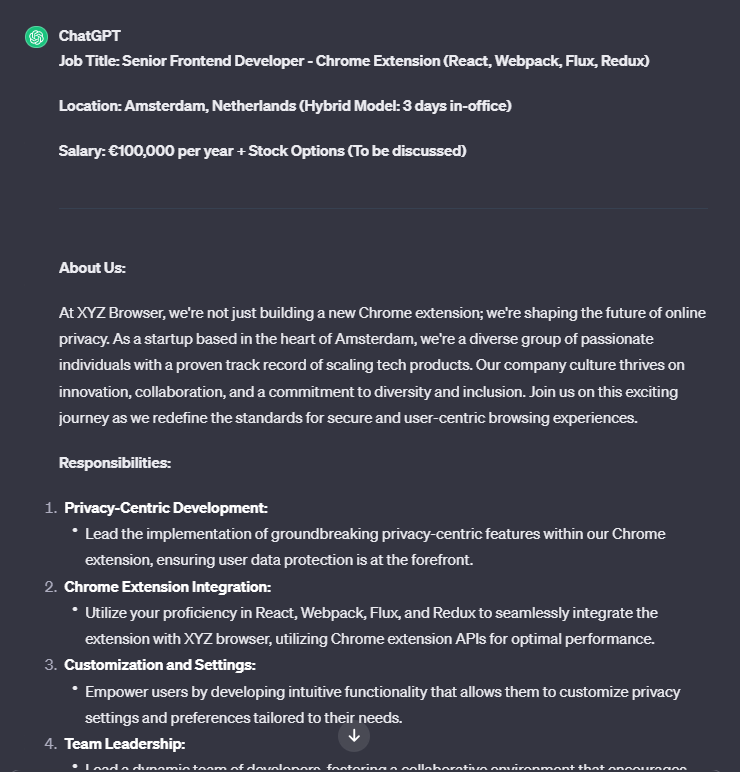
Now we’re ready to feed all the information into the AI and let it work its magic.
The result:
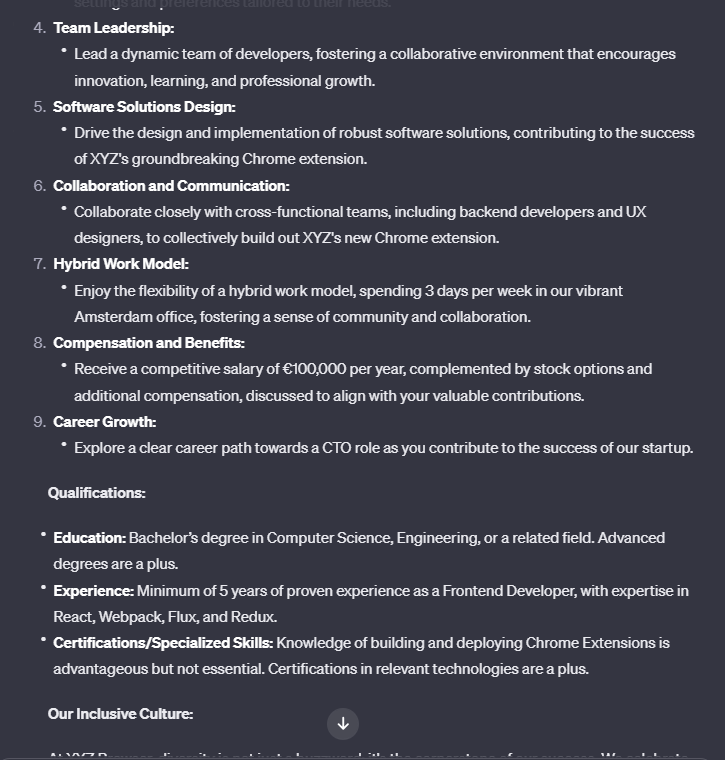
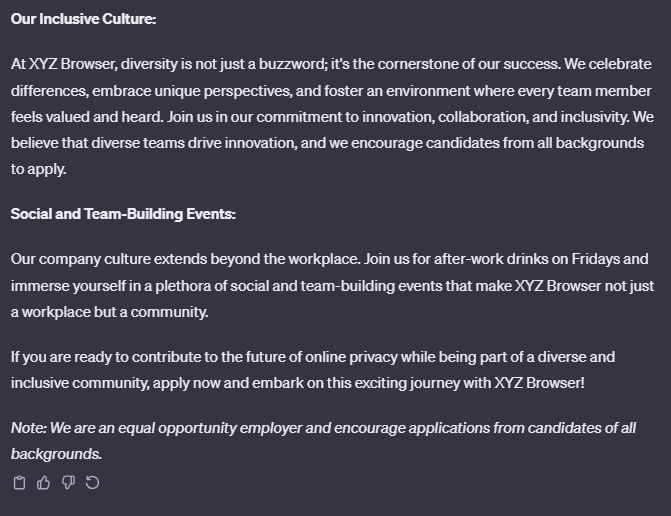
Step 8: Refine and iterate
ChatGPT may not always produce a finished piece, however, it does produce the bulk of the work (we can’t have it all!). You’ll need to fine-tune the language, adjust details, and incorporate any additional information to finish creating a compelling job description.
You can even ask ChatGPT for suggestions by prompting: Give a few suggestions on how I can add to the above prompt, making it a final piece.
Further tips
Use a project, not a pile of threads
An earlier version of this guide told you to keep separate threads for job descriptions, candidate emails and client outreach so the AI would remember your successful prompts. That part was never quite right: a new chat starts blank, and one thread cannot read another.
What does work is Projects, which OpenAI describes as dedicated spaces that hold chats, files and instructions in one place so you do not have to restate the same background every time you start a conversation. Make one project called “Job descriptions”. Upload your two best existing descriptions and your employer-brand boilerplate as files, and write your style rules once into the project instructions. Every new chat inside that project starts from that context, and the project’s memory draws on the chats inside it rather than on your unrelated work. That is the thing the old advice was reaching for.
Maintain the same style
Try to be as consistent as possible with your language and style, so ChatGPT can take note. Also before prompting you can tell ChatGPT what its role is, the more it hears this the better the prompts will be. For example “Your job is a Python Engineer recruiter.”
Feed it examples
If you have a really good job description for a role, you can copy and paste it into ChatGPT and prompt something like “Here is a well-done job description that’s for a Frontend Developer. It is formatted perfectly, please give me the same as above except for a Backend Engineer”
Where the finished description actually goes
The step this guide used to skip: the description is not finished when ChatGPT stops typing. It has to be published, multiposted to the boards, and attached to something that collects the applicants. If you are running more than a couple of roles, that copy-paste round trip between a chat window and wherever the job actually lives quietly becomes the slowest part of the process.
Most modern applicant tracking systems now ship a job description generator of their own. Workable puts a free one on its public site, and Manatal builds one straight into the job-creation screen. They are weaker than what you just did in ChatGPT, because you cannot argue with them across eight steps the way you can in a conversation. What they have is proximity: the draft appears one click from the posting itself. The honest split is to use the built-in generator for routine, high-volume reqs, and run the full prompt sequence above for the roles you actually need to win.
Manatal
If you do not have an ATS yet and you are drafting in a chat window because there is nowhere else to put the description, Manatal is the cheapest credible place to land it: $15/user/month billed annually ($19 month to month), with a 14-day trial that does not ask for a card. Its built-in generator drafts one click from the posting and the pipeline, which is exactly the proximity argument above. Be clear about what you give up: a generator embedded in a job-creation form cannot be argued with across the eight steps in this guide, so treat it as the tool for routine reqs and keep ChatGPT for the roles you need to win. And the $15 tier caps at 15 active jobs and 10,000 candidates, so past 15 open reqs you are really pricing the $35/user/month tier, not the headline number.
Remember, ChatGPT should be treated like your assistant and not your replacement. Harness its power and make sure you are feeding it lots of information to work with and don’t be afraid to critique its responses.