



Disclosure: some links in this article are affiliate links. If you sign up through one, HeroHunt may earn a commission at no extra cost to you.
Almost every search engine uses keywords to find the best results for you. LinkedIn is no exception.
But many recruiters using the LinkedIn platform are not sure how to use keywords and what the impact can be to your search results of the slightest change to a keyword.
This example demonstrates how a minor difference in your keyword can have major impact on your search results:
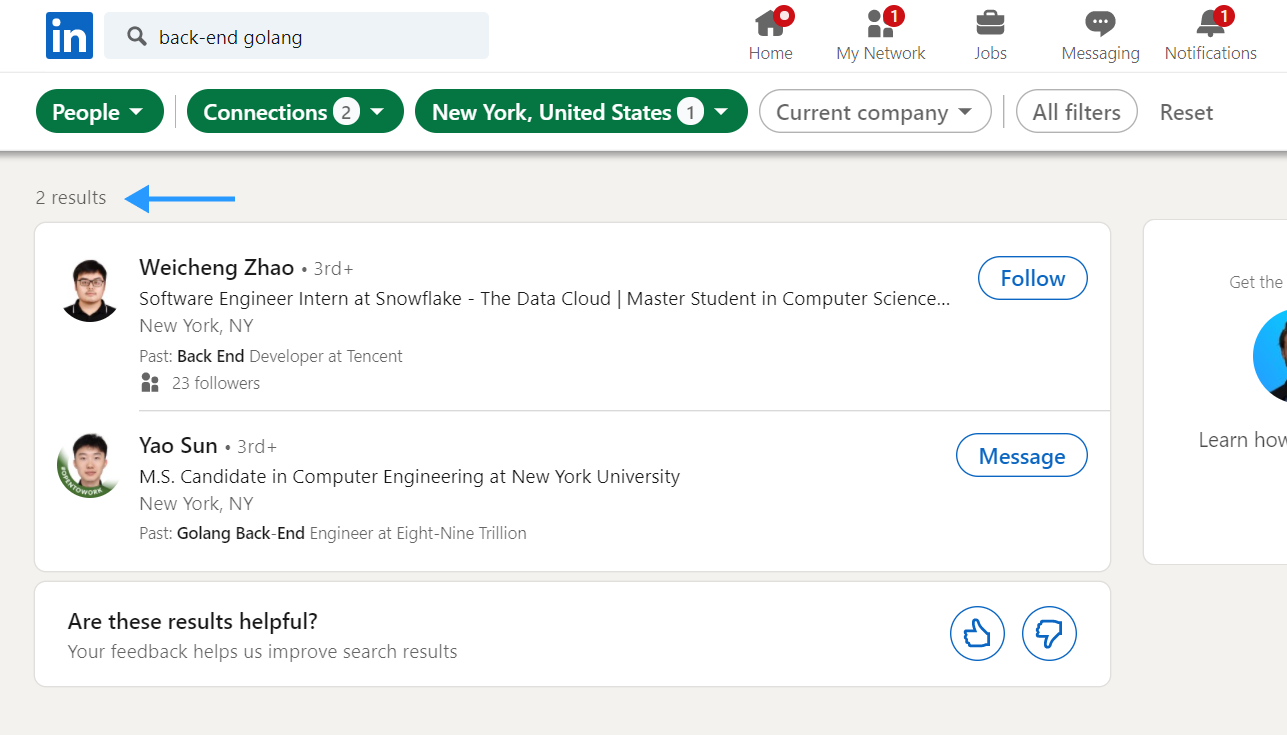
Results for back-end engineer (with dash):
Results for backend engineer (without dash):
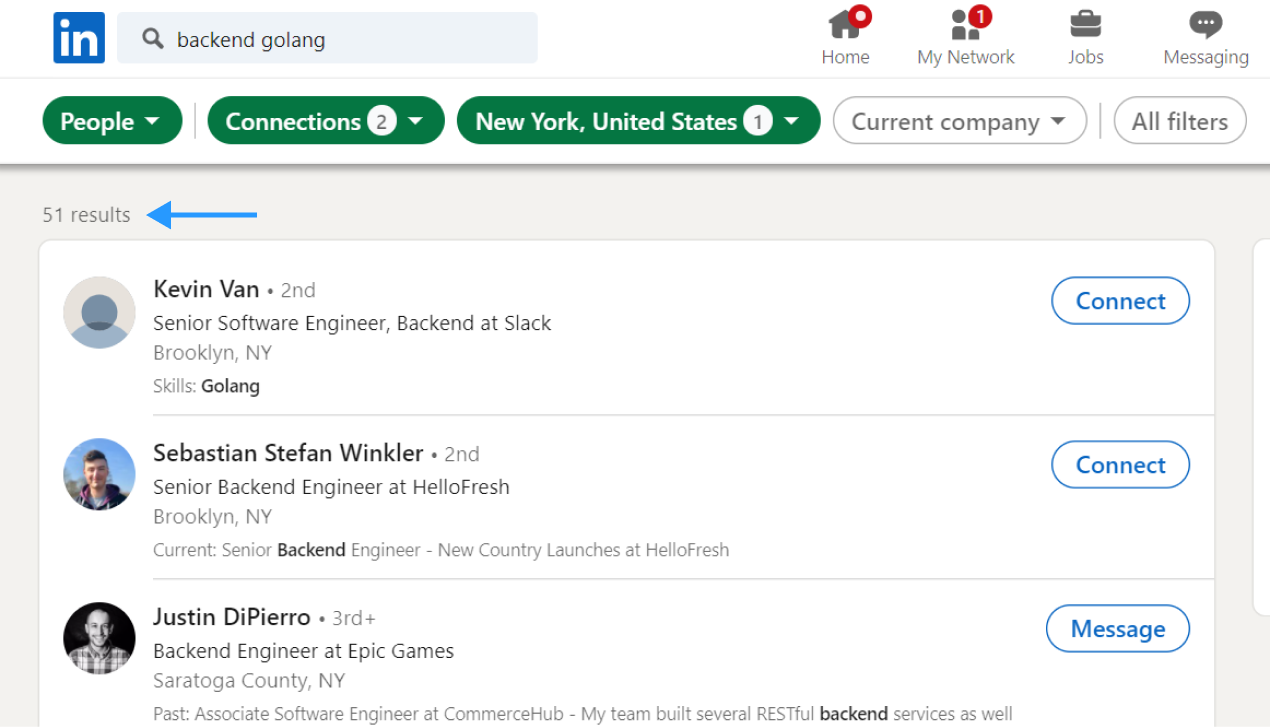
Just one little dash can multiply your search results with X25.
And this example is no exception.
Different ways of writing a keyword impact your daily searches on LinkedIn:
- Using a dash or not (back end or back-end)
- Using an abbreviation or a spelled out word (JS or JavaScript)
- Using a word with many synonyms (Engineer can also be developer, coder or programmer)
These are just a few examples of how your keywords of choice can impact your search results.
LinkedIn is not a star at recognizing these different ways of writing so if you choose to use LinkedIn, read through this blog to find out how to use keywords in the right way.
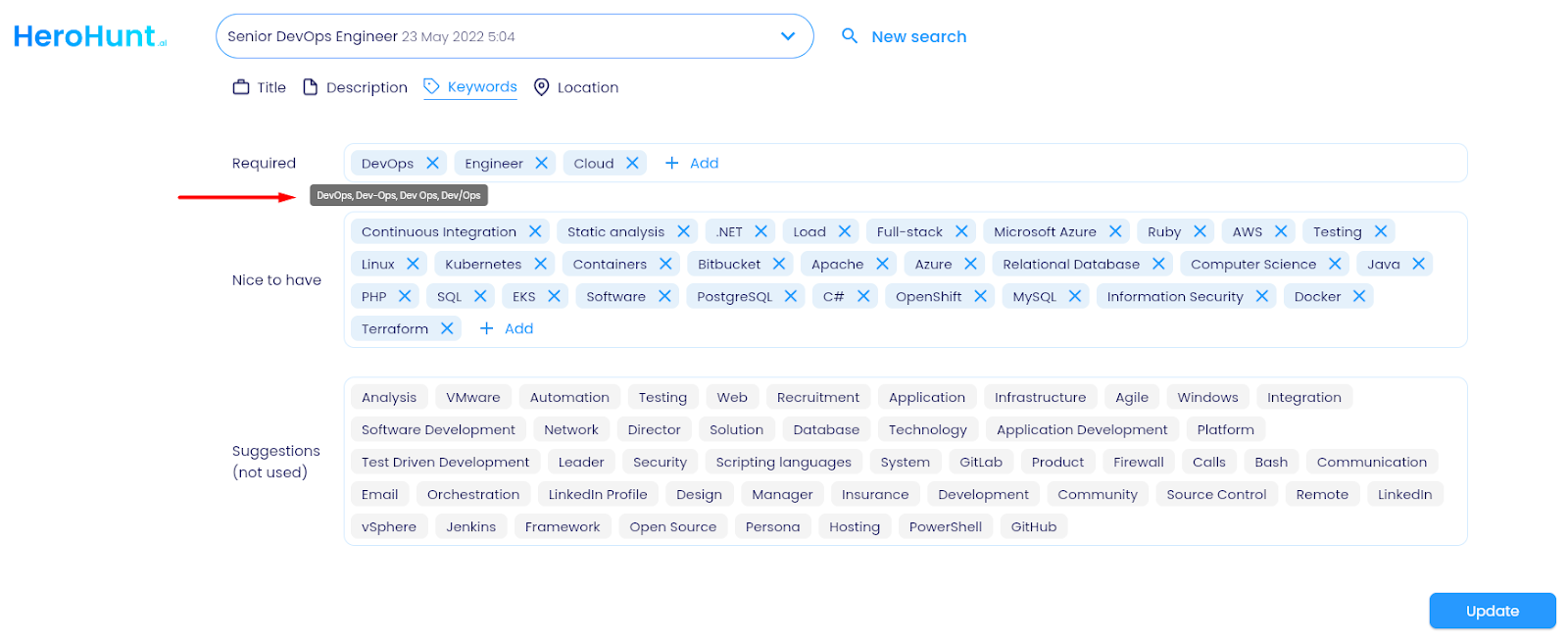
You can also choose to use a talent search engine like HeroHunt.ai that does take into account all the different ways of writing and possible synonyms of keywords.
Here’s an example:
If you do choose to work with LinkedIn, below are the things to take into account from a keywords perspective. Everything here is checked against LinkedIn's own Recruiter help documentation, because most of the boolean advice floating around recruiting blogs describes operators that LinkedIn does not actually support.
First: know which box you are typing into
The single most common keyword mistake is not a syntax error. It is putting the right words in the wrong field.
The Keywords filter is a full-text search. It matches anywhere in the profile: the headline, the About section, experience descriptions, skills, education, project titles. That is why it returns the most results, and also why it returns the most junk. A search for Kubernetes in Keywords will happily return a recruiter whose profile says "I hire Kubernetes engineers".
The other filters are scoped. Job titles only looks at title fields. Skills only looks at the skills section. Companies only looks at employers. LinkedIn supports boolean modifiers in all of these, not just Keywords. Per LinkedIn's Recruiter help, boolean works in Job titles, Companies, Keywords, Skills, Assessments, Schools, Industries, Location, Spoken languages and Workplace types. The one place it does not work is the Project filter.
The practical rule: if you know a term is a job title, put it in Job titles. If you know it is a skill, put it in Skills. Reserve the Keywords box for the things that live in free text and nowhere else, like a specific technology, a certification, a product name or a competitor's internal jargon.
The five operators that actually work
| Operator | What it does | Example |
|---|---|---|
| " " quotes | Exact phrase | "machine learning" |
| AND | Both terms must appear | python AND django |
| OR | Either term (this is how you catch variants) | engineer OR developer |
| NOT | Excludes a term | engineer NOT manager |
| ( ) parentheses | Groups logic | (java OR kotlin) AND android |
AND, OR and NOT must be typed in capital letters. This is not a style preference, it is a parsing requirement. Type engineer not manager in lowercase and LinkedIn does not exclude managers, it searches for the word "not" as a keyword. This is the single cheapest bug to fix in most recruiters' searches.
The operators that do not work (and this is why the dash matters)
Here is where the example at the top of this article comes from. LinkedIn's help documentation is explicit: LinkedIn does not support wildcards like the asterisk, and it does not support braces { }, brackets [ ] or angle brackets < >. The + and - operators are not officially supported either.
That single fact is the root cause of the 25x gap in the screenshots above. On a search engine with wildcard support, back*end would collapse "backend", "back-end" and "back end" into one query. On LinkedIn you cannot do that. LinkedIn does not stem your words or normalise your punctuation for you, so "back-end" and "backend" are two different tokens, and searching one of them silently discards everyone who wrote the other.
There is no clever syntax that fixes this. There is only enumeration:
- Punctuation variants:
"back end" OR "back-end" OR backend - Abbreviations:
"machine learning" OR ML,JavaScript OR JS - Synonyms:
engineer OR developer OR programmer OR coder - Spelling:
optimisation OR optimization,analyse OR analyze
Write the variant block once per concept, save it, and reuse it. Every senior sourcer you have ever met has a text file of these. That file is the actual skill.
HeroHunt.ai
Before you decide how much of your week this enumeration is worth, run the test from the top of this article on your own req: search backend, then back-end, then "back end" as three separate LinkedIn searches and write down the three result counts. If they diverge the way the screenshots above do, every single-token search you have run this quarter was silently discarding most of the market. That gap is the case for a search engine that expands synonyms, abbreviations and punctuation variants itself instead of making you maintain the text file, which is what HeroHunt.ai does from the job description. The honest caveat: it is a separate tool, not a filter inside Recruiter, so if your team lives in Recruiter projects and InMail then you are adding a second system to your workflow, and for one straightforward req the hand-written OR block is still cheaper than changing how you source.
Order of precedence: the rule that silently rewrites your search
LinkedIn evaluates a boolean string in a fixed order: quotes first, then parentheses, then NOT, then AND, then OR last. OR having the lowest priority is the part that catches people out.
Take this string:
java OR kotlin AND android
You meant "an Android developer who writes either Java or Kotlin". Because AND binds tighter than OR, LinkedIn reads it as java OR (kotlin AND android), which returns every Java developer on the platform, Android or not. Your results balloon and you assume the search is broken.
(java OR kotlin) AND android
That is the search you meant. The habit worth building: every OR group gets its own parentheses, always, even when you think it is unambiguous. It costs two characters and removes an entire class of silent failure.
Your quoted phrases are losing words
LinkedIn filters out stop words such as "by", "in" and "with" to keep site performance up. That means an exact-phrase search is not always as exact as it looks: "director of engineering" and "director engineering" can behave more alike than you would expect, and a phrase whose meaning depends on a small connecting word will not do what you want.
Do not build a search that hinges on a stop word. Anchor on the load-bearing nouns instead.
Keep the string short and push the rest into filters
LinkedIn warns in its own documentation that too many facets in a boolean query can cause a search result issue, and recommends moving items out of a long boolean string into the individual filter sections. There is no published character limit, which is precisely the problem: an over-stuffed string does not throw an error, it just quietly returns worse results.
So a 400-character monster string that crams titles, skills, locations and exclusions into the Keywords box is not impressive, it is fragile. Split it:
- Titles and their variants go in Job titles
- Skills go in Skills
- Employers and competitors go in Companies
- Locations go in Location
- Keywords holds only what does not fit anywhere else
Each field stays short, readable and debuggable. When a search misfires you can empty one field at a time and see what changed, which you cannot do with one long string.
Does AI-assisted search make keywords obsolete?
No, and it is worth being precise about this because the marketing suggests otherwise.
LinkedIn now offers AI-Assisted Search in Recruiter, where you describe the role in plain English ("Find me marketing managers in Dublin with sales enablement experience") and it builds the structured search for you. LinkedIn's help centre is clear that boolean and keyword search still sit right there as alternative ways to start a search. Two caveats matter for planning: Advanced AI-Assisted Search is limited to Recruiter and RPS+ customers with English language settings, and what the AI produces is a set of filters, which you then have to read and correct.
Which puts you back where you started. The AI writes the string; you still have to know whether the string it wrote catches "back-end" as well as "backend". Understanding the syntax is now a reviewing skill rather than a typing skill, but it has not gone anywhere.
The part a perfect keyword string cannot solve
Here is the uncomfortable arithmetic at the end of all this. The entire point of the work above is to build a bigger, cleaner, more complete list. Then you have to message it.
LinkedIn's published limits are 30 InMail credits per month on Recruiter Lite and 150 per month on Recruiter. So the recruiter who does everything in this guide correctly and surfaces 300 well-matched people on a Lite seat can contact 10% of them this month. The better your keyword search gets, the more sharply that ceiling bites.
This is why experienced sourcers treat the keyword search as one half of the job and getting contact details outside LinkedIn as the other half. The tooling for that half is a browser extension that reads the profile or search page you are already on and returns an email address or a phone number, which you then work from your own inbox instead of your InMail balance. Lusha, ContactOut and SignalHire are the three you will see most often in recruiting teams, and they are close enough in function that the real differences are credit pricing and hit rate on your particular roles. Lusha is the one we would start with for a Recruiter user, mostly because its free tier is large enough to actually test the hit rate on your own shortlist before paying anything.
Lusha
If your Recruiter seat's InMail budget is the thing throttling a search you just spent an hour perfecting, a contact-data extension is the usual release valve, and Lusha is the mainstream one for this exact workflow: it runs as a browser extension over the LinkedIn search results you are already looking at. Check the credit table before you plan around it, because credits are not one currency. A verified email costs 1 credit and a phone number costs 10. So the free plan's 40 credits a month is 40 emails or 4 direct dials, and Starter at $49.90 per user/month (a 35% promo is often showing, which takes it to $32.45) buys 400 credits, which is 400 emails or 40 phone numbers, not both. The honest limit is coverage: Lusha is a B2B sales database first, so hit rates are strongest on corporate desk jobs at identifiable companies and get noticeably thinner for non-corporate, frontline or public-sector candidates. If you source nurses, tradespeople or retail managers, test it on a real shortlist before you buy, because your roles are not what the database was built for.
The checklist
- AND, OR, NOT in capitals. Lowercase operators are searched as words.
- Parenthesise every OR group. OR binds last and will widen your search without telling you.
- No wildcards. Enumerate punctuation variants, abbreviations and synonyms by hand with OR.
- Do not lean on stop words inside quoted phrases; they are stripped.
- Use the scoped filters (Job titles, Skills, Companies) instead of one giant Keywords string.
- Test each variant separately before you combine. If "backend" and "back-end" return wildly different counts, that is your signal that a variant is missing.
- Read what the AI wrote. AI-Assisted Search builds filters, it does not guarantee they are complete.
None of this is difficult. It is just undocumented in the place you need it, and the failure mode is invisible: a keyword search that quietly misses two thirds of the market returns results, looks fine, and never tells you what it dropped.