


The LinkedIn connection invitation limit
You might have encountered this while you were busy extending your network, doing business development or recruiting people.
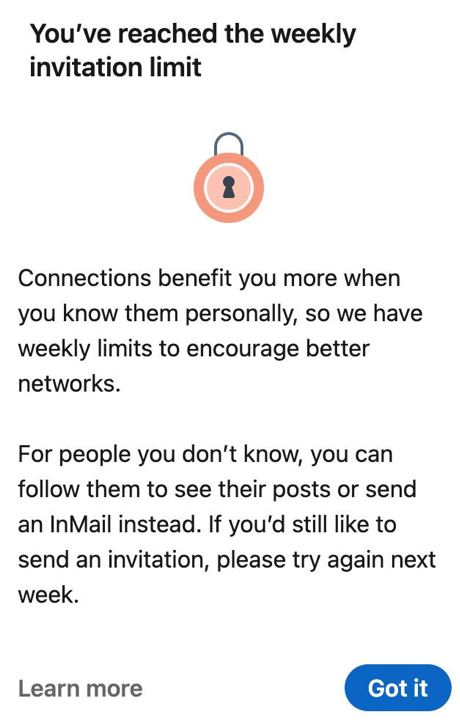
This means you have reached LinkedIn’s weekly invitation limit, which LinkedIn rolled out to everyone to “ensure that our members only receive relevant requests”.
Definitely annoying if you want to recruit people, do marketing automation or have other ways of trying to get interesting conversations going.
How big is the limit exactly?
For most accounts it lands around 100 invitations per week, measured on a rolling seven day window rather than a calendar week. But one thing deserves to be said plainly, because almost every article on this topic (including the first version of this one) skips it: LinkedIn has never published the number. Its help page on invitation restrictions commits only to this: “All LinkedIn members (Basic and Premium) are subject to invitation limits and restrictions”, and “most restrictions will automatically be removed within one week”.
Every “100” or “200” you read is observed behaviour, not documented policy. That is exactly why it moves without warning, and why any tactic built on the precise number is built on sand. Two things follow, and both matter more than the number itself:
- Premium does not buy you out of it. LinkedIn states the limits apply to Basic and Premium alike. Upgrading to Sales Navigator to lift your invite ceiling is a common and largely wasted purchase.
- The cap is partly behavioural, not just numeric. LinkedIn names three triggers for restricting an account: sending many invitations in a short amount of time, having many invitations “ignored, left pending, or marked as spam”, and suspected use of automation tools. Your acceptance rate is a lever you control. Raw volume is not.
That third trigger is worth sitting with, because it is the one that quietly punishes the obvious fix. Bolting an automation tool onto the problem to push more invites through is the behaviour LinkedIn says it restricts accounts for.
Update: the invite by email workaround is closed
The original 2021 version of this article recommended the workaround everyone used: send your connection invites through the “Invite by email” screen, because those invites were not counted against the weekly 100. That advice has expired, and you should know it before you go hunting for the button.
LinkedIn now publishes a help page titled “Sync contacts from other address books and sources no longer available”, which says: “we have started to remove this feature and you should expect this feature to no longer be available.” The bulk paste and upload path is gone for most accounts. LinkedIn’s current “Various ways to connect with people on LinkedIn” page lists exactly three routes: the Connect button on a profile, People you may know, and pending invitations in My Network. Inviting a pasted list of sourced candidates is not among them.
What survives is much narrower: mobile contact sync and a Gmail import, both of which invite people already sitting in your address book. That is a real feature for reconnecting with people you actually know. It is not a sourcing channel. And it is worth being clear that “email invites don’t count toward the limit” was never a documented exemption in the first place. It was observed behaviour, which is precisely why LinkedIn could remove it at its own convenience, without announcing anything.
Apollo.io
With the paste box gone, the list of addresses you used to feed it still has a use: you send to it yourself, outside LinkedIn, where nothing is rationed. That is what an email finding database is for now. Apollo’s free plan gives each seat 900 general credits per year, released monthly, so about 75 a month. Email credits are metered separately under its fair use policy: in practice around 10,000 a month if you signed up on a verified company domain, but only 100 a month on a personal Gmail address, which is the gate a solo recruiter actually hits first. Paid starts at $49 per seat per month billed annually, or $65 if you pay month to month. The caveat matters for recruiters specifically: Apollo is a B2B sales database at heart, so it indexes work emails, and a work email is precisely the address that dies the moment your candidate changes job. Expect gaps on exactly the passive candidates you most want, and expect to verify before you send.
What the old workaround looked like
Kept here for reference, because a handful of accounts still report seeing some version of this flow, and because it explains what the video below is demonstrating. If it is missing from your account, it is not a bug and there is no setting that brings it back.
You went to ‘My network’, then ‘Connections’, opened ‘More options’ on the right side of the page, and picked ‘Invite by email’.
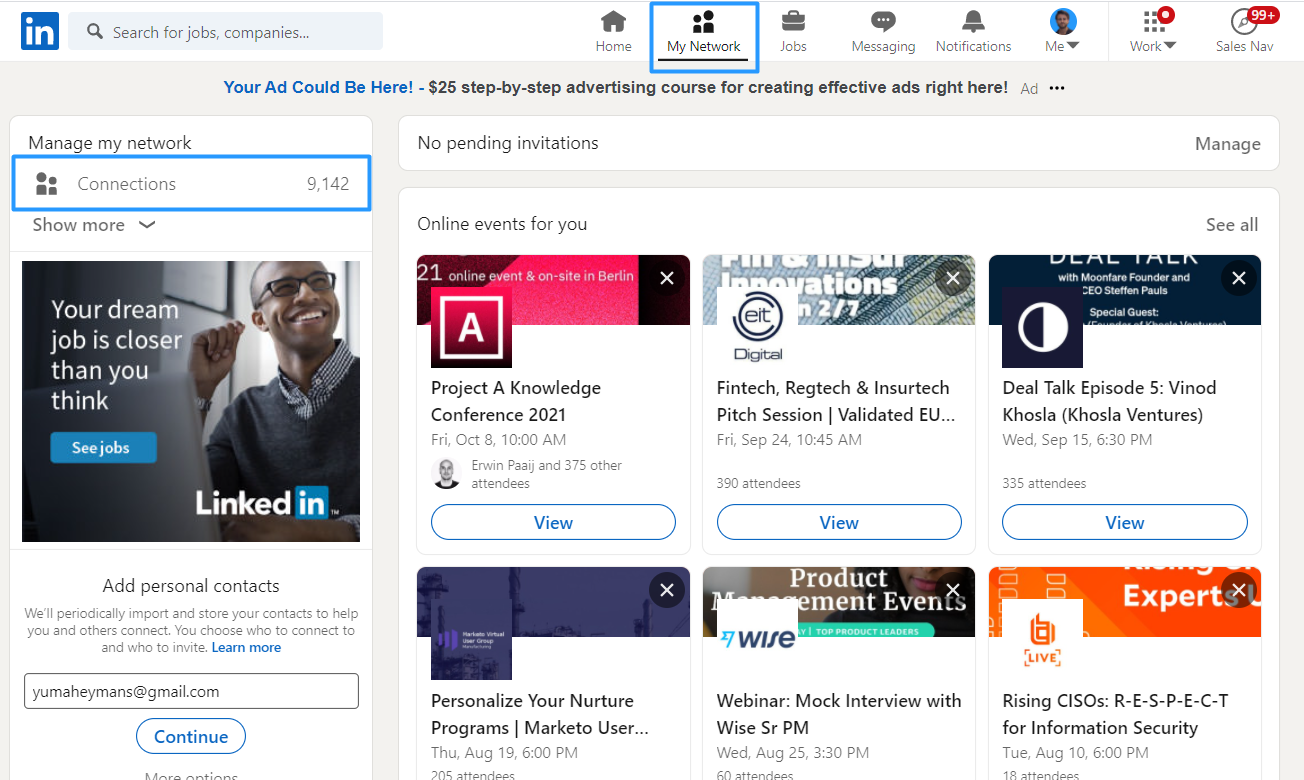
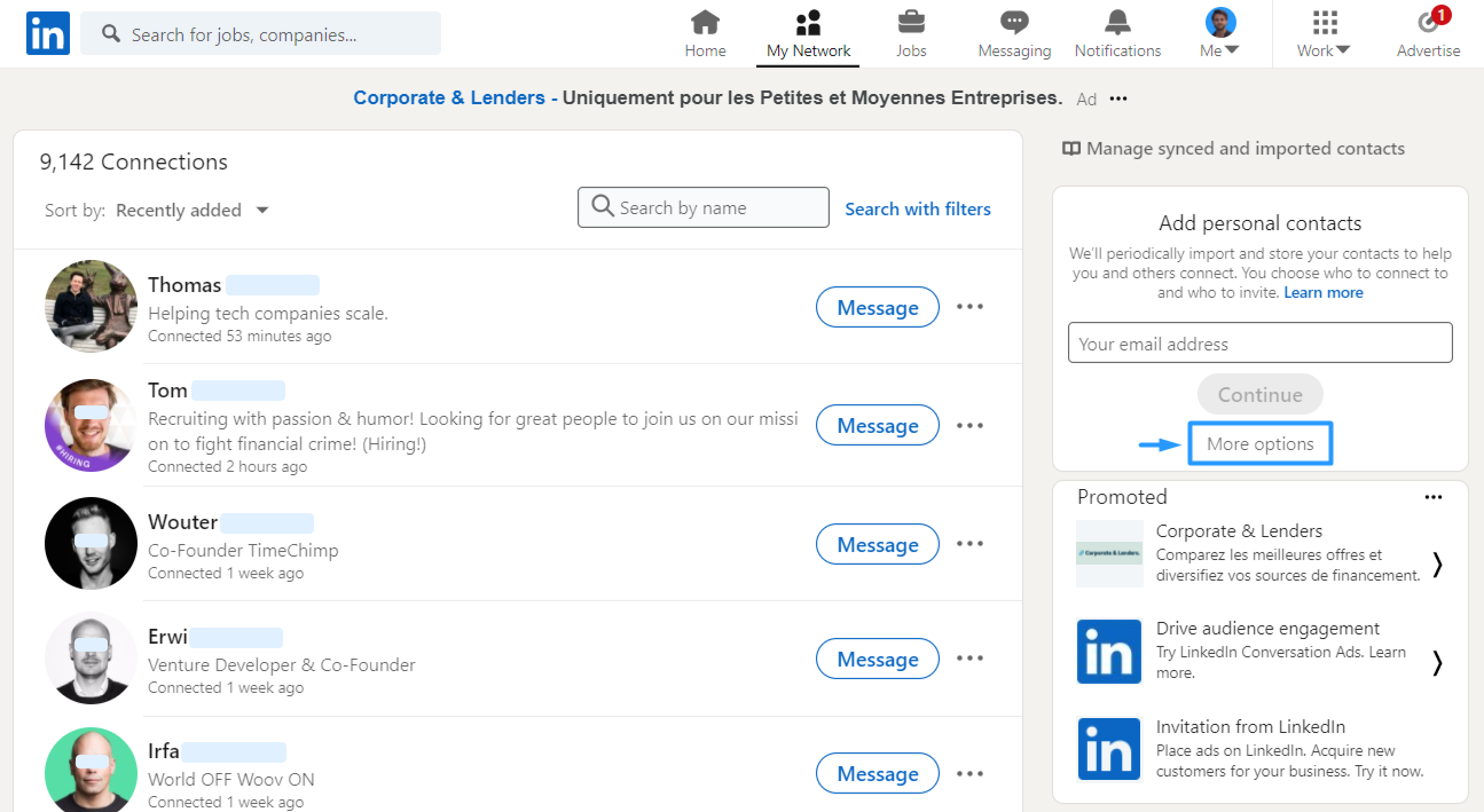
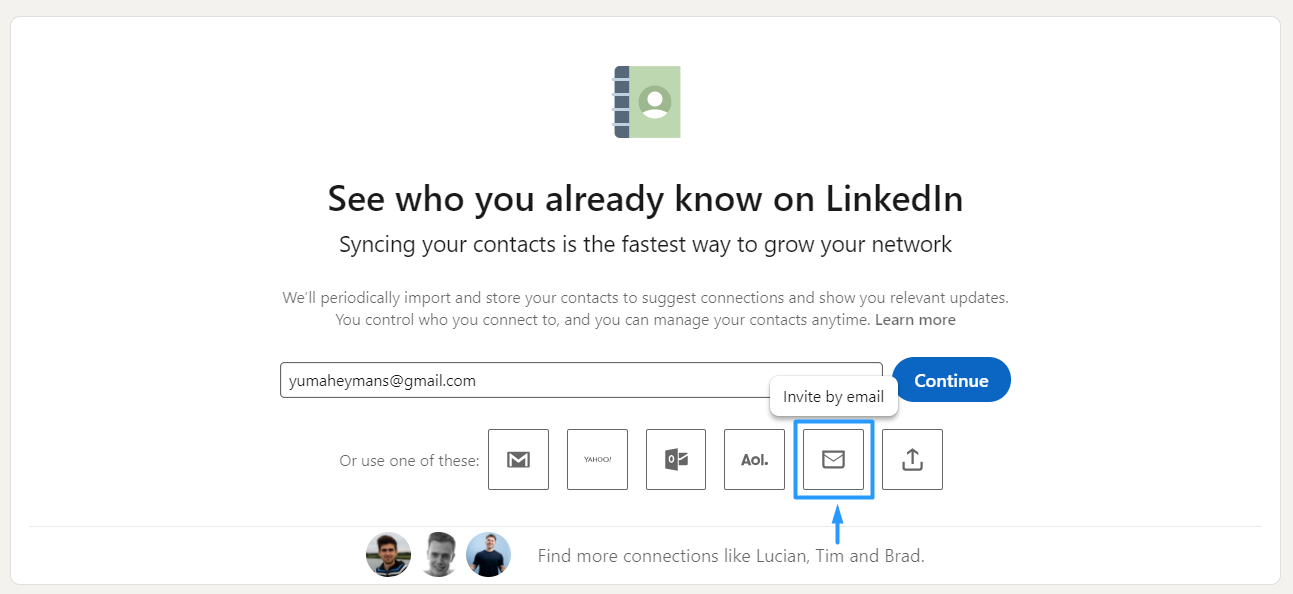
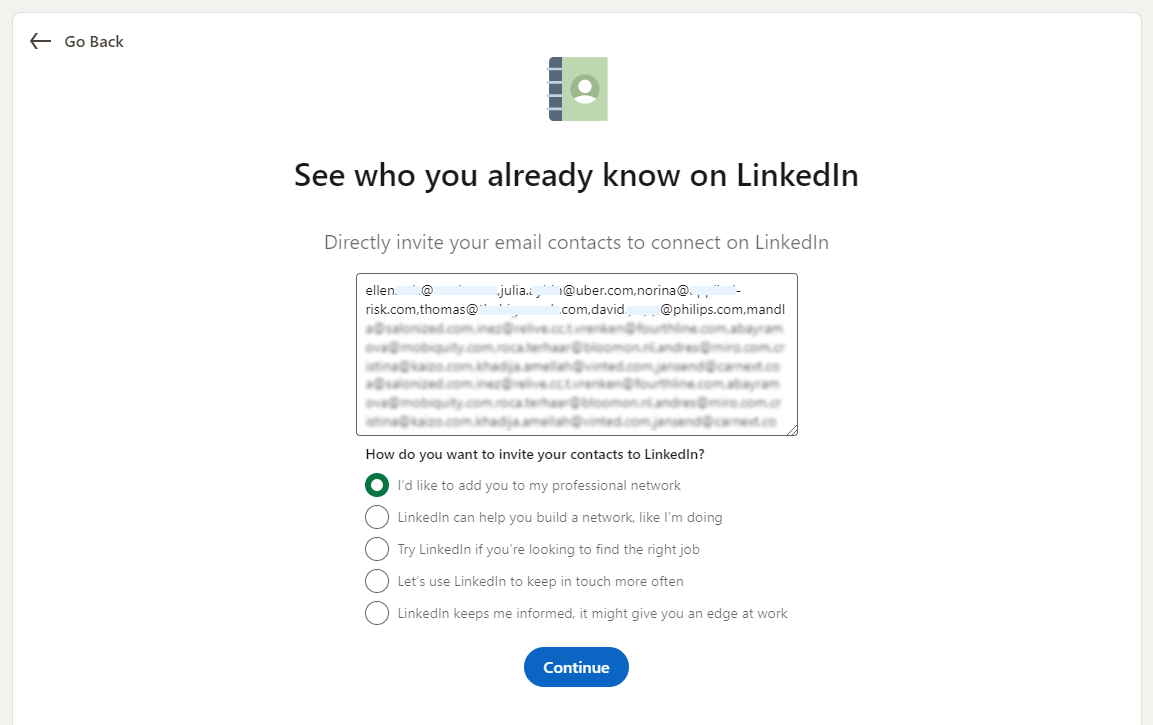
From there you pasted in the email addresses of the candidates you wanted to invite (an Apollo style contact database was how most people got those addresses, or see this guide), picked one of the canned messages, and hit Continue.
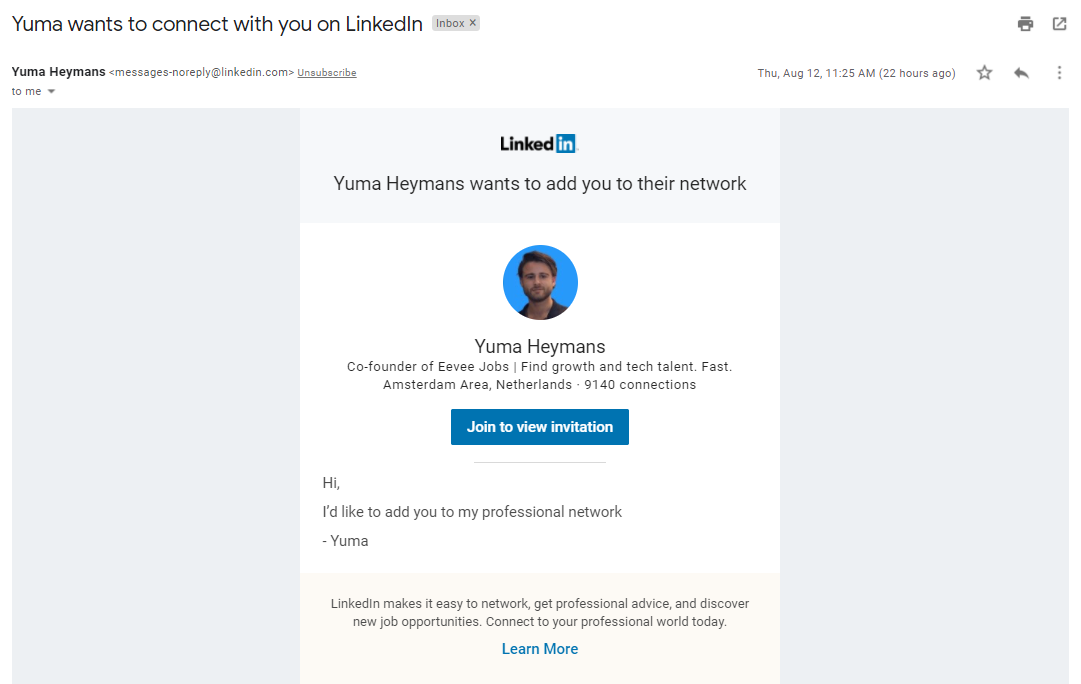
The candidate then received an invite in their mailbox that looked like this.
What actually works in 2026
1. Spend the 100 on people likely to accept
Since ignored and pending invitations are one of LinkedIn’s stated restriction triggers, a low acceptance rate does not just waste invites, it actively degrades your standing. Sending 100 scattershot requests at a 20% acceptance rate is worse than sending 40 well targeted ones at 60%, on both counts. Tighten the list before you touch the volume.
2. Know the personalised note cap (this one catches people out)
Here is the constraint most recruiters have never read, straight from LinkedIn’s “Personalize invitations to connect” page: on a free account you can add a personalised message to up to three connection requests per month, each capped at 200 characters. Premium members can send unlimited personalised invitations.
Read that against the old advice and the irony is sharp. This article used to warn that the email workaround’s “only downside” was losing the personal message. On a free account today you get three personalised notes a month anyway. If you are sourcing on a free seat, the note limit, not the weekly 100, is your real ceiling on personalised outreach.
Note also that this number is three, not the “5 per month” that circulates on most blogs covering this. LinkedIn’s own documentation is the source above.
3. Follow instead of connecting
Following someone costs you no invitation credit and has no weekly cap to hit. For a passive candidate you want on your radar rather than in your network, it is the cheaper move, and it leaves the connection request available for when you have an actual reason to send one.
4. Move the conversation off LinkedIn
This is the durable answer, and it is the one the closure of the email loophole should push you toward rather than away from. The weekly limit only binds inside LinkedIn’s walls. An email to a candidate is not rationed by LinkedIn, is not counted against 100, cannot be revoked by a product decision made in Sunnyvale, and does not restrict your account if it goes unanswered. It just needs a real message and a real reason for the candidate to care, which was true of your InMails as well.
The one input you need is the address, which is what a contact database like Apollo is for. Just go in with clear eyes about coverage: no provider has everyone, and the hit rate on passive candidates is always lower than the marketing suggests.
Hit the weekly wall? The candidate’s inbox is the one channel LinkedIn does not ration.
Made with 💙 by HeroHunt