


Sourcing talent with the Programmable Search Engine (PSE)
Have you heard about the Google Programmable Search Engine (PSE)? Chances are that you have not, yet. And if you did, probably still a lot of mystery remains around it.
The PSE is one of the most underutilized tools in recruitment.
But it can be very powerful.
The PSE provides significant benefits compared to a standard or advanced Google search for talent.
First: two things changed since this guide was written
Both LinkedIn and Google moved the goalposts, and both changes land directly on this workflow. Read these before you build anything.
LinkedIn stripped its public profiles. Starting in early 2024, LinkedIn pulled the job title out of the page title that search engines index and cut back what crawlers can read from the Headline, About, Experience and Education sections - PCRecruiter. That text is exactly what your PSE keywords match against. A search for "sales executive" now hits a much thinner page than the one the screenshots below were taken from, and the result preview often shows little more than a name. X-ray on LinkedIn still works, but treat it as a way to discover people, not as a way to filter them precisely.
Google capped the PSE. On 20 January 2026 Google announced that new search engines must use the "Sites to search" feature, with a maximum of 50 domains. The "Search the entire web" option is gone for new engines, and existing full-web engines keep working only until 1 January 2027 - Google.
The good news: recruiting PSEs are the use case that survives. Everything in this guide is site-restricted by design (we point it at linkedin.com/in), so it sits inside the free tier Google is keeping, and 50 domains is far more than a sourcing PSE will ever need. The part with a deadline is the Custom Search JSON API, which matters only if you call your PSE from a script or a spreadsheet. It is now closed to new customers, and existing customers have until 1 January 2027 to move to something else - Google for Developers.
What is the Programmable Search Engine
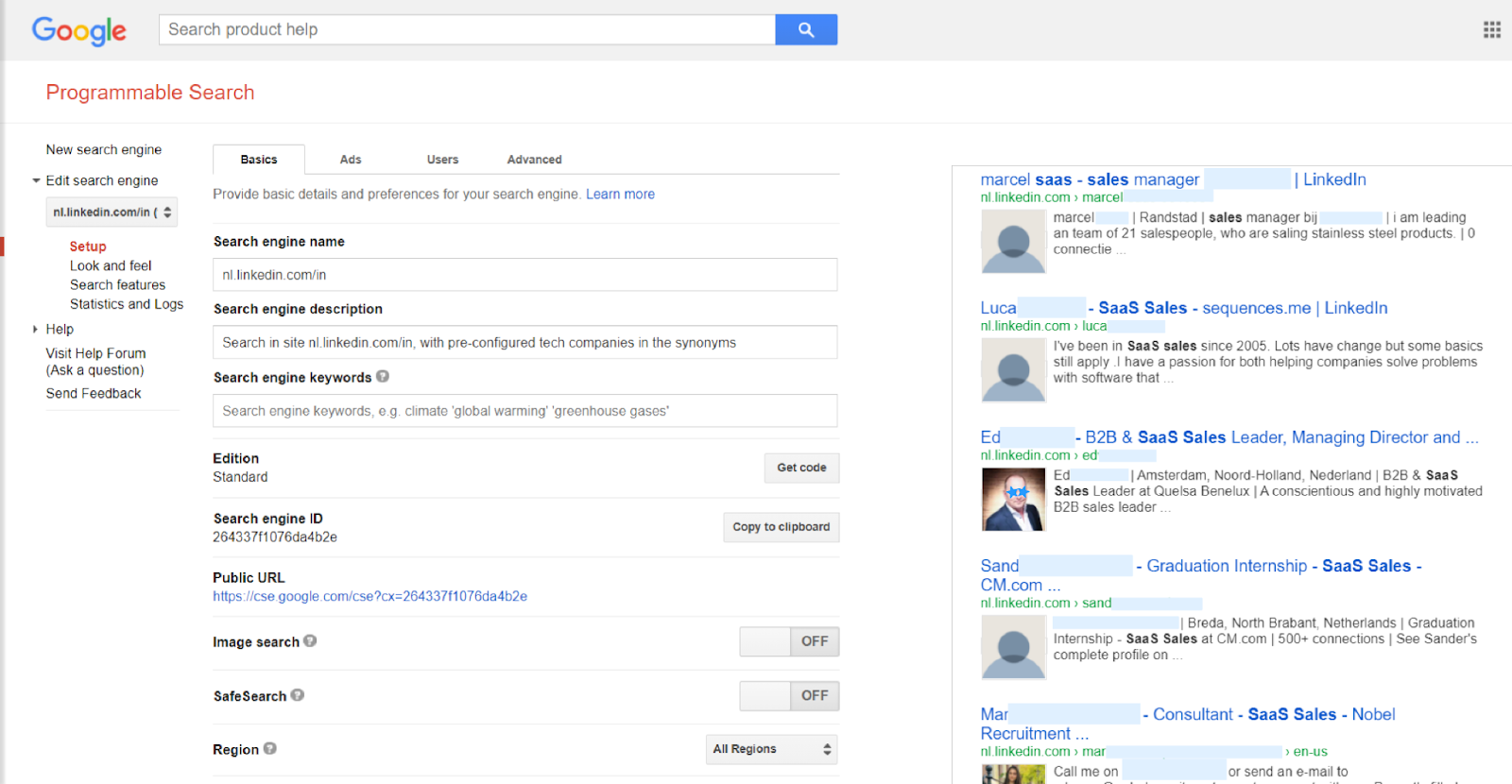
The PSE is a Google search engine that users can build themselves and customize based on search features like pre-set websites to search in, synonyms, default keywords and languages.
It is also commonly referred to as the Google Customizable Search Engine (CSE), which is the old name that Google used for it.
With a PSE you can build for an example your own search engine dedicated to searching in LinkedIn and Stack Overflow only, which only displays candidate profiles as results, that includes only people that work at pre-set companies and that uses preconfigured keywords that ranks the profiles with those keywords higher.
PSE’s can be shared with the world by making them public and optionally you can integrate them on your website.
Benefits of the PSE
Compared to a regular Google search, the PSE has a couple of important benefits.
- Advanced search features: A PSE offers more advanced search features than a regular Google search.
- Save searches: For searches that you do often you don’t have to start every new search from scratch because you can save the search including all the search parameters like websites, locations, keywords and for an example companies that you included.
- Share preconfigured search engines: Your team or clients can use the PSE to use the search intelligence you have incorporated without requiring them to understand complex search operators and settings.
- More keywords: You can use up to 500 search terms by making use of the synonyms search feature in a PSE - Google for Developers. So you can overcome the limit of a regular Google search, which is 32 words - Google Guide.
- No CAPTCHAs: You don’t have to deal with the annoying CAPTCHAs that usually pop-up in a regular Google search, especially when you search repeatedly.
Cons of the PSE
Next to the fact that the PSE looks horrible, there are some other things to take in mind while starting out with the PSE:
- There is a limit of 10 results pages so you can get a maximum of 100 results per search
- For other users of the PSE than yourself it’s hard to see how the PSE was set up
- It has a bad design and inconsistent user experience
- Instructions on how to use the PSE are not very well documented
- Sometimes you just don't get the results you wished for and it's unclear why that happens
The 100-result ceiling is the one to plan around, because it is a hard product limit rather than a free-tier restriction: results come ten per page across ten pages, and paying Google does not lift it. A PSE is therefore only useful when your query is narrow enough that the right people sit inside the first hundred hits. Run something broad like "engineer" across linkedin.com/in and Google will quietly hide most of the market from you, with no warning that it did.
Once you get over these cons, the PSE can be a very powerful addition to your recruitment stack.
How to set up and use the PSE
This is a simple guide to start using a PSE. Using advanced (PSE) search features like schema.org types, meta data tags and Knowledge Graph Embeddings (KGE’s) are not covered here.
For an advanced read on PSE’s, we recommend reading the book Custom Search – Discover more: by Irina Shamaeva and others. This is one of the few reads that explains the PSE in detail.
The steps that follow now help you set up your PSE. This is an example so please note you can use other search parameters than stated here.
1. Go to https://programmablesearchengine.google.com
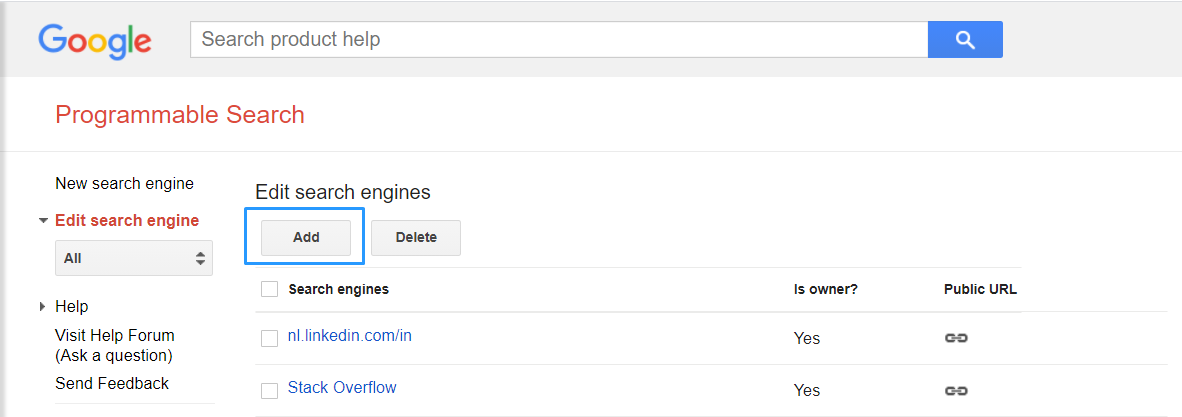
2. Add a new PSE
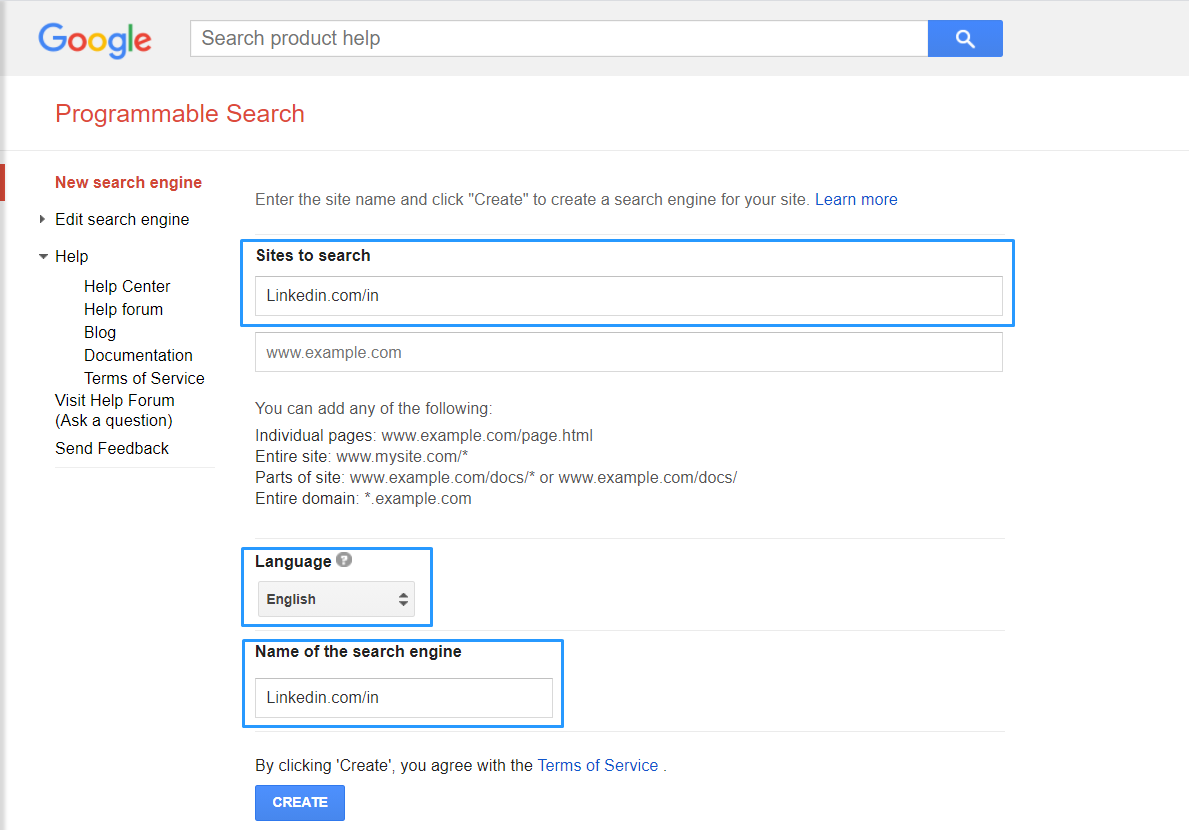
3. Add websites to search
Als set a language to search in and give the PSE a name. In this example we’re searching linkedin.com/in to include profiles only, so no other results like LinkedIn articles. You can also add a country code in front of the url to only search profiles of that country. Example for the United Kingdom is uk.linkedin.com/in
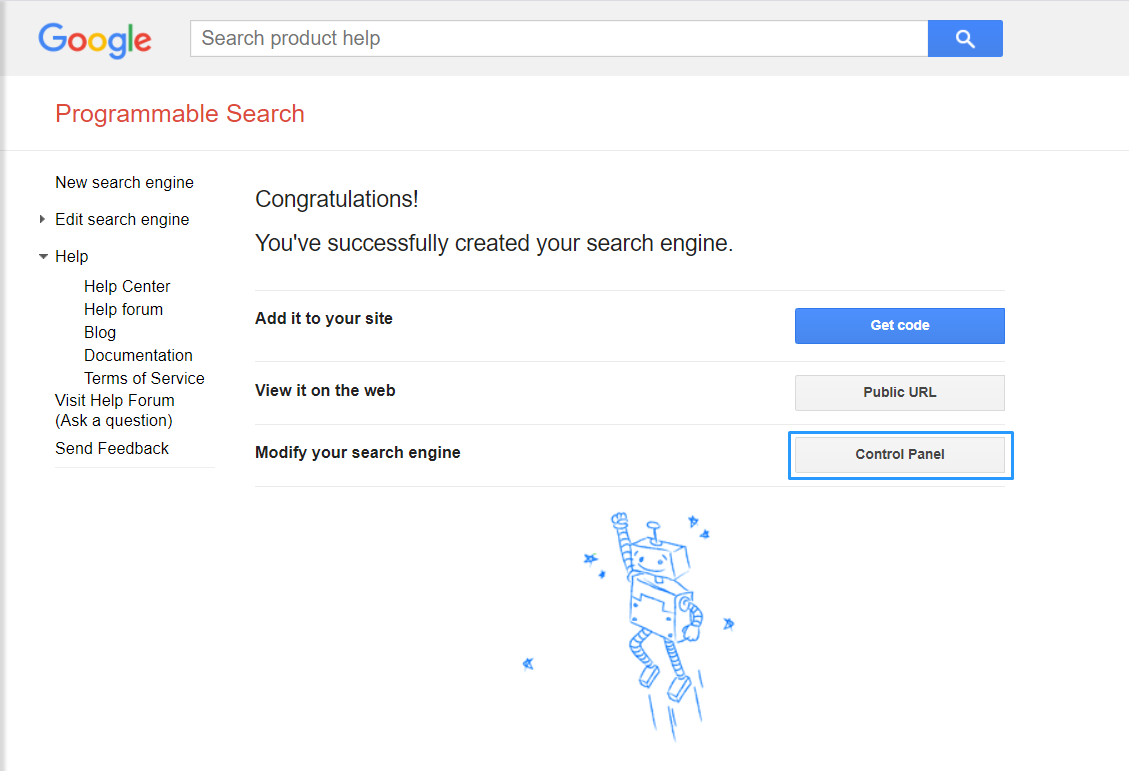
4. Go to the control panel to modify search features
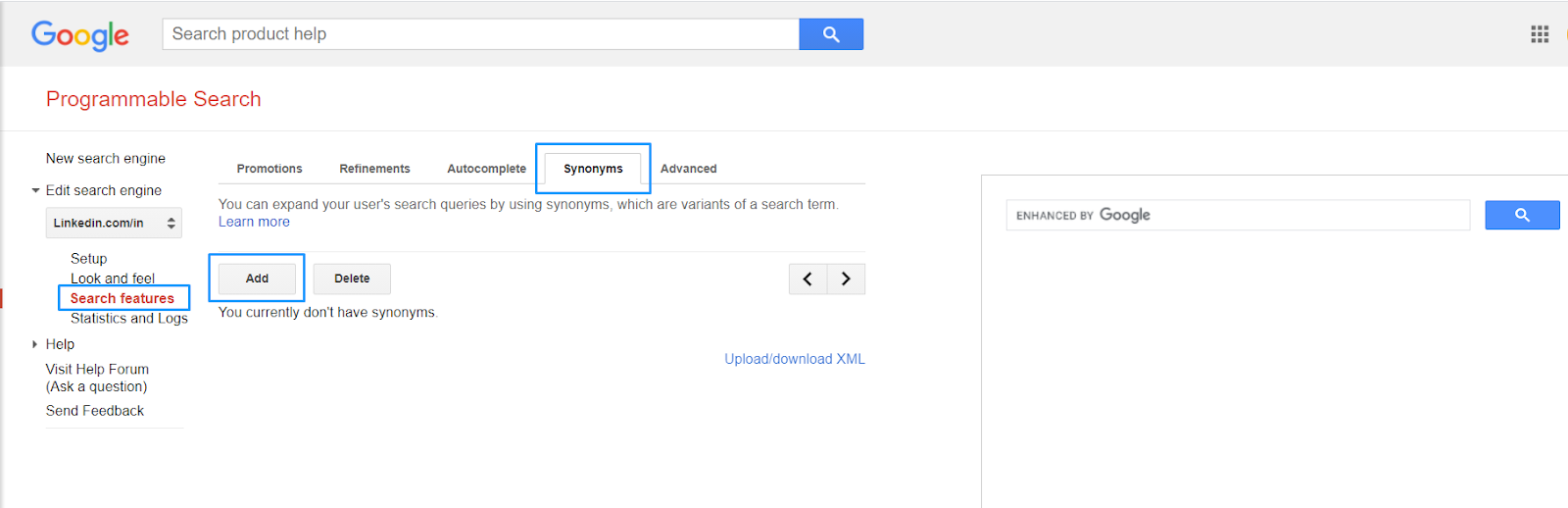
5. Add search features
Add for example synonyms to include a list of companies you want your candidates to be part of. Note, adding synonyms doesn’t have to mean the words you include are actual synonyms. This becomes clear in the next step.
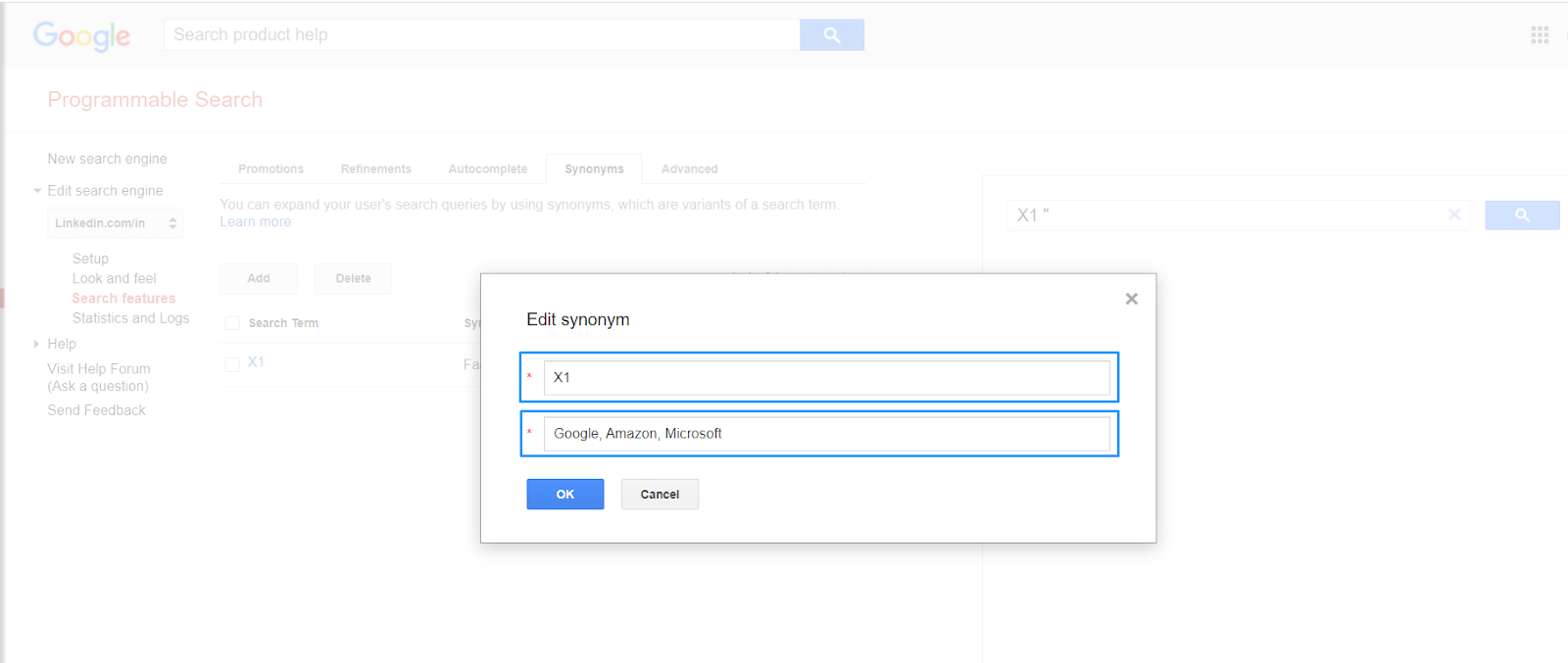
6. Add codes for synonyms
This can be anything. For example ‘X1’. But make sure it’s something that doesn’t actually pop up in candidates’ profiles. Add company names that you would like to search for (these could also be cities or universities for instance). In this example we search for people with Google, Amazon or Microsoft in their profile. The limits are 500 variants in total per search engine and a maximum of 10 variants per synonym, so 'X1' can stand for ten companies and you can build fifty codes like it. This is the mechanism behind the well-known 500-keyword hack, and it is still the single best reason to bother with a PSE at all.
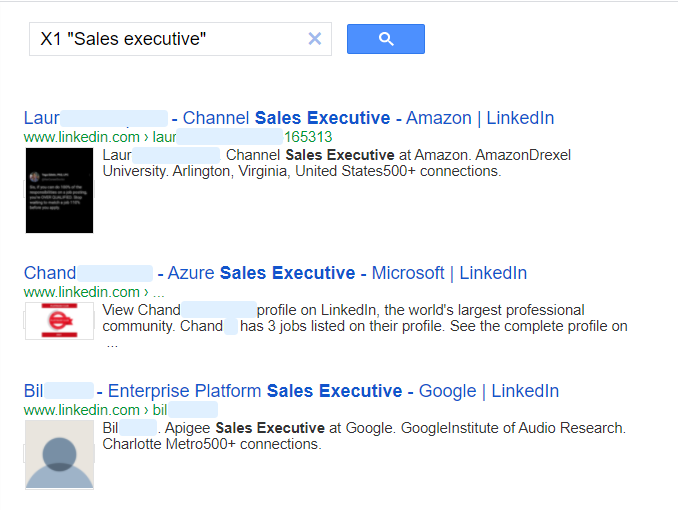
7. Include synonym codes
Go to your public url which you can find under ‘Setup’ on the left bar or test your PSE in the preview search box on the right. Include ‘X1’ in the search bar as this is the trigger to search for your included companies (Google, Amazon, Microsoft). Include the keywords for your search, in this case “sales executive”. You can add operators in PSE. Ignore the ads and find your candidates!
What a PSE will not give you: a way to reach anyone
A PSE stops exactly where sourcing starts costing money. It hands you a ranked list of names and profile URLs, capped at a hundred, and nothing else. No email, no phone number, no way to send a message. Since LinkedIn's strip-down the result is often little more than a name and a URL, so you cannot always tell from the search page whether a person is worth opening, let alone worth contacting.
So be honest about what you have built: a free discovery layer, not a sourcing pipeline. The recruiters who get real value out of a PSE treat it as step one of two. Step two turns a profile URL into someone you can actually reach, which in practice means paying LinkedIn for InMail, or running those profiles through a contact database such as Apollo.io or Lusha, both of which have Chrome extensions that surface a work email or direct dial while you are sitting on the profile. Tools like HeroHunt.ai collapse the two steps into one, with the obvious trade-off that you give up the hand-built precision a PSE gives you.
Apollo.io
Your PSE costs nothing, so pair it with the enrichment tier that also costs nothing while you find out whether this workflow is worth your time. Apollo's free plan gives each seat 900 credits per year, released monthly, and its Chrome extension pulls an email or direct dial off a LinkedIn profile you surfaced through your PSE. Do the maths before you commit, though: 900 a year is about 75 lookups a month, which is a trial, not a live req. Basic is $49 per seat per month billed annually, or $65 month to month if you will not sign for a year. And Apollo is built for B2B sales, so its coverage is strongest on corporate roles at company domains and thinnest on exactly the people a PSE is best at finding: freelancers, contractors and anyone whose work lives on a personal site rather than an employer's.
The pattern that works, then, is to keep the PSE narrow and let it do what it is genuinely good at: finding people that LinkedIn's own search hides from you because you are not paying for Recruiter. Then hand that short list to whatever you use to make contact. Where the PSE still shines is the sites LinkedIn does not control. Point one at github.com, stackoverflow.com, dribbble.com, about.me and a handful of personal-site domains, and every word of those profiles is still fully indexed, exactly as it was in 2021. That is where the 500 synonyms earn their keep, and it is well inside the 50-domain cap.
HeroHunt.ai
A PSE caps at 100 results per query and hands you no way to contact a single one of them, which is fine while you are testing a niche and painful when you are filling a live req. That is the two-step problem this guide describes, and HeroHunt.ai is the shortcut through it: search across LinkedIn and the open web, screening and outreach in the same pass, so you are not rebuilding a 500-variant synonym table every time the brief shifts. The honest trade-off is the one already named above. You give up the hand-built precision of a search engine you configured yourself, and you can no longer see which operator produced which name. A PSE is free and stays the better tool for a narrow search you run once, or for the corners of the web (github.com, dribbble.com, personal sites) where you want to control every domain in the index yourself.
In conclusion
Hope you have found this helpful! Note that PSE’s are not perfect and sometimes frustrating with the dinosaur age look and feel. Also, there are many more scenarios and options to include in your search than we included in this guide, so try different things out.
We’re sure you can start finding candidates in a way you haven’t experienced before. It does take some practice and testing though.
The honest summary in 2026: the PSE is a weaker LinkedIn tool than it was when we first wrote this, because LinkedIn decided it should be. It is still a very good tool for everywhere else on the web, it is still free, and the 50-domain rule Google announced in January 2026 does not touch the way recruiters use it. Build one narrow PSE for the sites that matter to your niche, accept that it finds people rather than filtering them, and pair it with something that can actually get you an inbox.
Good luck!
Verified against Google's Programmable Search Engine announcements and Apollo's published pricing in July 2026. Pricing and platform limits change: check the source links before you commit to anything.