


The insider's guide to AI agents that drive a web browser to find candidates: what they can really do, what they cost, where they break, and when to use something else.
Three of the most hyped AI browsers of 2025 were shut down before their first birthday. OpenAI's Operator launched in January 2025 and was gone by August 31, 2025 - TechCrunch. Its successor, the ChatGPT Atlas browser, reportedly reached roughly 11 million monthly users and was discontinued on August 9, 2026, less than ten months after launch - TechRadar. Google's Project Mariner shut down on May 4, 2026 - Android Headlines. The technology did not fail. The products got folded, renamed, and absorbed faster than most recruiters could learn their names.
Here is the problem underneath the churn: browser agents are far better at demos than at real work. When OpenAI first showed Operator, it scored 87% on the WebVoyager benchmark - OpenAI. On a harder test built from 300 tasks across 136 live websites, the same class of agent solved only about 30% - the "Illusion of Progress" paper. For sourcing, which is exactly the kind of long, multi-step, login-gated work these agents are weakest at, that gap is the whole story.
This guide breaks down what a browser AI agent actually is, the consumer browsers and developer frameworks you can point at LinkedIn or GitHub today with real 2026 pricing, how well they work on honest benchmarks, the LinkedIn wall of rate limits and CAPTCHAs, the legal and GDPR exposure of automated harvesting, the prompt-injection security hole, the purpose-built AI recruiters that skip the browser entirely, a safe sourcing playbook, a worked cost comparison, and where the agentic web heads by 2027. Everything here is grounded in late 2025 and 2026 sources, because in this market a benchmark from two years ago describes a different product.
Written by Yuma Heymans (@yumahey), who built HeroHunt.ai and has spent five years building autonomous sourcing agents, which mostly meant watching them get stuck on a login screen until they didn't.
Contents
- What a Browser AI Agent Actually Is
- The 2025-2026 Boom and Bust
- How These Agents See and Click a Page
- The Consumer Browsers: Comet, ChatGPT, Claude, Gemini
- The Builder's Toolkit: browser-use, Browserbase, Skyvern
- The Incumbents Bolting On "Agents"
- Do They Actually Work? The Benchmark Reality
- The LinkedIn Wall: Limits, CAPTCHAs, and Bans
- The Law: Public, Contract, and GDPR
- The Security Hole: Prompt Injection
- The Compliant Alternative: AI Recruiters Without the Browser
- A Safe Sourcing Playbook
- What It Really Costs
- The Agentic Web: Where This Goes by 2027
- Conclusion: A Decision Framework
1. What a Browser AI Agent Actually Is
A browser AI agent is a large language model wired to a real web browser so it can look at a page, decide what to do, and click, scroll, and type like a person. That is the whole idea, and it is genuinely new. A normal chatbot can tell you how to find a Rust engineer in Berlin. A browser agent will open a tab, run the search, open each profile, and copy the details into a list, taking actions in the live web rather than just describing them. For sourcing, the appeal is obvious: most of what a sourcer does is repetitive navigation, and navigation is precisely what these agents automate.
The distinction that matters for recruiting is how the agent gets to candidate data, and there are two fundamentally different answers. The first is a browser agent that drives your authenticated session: it logs into LinkedIn as you, moves through profiles, and copies what it sees. The second is a purpose-built recruiting agent that never touches your browser at all, running its loop over its own licensed or aggregated candidate index. These look similar in a demo and could not be more different in risk. The first is, by LinkedIn's own definition, prohibited software running on your account. The second is a software vendor you pay. Most of the confusion in the market comes from treating them as the same thing.
It is worth being clear about why this is different from the screen-scraping and robotic process automation recruiters have used for years. Old automation was brittle and literal: it followed a fixed script of clicks and broke the instant a page changed. A browser AI agent is supposed to reason about the page, so it can adapt when a button moves or a layout shifts, and it takes instructions in plain language rather than code. That flexibility is the genuine advance, and it is also the source of the trouble, because a system that decides its own next click is far harder to predict, to bound, and to keep from doing something you did not intend. Every strength in this technology has a matching failure mode, and sourcing sits right where those meet.
The diagram below shows why the path you pick decides almost everything downstream, from reliability to whether you can lose your LinkedIn account.
The rest of this guide walks both branches. Chapters 3 through 10 are about the browser-driving path, its tools, its reliability, and its walls. Chapter 11 is about the alternative. The reason to understand both is that the honest answer for most teams is a mix: use a browser agent for the tasks it is safe and reliable at, and buy a compliant platform for the parts where driving your own LinkedIn session is a liability rather than a shortcut.
HeroHunt.ai
If the reason you are reading this is that pointing a browser bot at LinkedIn keeps getting your account flagged, the cleaner experiment is a tool that never opens your browser. HeroHunt.ai runs its agent loop over its own aggregated index of 1B+ profiles across sources like LinkedIn, GitHub, Xing and Stack Overflow, and screens each person with a language model against your written brief instead of matching keywords in one network, so there is no logged-in session to detect and no Terms-of-Service breach to worry about. There is a free tier with no credit card, so a single hard role is a cheap test. The honest caveat: it is a sourcing layer, not an applicant tracking system, so you keep your system of record, and its coverage is thinnest in fields where people do not publish their work in public.
2. The 2025-2026 Boom and Bust
The most important context for any 2026 sourcing decision is that this category is violently unstable, and the instability is at the product level, not the research level. The models kept getting better while the products kept getting killed. OpenAI's Operator merged into "ChatGPT agent" in July 2025 and the standalone product was retired by that August - TechCrunch. The ChatGPT Atlas browser that replaced part of it lasted under ten months - 9to5Mac. Google absorbed Project Mariner into Gemini and Chrome - TechSpot. The Browser Company, maker of Arc and the AI browser Dia, was acquired by Atlassian for $610 million and refocused on "a browser for work" - CNBC. If you built a sourcing workflow on a specific browser product in early 2025, there is a real chance it no longer exists.
Underneath the wreckage, demand is real and large, which is why capital keeps flowing in. Korn Ferry's 2026 Talent Acquisition Trends report, based on 1,674 global talent leaders, found that 84% plan to use AI in 2026 and 52% plan to add autonomous agents to their teams, not just AI features - Korn Ferry. Gartner reports 73% of enterprises already use AI for at least one recruiting function - Gartner. And on the staffing side, Bullhorn's GRID report found that only 10% of firms have implemented agentic AI across a full workflow, with candidate sourcing named the top function firms want to automate - Bullhorn. The intent is enormous; the mature deployment is still rare.
The chart below shows how wide that gap between intent and execution really is.
How far recruiters have actually gone with AI (2026)
Read the bars from left to right and you see the shape of the moment: almost everyone plans to use AI, most want autonomous agents, a large majority already use AI for something in hiring, but only a sliver has wired agents through an entire workflow. The distance between the first bar and the last is where the disappointment lives, and it is why Gartner's most-cited prediction is that over 40% of agentic AI projects will be canceled by the end of 2027, blaming escalating costs, unclear value, and weak risk controls - Gartner. Gartner also estimates that of the thousands of vendors claiming agentic capability, only around 130 are building genuinely agentic systems, a pattern it calls agent washing. For a recruiter, the takeaway is not to stay away. It is to expect the specific product you choose to change, and to build workflows that survive a vendor pivot.
3. How These Agents See and Click a Page
To judge which browser agent fits sourcing, you need a plain-English model of how they work, because the two main architectures fail in different ways. The first approach is computer use, or vision: the agent takes a screenshot, a vision model looks at the pixels, and it outputs mouse coordinates and keystrokes exactly like a human staring at a screen. OpenAI's Computer-Using Agent and Anthropic's "computer use" tool work this way. The second is the DOM or accessibility-tree approach: instead of pixels, the agent reads the page's structured code, a stripped-down list of the interactive elements (buttons, links, fields) with their labels. This is far cheaper because it skips the image, and it is what the open-source library browser-use does, converting a page into structured text the model can act on deterministically - browser-use.
Most production agents blend the two, and a common trick bridges them: set-of-marks prompting, where every clickable element gets a numbered box drawn on the screenshot so the model can say "click element 14" instead of guessing pixel coordinates, a technique popularized by the WebVoyager and VisualWebArena work - VisualWebArena. Underneath, the browser is almost always driven through the Chrome DevTools Protocol via tools like Playwright. Microsoft's official Playwright MCP server leans entirely on the accessibility tree, returning a structured snapshot at roughly 200 to 400 tokens versus thousands for a screenshot - Playwright MCP. That token difference is not a footnote. It is the difference between an agent that costs cents and one that costs dollars per candidate.
The hidden tax of any browser agent is that it must re-describe the page at every single step, which makes it burn tokens at a rate a chatbot never approaches.
- Ten to a hundred times more tokens than a one-shot chat, because the context is rebuilt each step - AgentMarketCap.
- Around 200,000 tokens for a single multi-step task on a real site.
- 1,000 to 1,800 input tokens per screenshot for vision-based agents, added at every look.
- Roughly 0.8 seconds of extra latency each time a fresh 1080p screenshot is sent.
- About $3,600 a month in one documented case of an always-on browser agent, purely from this context bill - DEV.
Those numbers explain a design pattern you will see repeatedly in the tools below. Vision agents are more resilient to layout changes because they "see" the page like a person, but they are the most expensive and slowest per action. Accessibility-tree agents are cheaper and faster but break when a site hides its structure or renders everything as opaque canvas. For sourcing at any volume, the token economics matter as much as the intelligence, because a sourcing run is hundreds of page loads, not one. A tool that is brilliant but costs a dollar a profile is worse than a tool that is adequate and costs a cent. This is also why the developer-facing frameworks compete hard on efficiency, not just capability.
For a concrete sense of what "taking action in a browser" looks like when it works, Google DeepMind's official Project Mariner demo shows the agent moving the cursor, clicking through Chrome, and compiling contact details into an outreach list. It documents the moment in 2025 when the wave crested, before the product itself was absorbed into Gemini.
Project Mariner: an AI agent taking action in Chrome
4. The Consumer Browsers: Comet, ChatGPT, Claude, Gemini
The fastest way to try browser-agent sourcing is a consumer AI browser, and in 2026 there are several genuinely capable ones, though the field reorganizes every few months. These are products a recruiter can install today, point at LinkedIn or GitHub, and ask to compile a list. They differ mainly in price, how gated their agent mode is, and how cautious they are about acting on your behalf. What none of them changes is the wall in Chapter 8: the target sites still detect and throttle automation regardless of which browser drives it.
The most recruiter-cited option is Perplexity Comet, which launched in July 2025 as a Perplexity Max perk at $200 a month and then went free worldwide on October 2, 2025 - CNBC. Comet reached 3 million-plus monthly users on the browser itself (Perplexity's product base is far larger, around 45 million) and shipped an iOS app in March 2026 - DemandSage. Recruiter write-ups praise it for moving through profiles and drafting outreach, though Perplexity also drew a public accusation from Cloudflare in August 2025 of using stealth crawlers to evade site blocks - AlternativeTo. Anthropic's Claude for Chrome is the most safety-conscious of the group, rolling out from an August 2025 research preview to Pro, Team, and Enterprise plans by December 18, 2025 - Anthropic. It asks permission before high-risk actions and blocks entire categories of sites, which makes it deliberately conservative for bulk work. Gemini in Chrome wins on distribution, since it is built into the browser most recruiters already use, but its agentic "Auto Browse" is gated to paid Google AI Pro and Ultra tiers - Neowin.
The table below summarizes the live consumer options and their 2026 pricing.
| Browser agent | 2026 status | Price | Agent-mode gating |
|---|---|---|---|
| ChatGPT agent | Atlas retired Aug 2026; agent mode now in the ChatGPT app and Chrome extension | Plus $20/mo, Pro $200/mo | 40 agent messages/mo (Plus) vs 400/mo (Pro) |
| Perplexity Comet | Free worldwide since Oct 2025 | Free; Comet Plus $5/mo | Included |
| Claude for Chrome | GA to Pro/Team/Enterprise Dec 2025 | Pro ~$20/mo, Max from $100/mo | Permission-gated per action |
| Gemini in Chrome | Free in Chrome; Auto Browse on paid tiers | Free; AI Pro/Ultra for Auto Browse | Auto Browse requires a paid plan |
| Opera Neon | Public since Dec 2025 | $19.90/mo | "Neon Do" agent built in |
| Manus | Viral 2025; credit-metered | Free 300 credits/day; $20 / $40/mo | Complex tasks burn 500-900 credits |
| Genspark | Autonomous agent with built-in browser | Free ~100 credits/day; $24.99 / $249.99/mo | Credits do not roll over |
Two practical points fall out of that table. First, the quota math punishes sourcing at volume: OpenAI's $20 Plus plan grants only about 40 agent runs a month - Cursor IDE blog, so a single push through a hundred candidates blows the budget and forces the $200 Pro tier. Comet's free browser is the cheapest way to experiment, which is exactly why it dominates recruiter tutorials. Second, the credit-metered agents (Manus, Genspark) hide their true cost behind opaque metering, and Manus additionally raises data-handling questions for European recruiters given its China-origin ownership saga - Wikipedia. For a recruiter testing the water, the honest recommendation in 2026 is Comet for free experimentation, the ChatGPT Chrome extension if you already pay for it, and Claude for Chrome when you want the safest defaults. None of them removes the LinkedIn problem.
5. The Builder's Toolkit: browser-use, Browserbase, Skyvern
If your team has any engineering capacity, the more powerful path is to build a sourcing agent on a developer framework rather than a consumer browser, because you control the loop, the data destination, and the cost. This layer matured fast in 2025 and is where the real money and mindshare sit. The category leader by attention is browser-use, an open-source Python library that lets any model drive a real browser and has grown to roughly 110,000 GitHub stars on the back of a $17 million seed round led by Felicis in March 2025 - browser-use. It takes the cheaper accessibility-tree approach and is free to run if you host it yourself, with a managed cloud for teams that do not want to.
The infrastructure beneath many of these agents is Browserbase, effectively an "AWS for browsers" that runs headless Chromium at scale with stealth and proxies, and which raised a $40 million Series B at a $300 million valuation in mid-2025 - AIM Media House. Its open framework Stagehand wraps Playwright with three simple commands (act, observe, extract) and its no-code layer Director lets non-engineers describe automations in plain language. The vision-first alternative is Skyvern, which uses a vision model to identify elements by how they look, so it can run on sites it has never seen without brittle selectors, and which moved from per-step pricing to monthly credits in January 2026 - Skyvern. The big clouds have entered too: Amazon Nova Act reached general availability on December 2, 2025, billed at a distinctive $4.75 per agent hour rather than per token - AWS.
Here is what the open-source and infrastructure layer looks like in the field.
The table below sets out the main builder options and their 2026 pricing.
| Tool | What it is | License | Cost |
|---|---|---|---|
| browser-use | OSS Python library, accessibility-tree first | MIT | Cloud $0.02/browser-hr + $5/GB proxy; plans $29 / $299 / $999 |
| Browserbase + Stagehand | Managed browser infra + AI framework | Stagehand MIT | Free; $20/mo Developer; $99/mo Startup |
| Skyvern | Vision-first OSS automation | AGPL-3.0 | Free (5k credits); $29/mo Hobby; $149/mo Pro |
| Playwright MCP | Microsoft browser control for MCP agents | OSS | Free |
| Amazon Nova Act | AWS browser-agent SDK | Proprietary | $4.75 per agent hour |
| Anthropic Computer Use | Claude's screenshot-driven virtual computer | API tool | Tokens only (~1-1.8k tokens/screenshot) |
| Firecrawl | Web-data API for agents | OSS core | Free 500 credits; per page from $0.0006 |
The pattern across this layer is a trade between resilience and cost, and it maps onto the mechanics from Chapter 3. Accessibility-tree tools like browser-use and Playwright MCP are cheap and fast but break on hostile or heavily obfuscated pages. Vision tools like Skyvern and Anthropic's computer use survive layout changes but pay for every screenshot. Firecrawl sits slightly apart as the data-retrieval half of a pipeline rather than a browser driver, and it is a common default underneath sourcing agents. For a build-it-yourself sourcing stack, the sane 2026 starting point is browser-use or Playwright MCP for the driving, Browserbase if you need to scale sessions without running your own fleet, and a compliant data source for the actual candidate records, which brings the whole thing straight back into the LinkedIn and legal questions in the next chapters.
6. The Incumbents Bolting On "Agents"
Long before "agent" was a marketing word, recruiters were already automating LinkedIn with a mature category of tools, and in 2026 nearly all of them are repositioning as AI agents. The most important thing to understand about this group is not their feature lists but their execution architecture, because architecture drives account-ban risk more than anything the vendor claims. There are three structural types, and they carry very different exposure. Chrome-extension tools drive your real, logged-in LinkedIn session and must keep the browser open. Standalone desktop apps run their own embedded browser on your machine. Cloud tools with dedicated per-account IP addresses run around the clock with your browser closed.
That architecture split is the single most useful lens for a buyer. The incumbents' own safety guides admit that Chrome extensions carry the highest structural detection risk because they leave the most automation fingerprints on a live session, while cloud tools with a dedicated country-based IP and warm-up routines are positioned as the safest posture - Dux-Soup. Note that "safest" here is relative and does not mean compliant: every one of these tools that automates LinkedIn still breaches the platform's Terms, a point Chapters 8 and 9 make concrete. What has genuinely changed in 2026 is that several are moving from rule-based sequences toward autonomous agents. Bardeen launched a "Work Intelligence Platform" of AI agents in May 2025 and shipped BardeenAgent, a browser research agent that hit 66.2% recall on its WebLists benchmark at about 1.07 cents per row, in August 2026 - Bardeen. Captain Data and TexAu now expose their action libraries as agent-callable tools over the Model Context Protocol.
The table below groups the main incumbents by architecture and 2026 entry price.
| Tool | Execution model | Entry price | Structural ban risk |
|---|---|---|---|
| PhantomBuster | Cloud automation library | $69/mo | Lower (runs with computer off) |
| Captain Data | Cloud / API, enterprise | ~$399+/mo | Lower (cloud, API-driven) |
| Bardeen | Chrome extension | ~$10/mo+ | Higher (drives your session) |
| Dux-Soup | Extension (Pro/Turbo) or cloud | $14.99/mo | Extension high, cloud lower |
| Linked Helper 2 | Desktop app, own browser engine | $15/mo | Medium |
| Expandi | Cloud, dedicated IP per account | $99/mo | Positioned as lowest |
| Dripify | Cloud, dedicated IP | $59/mo | Positioned as lowest |
| Waalaxy | Chrome extension | €19/mo | Higher (extension) |
Two cautions come with this table. First, several 2026 shifts are quiet but consequential: TexAu retired its LinkedIn automations while it rebuilds, so despite its published plans it is a watchlist option rather than a working LinkedIn tool today - ConnectSafely. Second, the ban-risk numbers these vendors publish come from the vendors. Dux-Soup's own ecosystem cites roughly 23% of users receiving warnings or restrictions within 90 days and about 3% permanent bans, while Dux-Soup itself claims no known bans since 2021 - SalesRobot. Treat those as directional vendor claims, not audited facts. The strategic reality is that this whole category is racing to graft autonomy onto tools whose fundamental job, automating a network that forbids automation, is getting harder to do quietly as detection improves. That tension is the subject of Chapter 8.
7. Do They Actually Work? The Benchmark Reality
Before you build a sourcing workflow on any of these agents, sit with one uncomfortable fact: the impressive numbers you have seen almost all come from easy benchmarks, and the honest numbers are much lower. This is not cynicism, it is the published research. WebVoyager, the benchmark where Operator scored 87%, is so forgiving that a trivial search-only agent already scores 51% on it, because many of its tasks need almost no navigation - Illusion of Progress paper. The same research group built Online-Mind2Web, a harder test of 300 tasks across 136 live sites, and the leaderboard collapsed: OpenAI's Operator managed 61.3%, Anthropic's computer-use agent 56.3%, and most other agents only 28 to 30%. Their blunt conclusion was that state-of-the-art agents solve roughly 30% of realistic tasks.
The other benchmarks tell the same story from different angles, and the pattern is that reliability falls off a cliff as tasks get longer, more adversarial, and more action-heavy. WebArena, an 812-task benchmark, has climbed from a 14.4% best score in 2023 to about 72% by early 2026, still under the roughly 78% human baseline - beancount research log. On OSWorld, which tests full desktop control, Simular's Agent S reached 72.6% in December 2025, the first to edge the human baseline, but on the harder OSWorld 2.0, whose tasks average 1.6 human-hours, the best system finishes only 20.6% and uses far more steps than a person - CryptoBriefing. Worst of all for sourcing, BrowseComp, OpenAI's benchmark of hard research questions, saw a plain GPT-4o with browsing score just 1.9% - Galileo.
The chart below shows how the numbers fall as the tasks get realistic.
Success rate falls as web tasks get realistic
The recruiter-specific reading of this chart is the crux of the whole guide: sourcing is a long, multi-step, action-heavy task on live, defended sites, which is exactly the right-hand side of the chart, not the left. Agents are genuinely good at reading and finding information and genuinely weak at reliably completing multi-step actions like logging in, filling forms, and sending messages. A Skyvern-authored benchmark of 5,750 tasks found agents "performed surprisingly poorly on write-heavy tasks" even when reading worked fine, and that CAPTCHAs and auth checks caused a meaningful share of failures before the agent even started - Skyvern. No public benchmark yet measures "source N qualified candidates," so the roughly 30% real-task figure is a proxy, not a service-level guarantee. The closest sourcing-relevant number is Bardeen's 66.2% recall on list-building, and even that means a third of the rows are missed. Plan for supervision, not autonomy.
8. The LinkedIn Wall: Limits, CAPTCHAs, and Bans
For most recruiters, "browser agent for sourcing" really means "browser agent for LinkedIn," and that is precisely where the approach hits its hardest wall. LinkedIn's User Agreement, in force since November 3, 2025, is unambiguous. Section 8.2 prohibits members from using "software, devices, scripts, robots or any other means or processes (such as crawlers, browser plugins and add-ons or any other technology) to scrape or copy the Services," and from using "bots or other unauthorized automated methods to access the Services" - LinkedIn User Agreement. The companion help article on prohibited software repeats that browser plug-ins and extensions that scrape or automate activity are banned and warns that violators "risk having their LinkedIn account restricted or shut down" - LinkedIn Help. By LinkedIn's own definition, a browser agent driving a logged-in session is prohibited software, whether it is a Playwright script, a Chrome extension, or ChatGPT agent.
Even setting the contract aside, the platform is engineered to throttle exactly the actions a sourcing agent performs. Free accounts hit a Commercial Use Limit on searches each month, with LinkedIn deliberately hiding the remaining count - LinkedIn Help. Connection invitations are capped at roughly 100 to 200 per week on a rolling basis, a figure LinkedIn does not publish but that automation vendors consistently observe. And the platform openly uses CAPTCHA to "distinguish human attempts to access the site from automatic, computer-generated attempts," triggered when it detects an unfamiliar device or suspicious activity - LinkedIn Help. LinkedIn is a long-time user of Arkose Labs' rotating-puzzle FunCaptcha, so an agent pointed at it reliably hits challenge walls. Its transparency reporting says automated defenses stopped 97.8% of fake accounts and caught 99.7% proactively in the second half of 2025 - LinkedIn Community Report.
Enforcement is not theoretical, and 2025 and 2026 supplied several object lessons.
- Proxycurl, a LinkedIn-scraping API reportedly at $10 million in annual revenue, was sued by LinkedIn in January 2025 and shut down by that July - Social Media Today.
- LinkedIn v. Mantheos ended in an injunction plus permanent deletion of scraped data after the firm used hundreds of fake accounts - Law Street Media.
- HeyReach had its company page removed and its founders' profiles restricted in March 2026, a vendor-level crackdown even as the tool kept running - HeyReach.
- Arkose Labs launched "Titan" on January 30, 2026, explicitly designed to make AI-agent automation "economically unsustainable" - Help Net Security.
The strategic conclusion is that the anti-bot side is now hunting agents specifically, not just crude scrapers. Arkose frames agentic AI as "a reasoning attack," not a replay attack, which is why proof-of-work and behavioral challenges are the new front line. Meanwhile the compliant door is mostly closed: LinkedIn's official API reserves candidate and recruiting data for approved Talent Solutions partners, and its Compliance API is marked "Closed" and "may not be requested" - Microsoft Learn. There is no self-service route for an individual recruiter to search LinkedIn candidates through an official API, which is exactly why the temptation to point a browser at it persists despite being prohibited. The most exposed asset in all of this is the recruiter's own account, including any paid Recruiter or Sales Navigator seat, which is a business-critical login to risk on an automation the platform is designed to catch.
9. The Law: Public, Contract, and GDPR
The single most misunderstood point in this entire field is the legal status of scraping, and getting it wrong can cost real money. The nuance is that there are three separate exposures, and winning one does not protect you from the others. The first is the U.S. anti-hacking law, the CFAA. The second is contract, meaning a site's Terms of Service. The third, and for candidate data the most dangerous, is data-protection law like the GDPR. Recruiters who have heard "scraping public data is legal" usually know only the first, and the first is the weakest hook a platform has.
The case everyone cites, hiQ Labs v. LinkedIn, actually says both things. In April 2022 the Ninth Circuit reaffirmed that scraping data a site makes publicly available does not violate the CFAA's "without authorization" clause, with a password gate as the dividing line between open and closed - Justia. But the case ended badly for the scraper anyway: in December 2022, hiQ paid a $500,000 judgment and accepted a permanent injunction for breaching LinkedIn's User Agreement, and its CFAA defense survived only for genuinely public pages, not the areas it reached with fake accounts - Privacy World. The logged-in versus logged-out line was sharpened by Meta v. Bright Data in January 2024, where the court held that Meta's Terms could not bar logged-off scraping of public data because a scraper that is not signed in is not a bound "user" - Quinn Emanuel. The operational rule that creates is stark: a browser agent driving your authenticated LinkedIn session is inside the Terms and unprotected by the public-data logic. Using fake accounts, as hiQ and Mantheos did, removes the CFAA protection entirely and invites suit.
For anyone touching European or UK candidates, data-protection law is the bigger risk, and it is being enforced now.
- France's CNIL fined KASPR €240,000 in December 2024 for a Chrome extension that scraped LinkedIn contact details, including masked ones, into a 160-million-contact database sold for recruitment - CNIL.
- GDPR Article 14 generally requires notifying scraped individuals within one month, and the "disproportionate effort" exemption is read very narrowly - GDPR text.
- The UK ICO's 2024 audit of AI recruitment tools made almost 300 recommendations, flagging tools that scraped candidate data and photos without knowledge as potentially unlawful - ICO.
- The EU AI Act classifies recruitment and candidate-evaluation AI as high-risk under Annex III, with obligations now applying from December 2, 2027 and fines up to €15 million or 3% of global turnover - Gibson Dunn.
- In the U.S., NYC Local Law 144 already requires an annual bias audit and candidate notice for automated hiring tools - Littler.
The practical synthesis for a recruiter is five short sentences. Public does not mean permission, as hiQ's half-million-dollar contract loss proves. A logged-in agent is the danger zone, unprotected by the public-data cases. Fake accounts revive the worst liability. European candidate data triggers the GDPR, which means a lawful basis, notification, minimisation, and retention limits, with KASPR as the enforcement signal. And automated sourcing that feeds screening is drifting into high-risk regulatory territory under the EU AI Act and biometric-privacy statutes like Illinois BIPA, where HireVue settled a video-interview class action for $3.75 million - Class Action U. None of this makes browser-agent sourcing impossible. It makes reckless browser-agent sourcing expensive.
10. The Security Hole: Prompt Injection
There is a category of risk with browser agents that has nothing to do with LinkedIn or the law, and it is the one security researchers consider unsolved. Because a browser agent runs with your logged-in privileges, any hidden instruction on a page it reads can hijack it. This is called indirect prompt injection, and it is not a hypothetical. An attacker plants text on a web page, often invisible to a human, and when your agent reads the page it treats that text as a command. For a sourcing agent with access to your email, your applicant tracking system, and your LinkedIn account, that is a serious new attack surface, not a curiosity.
Anthropic published its own numbers when it launched Claude for Chrome, and they are sobering precisely because they come from the vendor. An unprotected version of the agent obeyed malicious injected commands 23.6% of the time, which mitigations reduced to 11.2%, while a set of browser-specific attacks dropped from 35.7% to 0% - Anthropic. One tested attack instructed the agent to delete a user's emails under the guise of "mailbox hygiene." The chart below is Anthropic's own measurement of how much its defenses helped.
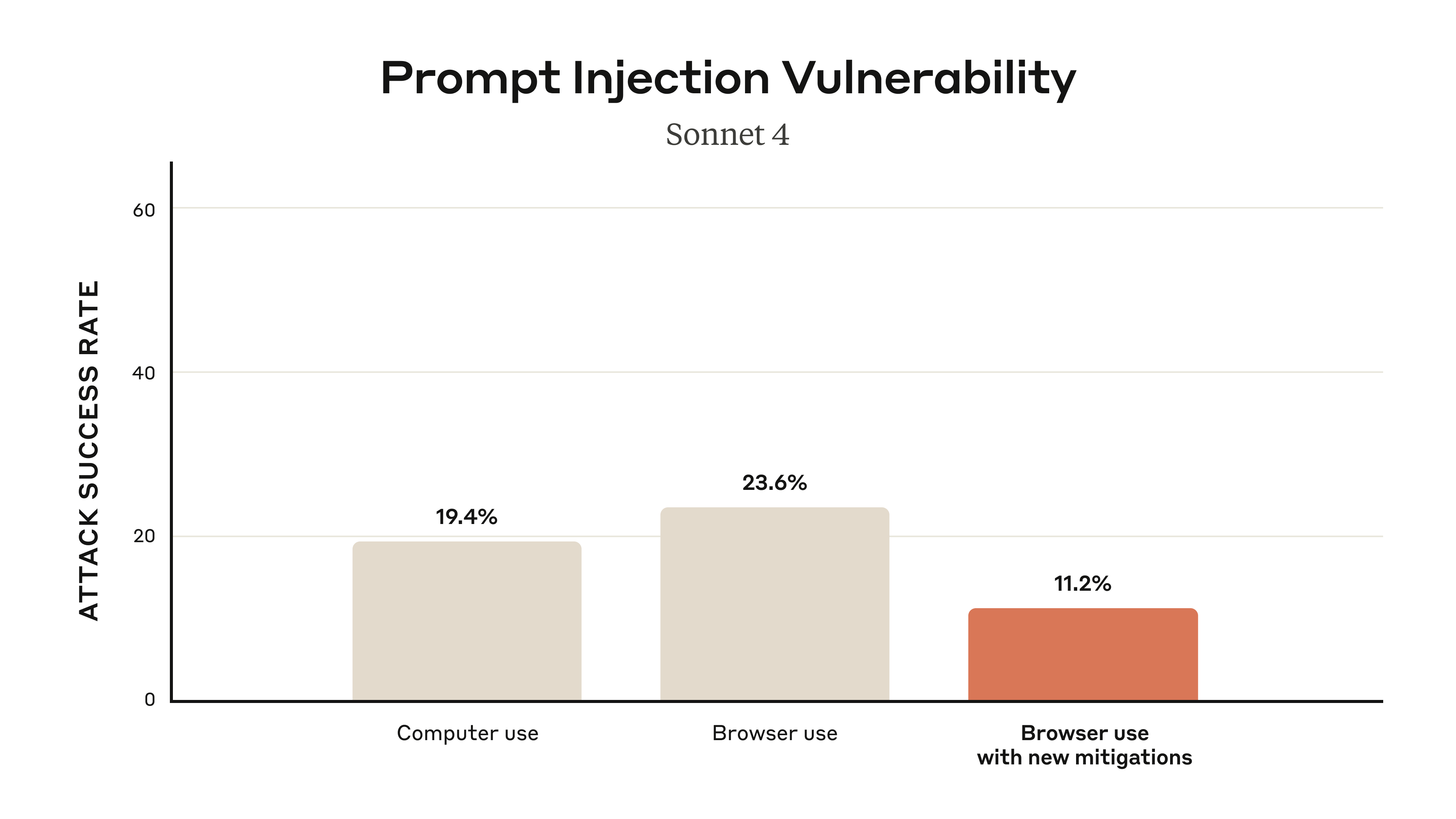
The uncomfortable part is that even the mitigated number is not zero, and other vendors report the same class of problem. Brave's security team disclosed in July and August 2025 that Perplexity's Comet could be hijacked by hidden page text, including "unseeable" instructions embedded in screenshots via faint text and OCR, to exfiltrate one-time passwords and credentials when a user simply asked the browser to summarize a page - Brave. OpenAI, while hardening its Atlas browser, stated plainly that prompt injection is "unlikely to ever be fully solved," a view echoed by the UK's National Cyber Security Centre - IT Pro. The screenshot below shows what a defended agent is supposed to do when it meets one of these attacks: recognize it and refuse.

The recruiting-specific lesson is direct. The whole appeal of a sourcing agent is that it acts on your behalf across your tools, which is also exactly what makes prompt injection dangerous: the same privileges that let it enrich a candidate record let a hijacked agent leak your pipeline or send outreach you never wrote. The mitigations are real and worth using, but they are risk reduction, not elimination. The practical defenses are to keep a human in the loop on anything the agent sends or writes, to never let a sourcing agent operate with logged-in banking or primary-email privileges, and to prefer agents that gate high-risk actions by default. An agent that can read the open web and act with your credentials is, structurally, a machine that does whatever the last malicious page told it to, unless you constrain it.
11. The Compliant Alternative: AI Recruiters Without the Browser
After eight chapters of walls, it is worth stating the alternative plainly, because for most sourcing at scale it is the better answer: use an agent that never drives your browser at all. Purpose-built AI recruiters run their loop over their own aggregated candidate index rather than your authenticated LinkedIn session, which removes the Terms-of-Service breach, the ban risk, and most of the CAPTCHA problem in one move. They are software you pay for, not automation you hide. The incumbents understood this first. LinkedIn built its own answer, Hiring Assistant, described as its first AI agent for recruiters, which reached general availability in English at the end of September 2025 and is sold as a paid add-on to LinkedIn Recruiter - LinkedIn. Because it has native access to LinkedIn's own graph, it carries none of the scraping risk a third-party browser agent does.
The commercial signal is loud. LinkedIn disclosed on April 29, 2026 that its agentic hiring products are on track for roughly $450 million in annual sales, its first product-level AI revenue figure - Reuters via Investing.com. LinkedIn's own charter figures for Hiring Assistant claim recruiters reviewed 62% fewer profiles, saved 4-plus hours per role, and saw a 69% lift in InMail acceptance. The venture-backed challengers are moving just as fast. Juicebox, whose PeopleGPT searches 800 million-plus profiles from a plain-language prompt, raised an $80 million Series B at an $850 million valuation in March 2026 - Juicebox. hireEZ rebuilt itself as an agentic layer that sits on top of your ATS. And a wave of full-autopilot startups, from Fetcher to Tezi, promise to run the entire funnel.
The table below sets out the main purpose-built platforms and their 2026 pricing.
| Platform | What it does | 2026 pricing |
|---|---|---|
| LinkedIn Hiring Assistant | Native LinkedIn sourcing and screening agent | Add-on to Recruiter (undisclosed) |
| Juicebox / PeopleGPT | Natural-language search of 800M+ profiles | Free; $99 / $179/mo; Agents $199/agent/mo |
| hireEZ | Agentic layer over your ATS | From $494/mo; ~$13k median annual |
| SeekOut | Enterprise sourcing and talent intelligence | $2,150/yr Lite; ~$20k median contract |
| Fetcher | Outbound sourcing over 500M+ profiles | $379 to $849/mo |
| HeroHunt.ai | AI recruiter over its own 1B+ profile index | Free to start |
The reason to treat this list as an alternative rather than a footnote is that it removes the two biggest problems in the first ten chapters at once: the legal and account-safety exposure of driving your own LinkedIn session, and the reliability collapse of a general-purpose browser agent on a long sourcing task. A platform that owns its data and controls its own agent loop does not need to defeat CAPTCHAs or dodge fingerprinting, because it is not pretending to be a human clicking through a network that forbids automation. The trade-offs are real and worth naming: you pay a seat price, you depend on the vendor's data coverage, and you give up the total flexibility of a general agent you can point at any site. HeroHunt.ai, the platform behind this guide, sits in this category, running a search-screen-outreach loop over an aggregated index rather than your browser. For teams whose sourcing keeps getting throttled or flagged, that trade is usually worth making, and it is the honest reason purpose-built agents are pulling ahead in revenue.
12. A Safe Sourcing Playbook
None of the above means browser agents are useless for sourcing. It means you should use them for the narrow set of tasks where they are both safe and reliable, and refuse to use them for the tasks where they are neither. The reliable zone is public, read-heavy work: reading and summarizing a public GitHub profile or a company team page into structured fields, compiling a list from a public directory or conference attendee page, and enriching a spreadsheet of names with public details. A hands-on evaluation of Comet found it strong at exactly this kind of citation-backed company research and profile reading - Four-Leaf AI. The danger zone is authenticated, adversarial, long-horizon work: logging into LinkedIn to scrape at scale or mass-message, and any task that chains many form submissions on defended sites, which the benchmarks in Chapter 7 show agents fail at routinely.
The safest architecture is to lead with public data and official APIs, keep a human on every consequential action, and let the agent enrich records rather than blast messages. GitHub is the model case here: it passed 180 million developers in 2025 and its official REST API grants 5,000 authenticated requests per hour, a compliant, rate-limited alternative to scraping - GitHub. Structure the agent's brief as an explicit pipeline with a human gate at the end.
- Role brief: must-have skills, seniority, location or timezone, comp band, and hard exclusions.
- Search: where to look (public GitHub, Stack Overflow, conference and team pages), the Boolean or X-ray strings, and a target count.
- Screen: objective keep-or-drop criteria for each candidate, each backed by an evidence URL.
- Shortlist: a structured table of name, current role, proof-of-work link, and fit rationale.
- Outreach draft, for human review: a personalized message referencing a specific public detail, flagged clearly as a draft and never auto-sent.
That final gate is not optional politeness, it is the load-bearing safety control, and it does double duty. It catches the roughly one-in-three tasks the agent gets wrong, and it is the mitigation against prompt injection from Chapter 10, since a human reviews anything before it leaves your systems. Two more rules keep you out of trouble. Do not use dedicated accounts and proxies to "get around" LinkedIn detection, because they delay detection without fixing the Terms-of-Service breach, and using fake accounts revives the worst legal liability. And wire the agent into your ATS, Greenhouse, Lever, or Ashby, so it deposits enriched candidate records into your system of record rather than acting as an unsupervised messaging cannon. Used this way, a browser agent is a genuinely useful research and enrichment assistant. Used to automate a logged-in LinkedIn session at volume, it is a liability waiting for an enforcement email.
13. What It Really Costs
Cost is where the browser-agent pitch looks most attractive and is most misleading, because the sticker price ignores the two expenses that dominate: reliability and risk. On paper, a do-it-yourself browser agent is cheap. Running browser-use costs about $0.02 per browser hour plus $5 per gigabyte of residential proxy, on top of subscription tiers of $29, $299, or $999 a month - browser-use, plus the LLM tokens, which for OpenAI's computer-use model run $3 per million input and $12 per million output - UC Strategies. A run through a hundred public profiles might cost a few dollars in raw compute. The trap is that the same run has a task-success rate closer to 40 to 60% on realistic work, so a meaningful fraction fails silently, and you pay again in your own time re-doing it. The always-on version of this, running continuously, is where one team documented a $3,600 monthly context bill.
The consumer and purpose-built paths trade that hidden cost for a predictable seat price. On ChatGPT's $20 Plus plan you get only about 40 agent runs a month, so a single hundred-candidate push forces the $200 Pro tier. A purpose-built seat like Juicebox Starter at $99 a month includes compliant data and carries no ban risk. The table below compares one honest scenario: reliably sourcing and enriching roughly 100 candidates in a month.
| Path | Entry cost | What you actually get | The cost the price hides |
|---|---|---|---|
| DIY browser agent | ~$130/mo all-in | Full control, cheap compute | ~40-60% task success, ToS/ban risk, prompt-injection exposure, your time on failures |
| ChatGPT agent (Pro) | $200/mo | 400 agent runs, general capability | Non-deterministic on long tasks, still hits LinkedIn walls |
| Juicebox Starter | $99/mo | 500 contact credits, compliant search | Vendor data coverage limits |
| SeekOut Lite | ~$179/mo equivalent | Enterprise sourcing data | Real value gated behind ~$20k enterprise tiers |
| hireEZ solo | $494/mo | Agentic layer over your ATS | Priced to replace multiple tools |
The chart below shows the entry costs side by side, with one large caveat baked into the first bar.
Rough monthly cost to reliably source ~100 candidates
The bar for the do-it-yourself agent is the cheapest and the most misleading, and reading it correctly is the whole point of this chapter. Its $130 excludes the reliability tax (the failed tasks you redo by hand), the risk tax (a flagged or banned LinkedIn seat, which for a paid Recruiter license is a several-thousand-dollar asset), and the compliance tax (the GDPR exposure from Chapter 9). Fold those in and the "cheap" option is frequently the most expensive one, because the failure modes are correlated with exactly the high-volume LinkedIn use that made it look attractive. The purpose-built seats look pricier per month and are usually cheaper per successful, compliant, delivered candidate, which is the only unit that matters. The right frame is not price per month but cost per hire that actually lands, and on that measure the browser agent's headline cheapness rarely survives contact with a real requisition.
14. The Agentic Web: Where This Goes by 2027
The deepest force shaping browser-agent sourcing is not any single product, it is a structural fight over whether the web will let agents in at all. Two opposing movements are reshaping access, and where they land decides whether "point an agent at a site" is a viable strategy in 2027. On one side, sites are hardening against bots. Cloudflare, which sits in front of a large share of the internet, launched Pay Per Crawl in July 2025, using the long-dormant HTTP 402 "Payment Required" status to let sites charge AI crawlers, and it now blocks AI crawlers by default on new domains - TechCrunch. Cloudflare's own figures on how little agents give back explain the anger: it cited crawl-to-referral ratios of roughly 1,700 to 1 for OpenAI and 73,000 to 1 for Anthropic. Automated bots crossed a threshold too, making up 51% of all web traffic in 2024, the first time they exceeded humans in a decade - Imperva via Thales.
On the other side, the industry is building rails so that legitimate agents can be identified and let through, which is the more interesting development for recruiting. The Model Context Protocol, which Anthropic launched in late 2024, was adopted across the industry and donated to the Linux Foundation in December 2025 - MCP blog. Cloudflare and Browserbase's Web Bot Auth gives an agent a cryptographic "passport," with the first signed agents including ChatGPT agent and Browserbase appearing in August 2025 - Cloudflare. And Google's Agent Payments Protocol, launched in September 2025 with more than 60 partners including Mastercard and PayPal, lets agents transact on a user's behalf with signed mandates - Google Cloud. The web is quietly splitting into a verified lane and a blocked lane.
The likely shape of 2027 follows from that split, and it is not friendly to the anonymous-scraper model. Expect a bifurcated web where verified, authenticated, and possibly paying agents get first-class access while anonymous scrapers are blocked or metered into irrelevance. For sourcing specifically, the decisive pattern is that platforms are launching their own agents rather than opening their data to third parties, exactly what LinkedIn did with Hiring Assistant and its $450 million trajectory. The incumbent with native data access and its own agent has a structural advantage that no amount of clever browser automation overcomes, because it is inside the wall the everyone else is climbing. The winning third-party strategy therefore shifts away from stealthy scraping and toward two things: verified-agent identity for the sites that support it, and owning or licensing a compliant data layer of your own. The recruiter who bets an entire workflow on quietly automating someone else's logged-in network is betting against the direction the whole web is moving.
15. Conclusion: A Decision Framework
Browser AI agents are a real and improving technology, and they are also the wrong default for most candidate sourcing at scale. The evidence across this guide points the same way: they are excellent at reading public information and unreliable at completing long, authenticated, multi-step actions, which is precisely what sourcing on defended networks demands. Add the LinkedIn Terms-of-Service wall, the GDPR exposure on candidate data, the prompt-injection security hole, and the product churn that killed three flagship browsers in eighteen months, and the case for building your core pipeline on a browser agent gets thin. The case for using one as a targeted research and enrichment tool, on public data, with a human gate, stays strong.
Here is the decision framework in practice. Use a browser agent when the task is public and read-heavy: enriching a list, reading GitHub or team pages, compiling a public directory, drafting outreach for human review. Comet is the cheapest way in, the ChatGPT Chrome extension the most capable if you already pay, and Claude for Chrome the safest by default. Do not use a browser agent to automate a logged-in LinkedIn session at volume, because that path breaches the Terms, risks the account, and increasingly loses to detection anyway. Buy a purpose-built AI recruiter when you need reliable, compliant sourcing at scale, since a platform that runs its loop over its own data removes the ban risk and the reliability collapse in one move. And whichever path you choose, keep a human on every message that leaves your systems, treat European candidate data as regulated, and expect your specific tool to change under you. In a category this unstable, the durable skill is not mastering one browser, it is knowing which task belongs to which tool, and refusing to hand a machine your logged-in credentials just because the demo looked magic.
Point it at one role you have failed to fill: brief it in plain language and see what a language-model screen over the open web returns, without ever opening a browser tab yourself.
This guide reflects the browser-agent and AI-sourcing landscape as of August 2026. Products, pricing, and legal deadlines in this space change constantly (three of the browsers named here were discontinued within a year of launch), so verify current details before you buy or build.