


The 2026 playbook for finding candidates on LinkedIn without risking your account, your employer's name, or your candidates' trust.
On September 16, 2026, a US federal court ordered a LinkedIn scraping operation to stop, delete what it took, and never use fake accounts again - The Record. One week later, LinkedIn announced that more than 115 million members have verified their identity or workplace, with 75 more verifying every minute - TechCrunch. Read together, those two announcements describe exactly where LinkedIn sourcing is heading. The platform is closing every unofficial route to its data, and it is turning verified authenticity into the most valuable signal on the network.
For recruiters, that changes the economics of every shortcut. The browser extensions, cloud automation tools, scraped contact databases, and burner profiles that filled sourcing playbooks a few years ago now carry three kinds of risk at once: a restricted or closed LinkedIn account, a privacy regulator asking how you obtained someone's data, and a candidate who simply does not trust you. That last risk is the one most teams underestimate. Only 8% of job seekers believe AI makes hiring fairer, and 46% of US seekers say their trust in hiring has fallen over the past year - Greenhouse. A sourcing method that wins a reply today by burning that trust is a method that makes every future message harder to answer.
The good news is that the ethical path is no longer the slow path. LinkedIn now sells sanctioned AI agents that search, screen, and draft outreach inside the platform, candidates broadcast their own intent through features like Open to Work, and a mature market of sourcing platforms works entirely outside your LinkedIn session. The recruiters getting the best results in 2026 are not the ones running the most aggressive tools. They are the ones who chose methods that LinkedIn, privacy law, and candidates all accept, and then executed those methods with discipline.
This guide lays out 10 account-safe methods for sourcing on and around LinkedIn, each one tested against two questions: does it stay inside LinkedIn's rules, and does it treat the candidate fairly under privacy and AI law? It covers the rulebook that defines "safe", the exact limits LinkedIn publishes (and the ones it does not), what each method costs, where each one fails, how AI agents are changing the picture, and a decision framework for building your own method mix.
Written by Yuma Heymans (@yumahey), who has been building AI sourcing tools since 2021 as founder of HeroHunt.ai, the AI Recruiter used by 15,000+ recruiters, and who has spent those years learning precisely where the line sits between automation that helps candidates find the right job and automation that just floods their inbox.
Contents
- What "Ethical" and "Account-Safe" Mean in 2026
- The Rulebook: LinkedIn's Contract, the Courts, and Privacy Law
- Method 1: Master Native Search Inside Its Limits
- Method 2: X-Ray the Public Web, Not the Logged-In Platform
- Method 3: Start With Candidates Who Raised Their Hand
- Method 4: Message Through the Sanctioned Channels
- Method 5: Connect and Follow Up at Human Pace
- Method 6: Let LinkedIn's Own AI Agents Do the Heavy Lifting
- Method 7: Attract Instead of Extract
- Method 8: Use Warm Paths: Referrals, Alumni, and Networks
- Method 9: Move Off-Platform the Right Way
- Method 10: Build the Compliance Spine
- Where Ethical Sourcing Fails, and the Shortcuts That Burn Accounts
- AI Agents and the 2026-2027 Outlook
- Choosing Your Method Mix: A Decision Framework
1. What "Ethical" and "Account-Safe" Mean in 2026
The single most useful idea in this guide is that ethical sourcing and account-safe sourcing are two different tests that now point in almost the same direction. Account-safe means everything you do on LinkedIn stays inside its User Agreement and usage limits, so there is nothing for its detection systems to flag. Ethical means you treat the person on the other end fairly: you have a lawful reason to process their data, you tell them how you found them, you collect only what you need, you honor their choices, and a human stays accountable for decisions that affect their career. A method that passes both tests is durable. A method that passes only one is a liability waiting for the wrong week.
The two tests converge because LinkedIn's enforcement targets the same behaviors that harm members. Its Professional Community Policies tell members not to send "untargeted, irrelevant, obviously unwanted" messages and not to use the invitation feature "to send promotional messages to people you don't know" - LinkedIn Professional Community Policies. Scraping, fake profiles, and bulk messaging are banned partly to protect LinkedIn's business, but they are also exactly the practices that make members feel surveilled and spammed. When you design your sourcing around the member's experience, you end up inside the platform rules almost by default.
The stakes are high because LinkedIn is still where candidates actually answer. The platform has 1.3 billion members, and recruiters at more than 20,000 companies now use LinkedIn's AI-powered hiring products, with seats up 140% in a single quarter - Microsoft FY26 Q4 earnings call. On the response side, the largest recruiting-specific benchmark of 2026 found LinkedIn messages replied to at 17.08%, against 4.96% for automated email - Pin. Losing access to that channel because of a tool you did not need is one of the most expensive mistakes a recruiter can make.
In practice, every method in this guide rests on five working principles. They are simple enough to remember and specific enough to check any new tool or tactic against:
- Be who you say you are: one real, verified profile, no personas, no shared logins
- Use only the access you pay for: no bypassing search, view, or message limits
- Collect only what you need: role-relevant data, kept for a defined period
- Tell people and honor choices: disclose your source, respect opt-outs and privacy settings
- Keep a human accountable: AI can rank and draft, a person decides
These principles look obvious on paper, but each one rules out a popular tactic. "Be who you say you are" rules out the second recruiting account used to double invitation capacity. "Use only the access you pay for" rules out tools that quietly page past search caps. "Collect only what you need" rules out exporting everything a profile shows into a spreadsheet you will never delete. "Tell people" rules out the silent database of sourced candidates who never learn you hold their details. And "keep a human accountable" rules out letting a model reject people without anyone reviewing the logic. If a vendor's pitch requires you to break one of these, the pitch is the problem.
The decision tree below turns those principles into a quick test you can apply to any sourcing action before you take it. It deliberately starts with the account question, because that is the one with immediate, irreversible consequences, and ends with the human-review question, because that is where the newest regulations focus.
Notice how few paths lead to "proceed", and how none of the failure paths depends on how careful you are with volume. That is the central point most "safe automation" marketing obscures: throttling a banned tool to a human-looking pace changes the probability of detection, not the fact of the violation. The ten methods that follow all sit on the "proceed" path by design, so the rest of this guide is about doing them well rather than about getting away with them.
2. The Rulebook: LinkedIn's Contract, the Courts, and Privacy Law
Three rulebooks govern LinkedIn sourcing in 2026, and you need all three in view to judge any method. The first is LinkedIn's own contract, which decides whether you keep your account. The second is the litigation record, which shows how seriously LinkedIn enforces that contract against vendors. The third is privacy and AI law, which applies to you as a recruiter regardless of what any platform allows. Most recruiters know a little about the first and almost nothing about the third, which is backwards, because the third is the one that follows the data out of LinkedIn and into your ATS.
Start with the contract, because its wording is broader than most people assume. The User Agreement in force since November 3, 2025 says members will not "develop, support or use software, devices, scripts, robots or any other means or processes (such as crawlers, browser plugins and add-ons or any other technology) to scrape or copy the Services" - LinkedIn User Agreement. The same Section 8.2 bans using "bots or other unauthorized automated methods to access the Services, add or download contacts, send or redirect messages", bars anyone from bypassing "any access controls or use limits of the Services (such as search results, profiles, or videos)", and prohibits "copying cookies" to use another person's account. Note the word use: the ban covers the recruiter running the tool, not only the company that built it.
LinkedIn's help center spells out what happens next. It does not permit "any third party software, including 'crawlers', bots, browser plug-ins, or browser extensions that scrape, modify the appearance of, or automate activity on LinkedIn's website", and members who use them "risk having their accounts restricted or shut down" - LinkedIn Help. For invitation-related restrictions, LinkedIn says most "will automatically be removed within one week", but it also warns that "repeated suspensions may result in permanent restriction of your LinkedIn account" - LinkedIn Help on invitation limits. The pattern is a ladder: warnings and temporary blocks first, then identity checks, then closure for repeat offenders.
The litigation record shows that the ladder has a top rung for vendors, and LinkedIn climbs it regularly. The highlights from the past two years are worth knowing because the tools involved were embedded in many recruiting stacks:
- Proxycurl shut down in July 2025 to comply with a settlement after LinkedIn sued it in January - Nubela
- ProAPIs was sued in October 2025 for scraping through "more than a million fake accounts" - BleepingComputer
- ProAPIs' consent judgment of September 16, 2026 bars scraping and requires deletion
- HeyReach lost its company page and executives' profiles on March 25, 2026 - HeyReach
The HeyReach case contains the most candid sentence any automation vendor has published about this market. In its own account of the takedown, the company writes that LinkedIn's User Agreement "explicitly bans software that automates connecting, messaging" and that "there is no approved outreach automation tool - ours included". That admission matters more than any vendor's safety claims, because it comes from a company with every incentive to say otherwise. The earlier, more famous hiQ Labs case ended the same way, with the scraper losing on contract even after winning a headline court ruling, and our LinkedIn recruiting automation guide walks through that history in detail. For this guide, the lesson is simpler: if a tool depends on LinkedIn tolerating it, plan for the day LinkedIn stops.
Behind the lawsuits sits a detection system that operates at enormous scale. In the second half of 2025, LinkedIn stopped 88.9 million fake accounts at registration and restricted another 24.4 million proactively, catching 99.7% of fake accounts before any member reported them - LinkedIn Community Report. Those numbers explain why burner profiles and multi-account setups have become so expensive to run, and why the verification push is accelerating: every verified member makes unverified behavior easier to spot.
The third rulebook is privacy law, and it applies even when LinkedIn's own rules are perfectly respected. Global data protection authorities stated in their joint position on scraping that "personal information that is publicly accessible is subject to data protection and privacy laws in most jurisdictions" - Swiss FDPIC, concluding joint statement. In Europe that means a lawful basis for every sourced profile (usually legitimate interest), a duty to inform candidates under GDPR Article 14, and limits on how long you keep their data. The clearest enforcement example is recruiting-adjacent: France's CNIL fined KASPR €240,000 in December 2024 for a Chrome extension that pulled contact details from LinkedIn profiles, including details members had restricted to their own connections - CNIL. Method 10 covers the full compliance picture, including the new AI hiring laws, but the principle belongs here: a method is only safe if it is safe for the data too.
Put the three rulebooks together and a clear map emerges. Anything that acts inside your LinkedIn session without LinkedIn's permission is out. Anything that copies LinkedIn data out at scale is out. Everything else is available, provided you handle the candidate's data lawfully and transparently. That still leaves an enormous amount of room, and the next ten sections show how to use it.
3. Method 1: Master Native Search Inside Its Limits
The most account-safe sourcing tool on LinkedIn is LinkedIn's own search, used by a human who knows what they are doing. There is nothing to detect when you type a query, read results, and open the handful of profiles that matter, because that is exactly how the product is designed to be used. Most recruiters who reach for automation do so because their searches return either thousands of weak matches or nothing at all, and both problems are almost always about query quality rather than tooling. Fixing the query is free, instant, and carries zero platform risk.
LinkedIn's search syntax is narrower than most cheat sheets claim, and knowing the real rules saves hours of silent failures. The operators AND, OR, and NOT must be typed in capitals, quotation marks force an exact phrase, and parentheses are the only grouping symbols the engine recognizes. LinkedIn states that it does not support "braces { }, brackets [ ], angle brackets <>, or wildcards like asterisks *", that the + and - operators "are not officially supported", and that stop words such as "by", "in", and "with" are dropped even inside a phrase - LinkedIn Help on Boolean search. The engine evaluates quotes first, then parentheses, then NOT, then AND, then OR, which is why an unbracketed OR can quietly swallow half your logic.
A well-formed search for a data engineer who works with modern orchestration tools, excluding students, looks like this:
("data engineer" OR "analytics engineer") AND (dbt OR Airflow OR Dagster) NOT (intern OR student)
The second thing to understand is the commercial use limit, because it is LinkedIn telling you, in product form, that sourcing is a paid activity. Free members who search heavily eventually hit a cap, and LinkedIn says reaching it means "your activity on LinkedIn indicates that you're likely using LinkedIn for commercial use, like hiring or prospecting" - LinkedIn Help on the commercial use limit. The allowance resets at midnight Pacific time on the first of each month, LinkedIn does not publish the number, and it "cannot lift the limit upon request". Profile searches and "People Also Viewed" browsing count against it, while searching a name in the top bar, browsing your first-degree connections, and job searches do not.
The ethical reading of that limit is straightforward. A tool that pages past it, rotates accounts to dodge it, or scrapes results to avoid spending searches is bypassing a "use limit" in the plain sense of Section 8.2, and it is also taking commercial value from a platform you have chosen not to pay for. If you are sourcing for a living, the honest move is to buy the seat that matches your volume. The paid ladder is published for everything below the Recruiter tier:
- Premium Business: $69.99 a month, 15 InMail credits - LinkedIn Premium
- Sales Navigator Core: $119.99 a month, 50 InMail credits - LinkedIn Sales Solutions
- Recruiter Lite: 30 InMail credits a month, the self-serve recruiting seat
- Recruiter: sales-negotiated, 150 InMail credits per seat per month
Each step up the ladder buys more search depth, more filters, and more sanctioned messaging, and the right rung depends on how much of your week is sourcing. A recruiter who sources a few hours a week can live comfortably on Premium Business plus good Boolean. A full-time sourcer will feel the limits quickly: Sales Navigator, for instance, shows a maximum of 2,500 lead results across 100 pages per search - LinkedIn Help. That cap is a feature in disguise, because a search that returns more than 2,500 people is too broad to act on anyway. If you are weighing the Recruiter Lite step specifically, our breakdown of what Recruiter Lite costs and includes covers the trade-offs, and for many teams skipping the Recruiter seat entirely is a legitimate option once the off-platform methods later in this guide are in place.
How to apply this in practice: build three to five narrow searches per role instead of one broad one, each targeting a distinct profile (a title cluster, a skills cluster, a past-employer cluster). Save them as alerts so new matches come to you rather than you re-running searches every morning, which also keeps your activity pattern calm and human. Validate tricky strings before you run them; our free Boolean search checker repairs brackets and curly quotes and converts one query into LinkedIn, Google, and ATS syntax. Then open only the profiles that genuinely look promising. The discipline of reading twenty profiles carefully beats skimming two hundred, both for the quality of your shortlist and for the health of your account.
4. Method 2: X-Ray the Public Web, Not the Logged-In Platform
X-ray search means using a general search engine to find LinkedIn profiles that members have chosen to make public, and it is one of the few sourcing methods that never touches your LinkedIn account at all. You type a query into Google or Bing, the engine returns public profile pages it has already indexed, and you read them like any other web page. LinkedIn explicitly permits this flow for approved search engines: its robots.txt lets Googlebot and Bingbot crawl public profile paths while telling every other crawler "Disallow: /", under a header warning that "the use of robots or other automated means to access LinkedIn without the express permission of LinkedIn is strictly prohibited" - LinkedIn robots.txt.
X-ray also has a built-in consent mechanism that makes it ethically cleaner than most people realize. Members control whether their profile appears to people who are not signed in "or can be viewed on search tools such as Google or Bing", and they can switch public visibility off entirely - LinkedIn Help on public profiles. When you X-ray, you only ever find people who left that door open. The ethical corollary is that you should not route around a member who has since closed it, for example by digging up an archived copy of a profile that is no longer public. LinkedIn notes that search engines can take "several weeks or even months" to reflect a change, so a stale search snippet is not a license.
The syntax is simpler than the folklore suggests, and getting it right matters more than any trick. Google's own help page documents quotes for exact phrases, the site: operator, the minus sign for exclusions, and date and file-type filters, with one rule that breaks many copied queries: "Do not put spaces between the operator and your search term" - Google Search Help. A practical X-ray query for site reliability engineers in Amsterdam looks like this:
site:linkedin.com/in ("site reliability engineer" OR SRE) Kubernetes "Amsterdam" -recruiter
X-ray has real limits, and treating its result counts as a measure of the talent pool is a common mistake. Google's documentation says the site: operator "doesn't necessarily return all the URLs that are indexed under the prefix" - Google Search Central. The main limits to plan around are these:
- Incomplete coverage: engines index only a sample of public profiles
- Stale snippets: titles in results can lag real job changes by months
- Engine quirks: Bing uses "only the first 10 terms" of a query - Microsoft Support
- Country hosts: many profiles live on country subdomains such as nl.linkedin.com
Those limits shape how you should use the method. X-ray is excellent for discovering people that LinkedIn's own search ranks poorly, for sourcing without a paid seat, and for checking whether a niche profile exists at all in a given city. It is weak as a complete census, so pair it with native search rather than replacing it. Country subdomains in particular trip people up, and our guide to LinkedIn country codes for X-ray search lists them, while the free LinkedIn X-ray search builder assembles correct queries for Google, Bing, and DuckDuckGo across 37 country hosts without you memorizing any operators.
The line X-ray must not cross is automation. Running queries by script breaks Google's terms, which prohibit "using automated means to access content from any of our services in violation of the machine-readable instructions on our web pages" - Google Terms of Service. Feeding the resulting profile URLs into a tool that visits them in bulk breaks LinkedIn's. And copying what you read into a spreadsheet makes you a data controller with notice duties, a point Method 10 covers in full. Manual X-ray, done by a person reading results and opening the profiles that matter, stays on the right side of all three lines, and that is the version this guide recommends.
5. Method 3: Start With Candidates Who Raised Their Hand
The most ethical person to contact first is someone who has already told the market they are open to hearing from you. LinkedIn gives candidates several ways to send that signal, and building your weekly sourcing around them flips the usual dynamic: instead of interrupting people, you are answering them. This is also the method that most directly improves response rates, which is why it belongs near the top of any account-safe playbook. Candidate intent is the cheapest personalization there is.
The best-known signal is Open to Work, and its privacy design deserves a careful read. Members can share their interest with "all LinkedIn members", which adds the green photo frame, or with "Recruiters only", which limits visibility to people using LinkedIn Recruiter - LinkedIn Help on Open to Work. For the second option, LinkedIn says it takes "steps to prevent LinkedIn Recruiter users who work at your current company from seeing your shared career interests, but we can't guarantee complete privacy". It also removes the feature if a member stops responding to recruiter InMails and does not confirm they are still looking, which keeps the signal fresh. LinkedIn's own data found that candidates who indicate they are Open to Work respond 37% more often than others, though that figure dates from 2022 - LinkedIn Talent Blog.
Inside Recruiter, these signals are packaged as Spotlights, which "help you prioritize candidates who are more likely to engage with you and your organization, based on activity, interests, and relationship insights" - LinkedIn Recruiter Help. LinkedIn's 2026 product update added a verification layer to that view, shown in the screenshot below, so recruiters can filter applicants to those who have confirmed their identity, employer, or school.
Recruiter Spotlights with verified applicant filtering
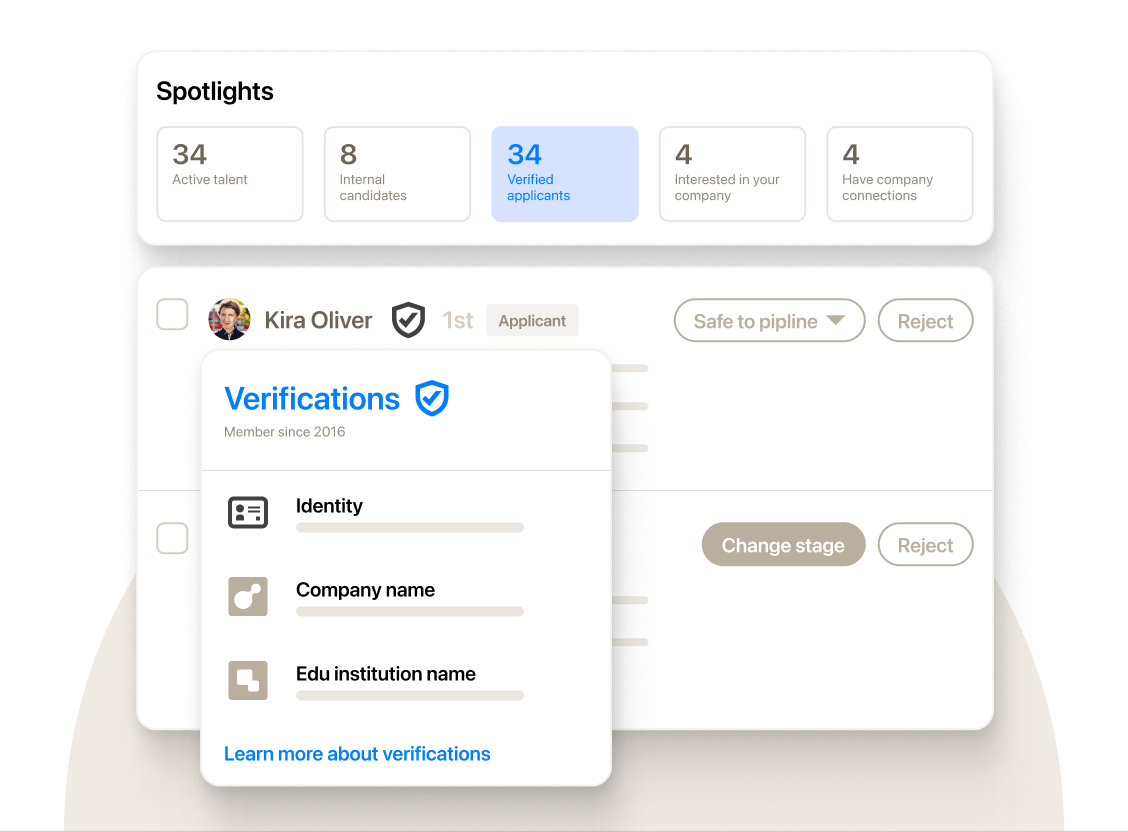
Look at the five tiles across the top, because together they form a ready-made priority queue. Active talent and Interested in your company are explicit intent. Internal candidates and Have company connections are relationship signals that point toward internal mobility and referrals. Verified applicants addresses the fake-candidate problem that is growing alongside AI-written applications. The verification card underneath shows what LinkedIn actually checks (identity, current company, education institution), which tells you how much weight a badge can bear: it confirms a person is real and works where they say, not that they are qualified.
A practical intent-first queue draws on five sources, roughly in this order of warmth:
- Applicants and past applicants who already chose your company
- Interested in your company: members who flagged interest in you
- Open to Work: the recruiters-only signal, handled discreetly
- Company page followers, who LinkedIn says accept InMail 95% more often - LinkedIn Talent Blog
- Internal candidates and former employees open to return
Working this queue first changes the shape of your week. Instead of starting every role with a cold search, you start with the people most likely to welcome the message, and only then widen the net. The ethical obligations are just as concrete as the tactical gains. Treat every intent signal as confidential: never mention a candidate's Open to Work status to anyone at their employer, never use it as leverage in a pay negotiation, and if your own Recruiter view ever surfaces a colleague's signal despite LinkedIn's filtering, ignore it. Candidates share these signals on the assumption that recruiters will use them to help, and protecting that assumption is what keeps the signals honest for everyone.
6. Method 4: Message Through the Sanctioned Channels
InMail and Open Profile messages are the channels LinkedIn actually wants recruiters to scale, which makes them the account-safe answer to the question every automation tool claims to solve: how do I reach people I am not connected to? Both are built into paid seats, both are governed by published rules, and both reward relevance mechanically. That last point is what makes them ethical by design. LinkedIn's messaging economics punish the spray-and-pray behavior that annoys candidates and reward the targeted, specific message they are glad to receive.
The mechanics are worth knowing precisely. Every InMail that is "accepted/declined or responded to directly within 90 days" is credited back, and monthly allotments run from 5 credits on Premium Career to 15 on Premium Business, 50 on Sales Navigator Core, and 30 on Recruiter Lite - LinkedIn Help on InMail credits. Separately, Premium members can switch on Open Profile, which lets "other LinkedIn members to message you for free, without using InMail messages" - LinkedIn Help on Open Profile. For Recruiter seats, Open Profile messaging is capped at 350 messages per calendar month per seat, after which standard credits apply - LinkedIn Recruiter Help.
The rules attached to these channels are explicit about what LinkedIn considers abuse. Its Recruiter InMail policy says simply: "Don't distribute unwanted or untargeted mass InMail messages. Don't use InMail for marketing campaigns", and if multiple InMails are flagged, sending is disabled until the following day - LinkedIn Recruiter InMail policy. The quality floor is even more concrete: "Recruiters must keep their InMail response rate at or above 13% on 100 or more InMail messages sent within every 14-day assessment period", and those who fall below it lose bulk InMail for two weeks in what LinkedIn calls the InMail Improvement Period - LinkedIn Recruiter Help. In other words, LinkedIn already enforces the ethics of relevance on its own sanctioned channel.
The reason to invest in these channels rather than route around them is that candidates answer them. The chart below shows reply rates by channel from Pin's analysis of more than 4 million recruiting messages sent between June 2025 and May 2026, which is the largest recruiting-specific dataset published this year.
Candidate Reply Rate by Outreach Channel
LinkedIn messages drew roughly 3.4 times the replies of automated email in that data, and the gap held in every quarter Pin measured. Two caveats keep this honest. Pin sells outreach software, so this is vendor data, and Pin itself notes that its multichannel findings show "association, not pure causation". But the direction matches everything else we know about candidate behavior: people treat LinkedIn as a professional context where a recruiter's message is expected, which is exactly why abusing that context with mass messages damages everyone's response rates over time.
What wins on these channels is brevity and specificity. LinkedIn's analysis of recruiter InMails found that messages of 400 characters or fewer get responses at a rate 22% higher than the global average - LinkedIn Talent Blog, 2024, and its earlier study found individually sent InMails outperforming bulk sends by about 15%. An ethical first message is also a short one, because it only needs to carry five things:
- Who you are: your name, company, and role, on a verified profile
- Why them: one specific detail from their actual experience
- The role: title, team, location or remote policy
- The pay range: where you can share it, and increasingly you must
- How you found them: plus a one-line way to say no thanks
The fourth and fifth items are where ethics and law now overlap. The EU Pay Transparency Directive gives applicants the right to receive "the initial pay or its range" before the job interview, and member states had to transpose it by 7 June 2026 - EUR-Lex. Several US states already require ranges in postings. Saying how you found someone is the first step of the GDPR transparency duty discussed in Method 10, and it costs one sentence. Teams that want a quick sanity check on draft copy can paste it into our free recruiting outreach checker, which scores length, personalization, and sequence design against published benchmarks.
7. Method 5: Connect and Follow Up at Human Pace
Connection requests are the most abused feature on LinkedIn and the most common trigger of account restrictions, so this method is less about volume than about restraint. LinkedIn states that it "limits the number of invitations you can send to protect the member experience" and that if you exceed those limits or use prohibited tools, "your account may be restricted" - LinkedIn Help on invitation limits. It applies those limits to Basic and Premium members alike, and it has never published the number. Automation vendors commonly cite a ceiling of roughly 100 invitations a week, but that is reverse-engineered folklore, and a human recruiter who is anywhere near it is almost certainly targeting too broadly.
A few published rules matter more than the unpublished cap. Once you withdraw an invitation, you cannot resend one to the same person "for up to three weeks", and the network size limit is 30,000 first-degree connections. Free accounts can add a personalized note to only three connection requests a month, each up to 200 characters, while Premium members can personalize all of them - LinkedIn Help on personalized invitations. That last rule surprises many recruiters, and it is one more reason the free account is not a sourcing tool.
The data on notes is more nuanced than either camp admits. Across 11.5 million connection requests sent in 2025, requests with a personalized note were accepted 25.3% of the time against 27.6% without, but drew an 8.2% reply rate against 5.3% - Belkins. Notes do not buy acceptances; they buy conversations. Recruiters also have a structural advantage here: in Expandi's 13.2 million-request dataset, Staffing and Recruiting had the highest acceptance of any industry at 36.5%, against a 28.5% platform average - Expandi. The same dataset shows reply rates to connection notes falling from 3.5% to 2.2% in twelve months, a sign that templated notes are wearing out the channel.
Human pace is a set of habits rather than a number. The ones that keep both your account and your reputation healthy are these:
- Invite with a reason: only people you would genuinely message next
- Withdraw stale invitations after two to three weeks, then let them be
- Never pitch in invites: LinkedIn bans promotional invitations to strangers
- Watch acceptance: a falling rate means your list, not your copy, is broken
- Stop at three touches unless the candidate re-engages
Those habits work because LinkedIn's systems appear to score behavior, not just count it: invitations that are ignored, left pending, or reported tell the platform you are reaching people who did not want to hear from you, which is also the ethical definition of spam. A falling acceptance rate is therefore your early-warning signal on both fronts. If it drops, pause, narrow the search, and rewrite the reason you are reaching out. Sending more is never the fix.
The "stop at three" rule deserves its own evidence, because follow-up is where persistence turns into pestering. The chart below shows the share of candidates replying at each step of a sequence in Pin's dataset.
Share of Candidates Replying at Each Sequence Step
The first three touches capture 93.2% of all replies a sequence will ever produce, and a fourth lifts that to 97.7%. Timing compresses the window further: half of all replies arrive within four hours and 74.8% within 24 hours. Past the third or fourth message you are interrupting people for statistically almost nothing, and each extra touch raises the chance of a spam report. Three thoughtful touches, spaced a few days apart, is the respectful default and the effective one.
Finally, human pace includes being a credible human. Candidates are wary for good reason: recruiter impersonation and fake job offers are now routine, and Greenhouse found that 69% of US job seekers had encountered fake job postings. LinkedIn's answer is verification, and its September 2026 expansion lets colleagues vouch for each other's work history, as the screens below show.
LinkedIn's colleague verification flow
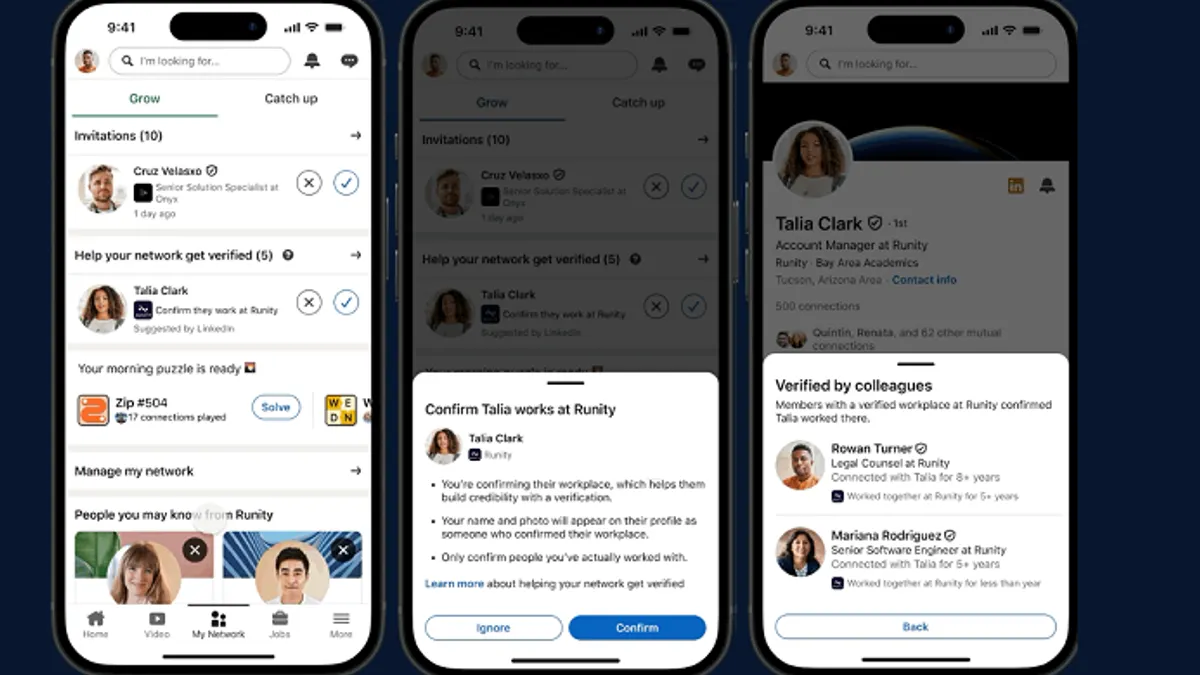
The flow is simple: LinkedIn prompts verified members to confirm connections they worked with, and once someone has enough confirmations their profile shows a "Verified by colleagues" panel, with an option to hide the badge. LinkedIn says verified members get close to 90% more profile views and 50% more post engagement - LinkedIn. For a recruiter, verifying your identity and workplace is free, takes minutes, and answers the first question a cautious candidate asks before replying. It is the cheapest response-rate improvement in this guide.
8. Method 6: Let LinkedIn's Own AI Agents Do the Heavy Lifting
The only party allowed to run an AI agent inside LinkedIn is LinkedIn, which makes its own agents the one fully account-safe way to automate on-platform sourcing at scale. That is not a small market anymore. Microsoft reported in April 2026 that "our agentic products in LinkedIn Talent Solutions, which help hirers automate time consuming tasks like sourcing, screening, and drafting messages, have already surpassed a $450 million annualized revenue run-rate" - Microsoft FY26 Q3 earnings call. If you want an agent to search LinkedIn, evaluate profiles, and draft outreach for you, this is the version that cannot get your account restricted.
The flagship is Hiring Assistant, which became globally available in English at the end of September 2025 - HR Brew. It takes an intake conversation or a job description, builds and runs searches, evaluates candidates against your qualifications, and drafts outreach. It is sold "as an add-on to LinkedIn Recruiter", now works in seven languages including Dutch, Spanish, Portuguese, and Italian, and LinkedIn claims recruiters using it review 81% fewer profiles per qualified match and see 66% higher InMail acceptance - LinkedIn Hiring Assistant. Those are LinkedIn's own figures and should be read as such, but the direction is consistent with what adopters report. LinkedIn does not publish the add-on's price, so budget for a negotiated contract on top of Recruiter.
LinkedIn's official spot below is short, but it shows the interaction model that matters: the recruiter describes the need in plain language, and the agent returns a shortlist for a human to review.
Hire top quality talent with LinkedIn Hiring Assistant
The part of Hiring Assistant most relevant to ethical sourcing is how it explains itself. The screenshot below, from LinkedIn's launch materials, shows a candidate evaluation inside Recruiter.
Hiring Assistant's per-qualification evaluation
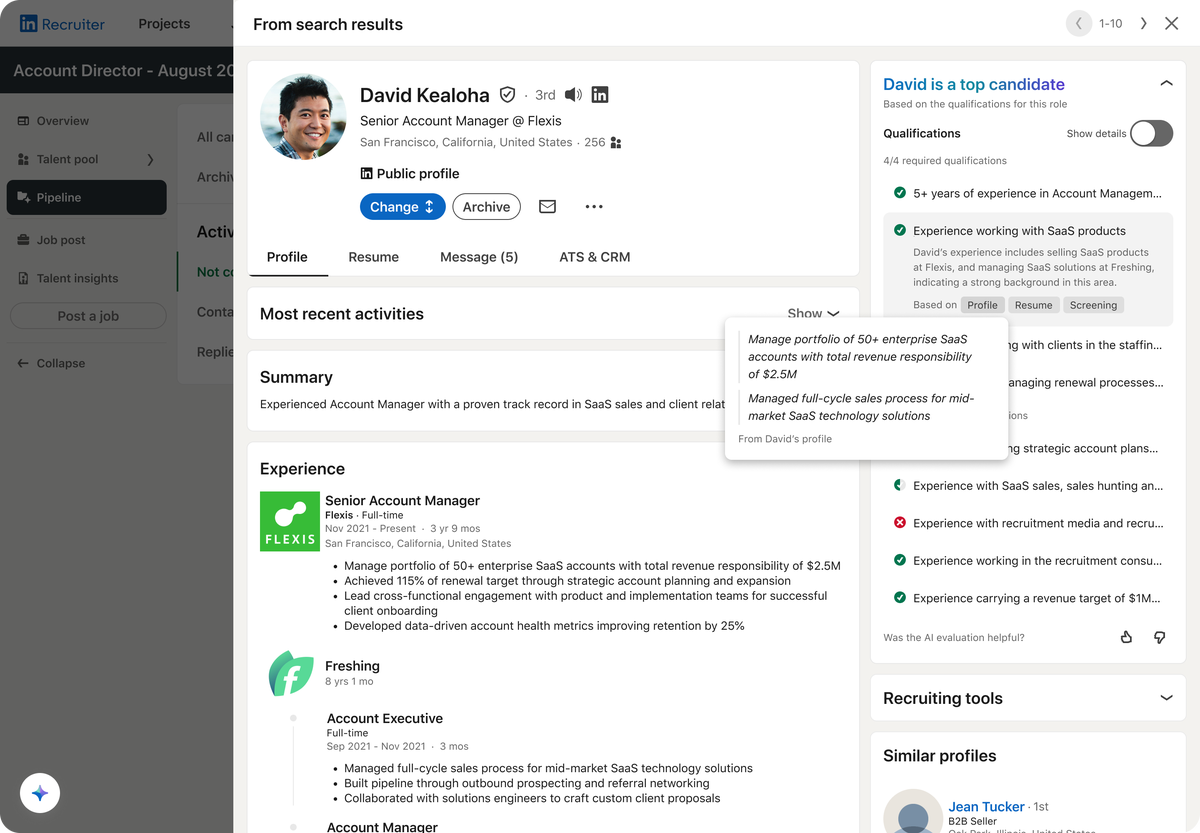
Look at the right-hand panel. Each qualification gets its own check or cross, each judgment cites its evidence ("Based on Profile, Resume, Screening"), and a quoted line from the candidate's own profile backs the claim. A red cross marks the one requirement the candidate does not meet rather than hiding it inside a single score, and a feedback prompt asks the recruiter whether the evaluation was helpful. This is what explainable AI in sourcing should look like: criterion-level reasoning a human can check, not an opaque ranking. Whatever tool you use, demand this standard, because it is also what the new AI hiring laws in Method 10 increasingly expect.
The next generation raises both the capability and the stakes. LinkedIn announced Hiring Assistant 2 at its Talent Connect event in New York at the end of September 2026, adding memory of each recruiter's preferences, a "fit signal" that goes beyond must-have checklists, verification signals, insights from partner ATSs, screening against a company's own rubric, and interview coordination - HR Brew. LinkedIn stressed that recruiters "can enable and disable different steps, override recommendations, and review the actions agents are performing on their behalf", and the update rolls out free to existing English-language customers in November. For small businesses without a recruiter, the January 2026 Hiring Pro agent offers a lighter version; LinkedIn says customers who report time savings average 5.1 hours a week - LinkedIn Hiring Pro.
Using LinkedIn's agents is account-safe, but it does not make you ethically or legally passive. You remain the employer making the decision, so a few obligations stay with you:
- Review every rejection the agent recommends before acting on it
- Write criteria carefully: vague or proxy criteria encode bias at scale
- Check local AI hiring laws: some require notices or bias audits
- Keep the evidence trail: why each shortlisted person was chosen
These obligations are not paperwork for its own sake. An agent that learns your preferences, as Hiring Assistant 2 is designed to, will also learn your blind spots unless someone reviews its output against the job's real requirements. The practical routine is to treat the agent's shortlist as a draft, read the criterion-level reasoning for a sample of both accepted and rejected candidates each week, and correct the brief when the reasoning drifts. Done that way, LinkedIn's agents give you the scale of automation with none of the account risk, and with a level of explainability that most third-party tools still do not match.