


The verified 2026 playbook for finding candidates through Google, Bing and the open web
Google handles 89.94% of the world's searches, and one operator turns it into a free people-search engine. Type site:linkedin.com/in/ in front of a job title and a city, and Google returns public profiles from a network that now counts 1.3 billion members - LinkedIn. Point the same trick at GitHub, Hugging Face, Google Scholar, Behance or a university website, and you can reach engineers, researchers and designers who never answer a LinkedIn message and never apply to a job ad. That technique, X-ray search, is still the most powerful free skill in a recruiter's toolkit.
But here is the problem: most X-ray strings were written for a Google that no longer exists. Between 2024 and 2026, Google removed the cache: operator, dropped the 100-results-per-page parameter, began requiring JavaScript, and closed whole-web custom search engines to new users. Microsoft retired the Bing Search APIs, Stack Overflow's question volume collapsed, and several profile sites that sourcers relied on shut down. Meanwhile, many of the "operators" in popular cheat sheets were never documented by Google at all, and a few (like AROUND() for web search, or wildcards on LinkedIn) never worked as advertised. Copied strings rarely throw errors. They just return plausible, unfiltered results, which is worse.
This guide fixes that. It gives you 50 X-ray strings that work in 2026, organised by where the talent lives: LinkedIn, engineering and AI networks, research databases, design portfolios, resumes, communities and market-mapping sources. Every operator was checked against the search engine's own documentation, every profile path against the site's current URL structure and robots.txt, and every string comes with an explanation of what it finds, what it misses and how to adapt it.
The short version, if you read nothing else: X-ray still works, but on fewer guarantees. Google documents only quotes, site:, the minus sign, filetype: and the date operators; everything else works by habit rather than promise. The strings that survive are short: a site constraint, a title family, one or two must-haves, a location and a few careful exclusions. LinkedIn remains the highest-yield target, but niche networks are where X-ray beats paid tools outright. And the bottleneck has moved from finding people to verifying and contacting them, which is exactly where AI sourcing agents, from LinkedIn's Hiring Assistant to HeroHunt.ai, now compete.
Contents
- X-Ray Search in 2026: What Changed and What Still Works
- The Operator Rulebook: What Each Engine Actually Supports
- Anatomy of a String That Works
- LinkedIn X-Ray Strings (1-15)
- Engineering, AI and Research Strings (16-29)
- Design, Product and Creative Strings (30-34)
- Resume and CV Strings (35-40)
- Community, Freelance and Professional-Directory Strings (41-44)
- Market-Mapping and Talent-Intelligence Strings (45-49)
- Adapting Strings for Bing, DuckDuckGo and Your Own Search Engine (50)
- How AI Agents Are Changing X-Ray Search
- Where X-Ray Fails: Limits, Legal Lines and Ethics
- From String to Shortlist: The Workflow That Turns Results Into Hires
- Conclusion: Choosing the Right String for the Job
1. X-Ray Search in 2026: What Changed and What Still Works
X-ray search means using a general search engine to read the public pages of a website, instead of searching inside that website with its own tools. When you type site:linkedin.com/in/ "data engineer" "Amsterdam" into Google, you are not using LinkedIn's search at all. You are asking Google which of the LinkedIn profile pages it has indexed contain those words. The same principle works for any site whose pages search engines can read, from GitHub to university staff directories.
The reason recruiters still care in 2026 is cost and reach. LinkedIn does not publish its Recruiter prices, but the UK government's G-Cloud rate card lists a Recruiter seat at £8,925 per year for one or two licences - G-Cloud 14 pricing. Procurement data from Vendr puts typical list pricing at $8,000 to $12,000 per seat annually - Vendr. X-ray costs nothing, reaches beyond LinkedIn, and works on the same profiles that a free LinkedIn account struggles to search.
Why X-ray still works
X-ray works because the big networks still want to be found by search engines. LinkedIn's help centre states that a member's public profile appears "when people search for you using search tools like Google, Yahoo!, Bing, DuckDuckGo" - LinkedIn Help. Its robots.txt file backs that up: it shuts out every crawler by default, then explicitly lets named search engines in, including Googlebot and Bingbot - LinkedIn robots.txt. As long as that arrangement holds, public profiles stay searchable through Google and Bing.
The amount of public professional evidence has also grown sharply, especially for technical roles. Stanford's 2026 AI Index counts 5.58 million AI projects on GitHub in 2025, the highest figure in a series that starts in 2011. Every one of those projects has contributors with public profiles, and most of them never appear in a recruiter's LinkedIn search results.
Number of GitHub AI projects, 2011-2025
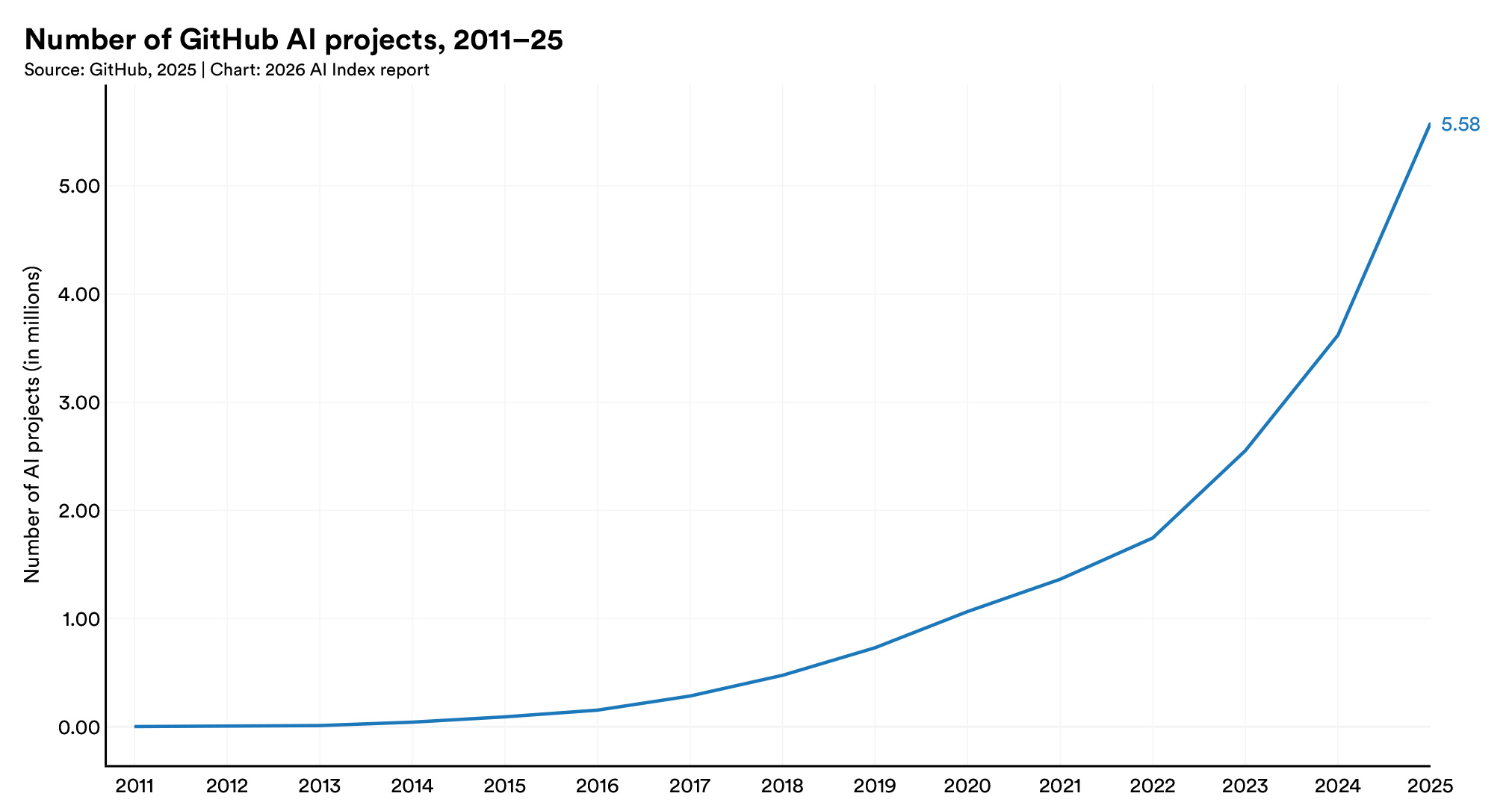
The chart, from the AI Index research and development chapter - Stanford HAI, shows why technical X-ray has become more valuable even as the tools around it changed. More public projects means more people whose skills can be verified from their work rather than their self-description, which is exactly what the GitHub and Hugging Face strings in Chapter 5 exploit.
What changed between 2024 and 2026
The ground under X-ray shifted more in the last two years than in the previous ten. None of the changes killed the technique, but each one broke a habit, a trick or a tool that sourcers relied on. The diagram below puts them in order, from the removal of Google's cache to the shutdown of whole-web custom search in January 2027.
The pattern is consistent: the manual, human use of search engines is largely untouched, while automated and programmatic access is being closed down from every side. That is the single most important thing to understand about X-ray in 2026, because it determines which strings and tools will keep working.
Read the diagram as a list of broken habits. The cache: operator once let sourcers open Google's stored copy of a profile; it is gone. Google began requiring JavaScript for search in January 2025, which broke simple scrapers but not human searchers - TechCrunch. In September 2025, Google stopped supporting the parameter that showed 100 results per page, saying it was "not something that we formally support" - Search Engine Land. The legal events in the middle of the timeline (Proxycurl and ProAPIs) are covered in Chapter 12, and the search API shutdowns in Chapter 10.
- Cached profiles - gone, so open the live page or move on
- 100 results per page - gone, so page through 10 at a time
- Scraping search results - harder technically and riskier legally
- Whole-web custom engines - closed to new users, ending for all in 2027
- Some profile sites - Read.cv and Polywork shut down, Meetup members went behind a login
The practical effect for a recruiter who searches by hand is modest: you page through results more often, you open live profiles instead of cached copies, and a few favourite sites have disappeared, so strings that target them need replacing. The effect on tools is large. Any sourcing product that quietly relied on scraping Google or calling a cheap search API has had to rebuild, which is one reason the market has moved towards AI tools with their own indexes (Chapter 11).
AI summaries and the "Web" filter
AI summaries now sit on top of a growing share of Google results, and they change what a search page looks like. Pew Research found that 18% of Google searches in its March 2025 study produced an AI summary - Pew Research Center. Data from Similarweb, reported in July 2026, put AI Overviews at 43% of searches, up from 15% a year earlier - TechCrunch. The two figures use different methods, but the direction is clear.
For X-ray, AI summaries are mostly noise, and Google provides a direct fix. Its help page lists a "Web" filter that "contains text-based links to websites", and adding &udm=14 to the end of a Google search URL switches it on - gHacks. That makes it worth bookmarking a Google search URL with the parameter already attached for X-ray work. It keeps the page focused on the links your string was written to find, which is all an X-ray search needs.
2. The Operator Rulebook: What Each Engine Actually Supports
Google officially documents only a handful of search operators in 2026, and most X-ray guides rely on several it does not document at all. Google's own help page lists exact phrases in quotes, site:, the minus sign, before:, after: and filetype:, and nothing else - Google Search Help. OR, parentheses, intitle: and inurl: are absent from that page, even though they still work in practice. That gap matters, because an undocumented operator can change behaviour without notice, and when it does, your string fails silently rather than with an error.
So a "string that works" is built on documented operators wherever possible, with undocumented ones used deliberately and checked when results look strange. Every string in this guide follows that rule, and this chapter is the reference to return to when one misbehaves.
The operator support table
The table below compares the three engines recruiters actually use, based on each vendor's own documentation as of October 2026. Bing's operator lists live on two Microsoft support pages - Microsoft Support - and DuckDuckGo publishes a single syntax page - DuckDuckGo Help.
Read the table by row: the question is never "which engine is best" but "will this operator work on the engine I am about to use". The differences explain most "works on Google but not on Bing" frustration.
| Operator | Bing | DuckDuckGo | X-ray use | |
|---|---|---|---|---|
site: |
Documented (domain, URL or prefix) | Documented (max two directory levels) | Documented | The X-ray itself |
"phrase" |
Documented | Documented | Documented, falls back to related results | Titles, skills |
-term |
Documented | Documented (also NOT) |
Means "fewer results" | Exclusions |
OR |
Works, undocumented | Documented, must be capitals | Not documented | Synonym groups |
( ) |
Works, undocumented | Documented | Not documented | Grouping |
intitle: |
Works, undocumented | Documented, one term | Documented | Headline match |
inurl: |
Works, undocumented | Not available | Documented | Resume paths |
filetype: |
Documented | Documented | Documented | Resumes, CVs |
before: / after: |
Documented | Not documented | Not documented | Fresh content |
Three rows deserve a closer look. First, Bing has no inurl: operator at all; its url: keyword only checks whether a page is in Bing's index, so any string that depends on inurl: quietly loses that clause on Bing - Microsoft Support. Second, DuckDuckGo treats a space between two words as "either word" rather than "both words", and documents the minus sign as giving "fewer" results rather than excluding them, so it is a weak engine for precise Boolean work. Third, Google's site: accepts a full URL prefix, which is why site:linkedin.com/in/ is enough on its own to isolate public profiles.
Limits nobody tells you about
The most damaging limits are the ones that fail silently. Bing states that "only the first 10 terms are used to get search results", which means a long string is truncated without warning and the exclusions at the end simply stop applying - Microsoft Support. Bing also requires NOT and OR in capitals and otherwise ignores them as stop words. Google publishes no equivalent limit for its search box, but very long strings are harder to debug, so the same discipline pays off there too.
Google's own documentation adds two warnings that every X-ray user should know. The first is that site: results are "not always exhaustive" and that "bigger sites shouldn't expect to see all their URLs in the results". The second is that a more specific prefix "may yield more results than broader prefixes", which runs against intuition: site:linkedin.com/in/ can surface profiles that site:linkedin.com never shows - Google Search Central.
- Bing's 10-term cap - keep Bing strings short and put exclusions early
- Bing's capitals rule - lowercase "or" and "not" are ignored as stop words
- Google's non-exhaustive site: - a result count is never a pool size
- Prefix specificity - narrower
site:paths can return more, not fewer, results - The 2024 filetype bug -
filetype:stopped filtering unless paired withsite:orinurl:
That last item is a useful example of how undocumented behaviour shifts. In February 2024, Irina Shamaeva showed that Google's filetype: had stopped filtering when combined only with keywords, but still worked when the query also contained a site: or inurl: operator - Boolean Strings. Google's search liaison described it as probably a bug. The lesson for 2026 is simple: if a document search ever starts returning ordinary web pages, add a harmless exclusion such as -site:example.com, which restores the filter without changing what you are searching for.
Folklore operators to stop using
A surprising share of X-ray advice still circulating in 2026 is simply wrong. Some of it was true years ago and some of it was never true for web search. Using these operators does not throw an error; it just produces results that look plausible and are quietly unfiltered, which is worse than no results at all.
The worst offender is the asterisk on LinkedIn. LinkedIn states plainly that its search does not support the * wildcard, and that + and - are not officially supported either, so exclusions must be written with NOT - LinkedIn Help. Recruiters who copy a Google X-ray string with minus signs into LinkedIn's own search box are, in effect, searching for the excluded words.
- AROUND(n) - documented by Google only for Google Vault, its e-discovery product
- The cache: operator - Google removed it from its documentation in September 2024
- LinkedIn wildcards -
develop*does nothing on LinkedIn - Lowercase or - ignored on Bing, unreliable on Google
- Curly quotes - pasted from a document, they break phrase matching
AROUND(n) is the most persistent myth. It appears in Google's documentation, but only for Google Vault, a different product used for legal holds and e-discovery - Google Vault Help. The cache: operator is gone entirely: Google's Search Central changelog recorded its removal on September 24, 2024, noting that it "no longer works in Google Search" - Google Search Central. Curly quotes, inserted automatically by word processors and chat apps, are the most common typographic failure; write strings in a plain-text editor to avoid them.
3. Anatomy of a String That Works
Every string in this guide is built from the same five blocks, and once you see them you can write your own for any role in under two minutes. The blocks are: the site constraint, the title family, the must-have qualifiers, the location, and the exclusions. Each block has one job, and most broken strings fail because one block is doing two jobs or is missing entirely.
The order matters less than the discipline. Search engines do not care which block comes first, but you will debug faster if you always write them in the same sequence, because you can then change one block at a time and see exactly what each edit did to the results.
The five blocks
The site constraint is the block that turns a web search into an X-ray. Without site:, a search for "data engineer Amsterdam" returns job ads, salary pages and course listings. With site:linkedin.com/in/, it returns only public profiles. Google documents that site: accepts a domain, a URL or a URL prefix, which is why constraining to the profile path is enough on its own - Google Search Central.
The other four blocks each control one dimension of the search, and keeping them separate is what makes a string debuggable. When a single quoted phrase tries to express both the title and the seniority, or when the location is buried inside an OR group with a skill, you can no longer tell which part of the string is filtering out your candidates. Keep each block self-contained, and write it so that you could delete it without breaking the rest:
- Title family - an
ORgroup of the three to five names the role actually goes by - Must-have qualifiers - the one to three skills, credentials or keywords that are truly required
- Location - a city, region or country, or a country host on LinkedIn
- Exclusions - minus terms that remove recruiters, students, job ads and other noise
The value of thinking in blocks is that each one maps to a specific fix. Too few results usually means the qualifiers are too strict. Too many irrelevant results means the title block is too loose or exclusions are missing. Results in the wrong place need a native-language city name or a country host, and the wrong page type means the site constraint is too broad. You never rewrite the whole string, only the block that is misbehaving, which is what makes the method fast.
How a string flows from intake to shortlist
The diagram below shows the search loop a good sourcer runs, from the hiring manager's intake to a shortlist ready for outreach. The important part is the feedback arrow: reading the first page of results is not the end of a search, it is information that tells you which block to adjust next.
Notice that the loop has two exits. One leads to outreach when the results are on target, and the other leads to a different source when the results stay thin after widening. Both are successful outcomes, because both tell you something true about the market.
The loop explains why experienced sourcers seem faster: they are not better at Boolean, they are better at reading results. An expert writes a small string, reads ten profiles, and uses what those people actually wrote to decide the next block. If the first five real data engineers all write "analytics engineering" rather than "data engineering", that phrase goes into the title family.
Precision, recall and the result count trap
Precision and recall pull in opposite directions in every X-ray string. Precision is the share of results that are genuinely on target; recall is the share of all on-target people that the string finds. Adding a required skill raises precision and lowers recall. Adding a synonym does the opposite. There is no string that maximises both, which is why this guide often gives a precise and a broad version of the same search.
The result count Google shows is the most misleading number in sourcing: it is an estimate, and site: queries are not exhaustive. A better measure is how many of the first 20 results you would actually contact. Aim for strings where at least 10 of the first 20 results are people you would reach out to. Below that, the string needs tightening. Above 15, it is probably too narrow and leaving good people out, so test a broader version. That simple ratio does more for sourcing quality than any advanced operator.
Free tools that build and check strings
You do not have to write every string by hand. HeroHunt.ai publishes a set of free, browser-only tools that encode the operator rules in this guide, so the output follows each engine's documentation rather than folklore. They do not search anything or collect any data: they build the text, and you paste it into the search engine yourself.
The three that matter most for X-ray work are the X-ray Search Builder, which writes engine-specific strings for 11 networks and 37 LinkedIn country hosts, the Boolean Search String Builder, which drafts a string from a plain-English brief, and the Boolean Search Checker, which repairs broken quotes and brackets and converts a string between LinkedIn, Google, Bing and other platforms. Even fluent string-writers benefit from a checker, because the most common X-ray failures are typographic: a curly quote, a lowercase "or" or a missing bracket.
4. LinkedIn X-Ray Strings (1-15)
LinkedIn is still the highest-yield X-ray target in 2026, because it is the one network where almost every white-collar professional keeps a structured, public-facing summary of their career. The strings in this chapter all start from site:linkedin.com/in/, the path where public profiles live, and then layer titles, skills, locations and exclusions on top. Because the /in/ prefix already removes company pages, job posts, articles and the member directory, none of these strings need the long lists of -inurl: exclusions that older guides still print.
The important mental model is that you are not searching LinkedIn. You are searching Google's copy of the public profile, which is a reduced version of what a logged-in member sees. Members control how much of it is public, and LinkedIn lets them hide their public profile from search engines entirely - LinkedIn Help. That means two things in practice: the words in your string must appear in the public sections (headline, about, current role, education, location), and any person who opted out will never appear, however good your string is.
Title, location and synonym strings
The first five strings are the workhorses. Every LinkedIn X-ray project starts here, because job titles and cities are the two facts most consistently present on a public profile. The craft is in handling the fact that one role goes by five names, and that the same city appears in different languages and formats depending on where the person lives.
Use these in order. Start with the baseline to see what the index returns, widen with synonyms, then narrow with must-have skills. If you skip straight to the most specific version, you have no way of knowing whether a thin result set means a thin market or an over-built string.
String 1: the baseline. This is the minimum viable X-ray: one exact title, one city, constrained to public profiles.
site:linkedin.com/in/ "data engineer" "Amsterdam"
The quotes force the title to match as a phrase rather than as two scattered words. Run this first and read two pages before changing anything: are the results actually data engineers in Amsterdam, or people who once worked with one? That read tells you whether to widen or narrow next.
String 2: the synonym group. Titles are the single biggest source of missed candidates, because companies invent their own.
site:linkedin.com/in/ ("data engineer" OR "analytics engineer" OR "data platform engineer") "Amsterdam"
The parentheses group the alternatives into one block, and OR must be written in capitals or Google reads it as an ordinary word. Three to five synonyms is the sweet spot: enough to catch the real variants, few enough that the string stays readable. If you are unsure which titles belong in the group, the free Job Title Synonym Expander generates the variants for a role, grouped by seniority.
String 3: must-have skills. Once the synonym group returns a healthy set, add the two or three skills that are genuinely non-negotiable.
site:linkedin.com/in/ ("data engineer" OR "analytics engineer") "dbt" "Snowflake" "Amsterdam"
Every quoted term outside an OR group is a hard requirement, because a space in Google means AND. That is why skills should be added one at a time: each one can halve the result set. Put the skill you care about most in first, check the volume, then decide whether the second skill is worth the loss. People rarely list every tool they use, so two required skills is usually the ceiling.
String 4: the country host. LinkedIn gives members in certain countries a public profile URL that begins with a two-letter country code - LinkedIn Help.
site:nl.linkedin.com/in/ ("data engineer" OR "analytics engineer") ("dbt" OR "Airflow")
Constraining to nl.linkedin.com/in/ targets people whose profile is registered to the Netherlands, without depending on how they spelled their city. It catches the engineer who wrote "Randstad" or "Utrecht area" instead of "Amsterdam". Treat it as a complement rather than a replacement: run it alongside String 3, because a profile indexed under the main www host will not appear here. The full list of country codes is in our LinkedIn country codes guide.
String 5: the headline match. The page title of a public profile is built from the person's name and headline, which makes intitle: the closest thing X-ray has to a "current title" filter.
site:linkedin.com/in/ intitle:"product designer" "Figma" "London"
Requiring the title in the page title means it sits in the headline rather than in a past role or a recommendation, so nearly every hit is someone who currently calls themselves a product designer. The trade-off is recall: anyone whose headline says "Design Lead at Monzo" disappears. Google does not document intitle:, though it has worked for years, so treat a sudden drop to zero results as a reason to retry without it.
Together, these five strings cover most day-to-day sourcing. The pattern to internalise is widen with OR, narrow with quotes, changing one thing at a time. Most "X-ray does not work" complaints come from strings that combined ten requirements at once and returned nothing.
Company, school and credential strings
The next four strings target the facts that sit around the job title: the employer, the university, the certification and the languages a person speaks. These are the levers for competitor mapping, alumni sourcing and roles with hard credential requirements, and they are where X-ray quietly outperforms basic keyword search inside LinkedIn's free tier.
The caveat for all four is that public profiles do not label which company is current and which is past in a way search engines reliably index. A company name anywhere on the page will match. That is why String 6 uses the headline, which almost always reflects the present.
String 6: the competitor map. Find people who currently carry a specific employer in their headline.
site:linkedin.com/in/ intitle:"Adyen" ("engineering manager" OR "staff engineer")
Putting the company in intitle: rather than the body filters out former employees, customers and anyone who merely mentions the brand in a project description. Spell the company the way its own staff write it, and run a second pass with common variants (for example "Booking.com" and "Booking Holdings"). This is the cleanest way to build a list of everyone at one competitor at one level.
String 7: alumni sourcing. University names are reliably present on public profiles and almost never ambiguous.
site:linkedin.com/in/ "TU Delft" ("machine learning engineer" OR "ML engineer") "Netherlands"
Alumni strings work well for early-career roles and for employers with a strong relationship with a particular school. Add the country rather than a city, because graduates spread out and you want the whole cohort that stayed in the market. For non-English universities, run the native-language name as a second pass, since many members list "Technische Universiteit Delft" instead of the English short form.
String 8: the hard credential. When a role genuinely requires a certification, put the exact certification name in quotes.
site:linkedin.com/in/ "AWS Certified Solutions Architect" ("cloud engineer" OR "DevOps engineer") "Dublin"
Certifications are written consistently because people copy the official name, which makes them better filters than skills. The same shape works for "Certified Kubernetes Administrator", "PMP", "CISSP" or regulated healthcare credentials. Keep in mind that the certification string matches anyone who mentions it, including trainers who teach it, so read the headline before reaching out.
String 9: language requirements. Multilingual roles are a classic X-ray use case, because LinkedIn's language section is part of many public profiles.
site:linkedin.com/in/ "customer success manager" "German" "Dutch" "Amsterdam"
This finds customer success managers in Amsterdam whose public profile mentions both languages. Expect some noise from people who list "German" because of a former employer or a client, and filter it by reading the snippet. For languages that are also nationalities, the native spelling ("Deutsch", "Nederlands") often returns a cleaner set.
Industry-specific strings
Strings 10 to 12 show how the same structure adapts to non-tech roles, where titles, credentials and success signals look completely different. Healthcare, sales and leadership hiring are where generic X-ray guides fall short, because they copy software-engineering strings that do not translate.
The principle stays the same: one block for the title family, one for the specialisation or proof of performance, and one for the location. What changes is the vocabulary, and the fact that abbreviations (RN, AE, VP) carry much of the meaning in these professions.
String 10: clinical specialisation. Nursing and allied-health roles hinge on the unit or specialty, not just the title.
site:linkedin.com/in/ ("registered nurse" OR "RN") ("ICU" OR "critical care") "Houston"
Including the abbreviation "RN" inside the title group matters, because many nurses write only the letters in their headline. Swap the specialty block for "ER", "NICU", "oncology" or "OR nurse" as needed. For licensed professions, X-ray only identifies the person: license verification still happens through the official state or national register before an offer.
String 11: proof of performance. Sales profiles carry evidence of results that can be searched directly.
site:linkedin.com/in/ ("account executive" OR "enterprise account executive") "SaaS" ("President's Club" OR "quota") "Chicago"
"President's Club" is a common public marker of a top-performing seller, and "quota" catches the many who write their attainment as a percentage. This is a precision string: it deliberately drops sellers who do not advertise results, which is a trade-off worth making for senior roles where you want evidence before the first call.
String 12: leadership titles. Executive titles vary by company size more than any other role family.
site:linkedin.com/in/ ("VP of Engineering" OR "Head of Engineering" OR "Director of Engineering") "fintech" "London"
A "Head of Engineering" at a 60-person startup and a "Director of Engineering" at a bank may do the same job, so the group should span the levels you would consider. The industry word ("fintech") does the work of a company list without needing one. For C-level and board searches, combine this with the news-based String 46 later in the guide, which finds recent appointments.
These industry strings illustrate the most important habit in X-ray: write the string in the candidate's vocabulary, not the job description's. Recruiters write "critical care registered nurse"; nurses write "RN, ICU". Recruiters write "enterprise sales"; sellers write "Club, 132% of quota". The closer the string mirrors how people describe themselves, the higher the yield.
Noise control and LinkedIn content strings
The last three LinkedIn strings deal with two practical problems: results polluted by recruiters, students and job ads, and candidates who reveal more in their posts than in their profiles. Neither is solved by adding more required terms. The first needs exclusions, the second needs a different path on the same site.
Exclusions are powerful and dangerous in equal measure. Each -term removes every page containing that word anywhere, so a careless exclusion can quietly delete the best candidates. The rule is to exclude only words that almost never appear on a target profile.
String 13: the noise filter. Recruiters and students are the two groups most likely to flood a result set.
site:linkedin.com/in/ "data scientist" "Singapore" -intitle:recruiter -"talent acquisition" -intern -student
Putting recruiter inside -intitle: only removes people whose headline says recruiter, so a data scientist who mentions "worked with recruiters" survives. The bare -student is blunter: it also removes a senior data scientist who mentors students. Start with the -intitle: exclusions and only add body exclusions if the noise persists.
String 14: the open-to-work signal. LinkedIn posts live under a different path from profiles and are indexed separately.
site:linkedin.com/posts ("open to work" OR "opentowork") "product manager" "Toronto"
This finds public posts in which people announce they are looking, which often contain more detail than the profile itself: the reason they left, the roles they want and the date they can start. Because posts age quickly, add a documented date operator such as after:2026/09/01 to see only recent ones, and treat every hit as a warm lead that deserves a fast, personal reply.
String 15: the thought leaders. People who write long-form articles on LinkedIn about a niche topic are usually practitioners in it.
site:linkedin.com/pulse "retrieval-augmented generation" "production"
The /pulse path holds LinkedIn's article platform. A string like this surfaces engineers and product people who have shipped a technology and written about it, which is a stronger signal than a skill tag. The author's profile is one click away, and the article gives you a genuine, specific reason to reach out.
The broader lesson is that LinkedIn X-ray is a precision tool, not a census: Google says a site: query "doesn't necessarily return all the URLs" for a site. Use these strings to find the first 30 to 50 strong profiles quickly, then let that sample tell you whether the market justifies a heavier tool.
5. Engineering, AI and Research Strings (16-29)
Technical talent leaves better public evidence than any other profession, and that is why X-ray beats paid tools most clearly for engineers, AI specialists and researchers. A developer's GitHub profile shows the code they actually wrote. A researcher's Google Scholar page shows what they published and how often it was cited. A Kaggle profile shows competition rankings. None of that depends on how well someone wrote their LinkedIn headline, and much of it belongs to people who barely use LinkedIn at all.
The scale of these networks has grown, not shrunk. GitHub says more than 180 million developers now build on the platform, with over 36 million joining in the past year alone and India the single largest source of new developers - GitHub Octoverse. The strings in this chapter target the profile pages of those networks, and each one explains which text on the page makes the string work.
Code platforms: GitHub, GitLab and developer communities
Code platforms reward a different kind of string. On LinkedIn you search for titles; on GitHub you search for languages, frameworks, locations and the small pieces of page text that only appear on profile pages. GitHub profiles live at the root of the domain (github.com/username), so there is no profile path to constrain to, and the string has to exclude repository, issue and code pages instead.
The trick that makes GitHub X-ray reliable is to anchor on words that appear on profile pages but not on repository pages. "Followers" is the classic example: every user profile shows a follower count, while most code pages do not. The same logic applies on GitLab ("Member since") and DEV ("Joined on").
String 16: the GitHub profile. Language plus location plus a profile-only anchor word.
site:github.com "followers" "Rust" "Berlin" -inurl:issues -inurl:pull -inurl:blob
The -inurl: exclusions remove issue threads, pull requests and file views, which otherwise dominate results for any popular language. Location on GitHub is free text, so run the city in local spelling too ("München" as well as "Munich"). This string finds people who list Rust prominently; for people who use it without saying so, the repository language is the signal, and that is where dedicated GitHub sourcing guides go deeper, such as our guide to sourcing AI engineers on GitHub.
String 17: the GitHub Pages site. Many engineers and researchers host their CV on a free github.io site.
site:github.io ("resume" OR "CV") ("PyTorch" OR "JAX") "PhD"
GitHub Pages sites are often richer than any profile: publications, talks, projects and a downloadable CV, all maintained by the person themselves. This string is especially strong for machine learning engineers with research backgrounds, who tend to keep academic-style homepages. Swap the framework group for any technology to adapt it.
String 18: the GitLab profile. GitLab is common in European companies and in teams that self-host.
site:gitlab.com "Member since" ("Golang" OR "Go developer") -inurl:"/-/"
GitLab puts project sub-pages (issues, merge requests, files) under a /-/ path segment, so excluding it leaves mostly user and project landing pages, and "Member since" appears on user profiles. Expect smaller result sets than GitHub. That is the point: the people here are less contacted.
String 19: the DEV community writer. DEV is a large developer blogging community with public profiles at dev.to/username.
site:dev.to "Joined on" ("Rust" OR "WebAssembly") "Berlin"
People who write tutorials are usually people who can explain their work, which matters for senior, client-facing or developer-relations roles. DEV profiles show a join date, location and work line, and the articles linked from the profile give you a concrete reason to reach out.
GitHub's own data shows why location-based strings now need to go beyond the usual hubs. The Octoverse chart below shows where contributions to generative AI projects come from: the US leads, but India is second and Germany, Japan, the UK and Korea follow.
Contributions to generative AI projects by country
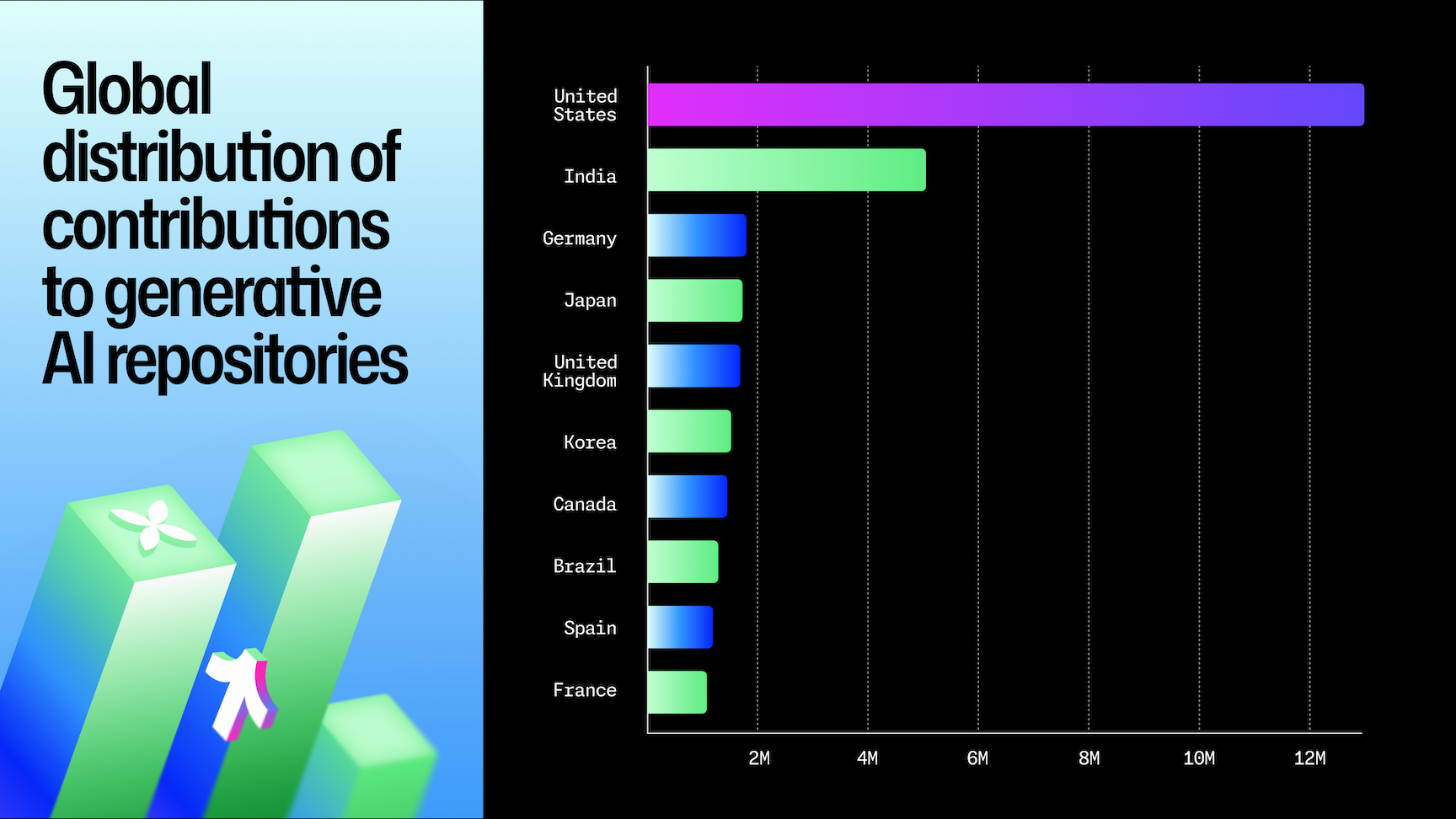
The chart is a practical argument for running GitHub strings with cities outside your default list. If you only search San Francisco, London and Berlin, you ignore the second-largest pool of generative AI contributors in the world. A location group such as ("Bangalore" OR "Bengaluru" OR "Hyderabad" OR "Pune") is a simple way to test that pool.
AI and data science networks: Hugging Face, Kaggle and Stack Overflow
AI talent has its own public networks, and they are among the most valuable X-ray targets in 2026. Hugging Face hosts models, datasets and demos from millions of practitioners; Kaggle hosts competitions and notebooks; Stack Overflow still carries years of answers, even as its activity collapses. Each has a distinct profile structure and a distinct quirk.
Hugging Face deserves special attention this year. NVIDIA announced on September 3, 2026 that it has agreed to acquire the company for about $12.9 billion, describing a platform used by more than 18 million developers, researchers and creators to share over 3 million models - NVIDIA. The deal had not closed when this guide was written, and public profiles remain open to search engines.
String 20: the Hugging Face practitioner. Profiles show the person's models, datasets and a field for their interests.
site:huggingface.co "AI & ML interests" ("speech recognition" OR "ASR")
"AI & ML interests" is a label on Hugging Face profile pages, so anchoring on it keeps model and dataset pages out of the results. Someone who has published a fine-tuned speech model has demonstrated the skill more convincingly than any CV line. Our Hugging Face sourcing guide covers how to read a profile's models and activity once you have found it.
String 21: the Kaggle competitor. Kaggle has more than 33 million registered users - Kaggle - and a public ranking system.
site:kaggle.com ("Competitions Grandmaster" OR "Competitions Master") -inurl:competitions -inurl:datasets -inurl:code -inurl:discussions
Kaggle's performance tiers are among the few public, objective rankings of data science skill, and Grandmasters are a small, heavily recruited group. The exclusions keep competition, dataset and notebook pages out. Add a location or a domain term ("NLP", "computer vision") once you see the volume, and remember that Kaggle profile content is rendered by JavaScript, so a search engine's snippet may show less than the live page.
String 22: the Stack Overflow veteran. Stack Overflow profiles still carry location, top tags and reputation.
site:stackoverflow.com/users "Member for" "Berlin" "python"
Two 2026 caveats make this string a declining asset. Question volume has collapsed, with only 3,862 questions posted in December 2025, a 78% drop on the previous year - DevClass. And some low-activity profiles carry a "noindex" header, so established contributors are the ones most likely to appear. Use it to find experienced engineers with a long public track record, not to find what people are doing today.
Research databases: Scholar, arXiv and ORCID
Research hiring is where X-ray is close to unbeatable. Academics and industry researchers publish under their real names, list their institution, and are indexed by tools designed to be found. Google Scholar's robots file explicitly allows author profiles to be crawled, which is why they appear reliably in search results.
The anchor phrase that makes Scholar strings work is "Verified email at", which appears on profiles where the researcher confirmed an institutional address. It lets you search by topic and by institution domain at the same time, which no other free tool offers.
String 23: Scholar by topic. Find researchers by field, with verified affiliations.
site:scholar.google.com "Verified email at" "reinforcement learning" "robotics"
Scholar profiles list research interests as tags, so topic terms match well. The results show citation counts directly, which gives you an instant sense of seniority. For industry research labs, this is often the only way to find people whose LinkedIn says "Research Scientist" and nothing else.
String 24: Scholar by institution. Search by the domain in the verified email.
site:scholar.google.com "Verified email at ethz.ch" "computer vision"
Swapping the domain turns this into a lab-mapping string: deepmind.com, meta.com, mit.edu or tum.de each return the researchers verified at that organisation. Pair it with String 48 (university lab pages) to find PhD students before they graduate. Scholar is also where you check citation impact for anyone found through the resume strings in Chapter 7.
String 25: the recent arXiv paper. arXiv abstract pages list every author of a paper, and Google documents after: for recent pages.
site:arxiv.org/abs "speculative decoding" after:2026/01/01
This finds recent papers on a narrow technique, and with them the people who are working on it right now. It is the fastest way to build a list for a frontier AI role where the skill is only a year or two old and nobody has it on their profile yet. The authors' affiliations are on the abstract page, and the first and last authors are usually the most relevant.
String 26: the ORCID record. ORCID gives researchers a persistent identifier with affiliations and publications.
site:orcid.org "computational biology" "University of Amsterdam"
ORCID is strongest in life sciences, chemistry and other fields where Scholar coverage is thinner. Its pages are rendered by JavaScript, so results depend on how much Google has rendered and indexed, and you may need to try both the topic and the institution in different combinations. The record links out to publications, which is all you need to judge fit.
The chart from Stanford's 2026 AI Index below shows why research strings should not stop at the obvious countries. Measured per 100,000 inhabitants, Switzerland and Singapore have the highest concentration of top AI authors and inventors, ahead of Sweden and the United States.
Top AI authors and inventors per 100,000 inhabitants, 2025
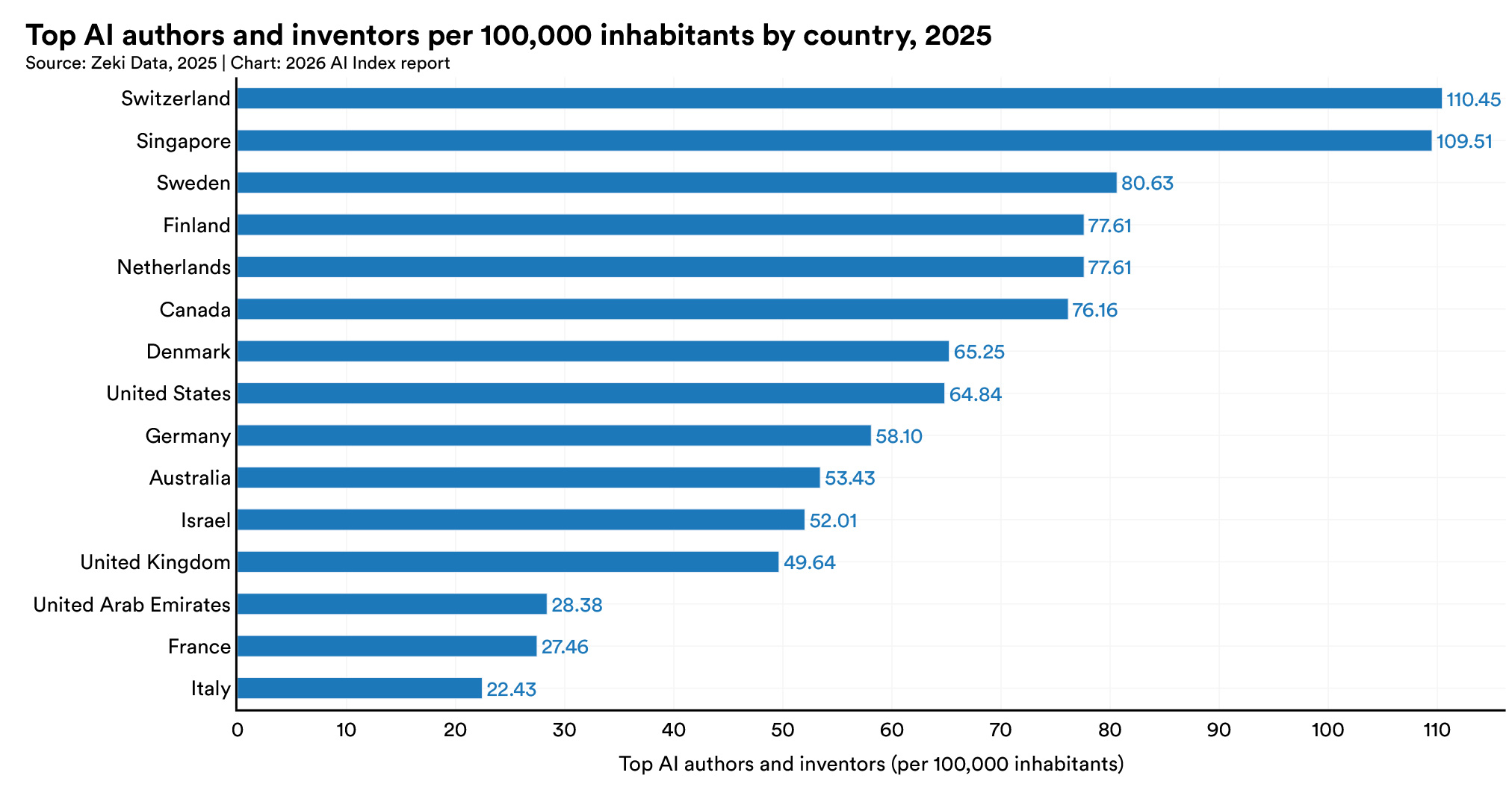
For a sourcer, the chart translates directly into string choices. A Scholar string with ethz.ch or epfl.ch covers a large share of Switzerland's research talent, and nus.edu.sg or ntu.edu.sg does the same for Singapore. Dense, small research hubs are exactly where institution-domain strings outperform keyword searches, because a handful of domains covers most of the market.
Credentials, speakers and inventors
The last three strings in this chapter find people through public proof of expertise: the certifications they earned, the conferences they spoke at and the patents they filed. Each source is maintained by a third party (the certification issuer, the conference platform, the patent office), which makes it harder to fake than a profile.
These strings are most useful for specialist and senior roles. A certified Kubernetes administrator, a conference speaker on platform engineering or a named inventor on battery patents has already been vetted by someone else, which shortens your own screening.
String 27: the conference speaker. Sessionize hosts speaker profiles for thousands of technical conferences.
site:sessionize.com intitle:"Speaker Profile" "Kubernetes" "Netherlands"
Speaker profiles list talks, topics and often location and employer. Speakers are typically senior practitioners who can communicate, which makes this string ideal for staff-level, developer-advocate and consulting roles. The talks themselves are a ready-made conversation opener.
String 28: the named inventor. Google Patents pages list inventors and assignees, and its robots file allows patent pages to be crawled.
site:patents.google.com ("solid-state electrolyte" OR "solid electrolyte") "lithium metal" "Inventor"
For hardware, materials science, battery and semiconductor roles, patents are the most precise public record of who did what. The assignee tells you where the inventor worked at filing time, and multiple patents on the same topic signal sustained depth. Expect to cross-reference names with LinkedIn (String 6) to confirm the current employer.
String 29: the certified professional. Credly hosts digital badges issued by AWS, Google Cloud, the Linux Foundation and many others.
site:credly.com/users "AWS Certified Solutions Architect" "Toronto"
Because the badge is issued by the certifying body, it is a verified credential rather than a claim. Credly pages are rendered by JavaScript, so results are thinner than on LinkedIn, but every hit is confirmed. Use this alongside String 8 when a certification is a hard requirement.
Credentials, talks and patents close the gap between "says they can" and "has shown they can". Third-party proof is what makes these strings valuable for senior and specialist hiring, and it is also what makes the resulting outreach more credible: "I saw your KubeCon talk on multi-cluster networking" lands very differently from "I came across your profile".
6. Design, Product and Creative Strings (30-34)
Designers and product people publish their work, not just their titles, and that changes how you should search for them. A designer's Behance or Dribbble portfolio shows the actual screens they made; a product manager's Product Hunt profile shows the launches they shipped; a writer's Substack shows how they think. X-ray strings for these roles should target the work itself, because it answers the hiring manager's first question (is this person any good?) before you ever send a message.
Portfolio platforms are also designed to be found, so search coverage is good and profiles are rarely behind a login. The challenge is the opposite of LinkedIn's: too many results, most of them project pages rather than profiles.
Portfolio platforms
The first three strings target portfolios, on the two big design networks and on the personal sites that senior designers increasingly build themselves. Each string includes exclusions for the gallery, project or search pages that would otherwise drown out the profiles you want.
The strongest portfolio signal is a phrase the platform adds when someone is open to opportunities. Dribbble shows "Available for work" on profiles of designers who have switched it on, which turns a broad search into a list of designers who have publicly said they want to hear from you.
String 30: the Behance portfolio. Behance profiles sit at behance.net/username.
site:behance.net ("UX designer" OR "product designer") "Amsterdam" -inurl:gallery -inurl:search
Excluding gallery removes individual project pages, which are the majority of indexed Behance URLs. The profile page then shows the designer's projects, tools and location in one place. Behance skews towards visual, brand and illustration work, so for product design roles you will often find stronger matches on Dribbble or on personal sites.
String 31: the available Dribbble designer. Target the open-to-work label directly.
site:dribbble.com "Available for work" "product designer" -inurl:shots
"Available for work" appears on Dribbble profiles whose owners have switched it on, so every relevant hit is someone actively open to opportunities. Excluding shots removes individual design posts. Add a city or a specialism ("fintech", "design systems") once you see the volume. Because these designers have raised their hand, expect warmer replies than from passive candidates.
String 32: the personal portfolio site. Senior designers increasingly host portfolios on site builders.
(site:framer.website OR site:webflow.io) ("product designer" OR "UX designer") "case study"
Framer and Webflow both give free sites a subdomain on a shared domain, which makes them searchable as a group. "Case study" is the phrase that separates a real product design portfolio from a template or a landing page, because product designers present their work as case studies. The same approach works with site:notion.site for people who publish portfolios as Notion pages.
Portfolio strings produce higher-quality shortlists than title strings because you can judge the work directly. The trade-off is that the most senior designers often have the least public work (much of it sits under NDA), so pair them with String 5 for leadership roles.
Product and writing platforms
Product managers and strategists show their thinking in public, through the products they launch and the essays they write. Product Hunt and newsletter platforms are where that evidence lives, and both have stable, public profile URLs that are easy to target.
These strings work best for roles where judgement and communication matter as much as hard skills: product management, product marketing, developer relations and founding-team hires. A launch history or a year of thoughtful posts is a better predictor for those roles than a list of tools.
String 33: the Product Hunt maker. Product Hunt profile pages carry a consistent page title.
site:producthunt.com intitle:"profile on Product Hunt" ("product manager" OR "founder") "AI"
Product Hunt profiles list the products a person has launched or helped make, which is direct evidence of shipping. Former founders who appear here are a classic source for senior product and founding-team roles: they understand the whole business, and a product that did not become a company is often the trigger for joining one.
String 34: the newsletter writer. Substack profiles live under substack.com/@handle.
site:substack.com/@ ("product manager" OR "product lead") "subscribers"
People who write regularly about their field are usually practitioners with strong opinions and the ability to explain them. The same approach works on Medium with site:medium.com/@ for engineers and designers who blog there. Read two or three posts before reaching out, and reference one specifically: writers notice when someone has actually read their work.
The common lesson for creative and product roles is that the work is the filter. Titles in design and product are inconsistent and inflated, but a portfolio, a launch or an essay is not. These strings let you skip the title debate entirely and go straight to the evidence a hiring manager will ask for.
7. Resume and CV Strings (35-40)
Resume X-ray is the oldest technique in this guide, and still one of the most underrated. People publish CVs as PDFs on personal sites, university pages, portfolio hosts and old job-board mirrors, and search engines index the full text of those documents. A resume found this way often contains far more detail than a public LinkedIn profile: full employment dates, project descriptions, tools, publications and sometimes contact details the person chose to publish.
The catch is noise. A plain search for "resume data engineer" returns thousands of templates, writing guides and job ads that all contain the word "resume". Every string in this chapter therefore has two parts: a block that targets real documents, and a block of exclusions that removes the template industry. Google documents the filetype: operator, which is the most reliable way to land on actual documents rather than pages about them - Google Search Help.
Document-type strings
The first three strings target the document itself, using the file type, the page title or the URL as the signal that a page is a CV. Each one trades precision for recall differently, so it is worth running all three on a hard search rather than picking one.
All three need the same exclusion block, which removes the words that appear on templates and job ads but almost never on a real person's resume. "Template", "sample", "example" and "jobs" do most of the work. If an exclusion starts removing real resumes (a candidate who worked on a "jobs board" product, for example), drop it and filter by eye instead.
String 35: the PDF resume. The highest-precision resume string, because the file type filters out web pages entirely.
filetype:pdf ("resume" OR "curriculum vitae") "data engineer" "Chicago" -template -sample -example
PDF resumes are typically uploaded deliberately by their owners, which makes them more current and more complete than scraped copies. Add a must-have skill only after you see the volume, because resumes describe tools in long lists and a single skill rarely narrows enough to matter. The same string with filetype:docx catches people who uploaded editable versions, which is more common in some industries than others.
String 36: the titled resume page. Many people publish their CV as a web page whose title says so.
(intitle:resume OR intitle:cv) "registered nurse" "Ohio" -template -sample -jobs
This catches HTML resumes on personal sites and portfolio builders that a filetype: search misses. Because Google does not document intitle:, check the results rather than trusting the count. For nursing and other licensed roles, a public resume often lists license numbers and states, which helps you shortlist, but verification still goes through the official registry.
String 37: the resume URL. Personal sites often put the CV at a path like /resume or /cv.
inurl:resume ("Java developer" OR "Java engineer") "Austin" -jobs -template -sample
inurl: is the broadest of the three, because it also matches resume directories and old job-board mirrors. That is useful for volume searches and noisy for precision work. Bing does not have an inurl: operator at all, so this string only belongs on Google; on Bing, use the filetype: version instead - Microsoft Support.
Together, the three document strings cover most of the public resume web: the filetype string finds deliberate uploads, the intitle string finds personal pages, and the inurl string sweeps directories. Running all three on a hard role and deduplicating by name often surfaces candidates who appear nowhere on LinkedIn.
Academic, international and trade strings
The last three resume strings target populations that generic guides ignore: academics, non-English-speaking markets and skilled trades. Each has its own document conventions, and writing the string in those conventions is the difference between a few results and a deep pool.
Academic CVs live on university domains and follow a standard structure. European CVs use local-language words for "resume" and "template". Trades resumes are more often Word documents than PDFs, and use certifications and machine names rather than job titles as the key signal.
String 38: the academic CV. University staff and PhD students publish CVs on institutional domains.
site:edu filetype:pdf "curriculum vitae" ("postdoctoral" OR "PhD candidate") "computer vision"
site:edu restricts to US educational domains, and the same shape works with site:ac.uk, site:ethz.ch or any national academic domain. Academic CVs list publications, advisors and grants, which makes them ideal for research hiring. Pair this with the Google Scholar strings in Chapter 5 to check citation impact before reaching out.
String 39: the German Lebenslauf. For German-speaking markets, write the string in German.
filetype:pdf ("Lebenslauf" OR "CV") "Softwareentwickler" "München" -Vorlage -Muster
"Lebenslauf" is the German word for CV, "Vorlage" means template and "Muster" means sample, so the exclusions remove the local template industry. The same approach works in every language: in French, "CV" plus "-modèle"; in Dutch, "curriculum vitae" plus "-voorbeeld". Native-language strings usually outperform English ones in non-English markets, because most local candidates write their CV in their own language.
String 40: the trades resume. Skilled trades and manufacturing resumes are often Word documents built around certifications and equipment.
(filetype:doc OR filetype:docx) "resume" ("CNC machinist" OR "CNC operator") "Michigan" -template -sample
For trades, the equipment and certification names are the strongest signals: "Fanuc", "Haas", "Mastercam", "NCCER" or "journeyman" are more precise than any title. This is also the population where X-ray has the biggest advantage over LinkedIn, because many skilled tradespeople have thin or no LinkedIn presence but uploaded a resume to a job board or personal site years ago.
A final word on resume X-ray: treat every document as potentially stale. A PDF uploaded in 2021 tells you who someone was in 2021. Check the most recent date on the document, cross-reference with a current profile where one exists, and write outreach that acknowledges where you found them, which also happens to be what European data protection rules expect (more on that in Chapter 12).
8. Community, Freelance and Professional-Directory Strings (41-44)
Some of the best candidates are not on LinkedIn at all, or barely use it. They are active on X, they run freelance businesses on Upwork, they joined a startup through Wellfound, or they are physicians whose professional identity lives in a medical directory. Each of these communities has a public profile structure that search engines index, and each needs a slightly different string.
This is also where the 2024 to 2026 changes bite hardest. Read.cv now returns an error page, Polywork's domain no longer resolves, and Meetup member profiles redirect to a login page, so only group pages (with their organiser lists) remain searchable. The strings below target networks that are still open and indexed.
Social and startup networks
Social networks and startup job platforms reach people in their own spaces, where they describe themselves in their own words. Bios on X are short and dense, Wellfound profiles are written for startup recruiters, and both are useful precisely because they are less crowded with recruiter messages than LinkedIn.
SourceCon compared X and Bluesky as X-ray targets in 2025 and concluded that X is still the stronger of the two for site searches - SourceCon. Bluesky profiles are public and crawlable (site:bsky.app/profile), but the volume of professional bios is lower, so treat it as a secondary pass.
String 41: the X bio. Profiles on X carry a short bio, location and links.
site:x.com ("ML engineer" OR "machine learning engineer") "Berlin" -inurl:status
Excluding status removes individual posts and leaves mostly profile pages. X bios often contain more honest signals than LinkedIn headlines: "building inference infra at a stealth startup", "ex-DeepMind", "open to new things". Our guide to sourcing AI talent on X covers how to read bios and engagement once you have a list.
String 42: the Wellfound candidate. Wellfound (formerly AngelList Talent) moved candidate profiles to a /p/ path.
site:wellfound.com/p "machine learning engineer" "San Francisco"
The old /u/ path now redirects to /p/ and is disallowed in Wellfound's robots file, so strings copied from older guides with site:wellfound.com/u return little or nothing. Wellfound candidates have, by definition, signalled interest in startups, which makes this one of the highest-intent X-ray targets for early-stage hiring.
Both strings illustrate a rule for every network: check the profile path before trusting an old string. A string that targets a retired path does not fail loudly; it just returns fewer and older results. When a string underperforms, open one profile and look at its current URL.
Freelance and professional directories
Freelance marketplaces and professional directories are structured for discovery. Upwork wants clients to find freelancers, and Doximity wants patients and colleagues to find physicians, so both publish public profiles with consistent labels that make precise X-ray possible.
These are also the sources most often overlooked by recruiters who learned X-ray on LinkedIn. Freelancers are an excellent pool for contract roles and increasingly for permanent ones, and physician directories are the primary public source for clinical hiring, where LinkedIn coverage is patchy.
String 43: the Upwork freelancer. Freelancer profiles live under upwork.com/freelancers.
site:upwork.com/freelancers "React Native" "Poland"
Upwork profiles show skills, hourly rates, job success scores and client reviews, which is unusually rich evidence for a free search. Many freelancers would consider a full-time role for the right team, and the reviews tell you how they work with clients. Check Upwork's terms before contacting anyone off-platform: if you hold an Upwork client account, its rules on moving relationships off the platform apply to you.
String 44: the physician directory. Doximity publishes public physician profiles under doximity.com/pub.
site:doximity.com/pub "Cardiology" "Board Certification" "Ohio"
Doximity profiles list specialty, board certifications, hospital affiliations and education, which covers most of a physician recruiter's first screen. The same structure works for any specialty and state. For German-speaking markets, Xing profiles remain publicly viewable under xing.com/profile, and anchoring on the German word for work experience ("Berufserfahrung") keeps results on profile pages.
The overall pattern in this chapter is that every community has a native vocabulary and a native URL. Learn both for the communities your candidates belong to, and you can reach people who receive a fraction of the recruiter messages that a well-optimised LinkedIn profile attracts. That scarcity is the real advantage of X-ray in 2026.
9. Market-Mapping and Talent-Intelligence Strings (45-49)
Not every X-ray string is meant to find a candidate directly. Some of the most valuable searches map a market: who works where, which teams are growing, which competitors are hiring the same profile and who just moved into a new role. This is the work that talent-intelligence platforms sell as a subscription, and a surprising amount of it can be done with five strings and an afternoon.
The output is usually a list of companies, teams or names to feed into the people-finding strings from earlier chapters: these strings tell you where to aim, and the LinkedIn, GitHub and Scholar strings then find the individuals.
Team, news and lab strings
The first four strings find people through the organisations they belong to rather than through their own profiles. Company team pages, press announcements, corporate research directories and university lab pages are all published deliberately, are usually current, and name people in the context of their actual work.
These sources are written by the organisation, not the individual. A team page that lists someone as "Staff ML Engineer, Search" is a stronger signal than a self-written headline, and a lab page tells you which PhD students are about to graduate.
String 45: the team page. Startups and scale-ups often publish their whole team with titles.
(intitle:"our team" OR intitle:"meet the team") "machine learning" "Amsterdam"
Team pages are the fastest way to map a local startup ecosystem: run this for a city and a discipline and you get a list of companies with in-house talent in that field, often with names and photos. Each company found becomes a target for String 6 (the competitor map on LinkedIn). Swap the discipline for "data", "design" or "sales" to map other functions.
String 46: the appointment announcement. Google documents the after: operator for finding pages updated after a date, which makes it ideal for recent moves.
("joins" OR "appointed" OR "named") "as VP of Engineering" after:2026/06/01
This surfaces press releases and news stories about recent senior appointments. For executive search it serves two purposes: it identifies leaders who just moved (and are therefore unlikely to move again soon), and it reveals which companies just changed leadership, which is often the trigger for a team rebuild. The leaders who were replaced, and their direct reports, are often worth a conversation in the months that follow.
String 47: the corporate research directory. Large technology companies publish directories of their researchers.
site:research.google/people ("speech recognition" OR "audio")
Google Research lists its staff with research areas, and Microsoft Research does the same under microsoft.com/en-us/research/people. SourceCon covered this technique for mapping AI talent inside the largest labs - SourceCon. These directories are among the most accurate public maps of who works on what inside big tech.
String 48: the university lab page. Academic labs list their members, including PhD students close to graduating.
site:edu (intitle:people OR intitle:members) "PhD student" "robot learning"
Lab member pages are the best early-warning system for research hiring, because they show students years before they enter the job market, along with their advisors and research topics. Visit the pages in the spring before graduation season to find the cohort that is about to defend. Swap site:edu for national academic domains such as site:ac.uk or site:ethz.ch for European labs.
The common thread is that organisation-published pages age better than profiles. A team page or lab page is maintained because the organisation wants it to be accurate, whereas a personal profile may sit untouched for years. When a team page and a profile disagree about someone's role, the team page is usually right.
The competitor job-board string
The final market-mapping string looks at demand rather than supply. Instead of finding candidates, it finds every company currently hiring the same profile you are. That tells you who you are competing against for talent, how they describe the role and, by implication, which teams are growing.
Most startups and scale-ups host their job boards on a handful of applicant tracking systems, each of which serves public job pages from a predictable domain. Searching those domains together is a quick competitive scan that would otherwise require a paid labour-market data tool.
String 49: the competing employers. Search the three most common startup job-board hosts at once.
(site:job-boards.greenhouse.io OR site:jobs.lever.co OR site:jobs.ashbyhq.com) "machine learning engineer" "Amsterdam"
Each result is a live job post from a company competing for your candidates. Read three or four of them to calibrate your own pitch: what salary ranges are published, which benefits are standard, which tech stacks are common. Then use the company names as targets for competitor-map strings. A team that has posted the same role for months is a team whose engineers may be stretched and open to a conversation.
Market mapping will never match a talent-intelligence platform's structured data, but for one search in one city, five strings and an afternoon often answer what a hiring manager actually asks: who else is hiring, who has the talent, and who just moved.
10. Adapting Strings for Bing, DuckDuckGo and Your Own Search Engine (50)
Google is where most X-ray happens, but it should not be the only engine you use. StatCounter puts Google at 89.94% of worldwide search in September 2026, with Bing at 5.29% and every other engine below 1.5% - StatCounter. That dominance is exactly why a second engine is useful: Bing crawls and ranks the web independently, so the same string often surfaces profiles that Google buries on page six or never shows at all.
The catch is that strings do not transfer unchanged. Bing processes only the first ten terms, ignores lowercase operators and has no inurl:. DuckDuckGo reads a space as "either word" and treats the minus sign as a nudge. A string copied from Google without adapting it will run, return results, and quietly ignore half of what you asked for.
Worldwide Search Engine Market Share, September 2026
The chart explains the strategy. Google is the primary index and should get your most refined strings, but Bing is the only other independent index of meaningful size in most Western markets, and it also powers part of what other engines show. Running your best two or three strings on Bing as a second pass is a cheap way to find candidates your competitors, who all search the same Google results, are missing. Yandex matters mainly for Russian-speaking markets, where it is the dominant local engine.
Translating a string for Bing
The Bing version of a string is shorter, capitalised and explicit. Bing documents AND, OR, NOT and parentheses, and requires NOT and OR in capitals or treats them as stop words - Microsoft Support. Because only the first ten terms count, every word has to earn its place, and exclusions should be kept to one or two.
The translation process is mechanical once you know the rules. Keep the site: constraint, keep at most one OR group, write NOT instead of the minus sign for clarity, and replace any inurl: exclusions with -site: exclusions or drop them. Count the terms before you run it: a quoted phrase counts once, and each operator clause counts once.
String 50: the Bing translation. Here is String 3 from the LinkedIn chapter, rewritten for Bing's rules.
site:linkedin.com/in/ "data engineer" (dbt OR Airflow) Amsterdam NOT recruiter
That is seven terms, comfortably under the ten-term cap, so every clause is applied. The Google version required both "dbt" and "Snowflake"; on Bing it is safer to use an OR group for skills and add precision later, because every additional required term pushes the count towards the cap. If the Bing results differ from Google's, that is the point: profiles that appear only on Bing are the ones nobody else contacted this week.
DuckDuckGo and the custom-engine shutdown
DuckDuckGo is the weakest of the three for precise X-ray work, and it helps to know why. Its syntax page says two words without operators return results about either word, that a quoted phrase falls back to related results when few are found, and that the minus sign gives "fewer" results rather than excluding them - DuckDuckGo Help. It is useful for privacy and as a quick sanity check, but not as a primary sourcing engine.
The bigger 2026 change is for recruiters who built their own engines. Google's Programmable Search Engine, the tool behind many sourcers' custom X-ray engines, stopped allowing new engines to "search the entire web" on January 20, 2026; existing engines can keep that option until January 1, 2027, and new engines are limited to a list of up to 50 sites - Programmable Search Engine blog. The Custom Search JSON API that powered many sourcing tools is closed to new customers and is scheduled for discontinuation on the same date - Google for Developers.
For most recruiters, the practical response is to rebuild any custom engine as a site-list engine. A Programmable Search Engine restricted to the 20 or 30 profile sites you actually use (LinkedIn's /in/ path, GitHub, Hugging Face, Kaggle, Scholar, Behance and so on) still works and is arguably better for sourcing, because it never returns noise from the rest of the web. Tools that relied on the whole-web API are a different story: Microsoft retired the Bing Search APIs on August 11, 2025 - Microsoft Learn, so with Google's API also closing, the era of cheap, programmatic X-ray through official search APIs is ending. That is a large part of why sourcing tools are moving towards their own indexes and AI agents, covered in the next chapter.
11. How AI Agents Are Changing X-Ray Search
AI is changing X-ray from a skill into a building block. For twenty years, X-ray search was a craft that separated strong sourcers from average ones. In 2026, large language models write competent strings in seconds, AI search engines answer "find me data engineers in Amsterdam" in plain English, and sourcing agents run hundreds of searches, screen the results and send outreach without a human writing a single operator. The strings in this guide still matter, but increasingly as something you understand and supervise rather than something you type.
The shift has three layers with very different reliability: AI that writes strings for you, AI search engines that replace the string with a question, and autonomous agents that replace the whole search-verify-message loop. Each fails in its own way.
Layer one: AI that writes the string
Every major chatbot can now draft an X-ray string from a job description, and the results are usually mostly right. The part that is wrong is where the danger lies, because the errors are exactly the folklore covered in Chapter 2: wildcards on LinkedIn, AROUND() in Google, inurl: on Bing, or a confident claim that Google allows exactly 32 words. A language model learned X-ray from the same blog posts that spread those myths, so it repeats them fluently.
The practical approach is to use AI for the part it does well (generating title synonyms, skill variants and native-language terms) and to check the operators yourself. Ask the model for "ten ways a backend engineer might describe themselves in their LinkedIn headline", then build the string with the operators you know work. Or paste its output into a checker that validates syntax against each engine's documentation, which is what HeroHunt's free Boolean Search Checker does.
Glen Cathey, one of the best-known names in Boolean sourcing, made the same case in a May 2026 SocialTalent session titled "AI Is a Teammate, Not a Search Engine".
AI Is a Teammate, Not a Search Engine, with Glen Cathey
That framing fits X-ray in 2026. A model is very good at the raw material of a string (the twenty ways people describe a role, local-language terms, adjacent skills) and unreliable at the operator layer. Split the work along that line and AI makes your strings better rather than quietly worse.
Layer two: AI search engines and what they can see
AI search engines replace the string with a question, but they can only answer from what they are allowed to read. This is the most misunderstood part of the shift. LinkedIn's robots.txt file, checked on October 1, 2026, explicitly welcomes Googlebot, Bingbot, DuckDuckBot and Applebot, as well as the search crawlers of OpenAI (OAI-SearchBot) and Anthropic (Claude-SearchBot). It blocks GPTBot, ChatGPT-User, PerplexityBot, Perplexity-User, ClaudeBot, Google-Extended and Common Crawl outright.
The consequence is that some AI assistants can see public LinkedIn profiles through their search indexes, and others are told not to fetch them at all. An assistant that cannot crawl LinkedIn will either decline, rely on a partner search engine's snippets, or (worst case) invent plausible-sounding people. Every name an AI search engine returns therefore needs the same verification as an X-ray result, plus one more check: does the person actually exist at that URL?
- Google AI Mode - plain-language search over Google's index, past one billion monthly users
- ChatGPT search - OpenAI's search crawler is allowed on LinkedIn profiles
- Perplexity - its crawlers are disallowed by LinkedIn's robots file
- Claude - Anthropic's search crawler is allowed, its training crawler is not
Google is the most important of these for recruiters, simply because its index is the one X-ray already depends on. Google launched AI Mode in the US in May 2025, expanded it to more than 180 countries in August 2025, and said at its I/O conference in May 2026 that it had surpassed one billion monthly users - Google. Google has said that AI Mode is not the default experience, so a typed X-ray string still lands on a classic results page. When AI features get in the way, the "Web" filter from Chapter 1 brings back a plain list of links.
Layer three: autonomous sourcing agents
Sourcing agents replace the whole loop: they take a role brief, run dozens of searches across multiple sources, screen each profile against the requirements, and draft or send outreach. This is the layer where the economics of X-ray change, because the bottleneck in Chapter 13 (verifying and messaging 200 people per hire) is exactly what agents automate.
LinkedIn is the incumbent here. On September 29, 2026, it announced Hiring Assistant 2, the next version of its recruiting agent, and said more than 20,000 companies were using its agentic hiring tools in the first year of general availability - LinkedIn. LinkedIn also claims recruiters using it find qualified matches while reviewing 83% fewer profiles. The important limitation for X-ray users is that it searches LinkedIn's own network: it is a better LinkedIn Recruiter, not a better web search.
LinkedIn Hiring Assistant evaluating a candidate

The animation shows the shift in miniature: instead of a recruiter reading a profile and judging fit, the agent checks each stated qualification against the profile, resume and screening answers and summarises the match. That is the same verification step described in Chapter 13, done in seconds rather than minutes, which is why agents compress the time from search to shortlist so dramatically.
A second group of tools sits between X-ray and full agents: semantic people-search engines that build their own index instead of borrowing Google's. Exa launched a dedicated People Search in December 2025, saying it had indexed more than one billion people with an ingestion pipeline built for over 50 million updates a week - Exa. Juicebox's PeopleGPT takes the same plain-English approach for recruiters, claims more than 800 million profiles, and is priced from $99 per seat per month - Juicebox. These tools matter for X-ray users because they remove the dependency on search-engine operators entirely: you describe the person, and a model matches the description against an index built for people rather than web pages. The trade-off is transparency, since you can no longer see exactly why someone matched, which is precisely what a well-written X-ray string shows you.
Outside LinkedIn's walls, independent agents search the open web and multiple profile sources. HeroHunt.ai is one example: its AI Recruiter takes a role description, searches profiles from multiple platforms, screens each candidate with language models and runs personalised outreach, priced by open positions rather than seats - HeroHunt.ai pricing. For a recruiter who already writes good X-ray strings, the value is not a better search but the follow-through.
HeroHunt.ai
X-ray finds people; it does not screen or contact them. If your strings already return more good profiles than you have hours to verify and message, that follow-through is the part worth automating. HeroHunt.ai runs the search across up to a billion profiles (750 million on Starter), screens every candidate against your written requirements with language models, and handles personalised outreach. It is metered on open positions, not seats: $149 a month for 3 positions on Starter, $249 for 10 on Pro. The honest caveat: positions reset monthly and do not roll over, and the 8-day trial requires a card, so it suits steady hiring better than a single one-off search.
Whichever layer you adopt, the sourcers who get the most from AI are the ones who still know what a good string looks like, because they can tell when a machine has written a bad one or an agent's shortlist has drifted from the brief. That is the strongest argument for learning these 50 strings even if an agent ends up running most of them.
12. Where X-Ray Fails: Limits, Legal Lines and Ethics
X-ray has real blind spots, and knowing them is what separates a sourcer who trusts their results from one who understands them. Some limits are technical (what search engines index), some are structural (who publishes online at all), and some are legal (what you may do with what you find). Each one can quietly distort a shortlist if you ignore it.
The most important point comes first: X-ray is a way of reading public pages, not a licence to collect data at scale. Searching by hand is ordinary web use; automated harvesting of profiles is a different activity with different legal exposure, as the last two years made clear.
Coverage limits: who X-ray cannot see
Every X-ray result set is a biased sample of the market. It contains only people who have a public profile, who did not hide it from search engines, whose page the engine chose to index, and whose wording happens to match your string. LinkedIn lets members switch off public visibility entirely and choose which sections appear to people who are not signed in, and notes that search engines may take weeks or months to reflect changes - LinkedIn Help.
No reliable public figure exists for what share of LinkedIn profiles are public and indexed, so any article quoting one should be treated with suspicion. What you can say with confidence is that coverage is uneven: thinner for people who are private by temperament or profession, and thinner in markets where other networks dominate.
In practice, five groups fall through the gaps. Members who opted out are invisible to every string, however good. Members with thin public profiles show only some sections to logged-out viewers, so the words you search for may simply not be on the indexed page. Recent job changes can take weeks to reach the index. Many frontline, trade and care workers have little online presence at all. And in markets where LinkedIn is not the default network, its coverage is thin by definition.
The practical response is to treat X-ray as one channel among several, and to notice when its sample is skewed. If every shortlist for a role comes back from the same three cities, the same universities and the same self-promotional writing style, that is a property of the method, not of the market. Referrals, communities, job boards and rediscovering past applicants in your own database fill gaps that no string can reach. Gem found that 46% of sourced hires in its 2026 benchmark were rediscovered candidates already in a company's CRM or ATS - Gem.
Fairness: who X-ray over-rewards
X-ray rewards visibility, and visibility is not evenly distributed. People who write long profiles, publish code, speak and post about their work are easier to find than equally skilled people who do not. Those habits track career stage, spare time and cultural norms about self-promotion, so an X-ray-only pipeline can quietly narrow a shortlist's diversity.
None of this is a reason to stop using X-ray. It is a reason to design strings deliberately: include title variants that underrepresented groups commonly use, search community and alumni networks alongside the obvious hubs, and run location groups that go beyond the usual cities. When a hiring manager asks why a shortlist looks the way it does, "that is who the strings found" is not a good enough answer.
The legal line: searching versus scraping
Searching is not scraping, and the courts and platforms treat them very differently. LinkedIn's robots.txt opens with a blunt notice that "the use of robots or other automated means to access LinkedIn without the express permission of LinkedIn is strictly prohibited". Its enforcement in 2025 and 2026 showed it means it. LinkedIn sued the data provider Proxycurl in January 2025, and in July 2025 Proxycurl announced it was shutting down, writing that "there is no winning in fighting this" - Proxycurl.
LinkedIn then sued ProAPIs in October 2025, alleging an "industrial-scale fake account mill" used to scrape member data - The Record. According to the complaint, ProAPIs charged customers up to $15,000 a month for the scraped data. The older hiQ case points the same way: hiQ won an early argument about public data, but the dispute ended in 2022 with hiQ agreeing to a permanent injunction and a $500,000 judgment - LinkedIn.
For recruiters, the line is practical. Typing strings into a search engine and opening the results is normal browsing. Using tools that automatically harvest search results or profile pages, or buying data from providers that do, carries legal and reputational risk that sits with you as well as the vendor. In the US there is also a separate question of whether an AI sourcing tool that compiles candidate reports falls under consumer-reporting rules, covered in our analysis of whether AI sourcing tools are an FCRA risk.
GDPR: what you owe the people you find
In Europe, finding someone through X-ray creates obligations the moment you record their details. The EU's data protection authorities warned in their joint Opinion 2/2017 that employers "should not assume that merely because an individual's social media profile is publicly available they are then allowed to process those data", and that a legal ground such as legitimate interest is required - Article 29 Working Party. Public does not mean free to use.
The most concrete obligation is transparency. When you collect personal data from somewhere other than the person, Article 14 requires you to inform them "within a reasonable period after obtaining the personal data, but at the latest within one month", or at the latest at the first communication if you contact them - GDPR Article 14. France's CNIL spells out the recruitment version in its recruitment guide: a firm that records profiles found on a professional network must inform those people individually - CNIL.
- Have a legal basis - usually legitimate interest, documented
- Tell people early - in the first message, and within one month at most
- Say where you found them - name the site or search
- Keep only what you need - and delete it when the search ends
- Stay professional - recruitment networks, not personal social media
Each of those habits costs almost nothing when it is built into the first message, and each one is far more expensive to retrofit after a complaint. The UK regulator's draft guidance on finding candidates draws the same distinction in practice: searching recruitment-focused platforms can be reasonable, while searching people's personal social media generally is not - ICO. The simplest compliant habit is also good recruiting: a first message that says where you found the person, why you are writing and how they can ask you to delete their details. For a deeper walk-through, see our guide to GDPR in recruitment.
13. From String to Shortlist: The Workflow That Turns Results Into Hires
A great X-ray string is worth nothing until the people it finds reply. The search is the cheap part of sourcing; verification, prioritisation and outreach are where hires are won or lost. This chapter covers what happens after the results page, and why sourced candidates are worth the extra effort compared with waiting for applicants.
The numbers make the case. Gem's 2026 benchmark report, built on 165 million applications and 1.2 million hires, found that 2.5% of sourced candidates are hired compared with 0.3% of inbound applicants, a gap of nearly 8x - Gem. The same report found that 86% of outbound candidates cleared the first screen, against 6% of inbound. Sourcing is slower per person, but the people it finds are far more likely to be right.
Verify before you reach out
Every X-ray result is a pointer, not a fact. The page may be years old, the person may have moved, and in rare cases two people share a name and a city. Before a profile goes on a shortlist, it needs a quick, structured verification pass: is the current role confirmed somewhere recent, does the location still hold, and does the evidence actually match the brief?
The fastest verification is triangulation: a LinkedIn headline plus a recent GitHub commit, or a Scholar profile plus a lab page, confirms the person is who and where the string suggested. It takes about a minute per candidate and saves you from pitching a role to someone who left that city two years ago.
- Recency check - find one signal from the last 12 months
- Role check - confirm the current title from a second source
- Location check - confirm the city, especially for country-host results
- Evidence check - match one concrete achievement to the brief
Those four checks also give you the raw material for outreach. The recent signal becomes the opening line, the evidence becomes the reason you are writing, and the confirmed role tells you how senior the pitch should be. A shortlist built this way does not need a separate personalisation step, because the verification already did the research. It also protects your sender reputation: messages that reference something real and recent get fewer spam reports than generic ones, which keeps the next hundred emails landing in inboxes rather than filters.
Outreach expectations, by the numbers
Reply rates to recruiting outreach sit in a range, not at a single number, and the range moved down through 2025. The datasets below measure slightly different things (some include only first emails, some whole sequences) and cover different periods, which is exactly why no single figure should be treated as the benchmark.
What the chart shows is the realistic band: somewhere between roughly one in six and one in four sourced candidates replies to a well-run sequence. That is the number to plan against when you decide how many profiles a single hire requires.
Recruiting Outreach Reply Rates by Dataset
The spread comes from methodology as much as performance. Gem's benchmark report measures outbound candidate reply rates across its customer base, which held between 23% and 26% from 2021 to 2025 - Gem 2026 Benchmarks. Ashby measured more than 500,000 sourcing sequences between 2022 and 2024 - Ashby.
Gem's separate email report covers 6.2 million sequences sent during 2025 - Gem Email Outreach Benchmarks. And hireEZ analysed 2.7 million recruiting emails from the first half of 2025 - hireEZ. Gem's email report also shows the trend inside a single dataset: reply rates fell from 22.6% in 2024 to 16.9% in 2025, as candidate inboxes filled with automated outreach. Plan against the lower end of the range, not the higher.
Sequence length is the biggest lever
The single most effective change most recruiters can make is to send more than one message. Ashby's sourcing data shows a one-email sequence earning about 7% replies, while a three-email sequence earned about 23%, and a fourth email added almost nothing - Ashby. That means a recruiter who sends one message is working roughly three times harder than they need to for the same number of conversations.
For X-ray-sourced candidates this matters even more, because they never applied. Three short, specific messages spaced several days apart, each adding one new piece of information (the team, the problem, the pay range), beat one long pitch. If you want to sanity-check a draft before sending, the free Recruiting Outreach Checker scores a message against published benchmarks for subject length, personalisation and body length.
A realistic plan for one hire from cold outreach therefore starts with a lot of profiles. HeroHunt's candidates-per-hire calculator chains the published reply, interest, screen, onsite and offer rates and lands at roughly 200 sourced candidates per hire across roles, with large differences by role and seniority. That explains why X-ray alone struggles at volume: writing strings is fast, but verifying and messaging 200 people by hand is days of work per hire.
Where the workflow breaks at scale
X-ray scales the search, not the follow-through. A sourcer can run 50 strings in a morning and collect several hundred profiles, but cannot verify, contact and follow up with all of them by hand. That is where manual X-ray hits its ceiling.
At this point teams usually add one of three layers: a contact-data tool that finds work emails, such as Apollo; an outreach tool that runs sequences; or an AI sourcing platform that does search, screening and outreach together. The right choice depends on volume. Below a handful of hires a quarter, strings plus a spreadsheet are enough. Above that, the hours spent on verification and follow-up cost more than the software that automates them, which is the point at which the AI agents in Chapter 11 start to pay for themselves.
14. Conclusion: Choosing the Right String for the Job
X-ray search in 2026 is a precision instrument with a shrinking set of guarantees. It remains the fastest free way to find people on LinkedIn, GitHub, Hugging Face, Google Scholar and the open web, and for niche roles it still beats paid databases outright. But it rests on a small core of documented operators and a handful of undocumented ones that work by habit, and the recruiters who get the most from it know which is which.
The decision framework is simple once you know where your candidates publish. Match the role to the place its people leave public evidence, pick the string family for that place, and start with the baseline version before adding requirements. Then decide, based on how many hires you need, whether the follow-through stays manual or moves to software.
- Business and leadership roles - start with LinkedIn Strings 1 to 15, then String 46 for recent moves
- Engineers and AI specialists - GitHub, Hugging Face and Kaggle strings (16 to 21) beat LinkedIn
- Researchers and PhDs - Scholar, arXiv, ORCID and lab pages (23 to 26, 47, 48)
- Designers and product people - portfolio strings (30 to 34) show the work itself
- Trades, healthcare and international - resume strings (35 to 40) in the local language
The list is deliberately short because the choice of network matters more than the choice of operator. A mediocre string on the right site beats a perfect string on the wrong one: a machine learning researcher with no LinkedIn activity is invisible to String 1 and obvious to String 23. When a search stalls, the first question should be "where else would this person leave evidence of their work?", not "which operator am I missing?".
Volume decides the rest.
If you hire a few people a quarter, the 50 strings here plus a spreadsheet and a three-message sequence are genuinely enough, and the free X-ray Search Builder will save you the typing.
If you are opening several roles a month, the search itself stops being the constraint: verifying, screening and messaging hundreds of profiles is. That is the point at which an agent such as LinkedIn's Hiring Assistant (inside LinkedIn) or HeroHunt.ai (across the open web, with screening and outreach included) earns its cost, while you keep the X-ray skills to supervise what it does.
Whatever you choose, three habits will keep your strings working as engines and sites keep changing.
Change one block at a time, so you know what moved the results. Judge strings by the first 20 results, never by Google's result count.
And read the engine's own documentation before trusting any operator, including the ones in this guide, because the next change will arrive the same way the last ones did: quietly.
Written by Yuma Heymans (@yumahey), who built HeroHunt.ai's AI Recruiter and has been building AI recruitment tools since 2021. HeroHunt.ai, used by more than 15,000 recruiters, automates the search, screening and outreach loop this guide describes.
This guide reflects search engine documentation, site structures and robots.txt files as checked on October 1, 2026. Search engines change undocumented operator behaviour without notice, and sites change their URL paths and crawling rules; verify a string on a small test search before relying on it.