


Recruitment is a dynamic field that constantly evolves with technology.
In today's landscape, there are thousands of recruitment agencies and hundreds of thousands of recruiters. So standing out from the competition, especially if you are a new or boutique agency, is a task that you have to pursue with the right preparation.
In the late ‘90s to early 2000s, long before LinkedIn, recruitment agencies had to rely on downloading CVs of candidates onto Floppy disks and mailing them to IT companies or going door-to-door on the high streets with CVs that they printed in hopes of getting an interview for their candidate. Since then, technology advanced and LinkedIn emerged to become the leading platform for recruitment businesses and candidates.
Now, it will be a battle of AI. Those who can master Artificial Intelligence (AI) and the use of Language Models like GPT will be light years ahead of the competition.
With the entrance of AI recruiters to the market, the case for the right useof AI is even clearer.
Let's dive into the best practices for mastering ChatGPT and how to make it specific to your recruitment business.
- ChatGPT For Recruiters: Best Cases
- Choosing The Right Prompts
- Effective Prompting Techniques
- Challenges and Considerations
- Getting Set Up With ChatGPT: Paid, Premium and Getting Started
1. ChatGPT For Recruiters: Best Cases
Candidate Screening
Recruiters can use ChatGPT to automate the initial screening of candidate resumes. By providing specific prompts like "Summarize the candidate's relevant experience in project management," recruiters can swiftly obtain concise overviews, allowing for efficient shortlisting. Copy and paste the resume into ChatGPT and the options are endless.
Drafting Customized Outreach Emails
ChatGPT can assist recruiters in crafting personalized and engaging outreach emails to potential hiring managers. Recruiters can input details about their role and company culture, and use prompts like:
"Here is my target company's website: HeroHunt.ai. They are an AI-powered Recruitment Engine that serves as a platform for recruiters to find and engage with up to 1 billion candidates. Compose a personalized sales outreach email based on the URL I provided to the hiring manager about what I find unique about their company and emphasize my work with a similar company in filling their role for a backend software engineer that has experience in Python and Django” .
The Result:
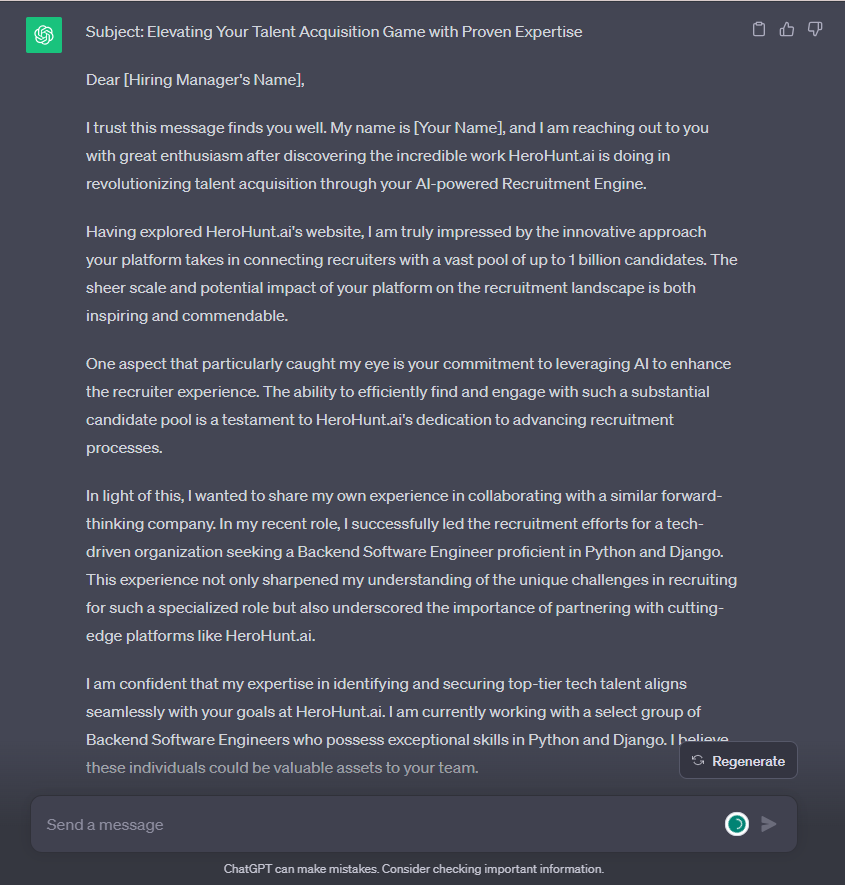
Of course, a polished email only lands if it reaches the right inbox. Once ChatGPT has drafted your pitch, you still need the hiring manager's actual email address, which you can find with a contact database like Apollo.
Apollo.io
This is the one gap ChatGPT cannot close for you. It will write the pitch, but it has no contact database behind it, and if you ask it for a hiring manager's email address it will pattern-match a plausible one and hand it to you with total confidence. That is how you end up with a bounce rate that kills your domain. Apollo is worth testing here because the free tier costs nothing to try: $0 for 900 credits per seat per year, released monthly, so roughly 75 credits a month to see whether the data quality holds up in your market. The honest caveat: 900 a year is genuinely small, and the moment you outgrow it the next step is Basic at $49 per seat per month billed annually ($65 if you pay month to month). Test the data on companies you already know before you build a workflow on it.
Building Boolean Search Strings
Boolean is the use case where ChatGPT saves the most time per minute of effort, because the syntax is fiddly and the logic is not. Describe the role in plain English and ask for a LinkedIn X-Ray string, and you will get a usable draft in seconds: "Write a Boolean search string for a senior backend engineer in Berlin with Python and Django experience, excluding recruiters and agency staff. Include common title variations."
The reason this works is that ChatGPT is good at exactly what Boolean demands: listing synonyms and nesting parentheses correctly. It will remember that "backend engineer" also appears as "back-end developer", "server-side engineer" and "platform engineer", which is the part most recruiters under-do. What it will not do is know which strings actually return good people on your target market, so treat the output as a first draft, run it, then paste the disappointing results back in and ask it to tighten the string.
Writing Job Descriptions and Job Ads
Feed ChatGPT the role requirements, your company's tone, and an existing job ad you liked, and ask it to write a new one in that style. The trick most people miss is the second half of that sentence: without a reference ad, you get the generic "we are seeking a highly motivated individual" copy that every other company is now also publishing. With a reference, you get something that sounds like you.
It is also a genuinely useful editor. Paste in a job description you already have and ask it to flag exclusionary language, unnecessary requirements, or anything that reads as gendered. That is a real, well-documented weakness in most job ads, and it is a task where a language model is legitimately better than a tired human at 5pm.
Interview Questions and Scorecards
Ask for competency-based questions tied to a specific requirement in the job description, and ask for the scorecard alongside them: what a weak answer, an adequate answer and a strong answer each look like. That last part is what turns a question list into an actual assessment tool, and it is the part recruiters most often skip.
2. Choosing The Right Prompts
A prompt is a brief, not a search query. This is the single mental shift that separates recruiters who get value out of ChatGPT from the ones who conclude it is overhyped after a week. If you type "write a recruitment email", you are briefing a contractor with no context and no deadline, and you will get work that reflects that. If you brief it the way you would brief a junior colleague, you get something you can actually send.
Every good recruiting prompt contains four things, and if a prompt is failing it is almost always because one of them is missing.
- Role and context: who ChatGPT should be, and who the audience is.
- The input data: the CV, the job description, the reference email, the company website.
- The task: one clear instruction, not five stacked ones.
- The output format: length, tone, structure, and what to leave out.
Compare the two. "Summarize this CV" gives you a paragraph of prose you still have to read. "You are a technical recruiter screening for a senior backend role. Here is the CV and the job description. In five bullets, tell me where this candidate meets the requirements, where they do not, and what I should probe in a screening call. Do not speculate about anything that is not in the CV" gives you a decision. Same model, same candidate, thirty seconds more typing.
The fourth element does the most work and gets the least attention. Output format is where you stop ChatGPT from writing 400 words when you wanted 40, and the phrase "do not speculate about anything that is not in the document" is the closest thing there is to a reliable hallucination brake on a screening task.
3. Effective Prompting Techniques
Once the basics are right, a handful of techniques separate a competent prompt from a good one. None of them are technical, and all of them are things a recruiter can pick up in an afternoon.
Show it an example. The highest-leverage technique available to you is pasting in one piece of work you consider good and saying "match this". Three of your best-performing InMails will teach ChatGPT your voice better than any adjective you can think of. Researchers call this few-shot prompting, and it consistently outperforms instructions describing the same thing.
Iterate, do not restart. The instinct when output is wrong is to rewrite the prompt from scratch. Do not. Tell it what was wrong: "too formal, cut the second paragraph, and stop using the word passionate". The conversation carries the context, and the second attempt is nearly always closer than a fresh prompt would be.
Make it interview you. Try ending a prompt with "before you write anything, ask me any questions you need answered to do this well". It will surface the three things you forgot to mention, which is a faster route to a good brief than trying to write a perfect one upfront.
Stop re-pasting your context. If you are pasting your company boilerplate into every conversation, put it in Custom Instructions or set up a Project so it applies automatically. This is the difference between ChatGPT being a toy you visit and a tool that knows how you work.
Use the right mode for the job. The model picker has settled into three modes: Instant, Thinking, and Pro. Instant is the fast default and is correct for the overwhelming majority of recruiting work: emails, Boolean strings, job ads. Thinking is worth the wait when you are reasoning over a long document, like comparing five CVs against one specification. Pro is for the rare, genuinely hard question. Most recruiters over-use the slow modes and lose the speed advantage that made the tool worth using. OpenAI changes model names frequently, so check the model release notes rather than trusting any version number you read in a blog, including this one.
4. Challenges and Considerations
ChatGPT is a reasoning and drafting layer, not a data source. Almost every serious mistake recruiters make with it traces back to forgetting that one sentence. It does not know who works where. It does not know anyone's email address or phone number. Asked for facts about a named person, it will produce fluent, specific, confidently wrong output, because generating plausible text is what it does. Use it to work on information you give it, and get the information itself from somewhere accountable.
The second consideration is candidate data, and it is the one that carries actual legal risk. A CV is personal data. Pasting one into a personal ChatGPT account means putting a named individual's employment history into a consumer product that, on consumer plans, may use your conversations to improve the models unless you have turned that off. Business and Enterprise workspaces are different: OpenAI states that business data is excluded from model training by default - OpenAI. If you handle candidate data at any volume, that distinction is the entire reason to be on a business plan rather than a personal one, and it matters more than any feature on the page.
Third, the law has caught up. If you recruit for roles in New York City, an automated employment decision tool must have passed an independent bias audit within the previous year, with the results published and candidates notified - NYC DCWP. In the EU, AI systems used for candidate evaluation are classed as high risk under the AI Act, which puts obligations on you as the deployer, not just on the vendor. Those high-risk obligations were originally set for 2 August 2026, though the EU has provisionally agreed to defer them to December 2027 under the Digital Omnibus - Ogletree. The practical read for a recruiter is simple: using ChatGPT to summarize a CV for your own reading is low risk, and using it to rank or reject candidates is a different category of activity that you should not be doing casually in a chat window.
Fourth, and least discussed: sameness. Everyone has the same tool now. If you send the ChatGPT default voice, candidates recognise it, because they are receiving twenty of them a week. The recruiters getting results are the ones feeding it their own material and editing the output, not the ones sending it raw. The tool removes the excuse for a bad first draft; it does not remove the need for judgement.
5. Getting Set Up With ChatGPT: Paid, Premium and Getting Started
Start free, then pay when you hit a wall, and know what the wall actually is before you pay to remove it. OpenAI currently runs a tier for almost every budget, and the gaps between them matter more than the prices.
Free costs nothing and is enough to find out whether the workflows in this guide fit how you work. Go is the cheapest paid tier at $8 per month in the US, and gives roughly ten times the free tier's messages, uploads and image generations. Plus at $20 per month is the tier most individual recruiters land on and the sensible default if ChatGPT is part of your daily work. Pro is $200 per month and is aimed at heavy users who need the highest usage limits; almost no recruiter needs it - OpenAI. Note that OpenAI has said it will begin testing ads on the free and Go tiers, which is worth knowing before you standardise a team on either.
If you are a team rather than an individual, the relevant tier is Business, at $25 per user per month billed monthly or $20 per user per month billed annually, with a minimum of two seats - OpenAI Help Center. The reason to be there is not the feature list. It is that your workspace data is excluded from model training by default, which is the difference between a defensible position on candidate data and an awkward conversation with your DPO. Enterprise exists above it and is quoted by sales.
The honest recommendation for most people reading this: use Free for a fortnight, move to Plus if you are using it daily, and move the whole team to Business the moment you are pasting candidate data into it. Pricing and tiers change often, so check the live pricing page before you buy.
Finally, be clear about what ChatGPT is in your stack. It is a superb assistant for anything that is text: drafts, strings, summaries, questions. It does not find candidates, it does not know who is open to a move, and it does not contact anyone. That is a different category of tool, whether that is a contact database for reaching decision makers, or a dedicated sourcing platform like HeroHunt.ai's AI Recruiter for finding and engaging candidates at scale. The recruiters who are light years ahead are not the ones who use ChatGPT hardest. They are the ones who know exactly which half of the job to give it.
HeroHunt.ai
This is the half of the job ChatGPT structurally cannot do. It has no live index of who works where, so it cannot search, and it cannot send anything, so a Boolean string it writes for you still has to be run somewhere and the results still have to be worked by hand. HeroHunt.ai's AI Recruiter is built for that half: you describe the role in the same plain English you would use in a prompt, and it searches across public profile sources, screens against your criteria, and runs the outreach sequence. Two honest caveats. First, it is our own product, so weigh this accordingly. Second, if you hire two or three roles a year, an AI recruiter is over-tooled for you and ChatGPT plus LinkedIn is genuinely enough. And whatever you use, note the point in section 4: the moment software ranks or rejects candidates rather than summarising them for you, you are the deployer of a high-risk system under the EU AI Act, and that is on you, not the vendor.
Written by Yuma Heymans (@yumahey), who built HeroHunt.ai, the world's first AI Recruiter, now used by 15,000+ recruiters to source and engage talent on autopilot. He has been building AI recruitment tools since 2021.
Pricing and model names in this guide were verified in July 2026. Both change frequently, so confirm current details with OpenAI before you buy.