


LinkedIn reports more than 1.3 billion members, which makes it the biggest single source of talent worldwide.
However, many people think they need to be using LinkedIn to find LinkedIn profiles. That’s not correct. Most LinkedIn profiles are public, and a public profile is by definition reachable from outside LinkedIn.
That word "public" is doing real work, so it is worth being precise about it. LinkedIn's public profile setting controls what parts of a profile are "eligible for display to people who are not signed in to LinkedIn, or can be viewed on search tools". It is on by default, which is why you can look at strangers' profiles in Google without an account. It can also be switched off: "Disabling your public profile hides your public profile from non-LinkedIn members or search tools results." So the honest version of the claim is that the large majority of profiles are findable outside LinkedIn, not every last one.
Just like you can find websites and content in Google search, you can find LinkedIn profiles in search engines made for finding talent.
Talent search engines have some additional benefits over recruiting in LinkedIn. Mainly that they are more affordable, find profiles from other platforms as well (next to LinkedIn profiles) and they are usually more user friendly.
This is how to find LinkedIn profiles without LinkedIn Recruiter:
What a Recruiter seat actually sells you
Before replacing something, it helps to know what it does. A Recruiter seat bundles three separate jobs: search (advanced filters and unlimited searching), contact (InMail credits to message strangers), and collaboration (shared projects, pipelines, reporting). The first two are the ones people think they cannot get elsewhere. They are wrong about both.
The price is hard to even quote back at you, which is its own tell. LinkedIn publishes the price of Premium and Sales Navigator, and does not publish the price of Recruiter Lite or full Recruiter: both pages quote the InMail allowance and then send you to sales. We keep a breakdown of the reported figures in our guide to LinkedIn Recruiter pricing, but treat those as quotes people have shared, not list prices, because LinkedIn prices per account and per market.
The bigger reason a free LinkedIn account is not the answer either is a limit most people meet without understanding it. Search enough profiles on a free account and LinkedIn's commercial use limit cuts you off. Two details from that page matter: "We are not able to display the exact number of searches or views you have left", and "we also cannot lift the limit upon request". Your usage resets at midnight PST on the 1st of each calendar month and not a moment earlier. So a free account has a hidden monthly ceiling you cannot see coming, which is exactly why searching somewhere other than LinkedIn is the move.
1. Find a talent search engine
There are several talent search engines on the market.
It’s good to check if the tool you’re using can find all LinkedIn profiles and is not reliant on any (local) databases, because if they do, this will significantly limit the amount of profiles you can find.
This is the one question worth being annoying about in a demo. A tool built on a stored database is showing you a snapshot taken on the day it was scraped, so job changes, new skills and new titles are missing until it is refreshed, and the vendor decides when that happens. A tool that searches in real time goes and looks now. The practical test: search for someone you know changed jobs recently and see which employer comes back.
For this how to we are using HeroHunt.ai as an example because HeroHunt.ai can find any LinkedIn profile online with real-time search.
You can sign up for HeroHunt.ai for free here.
HeroHunt.ai
Step 1 is the whole decision, so apply the test above to whatever you shortlist. HeroHunt.ai searches over a billion public profiles in real time instead of serving them from a stored snapshot, which is the difference between a candidate who moved in March showing up under the old employer or the new one, and it screens with language models and drafts the outreach in the same run. Check it the annoying way: search someone you personally know changed jobs recently, and see which company each tool hands back. Two honest caveats. Real-time search is slower to return than a tool answering instantly from a local index, so a very broad query makes you wait. And it replaces the search and contact jobs of a Recruiter seat, not the third one: shared projects, team pipelines and reporting are genuinely not what this is.
The free floor, if you will not pay for anything at all: X-ray the site in Google yourself. Searching site:linkedin.com/in plus a title and a skill returns public profiles, costs nothing, and (this is the point) runs the search step on Google rather than on LinkedIn, so it does not touch your commercial use limit however many strings you try. It is slower and it only finds what Google has indexed, but it works. Our guides on X-ray search and Boolean strings cover the syntax properly.
2. Include your job description to build your search
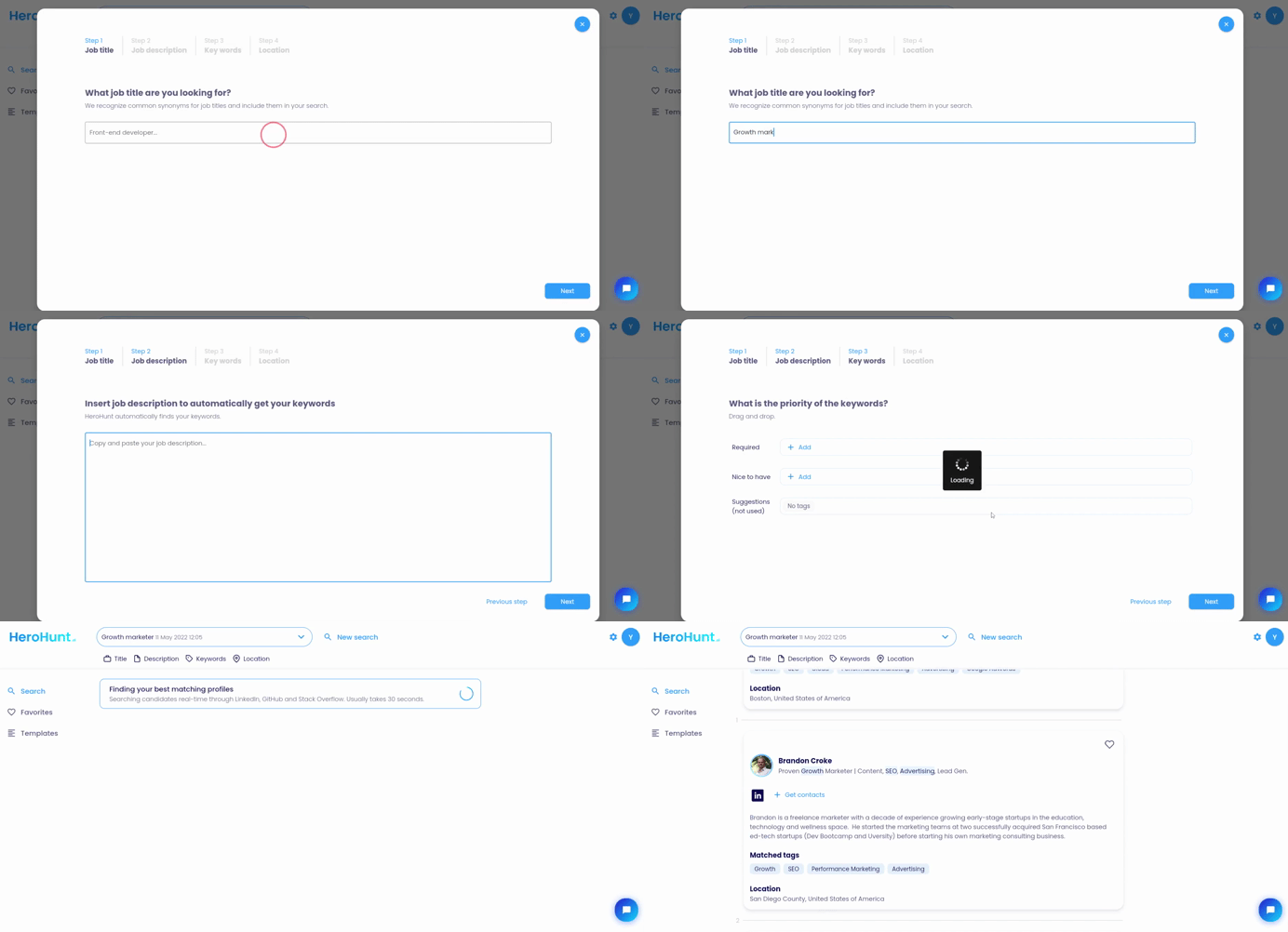
There is a lot of information in your job description already. HeroHunt.ai takes your job description and automatically turns it into a search. The automated search is completely customizable, so you can optimize it based on your understanding of the position to be filled.
You can also build your own search when you don’t have a job description for example.
3. Screen the best matching candidates and reach out
This is the step that decides whether any of the above was worth doing, because finding the profile is only half the job. A public profile hands you a name and a work history. It does not hand you a way to reach the person. That gap is what an InMail credit is really sold against: you are not paying for access to the candidate, since you already found them without LinkedIn, you are renting permission to send them a note.
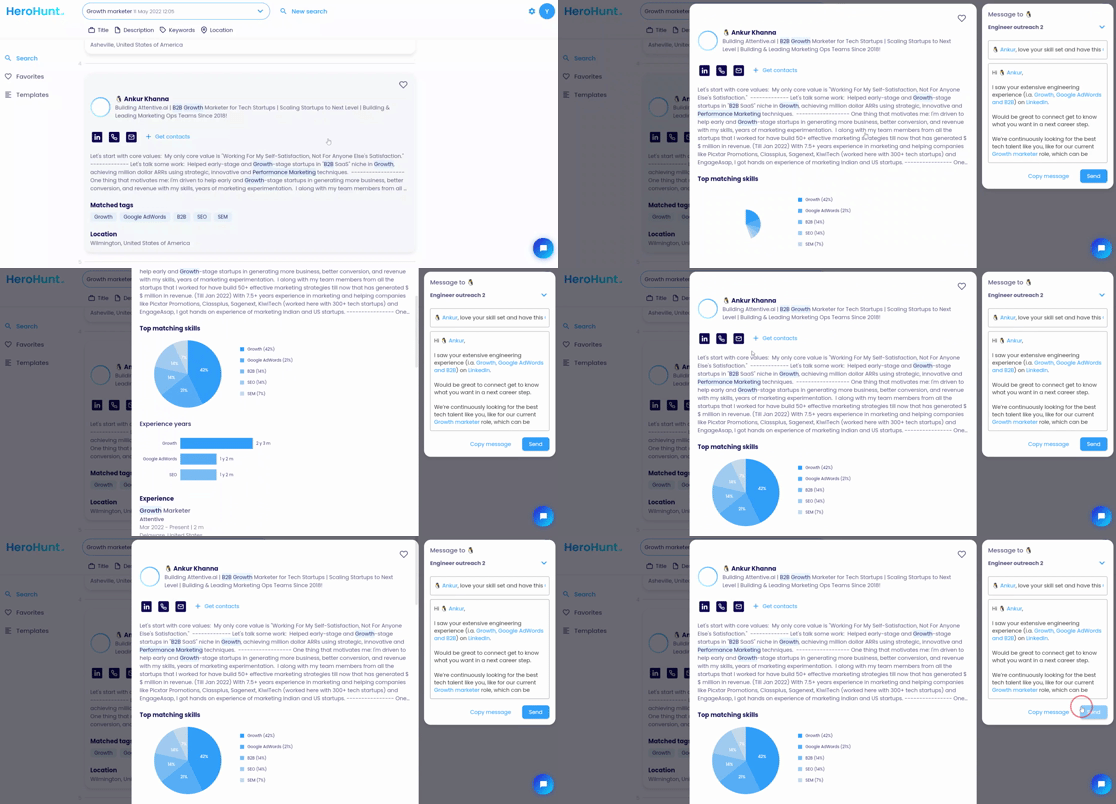
An additional advantage of HeroHunt.ai is that it finds contact details for you. With the ‘Get contacts’ button you can get the email address and social links of the candidate so you can reach out to them. This gives you an edge because most recruiters won’t use other contact details than LinkedIn (InMail). You can still also choose to navigate to the LinkedIn profile so you can reach out to the candidate there.
If your search tool does not return contacts, or you went the free route and X-rayed Google yourself, you need to close that gap separately with a contact database. Apollo.io is the usual answer: a large B2B contact database with a Chrome extension that matches the profile you are looking at and returns an email, plus sequencing so the follow-up happens in the same place. Our roundup of contact finder tools for recruiters compares the field more widely.
Apollo.io
You came here to avoid a Recruiter seat, so the honest test of a contact tool is what it does for free. Apollo's free plan is $0 and gives 900 credits per seat per year, and read that carefully: it is 900 a year released monthly, roughly 75 lookups a month, not 900 a month. That is enough to turn a shortlist you X-rayed out of Google into emails, and not enough to source a whole role. Once you outgrow it you are at Basic, $49 per seat per month billed annually ($65 month to month), which grants 30,000 credits per seat per year upfront. Two caveats before you plan around it. Apollo does not find the profiles: it only turns a profile you already found into an email, so it sits next to step 1 rather than replacing it. And Apollo is built for sellers by its own description, so coverage is strongest on commercial roles at companies that sell. Test it on ten names from your real shortlist before you trust it on a niche technical search.
Where this stops working
Be honest about the edges of the method. Profiles with public visibility switched off are not in Google's index and will not turn up in an X-ray, so the most outbound-proof candidates stay invisible to everyone who is not paying LinkedIn. Email coverage is never 100 percent on any contact database, whatever the marketing says, so expect to fall back to a connection request for part of your list. And the third thing a Recruiter seat sells, shared projects and pipelines and reporting across a team, is genuinely not replaced by any of this.
Which points at who this is actually for. If you hire continuously, at volume, with a team that needs to see each other's work, the seat is defensible. If you are making a handful of hires a year and being quoted team pricing for a solo problem, you are paying for collaboration you do not need in order to unlock a search you can run elsewhere for free. For more ways around the paywall, see our guide on recruiting on LinkedIn without a paid account.
If you are making a handful of hires a year, run the search somewhere that does not meter you and keep the seat budget.
Written by Yuma Heymans (@yumahey), who built HeroHunt.ai, the AI recruiter that searches 1B+ profiles in real time rather than serving them from a stored snapshot. LinkedIn's member count, public profile setting and commercial use limit were checked against LinkedIn's own pages in July 2026. LinkedIn does not publish Recruiter pricing, so any figure you see quoted for it is a reported quote, not a list price.