



GitHub is a platform for version control and code collaboration. It offers the distributed version control and source code management functionality of Git, plus its own features.
GitHub is rich of engineering talent with more than 180 million developers on the platform, growing by roughly one new developer every second - GitHub Octoverse 2025.
With 630 million repositories, of which 395 million are public or open source, it is by far the largest host of source code in the world.
A code repository is the code that the developer has written or shared on the platform.
These repository generate valuable keywords about the technologies and frameworks that the engineer works with on a day to day basis.
GitHub indicates the most used technologies by the user on their profile.
This is a screenshot of a profile and the information it presents about the engineer.
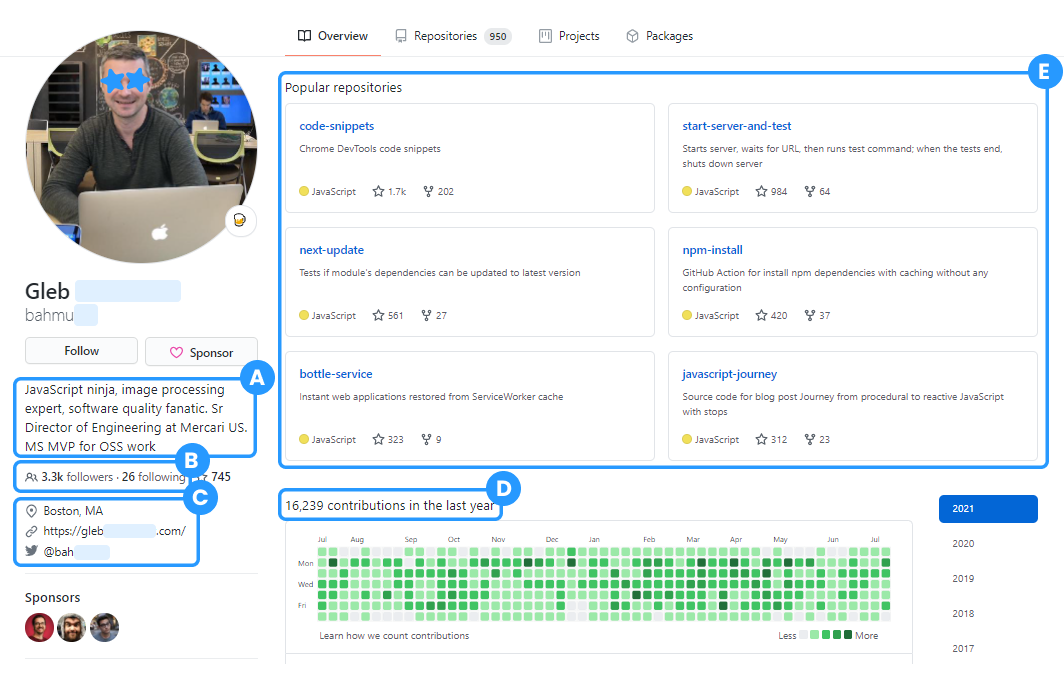
The benefit of sourcing on GitHub is that the information on talents is very up to date and relevant to their technical skills.
Many recruiters don’t recruit on GitHub because they don’t have an easy method for finding engineers on the platform.
The search of the platform itself is not made for recruiting and a Google X-ray often turns out to include a lot of documents instead of profiles and false positive matches.
Luckily there are ways that you can easily find engineers, including their public contact details.
Finding engineering talent on GitHub
Finding engineers on GitHub can be challenging if you are not sure what tools to use or how to search the platform. There are many ways of finding engineers, but a few work decently enough to highlight.
You can find engineers on GitHub in three different ways:
- Use free tools to search engineers on GitHub
- Search directly in GitHub
- X-ray GitHub
1. Use free tools to search engineers in GitHub
Using tools is the easiest and the most accurate way of finding the right engineers. With these tools you can skip the process of creating complex search strings yourself. And some tools like HeroHunt.ai also include contact details for profiles.
HeroHunt.ai
HeroHunt.ai finds the best matching engineers based on your requirements. The profiles are automatically searched in real time.
Any contact details that are found across several online sources are added to the profile so you can directly reach out to the candidate.
HeroHunt.ai doesn’t only find GitHub profiles, but also LinkedIn and Stack Overflow profiles, and combines all the information from several platforms so you get the most accurate matches. That cross-referencing matters more on GitHub than anywhere else, because a GitHub profile tells you precisely what someone builds and almost never tells you where they work. HeroHunt.ai offers an 8-day free trial, with plans from $99 a month.
Recruit’em
Recruit’em is a tool that creates search strings. GitHub is one of the platforms it supports (alongside LinkedIn, Stack Overflow, Xing, Dribbble and a handful of others), so you fill in a job title, a location and some keywords, and Recruit’em builds the x-ray search string and fires it at Google for you.
Recruit’em does not find anything else than the search engine results page on Google, so it doesn’t find contact details. It just creates the search strings. It is free and needs no account, which makes it a reasonable first stop before you commit to anything paid. We wrote a longer walkthrough of it in our guide to Recruit’em boolean x-ray search.
2. Search directly in GitHub
You can search profiles straight in GitHub. Using the GitHub search functionality you can search for engineers on GitHub.
Take into account that this search functionality is not built for recruiting purposes. It is built for engineers to find each other, primarily based on code repositories that they share.
The mistake almost every recruiter makes here is typing a skill into the user search. Search javascript with the users filter and GitHub returns roughly 234,000 accounts, with an account literally named “javascript” at the top. That is not a list of JavaScript developers. By default, GitHub user search only matches the username and the public email address, not the code someone actually writes - GitHub docs.
To search on skill you need qualifiers. The language: qualifier is the one that matters, because it filters on the languages in someone’s public repositories rather than on their handle.
A search that actually produces a shortlist looks like this:
- language:go location:amsterdam followers:>50 returned 32 accounts (checked July 2026)
- language:typescript location:berlin repos:>20 returned 131 accounts
- Other useful qualifiers: fullname:, created:, type:user and in:login
Thirty-two people is a list you can work through in an afternoon. The same search without qualifiers is a haystack. This is the single highest-leverage change you can make to how you search GitHub, and it costs nothing.
Two limits are worth knowing before you build a process on this.
First, GitHub search has no boolean OR. It is tempting to assume a string like javascript (java OR php) just works badly here. It is worse than that: language:go OR language:rust does not return poor results, it returns a flat “Validation Failed” error. There is no workaround and no parentheses to nest. Run one search per language and merge the lists yourself.
Second, every search caps at 1,000 results, no matter how many matches exist, and the API allows 30 requests per minute authenticated (10 unauthenticated) - GitHub REST API docs. So narrow searches are not just nicer, they are the only ones that return everything they matched.
3. X-ray GitHub
X-raying is searching profiles using Google or other generic search engines (like Bing or Yandex).
The thing to take into account is that x-raying GitHub is a more challenging than x-raying other platforms. This has to do with the fact that GitHub profiles are not marked by a clear distinguishing link (url) identifier.
For example, when you x-ray LinkedIn you can use the following search string, site:linkedin.com/in.
The /in part indicates that your looking for profiles, since every LinkedIn profile has /in in their url. Document pages for example don’t have /in in the url.
GitHub doesn’t work with a separate page identifier in the link that indicates that a page is a profile page. So you have to find other ways of finding profile pages only.
But those alternatives are not always waterproof.
It has strong limitations, but you can create a Programmable Search Engine (PSE):
Google's Programmable Search Engine (PSE) is a search engine that you can build and customize yourself.
You can already have quite an effective PSE by including the schema.org type ‘Person’. This type searches for pages that are marked as profiles (or persons) only.
This trick works because of how GitHub marks up its own pages, and you can check it yourself in the page source. A user profile like github.com/torvalds carries itemtype="http://schema.org/Person". A repository page like github.com/torvalds/linux carries schema.org/SoftwareSourceCode instead, and an organisation page like github.com/kubernetes carries schema.org/Organization.
That is exactly the distinction you are missing when you x-ray GitHub raw. Filtering on the Person type drops the repositories, the docs and the company pages in one move, and it is the closest thing GitHub has to LinkedIn’s /in identifier. Profile pages also expose homeLocation and worksFor in the same markup, which is often where the employer hides.
- Build a PSE yourself: Google Programmable Search Engine
- Use our prebuilt PSE: GitHub PSE
- Background on the method: our guide to AI-assisted x-ray search
Take into account that learning how to create a PSE requires some time and effort. Also, the PSE provides limited results compared to the regular search engine (Google Web Search): sometimes just 20% of the search results that Google Web Search would give you.
Reaching out to engineers
Once you have picked your preferred way of finding GitHub profiles, you obviously want to reach out to the engineers that you find.
The good thing is that many engineers have contact details on GitHub, like a personal email address or Twitter. You can also cross reference the profiles to find other social media accounts like LinkedIn where you can reach out.
There are three ways you can reach out via GitHub:
- Use a tool like HeroHunt.ai that finds contacts details for you
- Use the contact details on their profile pages
- Cross reference the profiles to find their other social media profiles
1. Use a tool to find contacts details for you
Ideally you use an all in one tool that finds GitHub (and other) profiles and also gives you the best contact details to reach the candidate on.
Many times the contact details are missing on a GitHub profile but can be found elsewhere online.
Tools like HeroHunt.ai find those contact details automatically without you having to search for them manually or guess them.
2. Use the contact details on their page
Quite some engineers include contact details on their profile. Engineers can choose to include their personal email address for example, but also often refer to their Twitter profile or their personal website where many times outreach options are available.
3. Cross reference profiles
You can also find the same person on different social media platforms. You can do this in several ways.
Here’s a guide on how to cross reference profiles.
Outreach message examples to engineers
Engineers are receiving loads of messages weekly and most of them are automated, so you can stand out by personalizing your message to them.
By doing that, not only your response rates will improve but also your chances to hire the engineer since they will remember you better.
This is an example of a longer personalized outreach message:
Hi [first name], I saw on LinkedIn that you’re a big Guardians of The Galaxy fan, can’t wait until the GoTG 3 release in 2023.
I’ve been looking at your GitHub repos and was impressed with your Angular projects, especially the dev tools projects, not something I have seen a lot of people working on but seems to be very relevant.
With [your company name] we’re building out our [subject] app which is reaching 50k business clients and we’re looking for someone who’s able to not only write great code using Angular but who takes the junior team to the next level.
This is the product and tech stack we’re building on.
With the variety of your Angular projects and the level of complexity you’re handling, it seems to be something that you might love to do.
If you want to have a chat over this you can reply in short and I'll take care of arranging our chat. Enjoy this sunny day! [your name]
Here are more examples including the shorter LinkedIn connection invite.