


Disclosure: some links in this article are affiliate links. If you sign up through one, HeroHunt may earn a commission at no extra cost to you.
LinkedIn direct messaging is limited to messages to 1st degree connections, with the exception of some 'open' profiles.
If you want to send direct messages to 2nd and 3rd level connections, it costs you money. LinkedIn does not publish Recruiter pricing or InMail allowances anywhere public, so every number you see quoted (including ours) comes from customer invoices and reseller reporting rather than a price page. The consistently reported figure for a Recruiter Corporate seat is roughly $1,080 per month (call it $11,000 to $13,000 a year, depending on what you negotiate) for 150 InMails per month - Leonar. See our full breakdown of LinkedIn recruiting pricing for the other tiers.
Luckily, there are ways to contact candidates without a paid LinkedIn account. Some of the ways are finding candidate contact details (with a tool like Apollo), send LinkedIn connection invites or use a sourcing platform that finds profiles including contact details (ours is HeroHunt.ai).
This blog focuses on the group messaging route: how to message candidates you are not connected to, for free, through LinkedIn groups.
One correction first, because this post used to get it wrong: group messaging is not unlimited. It never really was, and LinkedIn has tightened it since. It is a small, free, low-volume channel that is genuinely useful for a handful of high-value candidates per month. It is not a way to replace InMail at scale, and anyone selling it to you that way has not tried it recently. The honest limits are below.
Apollo.io
Because the group channel realistically gives you around 15 free messages a month, most recruiters use it for the few candidates worth the effort and find an email address for the rest. Apollo's free plan is 900 credits per seat per year, released monthly, so roughly 75 a month. Paid Basic is $49 per seat per month billed annually, or $65 month to month. Three honest caveats. Read that free allowance carefully: it is 900 per year, not per month. Watch which credit you are spending, too, because the free plan also meters exports separately at roughly 10 a month, so getting contacts out of Apollo is tighter than the headline number suggests and is not automatically more room than the group channel gives you. And Apollo indexes B2B work emails, which means you are often landing in the inbox your candidate's current employer administers. That is the wrong place to pitch someone a new job. Use it where a work email is fair game, and keep the group channel for the candidates where it is not.
What group messaging actually gets you in 2026
Before spending an afternoon on this, know what the channel is and is not. Four limits matter, and three of them come straight from LinkedIn's own documentation.
It is a message request, not a direct message. LinkedIn's help page on group messaging is explicit: if the member is your connection you can message them directly, otherwise you send a message request to group members you're not connected with. Message requests land in a separate tab that people check far less often than their main inbox. Expect lower response rates than a normal DM.
There is a cap, and LinkedIn does not publish it. The long-documented figure is 15 free 1:1 group messages per month, counted across every group you belong to rather than per group, with unused messages not rolling over - ERE. Third-party trackers now report the practical ceiling closer to 10 message requests per week across groups and events - PhantomBuster. Treat both as estimates: LinkedIn tunes this quietly and will simply show you an error when you hit it.
Members can switch you off. Every member has a per-group toggle for whether other members can message them, and LinkedIn tells them exactly where it is - LinkedIn Help. A meaningful share of any group is simply unreachable this way, and you only find out when the message option is missing.
No bulk sending, and no keyword targeting. LinkedIn states plainly that you can't send a direct message to all group members at once. The in-group member list also only searches by name, not by job title or skill, so you cannot filter a 40,000-member group down to "senior Rust engineers in Berlin" from inside the group. You are browsing, not sourcing. You are also capped at 100 groups - LinkedIn Help.
None of that makes the tactic worthless. Fifteen free, well-targeted messages a month to people you otherwise could not reach is a real thing, and it costs nothing. It just needs to be aimed at your shortlist, not at a list.
LinkedIn group messages
LinkedIn groups are groups that serve as online communities. The members within the group connect on a certain topic.
Some examples of LinkedIn groups are the ‘Venture Capital Cafe’ group and the ‘JavaScript Full Stack Developer’ group.
Within these groups, thousands of members are connecting and sharing content.
If you are part of the group, you can message other members for free without being connected to them, within the caps above.
Two eligibility rules catch people out: you generally need to have been a LinkedIn member for at least 30 days, and a member of the specific group for at least 4 days, before the option appears. If you joined a group this morning to message someone this afternoon, that is why the button is not there.
This is how to send messages to LinkedIn group members:
1.Find a group that represents your target candidate
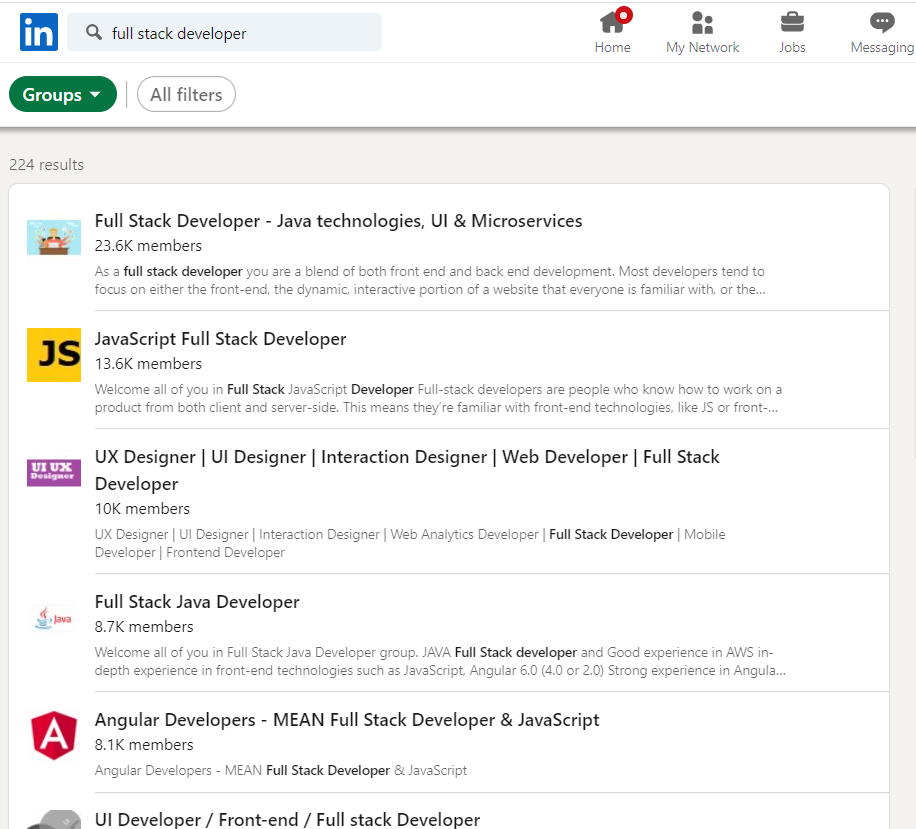
Go to the LinkedIn search bar and select Groups.
Then insert the keywords that describe your candidate.
Select the group(s) that best describe your target group.
2.Request to join the group
You have to be part of the group to send messages to group messages.
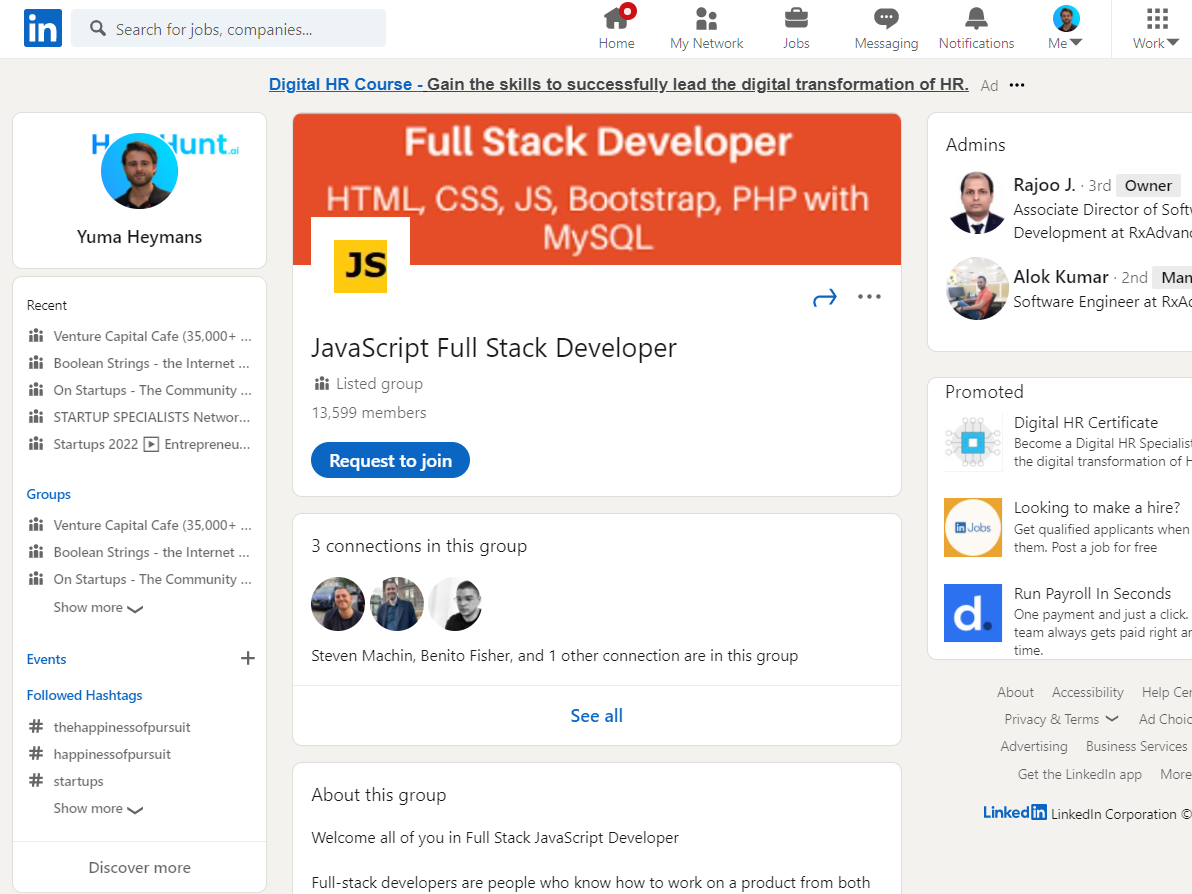
You can hit the button ‘Request to join’.
The group admin gets a notification with your request and can decide to give you access to the group or decline your request.
Once the admin has accepted your request you get a notification saying you’re now part of the group and you can access its content and members.
3. Open the member list and find your candidate
Once you are in, click the group's member count at the top of the group page. That opens the full member list with a search box.
Search here is by name only. It will not filter by title, company or skill. In practice this means the group is useful when you already know who you are looking for (you found them via a normal LinkedIn search, or a group post, or they commented on something) and you are using shared group membership purely as the delivery route. If the member has allowed group messages, a Message option appears next to their name.
4. Send the message request
Click Message and write it. This is where most people waste their 15 shots.
Remember where this lands: a message request tab, from a stranger, next to whatever else is sitting there. The group is your only credential, so use it. Reference the actual group and the actual reason you are both in it. A message that opens "I saw your post in the JavaScript Full Stack Developer group about migrating off Webpack" is doing work that "Hi, exciting opportunity" is not.
Keep it short, make the ask small, and do not attach a job description to the first message. If you want the mechanics of writing these well, our guide to InMail subject lines applies directly here.
When to use this, and when not to
Group messaging is worth it when you have a small shortlist of hard-to-reach people, no Recruiter seat, and there is a genuine, active group they belong to. Fifteen free touches a month aimed at fifteen people you actually want is a good trade for the setup time.
It is the wrong tool when you need volume, when you need to target by role rather than by name, or when there is no active group for your niche in the first place. Check before you invest the time: plenty of groups have five-figure member counts and almost no posts from the last year, and a dormant group is a dead channel no matter how many members it lists. In those cases the honest answer is that you are better off finding the contact details, sending connection invites, or comparing what a paid seat actually buys you in our InMail credits and alternatives breakdown.
HeroHunt.ai
Notice what the group cap actually exposes: the constraint is not how many messages you can send, it is that LinkedIn decides which candidates you are allowed to search and reach. HeroHunt.ai inverts that. It searches across roughly a billion public profiles rather than a single network, screens the shortlist with language models instead of leaving you to browse a member list that only matches on name, and returns contact details so outreach lands in a real inbox rather than the message request tab candidates rarely open. The honest caveat: it is a sourcing and outreach tool, not an applicant tracking system, so it will not run your interview pipeline once someone replies, and it does nothing to raise LinkedIn's own 15 messages a month. It is a replacement for that channel, not an extension of it.
Last reviewed July 2026. LinkedIn does not publish its group messaging caps and adjusts them without notice, so treat the 15-per-month and 10-per-week figures as current best estimates rather than guarantees.