


InMails are used by recruiters and sales people all over the world to reach candidates and leads to get a conversation going.
When you’re writing your InMails the key is to have the interest of the receiver in mind.
That sounds like an easy thing to do but many people forget about the receiver and focus (unconsciously) solely on their own goal.
To be able to focus on the interest of the candidate, you need to have done your research into the person you’re trying to reach.
If that person is a candidate for a job, then you’ll need to read about them in their profile and see if they have a profile in other online sources, like tech communities for instance (eg GitHub, Stack Overflow, AngelList, Medium, etc).
Once you understand the candidate better you can show in your InMail message that you know what their skills and interests are, and that you’re offering something that’s in line with that.
In this blog you get proven examples and templates that you can use to write your own.
- InMail example 1: short and powerful
- InMail example 2: long and involved
- InMail example 3: concise and humble
- InMail example 4: light and fun
First, what an InMail actually costs you
Before the templates, it helps to know what you are spending, because it explains why these messages are written the way they are.
A Recruiter Lite seat comes with 30 InMail credits per month, and you can never bank more than 120 of them. A full Recruiter seat gets 150 per month - LinkedIn Recruiter Help.
The part most recruiters miss is how you get a credit back. LinkedIn refunds it if the candidate accepts, declines or replies within 90 days, and a message left pending is never refunded - LinkedIn Recruiter Help. So a blunt "no thanks" costs you nothing at all. Being ignored is the only thing that burns budget, and that is exactly what a copy-pasted InMail buys you. Every template below is built to earn a reply, even a negative one.
One free lever people forget: messaging an Open Profile member does not touch your credits. Recruiter Lite allows 50 Open Profile InMails per month on top of the 30 credits, and full Recruiter allows 350. Check that first before spending anything.
Apollo.io
Even with the Open Profile allowance on top, thirty credits a month is roughly one working day of real sourcing, which is why most recruiters run email alongside InMail rather than instead of it. Apollo.io's free plan gives 900 credits per seat per year for finding verified addresses, so you can email the candidates you cannot afford to spend a credit on. Two honest caveats: those 900 credits are released monthly (about 75 a month), so you cannot burn through them in a launch week, and Apollo is a B2B sales database at heart. It is strong on work emails at identifiable companies and weak on the freelancers, students and stealth-startup people LinkedIn will happily show you. Paid plans start at $49 per seat per month billed annually ($65 month to month) for 30,000 credits a year.
Keep it short: LinkedIn's own numbers
The single biggest thing you control is length, and the data is not subtle. LinkedIn analysed tens of millions of InMails sent by its own corporate recruiters and found that messages under 400 characters get a response rate 22% above average, while messages over 1,200 characters land 11% below it - LinkedIn Talent Blog.
Here is the interesting part. Only 10% of InMails are under 400 characters and 46% run over 800. Brevity works partly because it is rare: a short message visibly stands out in an inbox full of walls of text. The same research found InMails sent individually beat bulk sends by roughly 15%, and that Saturday is the worst day to send (8% below average).
That does not make example 2 below wrong. Long works when the length is earned, meaning every extra sentence is about the candidate rather than about you. It just means you should default to short and only go long deliberately. Your subject line carries the same weight, so it is worth picking it as carefully as the message.
InMail example 1: short and powerful

Template
Hi [first name], I saw your experience with [X and Y]. You built up a nice combination of skills that I haven’t seen many people mastering. We’re continuously looking for great [role] to bring our product to the next level, preparing for global expansion.
Let me know if you want to have a chat to see where you are now in your career and what your potential next steps are, in the short or long term.
[your name], [your role]
Why it works: filled in, it lands right around the 400-character mark, which is the band LinkedIn's data rewards. It also asks for a conversation about their career, not an application, so replying costs the candidate nothing.
InMail example 2: long and involved

Template
Hi [first name], I saw on LinkedIn that you’re becoming a [talent X], and that all next to your [role], love seeing that drive and creativity.
I’ve been looking at the companies you worked and your recommendations, and was impressed with how quickly you’ve become a trusted sales person in the industry.
With [your company name] we’re building out our [offering] which is reaching [business achievement] and we’re looking for someone who can drive the product in entirely new geographies, many of them are in central Europe, where you are based.
This is the product we’re building on.
With the [skills of candidate] that you’ve built up and your proven track record of [achievements], it seems to be something that you might love to do.
If you want to have a chat over this you can reply in short and I'll take care of arranging our chat. Enjoy the day!
[your name], [you role]
Why it works: it breaks the length rule on purpose, and gets away with it because nearly every sentence is evidence that you actually read the profile. If you cannot fill the placeholders with something specific, use example 1 instead. Length without research is the exact combination that lands 11% below average.
InMail example 3: concise and humble

Template
Hi [first name], I might be the hundredth recruiter reaching out, but I thought I’d give it a try and see where you are in your career. I’ve seen your [portfolio/code/achievements] and I love it. We’re a team of ten people, and the one person we’re missing is a [role] who can build not only [design/product/code], but also [other design/product/code].
We’re just starting out with our company, but we love to explore with you how you could help us grow up.
Hope to hear from you.
[your name], [your role]
Why it works: it names the elephant in the room (you are not the first recruiter this week) instead of pretending it does not exist. Admitting the odds is disarming, and the "team of ten, and the one person we're missing" framing makes the role feel specific rather than mass-mailed.
InMail example 4: light and fun
Template
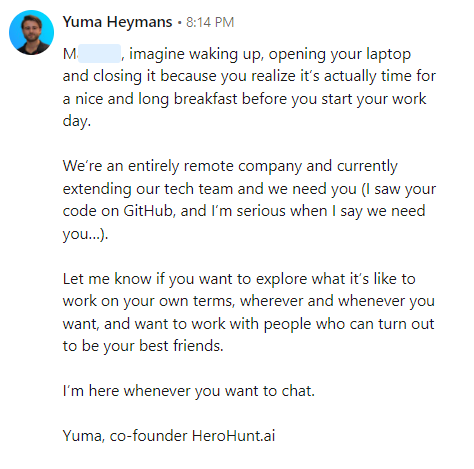
[first name], imagine waking up, opening your laptop and closing it because you realize it’s actually time for a nice and long breakfast before you start your work day.
We’re an entirely remote company and currently extending our tech team. We need you (I saw your [whatever you saw from the candidate], and I’m serious when I say we need you…).
Let me know if you want to explore what it’s like to work on your own terms, wherever and whenever you want, and want to work with people who can turn out to be your best friends.
I’m here whenever you want to chat.
Yuma, co-founder HeroHunt.ai
Why it works: it sells the job by showing the day, not by listing the perks. Note that it still does the homework ("I saw your [whatever you saw]"): the tone is light, the research is not. This one is the easiest of the four to get wrong, because humour without specifics reads as spam.
If you want to learn more on what InMails are, how they work and what they cost, your questions are answered in this blog:
Guide to LinkedIn InMails: credits, templates and more
InMail credits are limited and can get pricey, so if you would rather reach candidates directly, you can find their verified email addresses with a tool like Apollo.io and email them outside of LinkedIn. If you are weighing that trade-off, we broke down the real per-credit maths in LinkedIn InMail credits: cost, free InMails and alternatives.
Free plan, 900 credits a year per seat, no card required.
For more outreach guidelines and message examples, see: