


The 2026 buyer's guide to ContactOut's plans, the fair-use caps behind "unlimited", the real cost per contact, and the alternatives worth comparing
ContactOut's "unlimited" plans stop at 2,000 emails and 1,000 phone numbers a month. The ceiling is written into section 10 of its own terms, which limit paid unlimited plans to "2,000 email credits per account per month and 1,000 phone credits per account per month" - ContactOut Terms of Use. The struck-through prices on the pricing page tell a similar story. The $99 and $199 "regular" prices printed above the $49 and $99 you actually pay have appeared in every archived snapshot of the page since ContactOut launched this plan structure in August 2024 - Wayback Machine. The discount is the price.
None of that makes ContactOut a bad deal. Read correctly, it is one of the cheapest ways for a single recruiter to buy personal emails and mobile numbers in 2026: under 10 cents per phone number at full use, and under 5 cents if your candidates live outside the US, UK and Canada. But four things the plan cards barely mention decide what you will really pay. There is a US/UK data toggle that halves the price, a set of fair-use caps, a one-user-per-company rule on every self-serve plan, and a sales-led Team tier that is the only card listing LinkedIn Recruiter Pro and ATS integrations.
This guide breaks down every ContactOut plan, what each costs, how the credits, caps and exports work, the real price per contact against its rivals, how ContactOut's pricing has changed since 2023, the contract terms worth reading before you pay, and the nine strongest ContactOut alternatives in 2026. Those range from like-for-like contact finders to AI recruiters that find the candidates as well as their emails. Every price below was read from the vendor's own pricing page, terms or documentation in October 2026.
Written by Yuma Heymans (@yumahey), founder of HeroHunt.ai, the AI Recruiter that sources candidates from 1B+ profiles and contacts them on autopilot. He has been building recruiting tools on top of contact data since 2021, so this guide judges every vendor on one question: what does a reachable candidate actually cost?
Apollo.io
ContactOut's self-serve plans are limited to one user per company, so the moment a second recruiter needs access you are pushed into a sales-led Team quote. Apollo sells the same job per seat without a sales call: Basic costs $49 per seat per month billed annually ($65 month to month) with 2,500 credits per seat per month, so a three-recruiter team can start at $147 a month on annual billing. The honest caveats: Apollo is a sales platform first, built around business emails rather than the personal emails ContactOut sells to recruiters, mobile numbers cost more credits than emails, and unused credits expire every cycle. A solo recruiter who mostly needs phones still gets more from ContactOut's Email + Phone plan (section 4 has the numbers).
Contents
- ContactOut Pricing at a Glance
- How "Unlimited" Really Works: Fair Use, Credits and Exports
- The US/UK Toggle: Half Price If Your Candidates Live Elsewhere
- The Real Cost per Contact
- How ContactOut Pricing Changed From 2023 to 2026
- The Fine Print: One User per Company, Team Deals and Contract Terms
- What the Money Buys: Extension, Search, Campaigns, API and MCP
- Where ContactOut Wins and Where It Falls Short
- The 9 Best ContactOut Alternatives in 2026
- Full Comparison: Price, Meter and Best Fit
- How to Choose, and How to Buy ContactOut Well
- The Bottom Line
1. ContactOut Pricing at a Glance
ContactOut sells three self-serve plans and one sales-led tier, and the choice comes down to two questions: do you need phone numbers, and do the people you contact live in the US, UK or Canada? The answers move the price between $19 and $99 a month. Free gives you a small daily allowance, Email adds "unlimited" email reveals for $49 a month, Email + Phone adds "unlimited" phone numbers for $99 a month, and Team / API is quoted by sales - ContactOut Pricing. Paying annually cuts each paid plan by about 20% (24% on the regional Email plan).
Every self-serve plan carries the same quiet restriction: "1 user per company limit". The line sits on the Free, Email and Email + Phone cards alike, so ContactOut's published prices are prices for one person. Anyone buying for a team is really buying the Team tier, and that price is not published. Keep this in mind when you compare ContactOut's $49 with a competitor's per-seat price. The competitor lets you buy a second seat; ContactOut does not.
| Plan | Monthly billing | Annual billing | Emails | Phones | Exports |
|---|---|---|---|---|---|
| Free | $0 | $0 | 5 per day | 5 per day | 5 per day |
| $49/mo | $468/yr ($39/mo) | "Unlimited" (2,000/mo cap) | None | 300/mo (3,600/yr) | |
| Email + Phone | $99/mo | $948/yr ($79/mo) | "Unlimited" (2,000/mo cap) | "Unlimited" (1,000/mo cap) | 600/mo (7,200/yr) |
| Team / API | Quote | Quote | Custom | Custom | Bulk license |
These are the prices with US/UK data included, which covers profiles in every country. Switching the toggle to "Exclude US/UK Data" roughly halves them: Email drops to $25 a month or $228 a year, and Email + Phone drops to $49 a month or $468 a year (section 3 explains who can safely take that discount). When we loaded the pricing page it defaulted to the cheaper excluded-data prices, so check which toggle is active before you compare a screenshot with a colleague's.
The practical reading of the table is that ContactOut is priced like a flat-rate subscription, not like a credit marketplace. Most rivals sell you a bucket of credits and charge extra for phones. ContactOut sells you a ceiling and charges the same whether you reveal 50 contacts or 2,000. That structure rewards heavy users and punishes light ones: a recruiter who reveals 100 phone numbers a month pays 99 cents per number on Email + Phone, while one who reveals 1,000 pays under 10 cents.
So before choosing a plan, pull last month's numbers from whatever tool you use today. How many people did you need to reach, and how many of them by phone? Those two figures decide whether ContactOut is one of the cheapest tools in this guide or one of the most expensive. The rest of this guide shows how to run that calculation and where the caps and rules change the answer.
2. How "Unlimited" Really Works: Fair Use, Credits and Exports
"Unlimited" on ContactOut means up to 2,000 email reveals and 1,000 phone reveals per account per month, and the pricing page says so only in a tooltip. Hover over "Unlimited emails" and you get "subject to our fair use policy", which links to the terms clause quoted above. The caps are not hidden, exactly. They are one click away from the number most buyers remember, and for most solo recruiters they are generous: 2,000 emails is roughly 90 new people every working day.
The cap has also moved. In March 2024 the same clause allowed 10,000 credits per account per month on unlimited plans - Wayback Machine. By November 2024 it had been rewritten into separate email and phone allowances, and that wording has not changed in any snapshot since. The terms do not say what happens when you hit the cap. The API documentation describes the two outcomes ContactOut uses for API keys, overage billing or the key being "disabled until next period", and the terms leave room for a separate agreement with a higher limit.
What counts as a credit
ContactOut charges contact credits only for contact details it actually finds. Its API reference lists the cost of every endpoint, and the core rule is that a lookup "consumes 1 email credit if email is found and 1 phone credit if phone number is found" - ContactOut API documentation. A profile with no contact details costs a cheaper search credit instead, which matters mainly for API users. The Chrome extension follows the same logic. It shows masked contact details on a LinkedIn profile or search page, and you spend a credit when you click to reveal one, as the product screenshot below shows.
Every 'View email' and 'View phone' click spends one credit
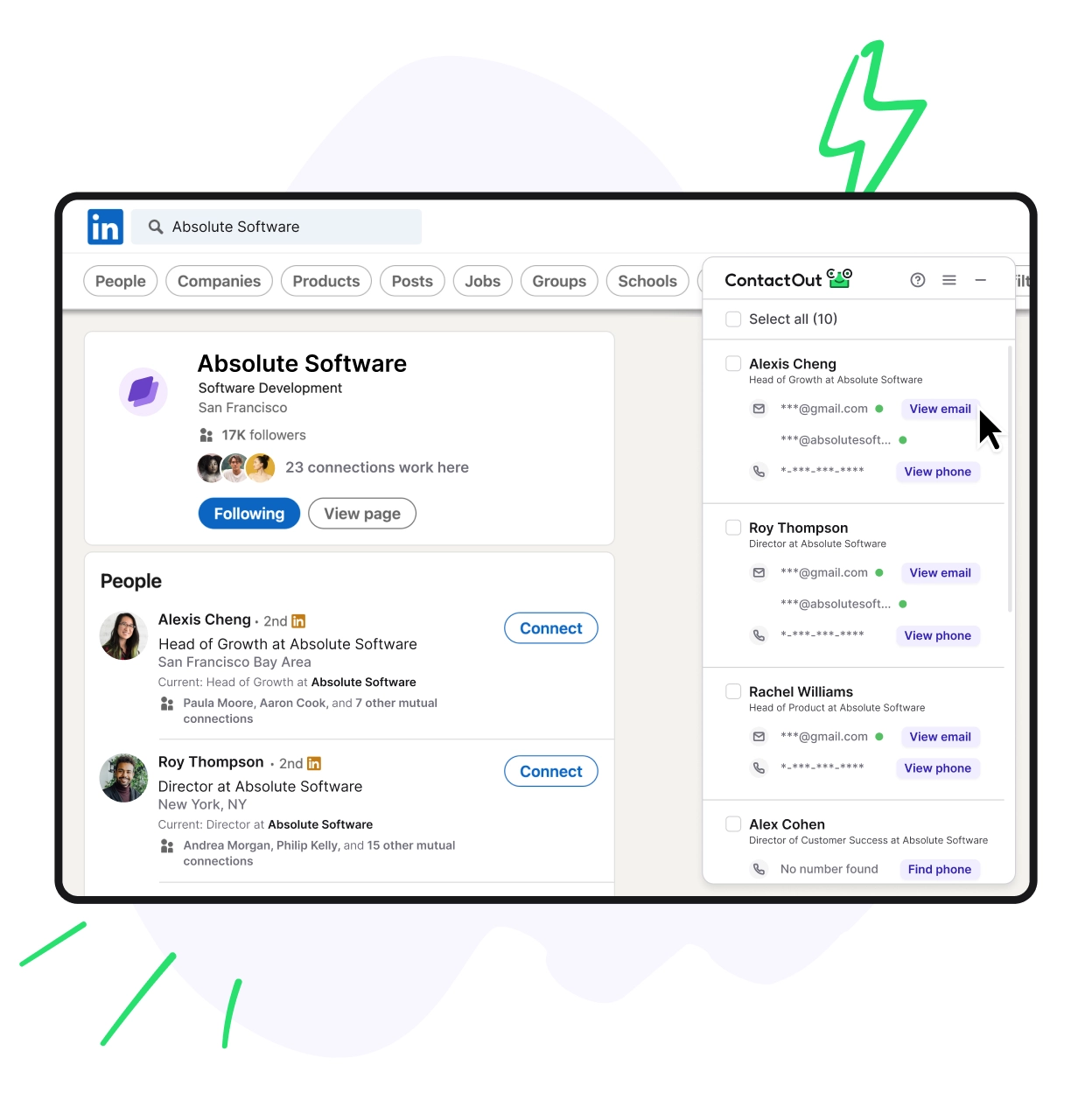
Notice the two kinds of email in the panel: a masked Gmail address and a masked company address for the same person. That pairing is ContactOut's core pitch to recruiters, because a candidate is far more likely to answer a career conversation on a personal address than on the work inbox their employer can read. Notice also the "Select all (10)" checkbox. Bulk reveal on a LinkedIn search page is how a fair-use cap gets used up quickly, since one click can spend a credit for every profile on the page.
Exports are the tighter limit
The cap that bites first is usually not reveals but exports. Email includes 300 exports a month and Email + Phone includes 600, against 2,000 email reveals. ContactOut does not publish a definition of an export. The industry norm is one record per export, so treat the number as the contacts you can move into a spreadsheet, ATS or CRM each month. On annual billing the allowance arrives as a yearly pool (3,600 or 7,200), which smooths out busy months.
The gap between 2,000 reveals and 300 exports matters because it decides where your work happens. Contacts you reveal but cannot export have to be used inside ContactOut, through its built-in email campaigns, or copied out by hand. If your workflow is "reveal in LinkedIn, push to the ATS, sequence from there", plan around the export number, not the reveal number. A recruiter who moves 400 candidates a month into Greenhouse needs Email + Phone for the exports alone, even if they never dial a phone.
3. The US/UK Toggle: Half Price If Your Candidates Live Elsewhere
The single biggest price lever on ContactOut is the data-coverage toggle at the top of the pricing page. "Exclude US/UK Data" covers "contact details for profiles in all countries excluding USA, Canada and UK", while "Include US/UK Data" covers every country, and the excluded option carries a 50% off badge - ContactOut Pricing. For a recruiter whose candidates sit in continental Europe, India, Latin America, Asia-Pacific or the Middle East, it cuts the bill in half for the same tool.
The regional prices are $25 a month for Email ($228 a year) and $49 a month for Email + Phone ($468 a year, or $39 a month). The regional Email + Phone annual plan costs exactly the same as the global Email-only annual plan, so a recruiter outside North America and the UK gets phone numbers included for the price of email. At the full 1,000-phone allowance that works out to 3.9 cents per phone number on annual billing, which is about as cheap as self-serve phone data gets anywhere in 2026.
| Plan (Exclude US/UK Data) | Monthly billing | Annual billing | Phones per month (cap) |
|---|---|---|---|
| $25/mo | $228/yr ($19/mo) | None | |
| Email + Phone | $49/mo | $468/yr ($39/mo) | 1,000 |
There are two risks to weigh before you take the discount. The first is coverage drift: remote hiring routinely crosses into the US, UK and Canada, and any candidate based there is simply invisible on a regional plan. ContactOut does not document how it decides where a profile is located, so a candidate who relocated recently may land on either side of the line. The pricing page's own checkout logic treats a switch from excluded to included data as an upgrade on the same plan, so you can start regional and move up if North American candidates start appearing in your pipeline.
The second risk is legal rather than commercial. A regional plan is, almost by definition, a plan full of people protected by the GDPR and similar laws. When you contact someone using personal data obtained from a third party, Article 14 of the GDPR requires you to tell them where you got it, at the latest at the time of your first communication - GDPR Article 14. ContactOut says it is GDPR and CCPA compliant and runs a public opt-out page, but the obligation to inform candidates sits with you, the recruiter who sends the email. Build a one-line source notice into your first-touch template and the regional plan becomes both cheap and defensible.
4. The Real Cost per Contact
ContactOut is one of the cheapest sources of phone data at full use and one of the most expensive at low use, because its price is flat while its value scales with volume. The table below shows what one contact really costs at four usage levels, using monthly billing. It assumes every reveal returns a result, which is the best case; misses cost nothing on ContactOut but do not count towards your output either.
| Contacts revealed per month | Email plan ($49), per email | Email + Phone ($99), per phone | Email + Phone, Exclude US/UK ($49), per phone |
|---|---|---|---|
| 100 | $0.49 | $0.99 | $0.49 |
| 300 | $0.16 | $0.33 | $0.16 |
| 1,000 | $0.049 | $0.099 | $0.049 |
| 2,000 | $0.0245 | Cap reached at 1,000 | Cap reached at 1,000 |
The pattern is stark. At 100 phone numbers a month, ContactOut costs almost a dollar per number, more than Lusha or Kaspr charge for a phone reveal. At 1,000 it costs under 10 cents, which very few rivals match. The useful number is your break-even volume. Below roughly 150 phones a month, the entry packages from Lusha, Kaspr and SignalHire all cost less than ContactOut's $99. At 200 phones, Kaspr Business matches ContactOut's $99 but stops there, and Lusha already costs about $115. Beyond that ContactOut pulls clearly ahead of both, and the one like-for-like rival that stays cheaper for US phone volume is SignalHire.
To show where that leaves ContactOut, the chart below compares the best cost per phone number each vendor offers on a self-serve plan costing up to $200 a month, on monthly billing and at full allowance. For credit-based tools it uses each vendor's own phone rule (Lusha charges 5 credits per phone, for example), and every figure comes from the vendor's pricing page in October 2026. Apollo is left out because its pricing page does not state how many credits a mobile number costs.
Best cost per phone number on self-serve plans up to $200 a month
Two conclusions follow. ContactOut's regional Email + Phone plan is the cheapest phone data on the chart, and its global plan is the third cheapest. But it is not unbeaten: SignalHire's Unlimited Phones package costs the same $99 and allows 2,000 credits a month, each credit returning every email and phone for one person, with unlimited users on a shared pool - SignalHire Pricing. For a team calling US candidates at volume, SignalHire is the like-for-like rival to price first.
What ContactOut offers that the cheapest rivals do not is the split allowance. Its 2,000 email credits and 1,000 phone credits are separate pools, so you can reveal phones for your 1,000 best candidates and emails for another 1,000 on top. Whether that beats SignalHire depends on how many of your candidates you actually call. For most recruiters the honest answer is "fewer than you think", which is why the email-only plan deserves a serious look before you pay double for phones.
5. How ContactOut Pricing Changed From 2023 to 2026
ContactOut's pricing went from scarce, tiered credits to flat "unlimited" plans in the summer of 2024, and the struck-through prices on today's page are the old price points. In January 2023 the page listed a Personal plan at $29 a month, Sales at $99 and Recruiter at $199, and the Recruiter plan included just 50 phone numbers a month - Wayback Machine. That worked out at almost $4 per phone number. The monthly strike-through prices on the 2026 cards, $99 and $199, match those 2023 Sales and Recruiter plans exactly.
The shift happened in stages. By September 2023 the Personal plan had gone, Sales had become $79 a month on annual billing (work emails only), and the Recruiter plan had moved behind a "Talk to us" button. In January 2024 the free plan changed from 40 emails a month to 4 emails and 2 phone numbers a day. The July 13, 2024 snapshot still shows that structure - Wayback Machine. By August 20, 2024 the current Email and Email + Phone plans were live, marked "Individual license only".
| Date | Plans and prices | Phones at the top self-serve plan |
|---|---|---|
| Jan 2023 | Free, Personal $29, Sales $99, Recruiter $199 | 50 a month ($3.98 each) |
| Sep 2023 | Free, Sales $79 annual or $99 monthly, Recruiter by quote | 50 a month |
| Jan 2024 | Free changed to 4 emails and 2 phones a day | 50 a month |
| Aug 2024 | Email $49, Email + Phone $99, individual license only | "Unlimited" |
| Nov 2024 to Oct 2026 | Unchanged prices; fair use set at 2,000 emails and 1,000 phones | 1,000 a month ($0.099 each) |
Read as a whole, the history says three things about where ContactOut is heading. First, phone data got about 40 times cheaper per number at full use, a sign of how commoditised contact data has become since 2023. Second, the recruiter-specific tier disappeared from self-serve. In 2023 the $199 Recruiter plan was the one that worked on LinkedIn Recruiter Pro and had full ATS integration; in 2026 those features appear only on the Team card. Third, the prices have been frozen for more than two years, with the same struck-through "regular" prices beside them throughout.
For a buyer, the stability is good news and the framing is noise. There is no sign that the $49 and $99 prices are a promotion about to end, so there is no reason to rush into an annual plan to "lock in" the discount. Choose annual billing only if you are confident you will use the tool for 10 months or more, because the 20% saving is the whole benefit, and nothing in the public terms promises a refund if you stop early.
6. The Fine Print: One User per Company, Team Deals and Contract Terms
The rule with the biggest cost consequence is one user per company, and it pushes every team towards a quote. The line appears on all three self-serve cards today. In August 2024 the same cards said "Individual license only", and the 2023 page added a footnote: "for additional users please talk to sales". In practice it means a two-recruiter agency cannot simply buy two Email + Phone plans; the second person is a sales conversation.
The Team product itself runs on a shared credit pool. According to ContactOut's help center, admins can set separate email and phone credit limits for each member, invited members get access to the shared pool, and "paid members can not be invited to a team", so a recruiter who already bought a personal plan has to drop to free before joining - ContactOut Help Center. The Team card on the pricing page lists "20% more data coverage", a bulk license to "700million+ profiles", "Works with recruiter Pro", Salesforce and ATS integrations, team reports and a dedicated account manager.
What a Team deal costs
ContactOut does not publish Team prices, and the only public contract data is thin. Vendr shows a median of $32,050 a year and a typical range of $10,200 to $102,340 - Vendr. Behind those numbers sit just 12 contract documents from three buyers, last updated in February 2025, so treat them as a rough sense of scale rather than a benchmark. They cover every ContactOut contract Vendr has seen, not only Team plans, but even the low end of the range is about 11 self-serve Email + Phone annual plans. Contracts negotiated through sales are sized for departments and API volume, not for a three-recruiter agency.
There is one published team offer, aimed at sales rather than recruiting. ContactOut's sales page promises "your entire sales team on a prospecting tool for less than $299 monthly", paying for credits used rather than seats, with the small print "For work emails only. Conditions apply" - ContactOut for Sales. For recruiters, a work-email-only plan removes the personal emails that make ContactOut worth buying in the first place, so this offer rarely fits. A small recruiting team is better served by asking for a Team quote and comparing it with the self-serve math in this guide, or by a tool that sells seats self-serve.
Contract terms worth reading
ContactOut's public Terms of Use defer to "the subscription agreement and subscription order form" for subscribers and contain no refund policy at all, so assume there is none unless your order form says otherwise. Liability is capped at AUD $50, and disputes go exclusively to the courts of Hong Kong under Hong Kong law. The entity is "ContactOut Limited" in the terms and "ContactOut Pty Ltd" in the company's own fact sheet for AI assistants, which describes a San Francisco location - ContactOut AI info page. If you need a contract with a specific legal entity, ask which one will sign.
The clause recruiters should read twice is section 5, "Data sharing and rights for free or subsidized users". Anyone who uploads names, emails or phone numbers grants ContactOut a "perpetual and irrevocable right to sublicense, make available, copy, display, publish or distribute the Submitted Data to any third party", unless a premium agreement supersedes it. In plain terms: do not upload your candidate database for enrichment on a free account. If enrichment is the job, do it on a paid plan whose agreement explicitly overrides section 5, and get that in writing.
Finally, trust the pricing page over the rest of the site. ContactOut's recruiter landing page still advertises a free plan with "40 emails reveals / month" and "3 phone numbers reveals / month" that "works on LinkedIn Standard only", which is the January 2023 free plan - ContactOut for Recruiters. The pricing page shows 5 emails, 5 phones and 5 exports a day, labelled "Limited time only" alongside a "Trial of premium features". Treat the free plan as an evaluation window, not a permanent tier, and test the data on your own hardest-to-reach candidates while it lasts.
7. What the Money Buys: Extension, Search, Campaigns, API and MCP
Most ContactOut subscribers live in the Chrome extension, and the rest of the product is built around it. The extension has 600,000 users and a 4.1 out of 5 rating from 800 ratings on the Chrome Web Store, and was last updated in May 2026 - Chrome Web Store. ContactOut itself claims 1.4 million users. The extension reveals contacts on LinkedIn profiles and search pages and, through "ContactOut Anywhere", on company websites. ContactOut's recruiter page says the extension works on standard LinkedIn, Recruiter Lite and Recruiter Pro, with the free plan limited to standard LinkedIn, though on the pricing page only the Team card mentions Recruiter Pro.
Around the extension sit a search portal with 20+ filters (titles, skills, locations, company size, technologies), email campaigns on the Email plan, and data enrichment plus an AI email writer on Email + Phone. A cloud phone dialer reaches 170+ countries, but its calls run on separately purchased call credits - ContactOut Cloud Phone Dialer. ContactOut's official getting-started video below covers the whole product in just over a minute, which is the fastest way to judge whether the workflow suits you before spending a credit. The plans it sells against have not changed since it was published.
How to Use ContactOut | Getting Started
The video opens the extension sidebar on a LinkedIn profile to reveal personal and work emails and a phone number, then bulk-reveals a LinkedIn search page and saves the results to tools like Lever, Greenhouse, Salesforce, HubSpot and Bullhorn. It closes on the Search Portal, the enrichment tool and multi-step email campaigns. For recruiters, the save step matters most, because it is where a revealed candidate either lands in your ATS or stays stranded in ContactOut, as ContactOut's own screenshot of the save menu shows.
Bulk-saving LinkedIn search results to an ATS or CRM
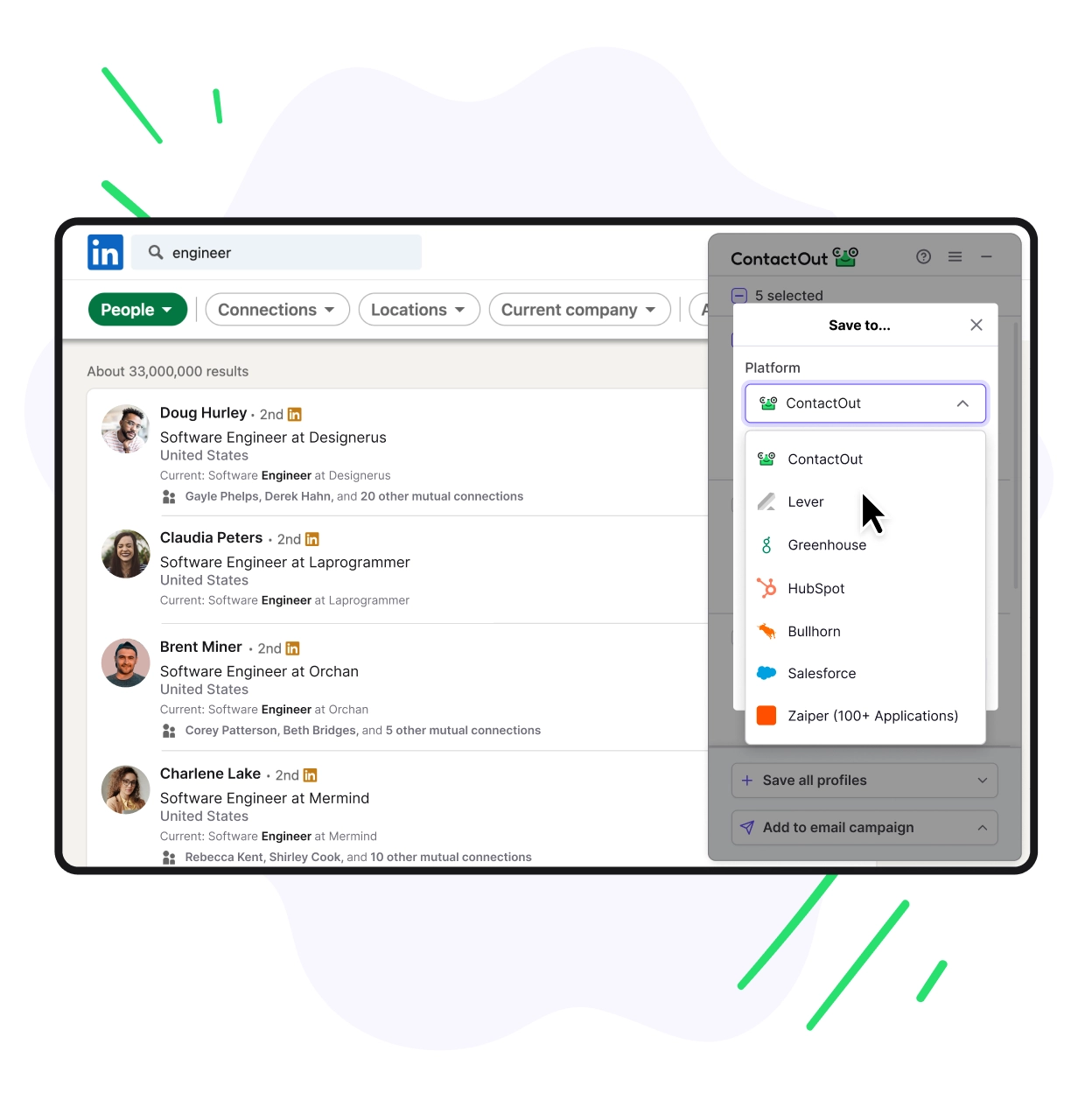
The catch is in the plan cards. Salesforce and ATS integrations are listed on the Team card, not on Email or Email + Phone, so confirm in writing that your ATS connection works on a self-serve plan before you build a workflow around this screen. Every contact saved this way also counts against your monthly exports, the limit section 2 flagged as the one that bites first.
The data behind the price
ContactOut's own numbers for its database do not agree with each other, which is worth knowing before you rely on any of them. Its data and API pages claim 800 million people profiles, 150 million personal emails, 200 million work emails, 100 million direct dials and 40 million companies - ContactOut Our Data. Its recruiter and sales pages say 350 million professionals, the Chrome Web Store listing says "over 300 million", and the Team card says "700million+". The gap is mostly profiles versus contacts: the figure that matters for a recruiter is the 150 million personal emails, and the honest way to test it is on your own candidate list.
The same pages describe the data as "triple-verified with 99% confidence", sourced by crawling the public web and matching contacts to people with AI. Treat accuracy claims like these as marketing until your own test says otherwise. Run 50 hard-to-reach candidates from a current search through the free plan over ten days, send to the personal emails, and count bounces and replies. That small experiment tells you more than any vendor's accuracy percentage.
API and MCP access
The API is sold only through a sales call: the documentation says to request a key "by booking a meeting", and no API price is published anywhere - ContactOut API page. The credit rules, however, are public. People search costs one search credit per profile returned (up to 25 per page), contact lookups cost one email or phone credit per result found, and the availability checkers that tell you whether an email or phone exists are free. Rate limits are 60 requests a minute for people search, 150 for the checkers and 1,000 for everything else, with prepaid or postpaid quotas per credit type.
Two limitations matter for anyone automating sourcing. The API matches on a single input, a LinkedIn URL or member ID, so its match rate can be lower than the extension's, and it "does not support URLs from salesNav or Recruiter" - ContactOut Help Center. ContactOut also runs an MCP server at contactout.com/mcp that lets Claude, Cursor and other AI assistants call people search, enrichment, contact lookup and email verification in plain language. It needs an API key, which the documentation says you can get by signing up for a free ContactOut account or booking a meeting, and it draws on the same credit types as the API.
The LinkedIn question
Any LinkedIn contact-finding extension carries a platform risk that no plan price reflects. LinkedIn's help center states that it does not permit "third party software, including 'crawlers', bots, browser plug-ins, or browser extensions" that scrape, modify its appearance or automate activity, and that members who use them "risk having their accounts restricted or shut down" - LinkedIn Help. Chrome's listing describes ContactOut as a publisher with "no history of violations", and the extension works on pages you are already viewing. Still, a recruiter whose Recruiter seat is their livelihood should know the policy exists before installing any tool in this category.
The practical response is to keep LinkedIn as the place you read profiles and move bulk work elsewhere. Reveal contacts on profiles you are already reviewing, rather than paging rapidly through search results with bulk reveal switched on, and do large list-building in ContactOut's own search portal, which queries ContactOut's database instead of LinkedIn pages. If your company pays for LinkedIn Recruiter seats, check whether your IT or talent operations team keeps an approved-extensions list, because the account at risk belongs to the employer as much as to you.
8. Where ContactOut Wins and Where It Falls Short
ContactOut's strengths and weaknesses both come from the same design choice: a flat, single-user subscription with a generous ceiling. That makes it excellent for one heavy user and awkward for everyone else. The company behind it is small and self-funded by its own account. Its official channel published a video titled "Hit $7.9M in 2023" - ContactOut on YouTube. Another, from late 2023, describes ContactOut as a "$10M bootstrapped startup" - ContactOut on YouTube. That is a reassuring sign of stability for a long-term data vendor, and also a reminder that it is a focused contact tool, not a recruiting suite.
Its strengths start with volume per dollar: up to 2,000 emails and 1,000 phone numbers for $99, or for $49 outside the US, UK and Canada, which few self-serve rivals match. The second is personal emails. ContactOut claims 150 million of them, and they are the contact type recruiters need most, because a passive candidate reads a personal inbox and ignores recruiter mail in a work one. The third is simple pricing: three public plans, unchanged for more than two years, with no credit arithmetic for phones. The fourth is the regional discount, which has no real equal for recruiters hiring outside North America and the UK. And the free plan's daily credits make for a low-friction trial that needs no card.
These strengths add up to a clear profile. ContactOut is at its best for a solo recruiter or sourcer who reveals hundreds of candidates a month, values personal emails over work addresses, and works a market where the regional discount applies. For that person it is hard to beat on price, and the simplicity of the plans means there is little to get wrong at checkout. The trouble starts when any one of those conditions does not hold.
The weaknesses come from the same design. Teams hit the one-user-per-company rule, so any second user means an unpublished quote. Light users pay a flat price for a ceiling they never reach, which makes each contact expensive below about 150 phone numbers a month. The export allowance (300 or 600 a month) is far tighter than the reveal allowance, which quietly ties your workflow to ContactOut's own campaigns. LinkedIn Recruiter Pro support and ATS integrations are listed only on the Team card. And the public terms offer no refund policy and cap ContactOut's liability at AUD $50.
The weaknesses matter most for agencies and in-house teams, which is a large share of the people searching for ContactOut pricing. If you are one of them, the real comparison is not ContactOut's $99 against a rival's $99. It is a ContactOut Team quote, which Vendr's small sample puts in the five figures a year, against tools that sell seats or shared pools self-serve. That comparison is what the next two sections are for.
9. The 9 Best ContactOut Alternatives in 2026
The right ContactOut alternative depends on which ContactOut limit you are escaping. Teams need seats or shared pools, light users need credits that do not punish low volume, and recruiters who are tired of buying contacts one by one may not need a contact finder at all. The nine tools below cover all three cases. The first seven are like-for-like contact finders; the last two are AI sourcing platforms that bundle contact data into a broader recruiting workflow.
Every price is the vendor's own published figure from October 2026. Where a vendor publishes both, the monthly-billing price comes first and the annual-billing price second, because annual prices flatter every vendor equally and monthly prices are what you pay while you are still evaluating.
9.1 Apollo.io: Per-Seat Plans for Teams
Apollo.io is the most direct answer to ContactOut's one-user rule, because it sells seats self-serve. Basic costs $65 per seat per month ($49 on annual billing) with 2,500 credits per seat per month, Professional costs $99 ($79 annual) with 4,000, and Organization costs $119 per seat on annual billing only, with a three-seat minimum - Apollo Pricing. There is a free plan with 75 credits a month. On email cost, Apollo's Professional plan works out at under 2.5 cents per email at full use, level with ContactOut.
The trade-offs are the ones the box at the top of this guide names. Apollo is a sales platform whose data centres on business contacts, and mobile numbers cost more credits than emails (third-party pricing guides put a mobile at 8 credits) - Docket. Apollo's own pricing FAQ adds that unused credits, including purchased add-ons, expire at the end of each billing cycle. Our Apollo pricing guide covers the credit types in detail.
Best for: recruiting and sales teams of two or more who mainly email and want sequences built in.
9.2 SignalHire: Shared Pools and Cheap Phones
SignalHire is ContactOut's closest rival on price and beats it on team access. Every package allows unlimited users on one shared pool, and one credit returns all the emails and phones for one person, charged only when something is found. Emails cost $49 for 600 credits or $69 for 1,000 a month, and the Phones packages cost $49 for 300 or $69 for 435. The Unlimited packages ($79 for emails, $99 for phones) are capped at 2,000 credits a month by SignalHire's own fair-use tooltip.
That Unlimited Phones package is the strongest like-for-like challenge to ContactOut: the same $99 buys twice the phone volume, for as many users as you like. ContactOut keeps the edge outside the US, UK and Canada, where its $49 regional plan matches SignalHire's cost per phone at half the price, and on its separate email pool. Our SignalHire pricing guide decodes its terms, including the no-refund clause.
Best for: phone-heavy recruiting teams that want one shared account.
9.3 Lusha: Credits That Roll Over
Lusha is the opposite of ContactOut's flat model, and that suits light or irregular users. Starter costs $49.90 a month for 400 credits and one seat, Professional starts at $69.90 for 600 credits and two seats, and Premium starts at $399.90 for 3,400 credits and five seats. An email costs 1 credit and a phone 5 - Lusha Pricing. The free plan includes 40 credits a month.
Lusha's standout rule is rollover: on monthly plans, unused credits accumulate up to twice your monthly allowance as long as you stay subscribed. A recruiter who needs 50 contacts one month and 500 the next pays less with Lusha than with any flat plan. At volume it is expensive, though: about 57 cents per phone at best on plans under $200, against ContactOut's 10 cents.
Best for: recruiters with irregular, lower-volume needs who hate wasting unused allowance.
9.4 RocketReach: Lookups With an Annual Unlimited Option
RocketReach sells "lookups" per user, each returning a person's contact details. Monthly plans cost $39 for 100 lookups (Essentials, emails), $79 for 250 (Pro + Phone) and $169 for 1,000 (Ultimate + Phone). Annual plans switch to unlimited lookups at $229, $619 and $1,379 a year, with export allowances of 1,200, 3,600 and 20,000 a year.
Ultimate + Phone works out at about 17 cents per phone number on monthly billing, competitive but behind ContactOut. RocketReach's distinctive appeal is the annual unlimited plan for a single power user, plus MCP and API access on every plan and integrations with Salesforce, HubSpot, Outreach and Bullhorn from the Pro tier upwards.
Against ContactOut, the annual Pro + Phone plan is the interesting comparison. At $619 a year it costs about $52 a month for unlimited lookups with phones, less than ContactOut's $948 annual Email + Phone plan. Exports are the catch here too: that plan allows 3,600 exports a year, half of ContactOut's 7,200, so it suits reveal-and-call work better than bulk ATS imports. It is also priced per user, so a team pays per head, and recruiters who care most about personal emails should compare match rates on their own candidates before switching.
Best for: solo power users who prefer one annual payment and a Bullhorn connection.
9.5 Kaspr: The European LinkedIn Option
Kaspr is a LinkedIn and Sales Navigator extension priced per user, with credits shared across the account. Starter costs €59 a month (€45 annual), or $65 and $49 in dollars, with unlimited B2B email credits and 100 phone credits a month. Business costs $99 a month ($79 annual) with 200 phones and 200 "direct email" credits.
Kaspr's unlimited B2B emails make it attractive for work-email outreach, but phones are scarce: even Business works out at about 50 cents per number at full use. Its natural buyer is a European recruiter who calls a few candidates a week and wants euro billing and a Sales Navigator workflow.
Compared with ContactOut's regional plan, Kaspr loses on phone volume by a wide margin: ContactOut's Exclude US/UK Email + Phone plan costs $39 a month on annual billing for up to 1,000 phones, against Kaspr Starter's $49 for 100. Kaspr makes sense when you want several users drawing on shared credits without a sales conversation, or when your outreach is mostly work email, where its unlimited B2B allowance removes any need to count.
Best for: EU-based recruiters with modest phone needs and work-email-led outreach.
9.6 Wiza: Built for Sales Navigator Lists
Wiza is built around exporting LinkedIn and Sales Navigator lists, and its pricing shows it. Starter costs $49 a month for 100 emails and 100 phones, Email costs $99 for 500 emails, and Email + Phone costs $199 for 500 of each, with extra emails at $0.15 and extra phones at $0.35. On annual billing Wiza switches to unlimited reveals: $990 a year for Email and $1,990 for Email + Phone, each with 2,500 exports a month.
The annual Email + Phone plan's 2,500 monthly exports are four times ContactOut's top allowance, which matters if your workflow is bulk list-building rather than one-by-one reveals. On monthly billing Wiza is one of the more expensive tools in this guide, at about 40 cents per phone at full use.
The comparison with ContactOut comes down to what you do with contacts after revealing them. ContactOut's Email + Phone plan costs less than half as much per year ($948 against $1,990) but allows only 600 exports a month, so a workflow that pushes every revealed candidate into an ATS or spreadsheet hits ContactOut's ceiling first. Wiza's pay-as-you-go overage rates ($0.15 per email, $0.35 per phone) also make it predictable for teams whose volume swings from month to month.
Best for: teams that build and export large lists from LinkedIn Sales Navigator.
9.7 Prospeo: The Cheapest Verified Work Emails
Prospeo is a credit-based email finder with some of the lowest per-email prices available. Starter costs $49 a month for 2,000 credits, Growth $99 for 5,000 and Pro $249 for 15,000, with annual plans from $441 a year for 24,000 credits. The free plan includes 100 credits.
At Growth level Prospeo costs under 2 cents per email at full use, cheaper than ContactOut's Email plan. Its focus is verified work emails for sales prospecting, though, so recruiters who depend on personal addresses should test coverage on their own candidates before switching.
For a recruiter, the choice between Prospeo and ContactOut is really a choice between email types. If your candidates are engineers, executives or other passive profiles who rarely act on recruiter mail at work, ContactOut's personal-email coverage is worth the small premium. If you recruit for roles where a work email is acceptable, or you run sales-style outbound to hiring managers on the client side of an agency, Prospeo's per-email price is hard to beat.
Best for: high-volume work-email outreach at the lowest unit cost.
9.8 Juicebox: AI Search With Contacts Included
Juicebox is an AI sourcing platform rather than a contact finder, and it bundles contact data into the seat. Starter costs $119 a month ($99 annual) with 500 contact credits covering email and phone, and Growth costs $199 ($179 annual) with 1,500. One credit returns every email and phone for a profile, which puts Growth at about 13 cents per contact at full use.
The difference from ContactOut is that Juicebox also finds the candidates, using natural-language search across professional profiles, and can run outreach. Its ATS and CRM integrations sit only on the custom Business plan. Our Juicebox pricing guide covers the plans in detail. At the enterprise end of the same category, hireEZ starts at $494 a month for a solo recruiter, with a 7-day free trial - hireEZ Pricing. Our hireEZ pricing guide explains what that figure includes.
Best for: recruiters who want search and contact data in one seat.
9.9 HeroHunt.ai: Candidates, Not Contact Lists
HeroHunt.ai takes a different route from every tool above. Instead of selling contacts for candidates you have already found, its AI Recruiter searches more than a billion profiles for people who match a role, screens them with language models, finds their emails and runs personalised outreach, so the contact lookup is one step inside an automated pipeline. Its RecruitGPT builds a candidate shortlist from a single prompt.
Plans start at $99 a month after an 8-day free trial (card required), with unlimited positions and searches. They are metered on matching profiles and candidate emails found: 500 emails a month on Starter and 1,000 on Pro - HeroHunt.ai Plans. It is not a phone-number tool, so a recruiter whose process runs on cold calls still needs ContactOut or SignalHire alongside it.
Best for: recruiters who would rather receive screened, contacted candidates than build contact lists by hand.
10. Full Comparison: Price, Meter and Best Fit
No single tool is cheapest for everything: ContactOut leads on phones outside North America and the UK, SignalHire on phones for teams, Prospeo and Apollo on work-email cost, and Lusha on flexibility for light users. The table puts each tool's entry paid plan, its meter and its phone rule side by side, because the meter decides your real bill. A tool that looks cheap per month can be expensive per phone, and a tool that looks expensive per seat can be cheap for a team sharing one account.
Read the table against your own usage rather than the cheapest headline. Count how many people you need to reach in a typical month, what share of them need a phone number, and how many people will share the account. Those three numbers, more than any feature list, decide which row is cheapest for you.
| Tool | Entry paid plan (monthly billing) | Meter | Phone rule | Best for |
|---|---|---|---|---|
| ContactOut | $49/mo, 1 user per company | Fair use 2,000 emails | 1,000 phones/mo on $99 plan | Solo heavy users |
| Apollo.io | $65/seat/mo | Credits per seat | Extra credits per mobile | Email-led teams |
| SignalHire | $49/mo, unlimited users | Credits per person | 1 credit, all fields | Phone-heavy teams |
| Lusha | $49.90/mo, 1 seat | Credits, roll over | 5 credits per phone | Irregular use |
| RocketReach | $39/user/mo | Lookups per user | Included on + Phone plans | Solo power users |
| Kaspr | €59/user/mo | Pools per data type | 100 phones/mo on Starter | EU LinkedIn sourcing |
| Wiza | $49/user/mo | Emails and phones | $0.35 per extra phone | Sales Navigator lists |
| Prospeo | $49/mo | Credits | Email-focused | Cheapest work emails |
| Juicebox | $119/seat/mo | Contact credits | 1 credit, all fields | AI search plus contacts |
| HeroHunt.ai | $99/mo | Profiles and emails | Not a phone tool | Automated recruiting |
The email view tells a different story from the phone view in section 4. The chart below shows the best cost per 1,000 emails on a self-serve plan up to $200 a month, on monthly billing and at full allowance. Kaspr is left out because its "unlimited" B2B emails have no published cap to divide by.
Best cost per 1,000 emails on self-serve plans up to $200 a month
On emails, ContactOut sits in a three-way tie for cheap with Prospeo and Apollo, and reaches that price at the lowest monthly spend, $49, matched only by Prospeo's Starter plan. The real differentiator is not price but email type. Prospeo and Apollo are built around work emails for sales, while ContactOut's pitch is the personal address a passive candidate actually reads. If your reply rates depend on reaching people outside their work inbox, compare personal-email coverage on a sample of your own candidates before you compare prices.
11. How to Choose, and How to Buy ContactOut Well
The decision follows three questions in order: how many people will use the account, whether you need phone numbers, and where your candidates live. The diagram below turns them into a route through the options in this guide. It deliberately starts with seats, because the one-user rule rules ContactOut's self-serve plans out for teams before price even enters the picture.
Follow the left branch and the answer is usually not ContactOut self-serve, because a team either negotiates the Team tier or moves to a seat-based or shared-pool tool. Follow the phone branch outside North America and the UK and ContactOut's regional plan is the cheapest phone data in this guide. The one branch where ContactOut faces a genuine like-for-like fight is heavy US phone usage, where SignalHire's Unlimited Phones package offers twice the volume at the same price.
Two cases deserve a second look before you follow the diagram. If you mostly email but your candidates often ignore work addresses, weigh personal-email coverage above price, because a cheaper tool that only finds work emails can cost you more in unanswered outreach than it saves per contact. And if you are a recruiter who spends more time finding candidates than contacting them, the contact-finder question may be the wrong one entirely, which is where the AI sourcing platforms in section 9 come in.
If ContactOut is the right answer, five habits keep the bill honest. Test on the free plan first, running your hardest-to-reach candidates through the daily credits before you pay anything. Pick the right toggle, taking Exclude US/UK only if almost none of your candidates live in those three countries. Count exports, not reveals, because 300 or 600 a month is the real ceiling for any workflow that ends in an ATS. Get integrations in writing, confirming LinkedIn Recruiter Pro and ATS support on your exact plan. And for teams, negotiate with numbers: price the same volume on self-serve tools first, so you know what a Team quote has to beat.
These habits matter because ContactOut's risks are front-loaded. With no public refund policy, the cheapest mistake is the one you avoid before paying, so the free plan is your real trial, and annual billing should wait until you have used a monthly plan for a full cycle. For teams, the self-serve prices in this guide are your strongest negotiating tool. Three recruiters on SignalHire's shared Unlimited Phones package cost $99 a month, and three Apollo Basic seats cost $147 a month on annual billing, so any ContactOut Team quote far above that should come with API access, ATS integrations and a fair-use allowance well beyond the self-serve caps.
12. The Bottom Line
ContactOut is one of the best-value contact tools in 2026 for exactly one kind of buyer: a solo recruiter who reveals hundreds of candidates a month and wants personal emails and mobile numbers. For that person, Email + Phone at $79 a month on annual billing (or $39 outside the US, UK and Canada) buys phone numbers for under 10 cents each at full use, from a vendor whose prices have not moved in more than two years. The "50% off" is permanent framing, the "unlimited" is 2,000 emails and 1,000 phones, and both are fine once you know them.
For everyone else, the alternatives are often better fits. Teams run into the one-user-per-company rule and an unpublished Team price, so Apollo's per-seat plans or SignalHire's shared pools are usually cheaper and faster to buy. Light users pay too much per contact on a flat plan and do better with Lusha's rollover credits. Heavy US phone users should price SignalHire's Unlimited Phones package before signing anything.
And recruiters who are tired of buying contacts one profile at a time can step back from the category entirely. AI sourcing platforms like Juicebox and HeroHunt.ai find the candidates, screen them and handle the outreach, with email finding built into the plan. The right choice comes down to the three numbers this guide keeps returning to: how many people you reach each month, how many you call, and how many colleagues share the account.
Need more than one seat? Apollo sells them self-serve from $49 per seat per month on annual billing.
This guide reflects ContactOut's pricing, terms and documentation as read in October 2026, with history from Wayback Machine snapshots of its pricing page and terms. Contact-data pricing changes frequently, so verify current details on each vendor's own pricing page before purchasing.