



How much does LinkedIn Recruiter cost in 2026? LinkedIn publishes a price only for Recruiter Lite, reported at $170 a month for one license, while Corporate is quoted per account at roughly $10,800 to $12,960 per seat per year after a 15% rise in 2026 - Leonar. LinkedIn's UK public-sector price sheet lists £8,925 per seat per year for 1 to 2 licenses, down to £6,350 at 251 or more - G-Cloud 14.
LinkedIn Recruiter pricing is hard to find online.
So we wrote this blog to inform you on the available plans, differences in plans and the latest pricing indications.
We'll answer these questions for you:
- Which LinkedIn Recruiter plans are there?
- What does LinkedIn Recruiter cost?
- When should I pay for LinkedIn Recruiter?
- What are my alternatives?
HeroHunt.ai
Before you price a Recruiter seat, be clear on what the seat actually sells you. LinkedIn profiles are largely public, so a five-figure Corporate licence buys the search filters, the InMail quota and the shared-project layer on top of that data, not exclusive access to the people. HeroHunt.ai attacks the same job from the other side: it searches over 1 billion profiles across LinkedIn, GitHub and Stack Overflow and runs personalised outreach automatically, without a per-seat InMail allowance to ration. The honest caveat: it is a sourcing tool, not an applicant tracking system, so you still need somewhere to run your pipeline, and its outreach goes by email, which is the wrong fit if your market genuinely only replies inside LinkedIn.
Which LinkedIn Recruiter plans are there?
For recruiters there are basically two plans: ‘LinkedIn Recruiter’ and ‘LinkedIn Recruiter Lite’. LinkedIn Recruiter has two flavours, ‘Corporate’ and ‘Professional Services’ (which now also comes as ‘Professional Services Plus’, or RPS+) - LinkedIn Help.
Other LinkedIn plans like ‘LinkedIn Sales Navigator’ and 'LinkedIn Premium Business’ are not necessarily made for recruiting, but can do the job for a sourcer or recruiter depending on how they work.
In this blog we'll focus on the available plans and pricing for LinkedIn Recruiter (corporate and professional services) and LinkedIn Recruiter Lite.
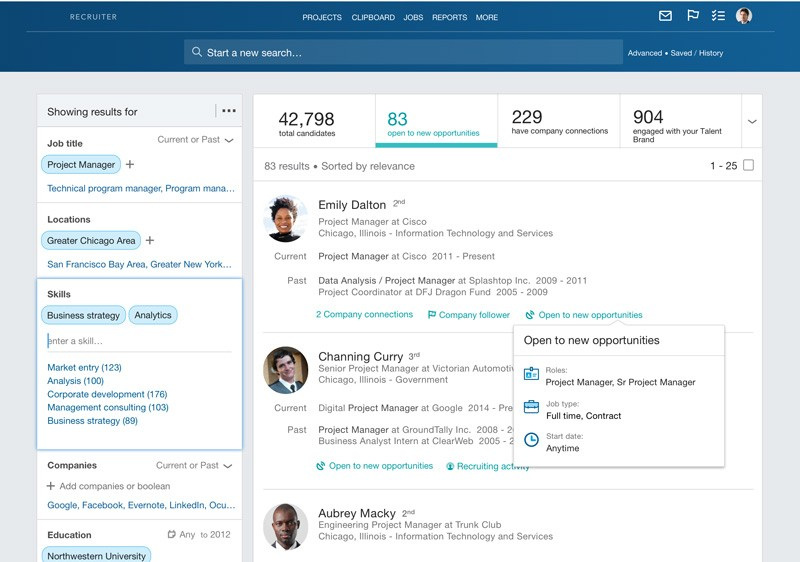
The main difference between LinkedIn Recruiter and LinkedIn Recruiter Lite are the amount of search filters you can use, the monthly amount of InMails (30 InMails vs up to 150 InMails) and that LinkedIn Recruiter (both corporate and professional services) are built for larger shared teams, while LinkedIn Recruiter Lite shares projects across up to 5 seats at most.
What does LinkedIn Recruiter cost?
Try to google LinkedIn pricing and chances are very small you find a reliable answer to your question.
LinkedIn intentionally keeps pricing vague because they have market and account based pricing strategies in place.
We can however give an indication of prices for 2026 based on the latest offered prices and validation with our recruiter network.
Take into account that prices can vary per geography, company and industry.
These are the latest LinkedIn pricing indications (averages, rounded off):
- Recruiter Corporate: $10,800 to $12,960 per seat per year, billed annually
- Recruiter Professional Services: $6,000 to $10,000 per seat per year (the staffing and agency version, a third-party estimate)
- Recruiter Lite: $1,680 per year for a single license, or roughly $2,670 per year per license for licenses 2 to 5
- Recruiter Lite month to month: about $170 per month for a single user, or $270 per month per user for licenses 2 to 5 - Leonar
- Business Premium (not a Recruiter license): $539.88 per year billed annually, or $69.99 per month billed monthly - LinkedIn Premium
Note the gap between the two Lite lines. Paying month to month costs about $170, while the same single license billed annually works out at roughly $140 per month. Committing for a year is therefore about 18% cheaper on Lite, and the gap is wider on Business Premium ($539.88 a year versus $839.88 at the monthly rate, a 36% saving per LinkedIn).
The Corporate number moved in 2026. Agencies publishing their renewal quotes put the increase at roughly 15% year over year - Leonar. It was not applied evenly: multi-year contracts with a lot of seats absorbed less of it, while single-year accounts with low usage tended to get the full jump. Recruiter Lite pricing stayed roughly flat.
Two things inflate the real bill beyond the seat price. First, Corporate is quoted per seat but sold as a team product, and reps commonly push a three-seat minimum (LinkedIn does not publish this as a rule, but it shows up in most quotes), so the practical entry point is closer to $32,000 per year than $10,800. Second, the seat is only the base: extra InMails reportedly run about $10 each or more, depending on contract once you burn through the monthly allowance, job slots and Talent Insights are separate line items, and Hiring Assistant, LinkedIn's AI sourcing agent, is sold as a paid add-on rather than included in your seat.
Main differences LinkedIn Recruiter and LinkedIn Recruiter Lite
The main differences between the plans are the amount of search filters, the monthly amount of InMails and the option to share accounts and data.
LinkedIn Recruiter (corporate and professional services)
- Corporate searches the full LinkedIn network, while Professional Services is limited to 3rd-degree connections plus 30 out-of-network unlocks a month (RPS+ has 50)
- InMails: up to 150 InMails every month (LinkedIn Help lists 150 on Corporate, 140 on RPS+ and 100 on Professional Services)
- Search: 40+ search filters
- Collaboration: Multi user account is available (collaborative environment)
- Reports: Jobs and InMail reporting, plus insights into your Recruiter pipeline, usage, and performance summaries
- AI: Hiring Assistant can be bought as an add-on on Corporate and RPS+ (not included in the seat)
LinkedIn Recruiter Lite
- Finds only 1st, 2nd and 3rd connections, doesn't find people outside of your network!
- InMails: 30 InMails every month
- Search: 20+ search filters
- Collaboration: multi-user dashboard and shared projects for up to 5 seats
- Reports: basic analytics only
- AI: no Hiring Assistant
These allowances come straight from LinkedIn's own Recruiter and Recruiter Lite pages and its plan comparison. The network limit is the difference that catches most buyers out: Lite looks like a cheap Recruiter, but it only searches inside your own 1st, 2nd and 3rd degree network (Professional Services is also limited to 3rd-degree connections, but adds 30 out-of-network unlocks a month). If you are sourcing in a market where you have no connections, Lite will simply not show you the people who are there.
When should I pay for LinkedIn Recruiter?
Pay for Recruiter Corporate when you hire continuously, at volume, as a team, and InMail is genuinely your main channel. That is the narrow case where the seat earns back its price: full network reach, shared projects and shared candidate notes, and enough hires per seat per year that a five-figure licence is small next to one agency fee.
Many recruiters and companies say that they pay for LinkedIn Recruiter because “LinkedIn has the most people on there”.
With more than 1 billion members, LinkedIn is indeed the biggest professional network in the world.
But what most people don’t know is that you don’t need a paid LinkedIn account to access the profiles on there. Those profiles are largely public. What a Recruiter seat actually sells you is the search interface, the filters, the InMail quota and the collaboration layer on top of that data, not exclusive access to the people themselves.
It is usually not worth the money if:
- You hire a handful of people per year
- You mainly need to organise a pipeline rather than find new people
- Your candidates respond better to email than to InMail
- You are a single recruiter who will never touch the shared-project features
What are my alternatives?
If you don't want to pay the indicated fees for LinkedIn Recruiter, there are plenty of alternatives.
Many engines provide the same data (profiles) as LinkedIn does itself.
These are your alternatives to recruiting on LinkedIn without paying the LinkedIn Recruiter fee:
1. Use a talent search engine that finds LinkedIn profiles
There are search engines specifically made for finding the right LinkedIn profiles.
Most of the time, these search engines also provide profiles from other platforms where candidates can be found.
An example is HeroHunt.ai which searches up to 1 billion public professional profiles and lets you reach out automatically with personalized messages by email and LinkedIn. Plans start at $99 a month with an 8-day free trial (a card is needed to start and is charged when the trial ends unless you cancel).
2. Use the free version of LinkedIn
You can search LinkedIn using your free account. It helps to know how to build the right search strings. Two things to know at least when you want to get the most out of searching LinkedIn with a free account are:
- How to x-ray LinkedIn (full x-ray guide, or the LinkedIn X-ray search tool)
- How to use search operators (full Boolean search guide)
3. Use affordable recruiting software
If you mainly need software to manage your pipeline, an AI-powered ATS and recruitment CRM like Manatal starts at $15 per user per month billed annually (with a 14-day free trial), a fraction of the Recruiter seat prices quoted above.
Manatal
This is the one alternative on the list that is not a Recruiter replacement, and it is worth being precise about why. Manatal publishes its price openly, $15 per user per month billed annually ($19 month to month) on a 14-day trial that needs no card, so it costs a rounding error next to the Recruiter Lite and Corporate numbers above. But it organises a pipeline, it does not search LinkedIn's billion-member network for you, so it only takes the place of a Recruiter seat when your real bottleneck is tracking the candidates you already have rather than finding new ones. Check the cap before you compare: the $15 tier stops at 15 active jobs and 10,000 candidates, so a busy desk is really pricing the $35 unlimited tier.
4. Use a contact database to reach out directly
A B2B contact database and email finder like Apollo.io lets you find candidate email addresses and run outreach directly, so you don't need to pay for InMail-bundled Recruiter plans just to contact people. Lusha is a comparable option that surfaces verified emails and direct-dial phone numbers, with a Chrome extension and a free tier to get started.
Frequently asked questions
How much does LinkedIn Recruiter cost?
LinkedIn quotes Recruiter Corporate per account and does not publish a price. Recent renewals ran about $10,800 to $12,960 per seat per year after a 15% rise - Leonar. LinkedIn's UK G-Cloud sheet lists £8,925 per seat per year for 1 to 2 licenses, falling to £6,350 at 251 or more - G-Cloud 14.
How much is a LinkedIn Recruiter license per month?
Only Recruiter Lite can be bought online, at about $170 a month for one license and $270 for licenses 2 to 5 - Leonar. Its free trial lasts one month, needs a card and converts to paid unless you cancel - LinkedIn Help. Corporate is billed annually, so $10,800 to $12,960 is roughly $900 to $1,080 per seat per month.
What LinkedIn Recruiter packages are there?
LinkedIn sells Recruiter Corporate, Professional Services Plus (RPS+), Professional Services (RPS) and Recruiter Lite. Lite includes 30 InMails a month, 20 filters and 1st to 3rd degree reach, while Corporate includes 150 InMails, 40+ filters and the full network - LinkedIn Help.
Is LinkedIn Recruiter worth the money?
It pays back when a team hires continuously and InMail is the main channel. Low-volume recruiters usually get more from a cheaper stack. Our guide to seven LinkedIn Recruiter alternatives compares the options.
Pricing indications checked September 2026. LinkedIn does not publish Recruiter pricing and negotiates per account, so treat these as ranges to negotiate against, not list prices.