


The 2026 playbook for getting recruiting email into the inbox: authentication, the new sender rules, warm-up, list hygiene, and the reputation signals that actually decide placement.
Roughly one in six marketing emails never reaches the inbox at all, landing in spam or vanishing entirely, according to EmailToolTester's ongoing seed test across 15 major providers, which measured an average inbox rate of just 83.1% in 2026. For recruiters the number is worse, because candidate outreach is the single hardest kind of email to deliver: it is cold, it goes to people who never asked to hear from you, it arrives in bursts, and it is increasingly sent by lists that were scraped or guessed rather than opted in.
Here is the problem most recruiting teams have not internalized: "sent" is not "delivered," and "delivered" is no longer "seen." Your applicant tracking system, your sequencing tool, and your mailbox will all cheerfully report that a message went out. None of them tells you whether Gmail quietly routed it to spam, whether Microsoft rejected it at the door with a 550 error, or whether Apple's AI filed it under Promotions before the candidate ever glanced at their phone. The gap between what your tools claim and what candidates actually receive is where entire sourcing campaigns die without a trace.
This guide is the complete 2026 field manual for closing that gap. It explains how an email physically reaches an inbox, the 2024-2026 sender mandates from Gmail, Yahoo, and Microsoft that now reject non-compliant mail outright, the authentication you must have (SPF, DKIM, DMARC, and BIMI), and the practical craft of warm-up, list hygiene, content, monitoring, and recovery. It names specific tools with real 2026 pricing, covers the compliance rules that carry five-figure per-email fines, and looks at how AI agents are quietly rewriting the deliverability game. The audience is recruiters and talent teams, so nothing here assumes you are a mail administrator, but it goes deep enough to fix the actual problem.
HeroHunt.ai
Deliverability is ultimately a volume-and-behavior problem, and the fastest way to blow past Gmail's 0.3% complaint ceiling is to blast a cold, low-engagement list from a single mailbox. HeroHunt.ai attacks the upstream cause rather than the symptom: its AI Recruiter sources from over 1 billion profiles and its RecruitGPT builds a targeted shortlist from a plain-language brief, so you are writing to genuinely relevant candidates (who complain and bounce far less) instead of a scraped dump. It runs the opening outreach from your own connected mailbox, on autopilot, with a free 8-day trial and plans from $99 a month. The honest caveat: it is a sourcing and outreach layer, not an SMTP or warm-up product, so SPF, DKIM and DMARC on your sending domain, plus the warm-up ramp in Section 5, remain your responsibility no matter which tool ultimately sends the mail.
Contents
- Why Recruiting Email Is a Deliverability Hard Case
- How an Email Actually Reaches the Inbox
- The 2024-2026 Sender Mandates
- Authentication: SPF, DKIM, DMARC, and BIMI
- Domain and Inbox Warm-up
- List Hygiene and Email Verification
- Content and the Spam-Word Myth
- Sending Infrastructure: Domains, Mailboxes, and IPs
- Monitoring: Postmaster Tools, SNDS, and DMARC Reports
- The 2026 Deliverability Tool Landscape
- Compliance: GDPR, CAN-SPAM, and PECR
- How AI Agents Are Changing Deliverability
- Recovering From a Deliverability Collapse
- The Future of Recruiting Deliverability
1. Why Recruiting Email Is a Deliverability Hard Case
Recruiters are, structurally, among the riskiest senders on the internet, and the mailbox providers treat them accordingly. The recruiting workflow demands exactly the behaviors that spam filters are built to catch: frequent cold email to passive candidates who never opted in, large seasonal bursts of near-identical templated messages, and low prior engagement because the recipient has no relationship with your domain. One deliverability team put it bluntly, noting that recruiting outbound "mimics spam patterns" and is disproportionately flagged because of the tell-tale "we have a great opportunity for you" content signature - Concord P2C. The filters are not being unfair. They are pattern-matching, and unfortunately good-faith recruiting looks a lot like bad-faith spam from the outside.
The consequence is that recruiters hit the provider "danger" thresholds far faster than a transactional sender ever would. A password-reset email gets opened, clicked, and welcomed; a cold sourcing message gets ignored, and a meaningful fraction gets marked as spam. Because the modern filter weighs complaints and engagement above almost everything else, that difference in reception cascades into the domain's reputation and drags down every subsequent send. This is why a recruiting team can do everything "right" on the message itself and still watch its inbox rate collapse: the medium is fighting the message.
The gap between providers makes the picture sharper. Deliverability varies enormously by where the candidate reads their mail, and Microsoft-operated inboxes (Outlook.com, Hotmail, and corporate Microsoft 365) are the graveyard where legitimate recruiting mail most often disappears.
Average Inbox Placement by Provider (2025)
Those figures come from Validity's 2026 benchmark, and the 75.6% at Microsoft is the number that should worry any recruiter sourcing into enterprise accounts, where Microsoft 365 dominates. Almost a quarter of your carefully written outreach to those candidates is not reaching the inbox before content, timing, or copy even enters the equation. Gmail, at 89.8%, is comparatively forgiving, but it is also where the strictest complaint accounting happens. The lesson is that deliverability is not one number; it is a per-provider reality, and a strategy tuned only to Gmail will quietly bleed candidates on the Microsoft side.
None of this means recruiting email is a losing game. It means the margin for sloppiness is gone. The teams that treat deliverability as an engineering discipline, isolating their outreach, authenticating properly, and watching their reputation, consistently reach candidates that their competitors cannot. The rest of this guide is how they do it, starting with the mechanics of what actually happens between "send" and "seen."
2. How an Email Actually Reaches the Inbox
The most useful mental model for deliverability is a series of checkpoints, not a single delivery event. When you press send, your message does not travel in a straight line to the candidate; it passes through a sequence of gates, and failing any one of them can silently divert it to spam or bounce it back. Understanding this pipeline is what separates recruiters who can diagnose a deliverability problem from those who just keep rewriting subject lines and hoping. The order matters, because the earliest gates (authentication) are pass-or-fail and absolute, while the later gates (reputation, content, engagement) are probabilistic and cumulative.
At the highest level there are four stages. First, authentication, where the receiving server checks that you are cryptographically allowed to send from your domain. Second, reputation, where it consults the historical track record of your sending domain and IP address. Third, content and list signals, where it weighs the message itself along with bounce and spam-trap evidence about your list quality. Fourth, machine-learning scoring, where engagement history (do people open, reply, and not complain) tips the message toward the inbox or the spam folder. Only after all of that does a fifth, newer stage apply: AI triage inside the client, which decides whether a delivered message lands in Primary or gets demoted to Promotions or Updates.
The diagram makes the critical point visible: authentication is a hard gate near the front, and everything valuable happens only after you pass it. A message that fails DMARC alignment at a strict provider never reaches the reputation or content stages at all; it is rejected or junked immediately. This is why so much deliverability advice about copy and timing is premature. If you are stuck at roughly 40% inbox placement, the problem is almost never your words. It is DNS and account setup, as warm-up specialists at MailReach repeatedly find when teams arrive convinced their subject line is cursed. Copy tweaks move you from good to slightly better; they do not rescue a broken foundation.
A concrete example makes the pipeline actionable. Suppose a recruiter's sequencing tool reports 100% "sent" but replies have cratered. Working the checkpoints in order, you first confirm authentication with a test to a seed address: if DMARC is failing, nothing downstream matters and you stop there. If authentication passes, you open Postmaster Tools and read the spam-complaint rate; a figure near or above 0.30% means recipients are actively reporting you, which is a targeting and consent problem, not a copy problem. Only if reputation and complaints look healthy do you examine the message itself. This ordered triage takes ten minutes and routinely saves recruiters from spending a week A/B testing subject lines against a problem that lived in a DNS record the whole time.
The second insight is that reaching the inbox is no longer the finish line. Even a message that clears every filter can be delivered and then buried by the client's own AI, sorted into a tab the candidate rarely checks or compressed into a one-line summary they skim without ever opening. That shift, which we return to in Section 12, means the modern deliverability goal is not merely "inbox" but "Primary inbox, opened, and answered." Each of the following sections tackles one checkpoint in this pipeline, in roughly the order the receiving server evaluates them, starting with the authentication gate that gates everything else.
3. The 2024-2026 Sender Mandates
The single most important development in email deliverability this decade is that the major providers stopped suggesting best practices and started enforcing them. Beginning February 1, 2024, Google and Yahoo made authentication mandatory for bulk senders, and Microsoft followed in May 2025. What used to be advice ("you really should set up SPF and DKIM") is now a gate: fail it and your mail is junked or rejected, not merely scored down. For recruiters running high-volume outreach, these mandates are the rules of the game, and ignorance of them is the most common reason a sourcing campaign silently fails.
The trigger for Google's rules is a volume threshold. A sender who transmits more than 5,000 messages per day to personal Gmail accounts is classified as a bulk sender, the count is cumulative across a rolling 24-hour period, and once you cross the line the classification is effectively permanent - Google. Bulk senders must authenticate with SPF and DKIM, publish a DMARC record (a policy of p=none satisfies the minimum), keep their From header aligned with SPF or DKIM, use TLS, maintain valid forward and reverse DNS, and offer one-click unsubscribe on marketing mail. Above all, they must keep the spam-complaint rate reported in Google Postmaster Tools below 0.30%, and ideally under 0.10%. Recruiters often assume they are under the 5,000 threshold and therefore exempt, but a team of ten sending 500 candidate emails a day each crosses it instantly, and the requirements are simply good practice at any volume.
Two details in the fine print catch recruiting teams repeatedly. First, the classification is sticky: once your domain crosses 5,000 messages in a rolling 24-hour window, providers treat you as a bulk sender going forward, so a single big push during a hiring surge can move you into the stricter regime permanently. Second, one-click unsubscribe is a specific technical requirement, not just a visible link. It means implementing the RFC 8058 headers (a List-Unsubscribe header plus a List-Unsubscribe-Post value) so the recipient's mail client can offer a native unsubscribe button that works without opening your message, and Google expects requests honored within 48 hours. A recruiting tool that only puts an "unsubscribe" hyperlink in the footer does not satisfy this, and the gap is invisible until placement quietly degrades.
The best explanation of why these rules exist comes from the people who wrote them. In this launch briefing, Google's and Yahoo's own product leaders walk through the intent and enforcement of the new sender requirements before the mechanics ever get technical.
Understanding new sender requirements: A fireside chat with Yahoo & Google
Microsoft's version arrived a year later and closed the last major loophole. Announced on April 2, 2025 and enforced from May 5, 2025, Microsoft now requires senders of more than 5,000 emails per day to Outlook.com, Hotmail.com, and Live.com to implement SPF, DKIM, and DMARC - Microsoft. The rollout is phased deliberately: in the first phase non-compliant high-volume mail is routed to the Junk folder as a grace period, and in the later phase it is rejected outright with the SMTP error "550 5.7.515 Access denied," as documented in Mailgun's breakdown. Because Microsoft inboxes already have the worst placement rates for recruiters, missing these requirements turns a difficult provider into an impossible one.
The following table summarizes the three regimes recruiters must satisfy simultaneously, because most sourcing lists contain a mix of Gmail, Yahoo, and Microsoft addresses.
| Requirement | Gmail (Feb 2024) | Yahoo (Feb 2024) | Microsoft (May 2025) |
|---|---|---|---|
| Bulk threshold | 5,000/day to Gmail | 5,000/day | 5,000/day to consumer domains |
| SPF + DKIM | Both required | Both required | Both required |
| DMARC | p=none minimum | p=none minimum | p=none minimum |
| One-click unsubscribe | Required (RFC 8058) | Required | Recommended |
| Spam-rate ceiling | < 0.30% (ideal < 0.10%) | < 0.30% | Enforced via filtering |
| Non-compliance | Rejected since June 2024 | Filtered/rejected | Junk, then 550 reject |
The practical takeaway is that these are not three different projects. Authenticate once, correctly, with SPF, DKIM, and an aligned DMARC record, add one-click unsubscribe, and keep complaints down, and you satisfy all three regimes at the same time. The escalation is also worth watching: through late 2025 and into 2026, all three providers moved from temporary errors to permanent 550 rejections for non-compliant bulk mail, with Gmail publicly ramping enforcement around November 2025 - Google. The window for treating authentication as optional has closed. Section 4 covers exactly how to set it up.
4. Authentication: SPF, DKIM, DMARC, and BIMI
Authentication is the foundation of everything, and it is the one part of deliverability that is genuinely binary: either your records are correct and aligned, or they are not. The good news is that it is a one-time setup you can largely forget once it is right. The three core standards work as a team. SPF declares which servers are allowed to send for your domain, DKIM cryptographically signs each message so the recipient can verify it was not altered, and DMARC ties the two together by telling receivers what to do when a message fails and, crucially, by requiring that the authenticated domain aligns with the visible From address. Missing or misaligned authentication is the reason a technically "sent" recruiting email is rejected before any human sees it.
The payoff for getting this right is measurable, not theoretical. An analysis of more than 32,000 email accounts found that fully authenticated domains are roughly 2.7 times more likely to land in the inbox than unauthenticated senders, with placement climbing steadily as you add each layer - TrulyInbox. The chart below shows the ladder: bare, unauthenticated sending floats around the two-thirds mark, and each authentication layer lifts you toward the inbox.
Inbox Placement by Authentication Level
Each standard has a sharp edge that trips up recruiters. SPF caps the number of DNS-querying mechanisms at ten per check; exceed it and receivers return a PermError that makes SPF effectively fail, a limit that is easy to breach once you chain several sending tools that each add an "include" - Mailhardener. SPF also authenticates the envelope sender, not the visible From, and it breaks whenever mail is forwarded, which is why DKIM (which survives forwarding) and DMARC alignment are non-negotiable on top of it. DKIM should now use 2048-bit keys as the standard, with rotation every 6 to 12 months using overlapping selectors so mail in transit still verifies during the DNS-propagation window - DuoCircle. DMARC passes when either SPF or DKIM passes and aligns with the From domain, so you only need one aligned path, and its aggregate reports are the single best source of truth about who is sending as you.
The Valimail diagram below is the clearest way to see how these pieces combine at the moment of delivery, showing the alignment check and the three possible policy outcomes.
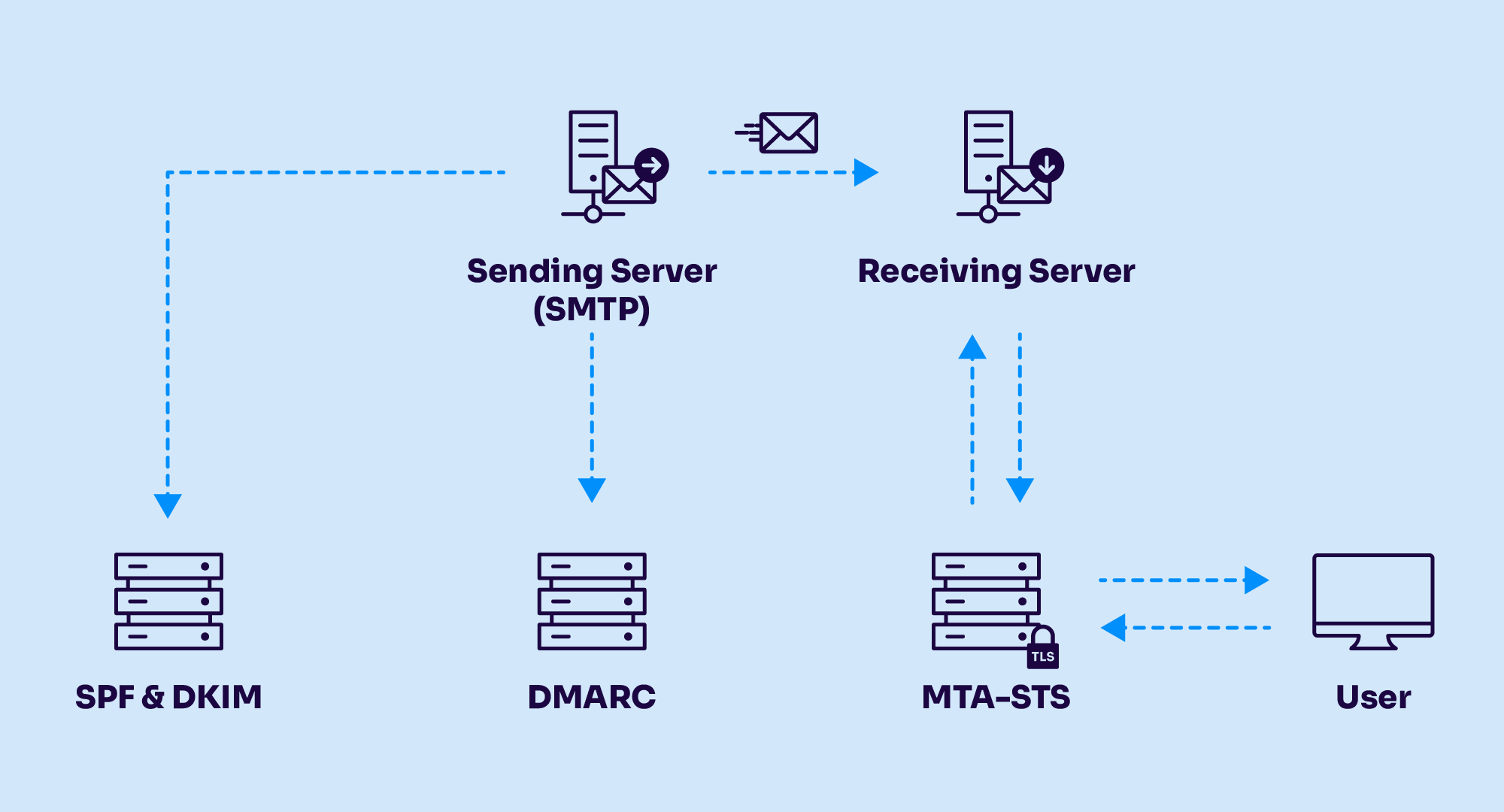
The DMARC policy you publish is where most senders quietly fail. A record of p=none monitors but protects nothing; p=quarantine sends failures to spam; p=reject blocks them. The recommended ramp is to sit at p=none for at least a full quarter while you read the aggregate reports and fix every legitimate source, then move to quarantine, then reject - DMARC Report. The problem is that most organizations publish p=none to satisfy the Google and Yahoo mandate and then stop. Valimail's 2026 State of DMARC report found DMARC record adoption at 78% of domains but actual enforcement (quarantine or reject) plateaued at just 42%, a 36-point "enforcement gap" that leaves the majority of domains monitoring without protecting - Valimail. For recruiters, p=none is the box-checking trap: it satisfies the letter of the mandate while doing nothing to defend your domain or maximize your alignment.
The reason to actually read those aggregate reports, rather than just publish a record and forget it, is that they reveal every service sending as your domain: your ATS, your sequencing tool, your calendar app, your payroll system. Each is a source that must be brought into alignment before you can safely move to enforcement, and the reports are how you find the one you forgot. Alignment itself has a subtlety worth knowing. Relaxed alignment, the default, treats subdomains as matching the organizational domain, so mail from mail.company.com aligns with a DMARC record on company.com. Strict alignment demands an exact match. Most recruiting setups want relaxed, because it lets a dedicated outreach subdomain inherit the parent's DMARC policy while still being isolated for reputation, which is exactly the architecture Section 5 recommends.
Setting these records up is a DNS task, not a coding one, and because most recruiting teams send from Google Workspace, a current walkthrough helps. This 2026 tutorial from the deliverability vendor Warmy shows the exact console steps for adding SPF, DKIM, and DMARC to a Workspace sending domain.
How to Set Up SPF, DKIM, and DMARC for Gmail in 2026 (Google Workspace)
Beyond the core three sits BIMI, which displays your brand logo (and, with the right certificate, a blue verified checkmark) next to authenticated mail. It requires DMARC at enforcement to work at all, and the logo certificate is not cheap: a Verified Mark Certificate lists around $1,474 per year from DigiCert, while the newer Common Mark Certificate that Gmail began supporting in September 2024 runs from roughly $649 per year and needs only a logo in use for a year rather than a registered trademark - SSL2BUY. For most recruiting teams BIMI is a nice-to-have brand signal rather than a deliverability necessity, and its adoption remains low (Valimail tracked it at just 4% of domains), but it is worth knowing it exists once your DMARC is at enforcement anyway.
5. Domain and Inbox Warm-up
Warm-up is the practice of gradually increasing send volume from a new domain or mailbox so that mailbox providers build a positive reputation for you before you send at scale. It exists because providers judge behavior over time, not the content of any single message, and a brand-new domain that suddenly emits a hundred cold emails looks exactly like a hijacked account being used for spam. The standing advice is blunt: never jump from 10 to 100 emails overnight, because a sudden spike is the primary cause of spam placement for new domains - MailReach. Skipping warm-up is the most common self-inflicted deliverability wound in recruiting, because the pressure to start sourcing immediately overwhelms the patience the providers demand.
A crucial and counterintuitive point is that domain age does not substitute for warm-up. Even a domain registered ten years ago "might as well be brand new" if it has never sent outbound email, because there is no engagement history for the filters to score. Reputation is built on behavior, not on the registration date, which is why buying an aged domain and blasting from it fails just as fast as using a fresh one. A representative manual ramp starts at 5 to 10 plain-text emails per day in the first week and climbs over three to four weeks, and even automated warm-up tools compress this to roughly two weeks rather than eliminating it. The other hard rule that catches recruiters by surprise is that new Google Workspace accounts are capped at 500 external recipients per day, and that limit only rises after the account has cumulatively paid at least $100, sometimes taking up to 75 days to lift - Digital Inspiration.
The strategic decision that protects a recruiting operation is domain separation. You should never send cold candidate outreach from your primary corporate domain, because a complaint spike or blocklisting on your outreach mail can poison the business-critical email (billing, ATS notifications, offer letters) that shares that domain. The two options are a dedicated subdomain or a fully separate domain, and they trade off differently.
- Dedicated subdomain (mail.company.com): keeps brand continuity and works well for controlled volume under roughly 500 sends per day on an already-strong parent domain.
- Separate domain (companytalent.com): provides strong reputation isolation for 1,000+ sends per day, so damage stays fully contained away from the root.
- Warm each independently: every subdomain or domain needs its own SPF, DKIM, and DMARC records and its own warm-up ramp before scaling.
To make the ramp concrete, a widely used Gmail warm-up schedule starts at 5 to 10 emails per day on day one and reaches about 50 per day by day fourteen using warm-up traffic only, then begins real cold sending on day fifteen at roughly 40 per day, adding around 10 per day until it caps near 100 per day by day twenty-one - MailReach. Notice that even the "graduated" ceiling stays around 100 emails per inbox per day; the schedule scales capacity by warming more mailboxes, never by pushing a single inbox harder. A recruiter who wants to send a thousand cold emails a day is therefore planning for ten or more warmed inboxes across an isolated domain, each ramped in parallel, not one heroic mailbox doing all the work.
The nuance recruiters miss is that a subdomain is not a perfect firewall. As lemlist warns, a subdomain still shares the parent brand and can have an indirect impact on the root domain's overall trust, so for unproven, high-volume cold outreach a fully separate domain is the safer isolation. The practical rule of thumb is to use subdomains for controlled, moderate volume from a reputable parent, and buy a separate domain when you are scaling aggressive cold outreach or want damage to stay completely contained. Whichever you choose, cap individual mailboxes at roughly 20 to 50 cold emails per day (75 to 100 maximum) and scale by adding warmed mailboxes rather than pushing more volume through one.
There is a genuine 2026 controversy here that recruiters should understand before paying for a warm-up tool. Automated warm-up networks work by having pools of inboxes send each other mail and mark it as important, simulating engagement. The warm-up vendors insist their real-inbox networks still help, and networks built from genuine Google Workspace and Microsoft 365 accounts do carry more signal than "custom SMTP" pools that Gmail cannot see. But deliverability authorities increasingly disagree that simulated engagement helps at all. Spamhaus, in June 2025, explicitly named "using warmup tools to spread traffic across multiple platforms" as a listing trigger, and flagged "large sets of throwaway domains that closely resemble the main business domain" as spam behavior in its own right - Spamhaus. The safe reading in 2026 is that warm-up buys you a gentle on-ramp and a baseline of real-looking activity, but it cannot manufacture a reputation, and the thing that actually moves the needle is a genuine reply from a real recipient. Warm up to establish a floor, then earn engagement for real.
6. List Hygiene and Email Verification
List quality is the deliverability lever recruiters most often ignore while obsessing over copy, and it is arguably the most important one they control. Every email you send to a dead address, a role-based catch-all, or a spam trap is a signal to mailbox providers that you do not know or care who is on your list, and those signals compound into reputation damage that content can never offset. The two metrics that matter are your bounce rate and your spam-complaint rate, and both have hard ceilings. The industry threshold is to keep hard bounces under 2%, because above that providers begin throttling and filtering, and crossing 5% triggers reputation damage that takes weeks to undo - Bulk Email Checker. Best-practice senders keep total bounces under 1%.
Spam traps are the hidden landmine in scraped recruiting lists, and understanding the two kinds explains why bought data is so dangerous. A pristine spam trap is an address that was never valid and was seeded on the web specifically to be scraped or sold, so hitting one is near-conclusive evidence that you harvested rather than earned your list, and it can trigger immediate blocklisting - Validity. A recycled spam trap is a once-valid address that a provider reclaimed after at least twelve months of inactivity, so hitting it signals that you are failing to prune inactive contacts. For recruiters, the implication is stark: purchased and scraped candidate lists are the single biggest cause of pristine-trap hits, because there is no record of consent and no way to verify the data's integrity. A cheap list of ten thousand "verified" developer emails can torch a domain in a single afternoon.
The reason a single bad segment does so much damage is that reputation is scored across all your sending, not per campaign. Send one clean batch and one scraped batch from the same domain on the same day, and the complaints and bounces from the bad batch drag down placement for the good one too, because the provider sees one sender, not two campaigns. This is why hygiene has to happen before the send, not after the damage. It is also why recruiters who inherit a large legacy list should not simply "email it and see what happens": a list that has sat unused for a year is full of addresses that have since become recycled spam traps, and reactivating it cold is one of the most reliable ways to blocklist a domain that was previously healthy.
This is why verification is not optional, and the tooling has matured into a competitive market with clear pricing. Every serious verifier checks syntax, domain, and mailbox existence, and the good ones do not charge you for the "unknown" and catch-all results they cannot confirm, which materially lowers the effective cost on the messy lists recruiters tend to have. The table below compares the leading 2026 options on entry pricing and their headline accuracy claim.
| Verifier | Entry price | Claimed accuracy | Note |
|---|---|---|---|
| MillionVerifier | $37 / 10,000 | 99%+ | Credits never expire; catch-all/unknown free |
| Bouncer | $0.008 / email | 99.5% | Dupes and unknowns not charged |
| NeverBounce | $8 / 1,000 | 99.9% | Guarantees under 3% bounce |
| ZeroBounce | $99/mo (10k min) | 99.6% | 100 free credits monthly |
| Kickbox | $5 / 500 | 95% | Only definitive results charged |
Those numbers come from each vendor's own pages and independent pricing trackers such as Puzzle Inbox, and the spread is real: at 100,000 verifications, MillionVerifier runs about $129 while Kickbox runs about $800. But treat the marketing accuracy figures with skepticism. Independent 2026 testing shows real-world accuracy for the top tools clustering in the 95 to 98% range on business lists, below the 99%-plus claims, and the true differentiator is not basic SMTP checking but how each tool handles catch-all, role-based, and disposable addresses - Instantly. Because roughly 20 to 30% of B2B domains are configured as catch-all (the server accepts any address, real or fake), a large share of any recruiting list cannot be definitively verified, and how you treat those addresses matters more than which verifier you buy.
The workflow that keeps recruiters safe is to verify at two points, not one. Verify each address at the moment of collection, and then re-verify the entire list within 24 to 72 hours before every major send, because addresses decay at roughly 2 to 3% per month as people change jobs. NeverBounce's own bounce guarantee, in fact, requires that you clean the list within 72 hours of mailing. Catch-all addresses should be handled as a separate, lower-confidence segment: send to them at reduced volume, score them by whether they engage, and drop the non-responders after a touch or two rather than either deleting them outright or blasting them alongside your confirmed contacts. This is the unglamorous work that protects the reputation everything else depends on.
7. Content and the Spam-Word Myth
The most persistent myth in email deliverability is that a secret list of "spam trigger words" decides whether you reach the inbox, and clinging to it wastes enormous recruiter energy on the wrong problem. In 2026, Gmail, Outlook, and Yahoo no longer maintain static keyword blocklists and have not filtered on individual words for years - Mailwarm. A word that trips filtering in one email passes cleanly in another, because placement is decided by sender reputation, recipient engagement, and overall content pattern, not by whether you wrote "opportunity" or "free." Gmail's defenses are machine-learning systems evaluating hundreds of signals, blocking nearly 15 billion unwanted emails every day and stopping more than 99.9% of spam - Google. You cannot word-swap your way past a model of that sophistication, and trying to is a distraction from the reputation and list work that actually moves placement.
That said, several content-side factors genuinely do still matter, and they are structural rather than lexical. The clearest is the image-to-text ratio: single-image or image-only emails are consistently flagged, because spammers historically used them to hide text from keyword filters, so a recommended balance is roughly 80% text to 20% images - SmartReach. Heavy HTML is a related trap. Gmail clips a message when its HTML exceeds about 102KB, and a clipped message can hide the unsubscribe link, which frustrates recipients into hitting the spam button - Litmus. Google also explicitly prohibits using HTML or CSS to hide content, warning that hidden content can mark a message as spam. For cold recruiting outreach specifically, the evidence favors plain text: it reads like a person writing to a person rather than a marketing blast, and practitioners report meaningfully higher reply rates from stripping the HTML scaffolding entirely.
Links and tracking are the other content levers, and recruiters routinely get them wrong. A single link in a first-touch cold email is usually fine, but three to five links look promotional and raise the spam score, and URL shorteners like bit.ly are treated as suspicious by default because they are so heavily abused for phishing. More subtly, open-and-click tracking via redirect domains can hurt you, because the spam world has already classified many tracking and redirect domains as marketing infrastructure. For cold outreach, where a reply is the only conversion that matters, turning tracking off is often the right call, and it also sidesteps the fact that open tracking became unreliable anyway after Apple's privacy changes. The recruiter-specific mistake worth calling out is attachments: sending an unsolicited resume or PDF triggers heavier spam scrutiny because of malware risk, so share a cloud link instead - Woodpecker.
Picture the difference in practice. A typical failing recruiting email is a branded HTML template with a header image, a company logo, three call-to-action buttons wrapped in redirect tracking, a bit.ly link to a job posting, and the role's PDF spec attached, sent to a personal Gmail address. Almost every structural spam signal is present, and the copy quality is irrelevant. The version that reaches the inbox is plain text sent from a person's mailbox, two or three short sentences that name something specific about the candidate's background, one plain link to the job on the company's own domain, no attachment, and a real signature. It reads like a colleague reaching out, which is exactly what the filters are tuned to allow through, and it is also, not coincidentally, the version candidates are more likely to answer.
Where does this leave message optimization? It is a real but secondary lever, worth pulling only after the foundation is solid. Techniques like spintax (rotating phrasings so you are not firing an identical template at a list) help at the margin, pushing placement from roughly 75% toward 85%, but they cannot rescue a broken setup: if you are at 40% inbox, the answer is DNS and account configuration, not more clever variables. The healthiest way to think about content is that it can lose you the inbox through obvious mistakes (image-only emails, clipped HTML, a wall of shortened links, an attached file) but it cannot win you the inbox on its own. That is decided upstream by authentication, reputation, and engagement, which is exactly why the recruiting benchmarks in Section 11 reward relevance over polish.
8. Sending Infrastructure: Domains, Mailboxes, and IPs
Infrastructure decisions determine your deliverability ceiling before you write a word, and recruiters tend to inherit these choices from whatever tool they happened to buy rather than making them deliberately. The core questions are which mailboxes you send from, whether you send from a shared or dedicated IP address, and how you distribute volume across sending accounts. Getting these right is what lets a recruiting team scale from a few hundred to several thousand candidate emails a day without watching placement collapse, and getting them wrong caps you at a volume no amount of copy or warm-up can lift.
The mailbox question usually comes down to Google Workspace versus Microsoft 365, and for cold outreach the pragmatic answer is often Google Workspace, priced at $8 per user per month for Business Starter, because its deliverability into Gmail is strong and its ecosystem of outreach tooling is mature - Email Vendor Selection. Microsoft 365 Business Basic is slightly cheaper at $7 per user per month, but recall from Section 1 that Microsoft-operated inboxes have the harshest placement rates, so sending from a Microsoft mailbox does not necessarily help you reach Microsoft recipients. Many high-volume recruiting operations run multiple mailboxes across a warmed domain and rotate sends among them, which is why the per-mailbox cost matters: scaling means buying more warmed inboxes, not pushing more mail through one.
A related choice recruiters face is whether to send outreach from the ATS itself or from a connected mailbox, and the two behave very differently. Sending from within an ATS or CRM usually means your mail leaves on the vendor's shared sending infrastructure, which can be well warmed but ties your candidate outreach to a reputation you do not control and cannot isolate. Sending from a connected Google Workspace or Microsoft 365 mailbox (which is how most sequencing tools and AI recruiters operate, via OAuth) keeps you on your own domain and reputation, which is better for personalized one-to-one cold outreach but means the warm-up and authentication burden is fully yours. The rule of thumb is to send transactional and lifecycle mail (application confirmations, interview scheduling) from the ATS, and cold candidate outreach from your own isolated, warmed mailboxes, so the two never share a reputation.
The shared-versus-dedicated-IP decision is where recruiters most often over-engineer. A dedicated IP address gives you sole control of your IP reputation, but it only becomes worthwhile above roughly 500,000 emails per month (5,000 to 10,000-plus per day), and it requires its own multi-week warm-up - Postmark. Below that volume, a reputable provider's pre-warmed shared IP almost always delivers better, because you are borrowing an established reputation instead of building one from zero. The critical caveat is that a dedicated IP will not fix problems caused by poor lists or high complaints; it just gives you a private lane in which to crash. For the vast majority of recruiting teams, a dedicated IP is a solution to a problem they do not have.
- Under 5,000/day: use a shared IP from a reputable ESP or your Workspace/365 mailbox; do not buy a dedicated IP.
- 5,000 to 10,000+/day sustained: a dedicated IP becomes viable, but budget a multi-week warm-up for the IP itself.
- Any volume: reputation is domain-first in 2026, so isolating your outreach domain matters more than the IP debate.
That last point reflects a genuine shift. Google's move to domain-based compliance and spam-rate metrics, and its retirement of the old IP Reputation dashboard, signal that domain reputation now drives filtering across both shared and dedicated IPs, with IP reputation mattering mainly on dedicated IPs - Iterable. For a recruiter, that means the highest-leverage infrastructure decision is not the IP at all; it is the domain separation from Section 5. Isolate candidate outreach on its own warmed domain, send from a small fleet of properly warmed mailboxes on a shared IP, and you have a foundation that scales. If you later cross into genuinely high volume, a dedicated IP and dedicated SMTP infrastructure (Amazon SES at about $0.10 per 1,000 emails, or Postmark from $15 per month for 10,000) become worth evaluating, but that is a bridge most teams reach far later than they expect.
Instantly
The small fleet of warmed mailboxes this section recommends is where your sender's billing model starts to matter, because many outreach tools charge per connected inbox or per seat, so every mailbox you add to spread the volume raises the bill. Instantly charges per workspace instead: its Growth plan is $47 a month and includes unlimited email accounts and unlimited warm-up, so connecting and warming a fifth inbox on your outreach domain costs you only the Google Workspace seat (about $8, above), not another sender licence. Two honest caveats. Growth caps you at 1,000 uploaded contacts and 5,000 emails a month, which is roughly 230 per working day, so a desk spreading volume across several inboxes outgrows it quickly and lands on Hypergrowth at $97 a month (25,000 uploaded contacts). And it is a sales tool, so it fixes the infrastructure layer only: it cannot save a list that bounces (Section 6) or a domain without SPF, DKIM and DMARC (Section 4).
9. Monitoring: Postmaster Tools, SNDS, and DMARC Reports
You cannot manage what you cannot see, and the single biggest advantage separating teams that maintain deliverability from teams that suffer mysterious collapses is that the former actually watch their reputation dashboards. The providers give this data away for free, and yet most recruiting teams never set it up, which means they learn about a reputation problem only when replies dry up and it is already weeks old. Three free monitoring surfaces cover the providers that matter: Google Postmaster Tools for Gmail, Microsoft SNDS and JMRP for Outlook, and a DMARC aggregate-report analyzer for everything. Setting up all three takes an afternoon and turns deliverability from a guessing game into an instrument panel.
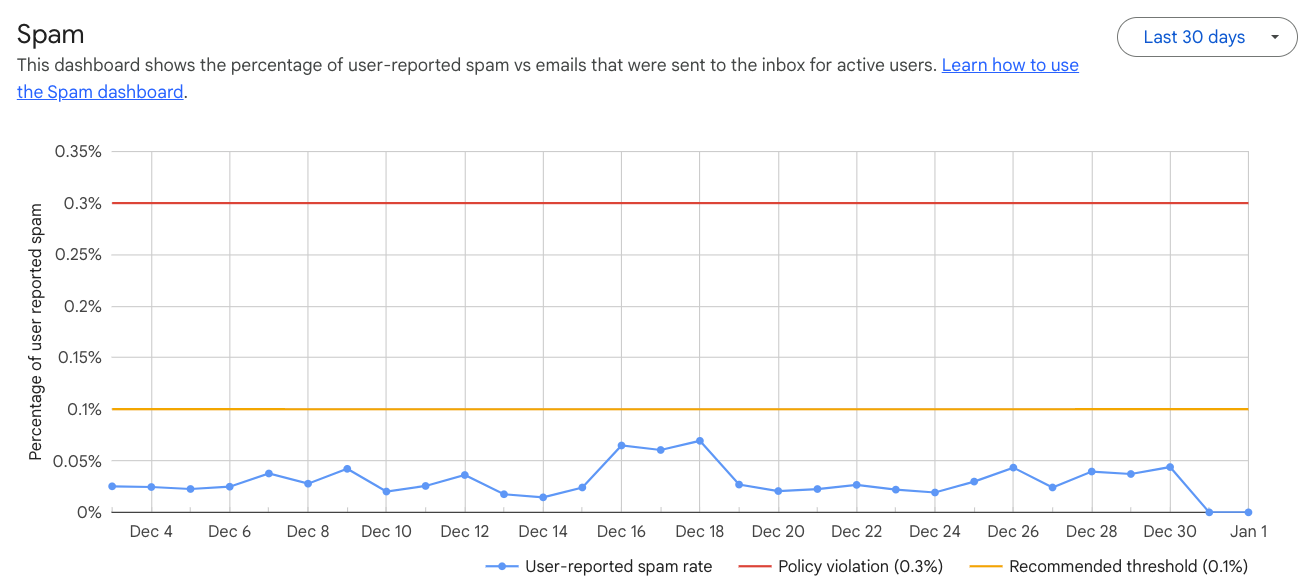
Google Postmaster Tools is the most important of the three, and it changed meaningfully in 2024. Google rolled out Postmaster Tools v2 starting March 2024, and in the redesign it retired the old Domain Reputation and IP Reputation dashboards, moving senders toward a binary green/red Compliance Status view plus the all-important Spam Rate dashboard - Google. The spam-rate view reports the percentage of your delivered Gmail messages that recipients manually marked as spam, and it is the number the entire bulk-sender mandate hangs on: keep it below 0.10% and never let it reach 0.30%. Two setup requirements catch recruiters out: Postmaster only reports on mail it can associate to your domain via SPF or DKIM, and the data only populates reliably once you are sending roughly 100-plus messages a day to unique Gmail users. Below that volume the dashboard stays empty, which is another reason very small senders should consolidate onto a single warmed domain.
The screenshot below shows what you are looking for: the daily user-reported spam rate plotted against the 0.10% and 0.30% threshold lines that define compliance.
For Microsoft, the equivalent tools are SNDS (Smart Network Data Services) and JMRP (the Junk Mail Reporting Program). SNDS grades each sending IP by complaint rate using color bands (green under 10% of mail marked as spam, yellow 10 to 90%, red above 90%), and JMRP is a free feedback loop that forwards copies of messages Outlook users mark as junk so you can suppress those complainers - Blue Spirit Hosting. The catch is that both are IP-based, so they are most useful if you control your sending IP range, which most recruiters on shared infrastructure do not. In practice, a recruiting team on Google Workspace or a shared-IP sequencing tool gets most of its actionable signal from Postmaster Tools and DMARC reports, and can treat SNDS as a bonus for the day it moves to dedicated infrastructure. Microsoft is also tightening access through late 2025 and 2026, requiring authentication to approve IP-range access and expiring data-access links after 30 days, so if you do use SNDS, expect to re-authenticate periodically.
The third surface is DMARC aggregate reports, and this is the one recruiters most benefit from because it works regardless of your IP or provider. Those reports arrive as dense XML that no human should read directly, so an analyzer turns them into a weekly digest of who is sending as your domain and whether they pass. The easiest free on-ramp is Postmark's free DMARC monitoring, which turns the XML into a human-readable weekly email, with a paid tier at a flat $14 per month per domain for a full dashboard and 60-day history - Postmark. Free tiers also exist from dmarcian (1,250 messages per month) and Valimail Monitor (unlimited volume). One piece of monitoring hygiene for 2026: the SORBS blocklist was permanently decommissioned in June 2024, so stop checking it and monitor Spamhaus and Barracuda instead. The reports are how you catch a problem in week one instead of month two.
10. The 2026 Deliverability Tool Landscape
The tooling market has split into three distinct categories, and recruiters waste money by buying the wrong category for their problem. The first is sending and outreach platforms that run your sequences and, increasingly, bundle deliverability features. The second is dedicated warm-up and deliverability tools that do one job well. The third is inbox-placement and monitoring tools that test where your mail actually lands. Knowing which category you need is more valuable than any single product recommendation, because a warm-up tool cannot fix a bad list and a sending platform cannot substitute for authentication.
Among sending platforms, the standout 2026 story is how much deliverability tooling is now bundled into the base price. Instantly ($47 per month) and Smartlead ($39 per month) both include unlimited email accounts and unlimited warm-up at no extra fee, which is why high-volume cold-outreach teams gravitate to them - Woodpecker. lemlist bundles its lemwarm warm-up and a Deliverability Hub into every paid plan from $79 per user per month. Apollo, popular with recruiters for its contact database, notably does not bundle native warm-up, so you pair it with a separate tool. The table below compares the main options on entry price and what deliverability they include.
| Platform | Entry price | Warm-up bundled | Best for |
|---|---|---|---|
| Smartlead | $39/mo | Unlimited, free | High-volume, many inboxes |
| Instantly | $47/mo | Unlimited, free | Cold outreach at scale |
| Reply.io | $59/user/mo | Free MailToaster seat | Sending + deliverability in one |
| lemlist | $79/user/mo | lemwarm included | Multichannel with warm-up |
| Apollo | $49/user/mo | Not bundled | Data + sequences (add warm-up) |
For a recruiting team that wants sending, warm-up, and authentication monitoring in a single tool rather than assembled from parts, Reply.io is the most complete option, which is why it earns a closer look. It bundles MailToaster warm-up, an Email Health Checker that watches your SPF, DKIM, and DMARC records, and a native Google Postmaster Tools integration for spam-rate tracking, so the monitoring from Section 9 lives inside the tool you already send from.
Reply.io
If you would rather not stitch a sender, a warm-up tool and a DMARC monitor together yourself, Reply.io bundles all three: its Email plan is about $59 per user per month on annual billing, and every email seat includes a free MailToaster warm-up seat plus an Email Health Checker that watches your SPF/DKIM/DMARC records and a native Google Postmaster integration for spam-rate tracking - Puzzle Inbox. That single-pane setup genuinely helps a recruiting team that wants sending and deliverability in one place. The honest caveat: it prices per seat, so if all you need is warm-up, a dedicated tool like MailReach at $25 per inbox or an unlimited-mailbox sender like Smartlead from $39/month is cheaper, and no bundled feature can rescue a bad list.
The dedicated deliverability tools are worth it when you have outgrown a bundle or want specialist monitoring. MailReach charges $25 per mailbox per month for warm-up plus inbox-placement seed testing to a network of 30,000-plus real Google Workspace and Microsoft 365 inboxes, and Mailivery at $29 per month notably does not charge per mailbox. On the testing side, GlockApps runs seed-based inbox-placement tests across 70-plus Gmail, Outlook, Yahoo, and corporate addresses, telling you exactly where a message lands and why. Its report is the clearest diagnostic in the category, breaking a test send down by provider and folder.
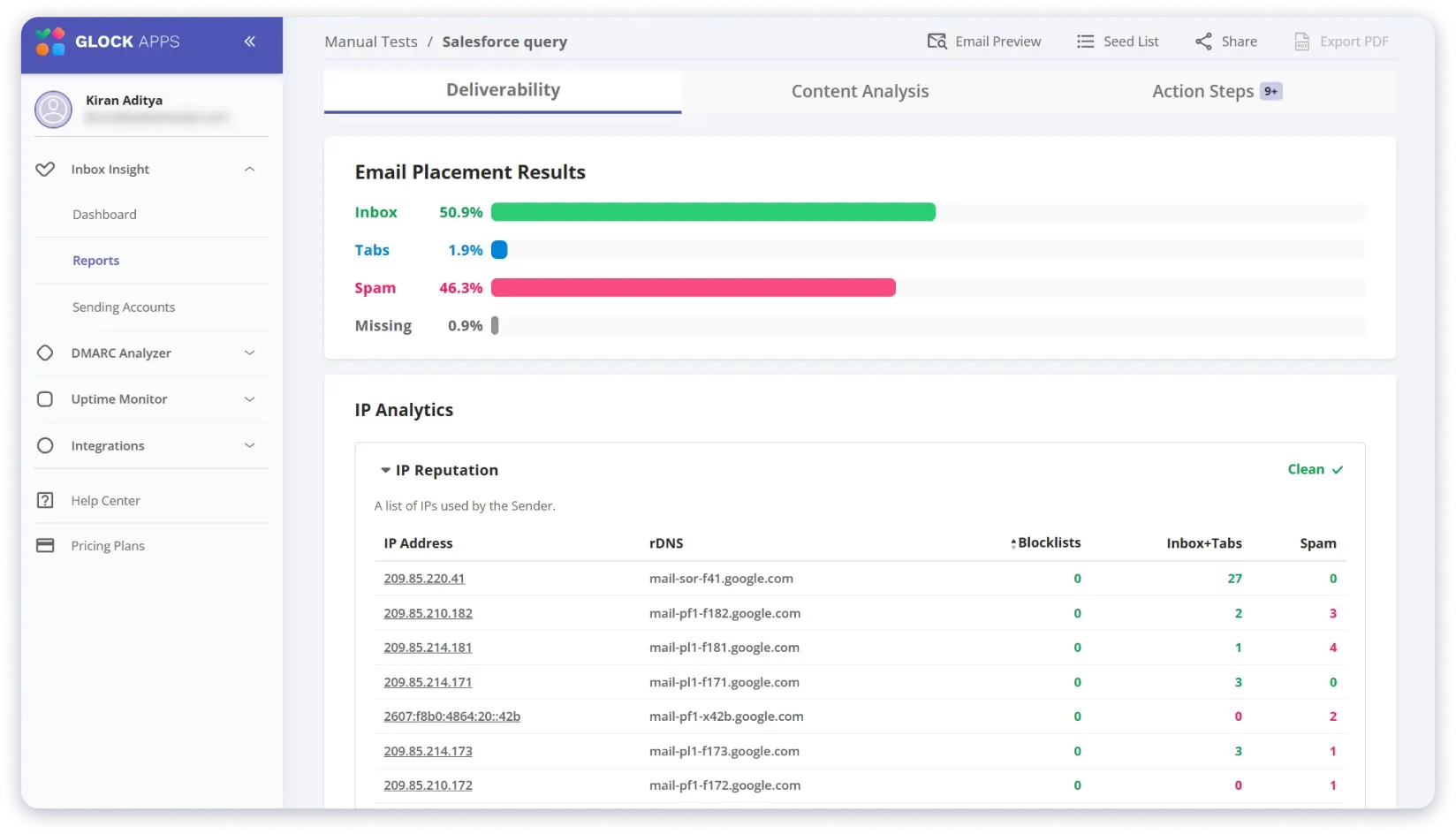
The practical way to shop this market is to start with what you already have and add only the missing category. If you send from a platform that bundles warm-up (Smartlead, Instantly, lemlist, or Reply.io), you likely do not need a separate warm-up tool at all; you need a testing tool like GlockApps or MailReach to verify placement, plus the free monitoring from Section 9. If you send from a data-first tool like Apollo that does not bundle warm-up, add MailReach for warm-up and testing. And if you are early and low-volume, the free tier of mail-tester.com and Postmark's free DMARC digests will carry you a surprisingly long way before you need to spend anything. Buy the category you are missing, not the tool with the best marketing.
11. Compliance: GDPR, CAN-SPAM, and PECR
Compliance is where deliverability stops being a technical problem and becomes a legal one, and recruiters are more exposed than most senders because candidate outreach so often targets personal email addresses. The rules differ sharply by jurisdiction, and the penalties have grown teeth. In the United States, CAN-SPAM penalties rose to up to $53,088 per individual email effective January 17, 2025, and every commercial email must carry a working opt-out and a valid physical postal address, with opt-outs honored within ten business days - Prospeo. The FTC has shown it will enforce this at scale: in August 2024 it settled with a security-camera firm for $2.95 million, the largest-ever CAN-SPAM penalty, after the company sent more than 30 million commercial emails lacking opt-outs and a postal address - FTC. For a recruiting team running high volume, those are not abstract numbers.
Europe is stricter and more nuanced, and the distinction that matters is personal versus corporate addresses. Most GDPR-compliant recruiting cold email relies on legitimate interest rather than consent, which requires a documented Legitimate Interest Assessment, and the core legal risk is sourcing: scraped or guessed personal addresses have no defensible basis, and "I found their email on LinkedIn" is not one - GrowLeads. Under the UK's PECR, marketing to corporate subscribers (work email addresses) does not require prior consent, only a valid opt-out, but because a named work address is still personal data under UK GDPR you must still have a lawful basis - ICO. Personal and consumer addresses fall under the stricter consent regime. The practical upshot for recruiters is that emailing a candidate at their work address under legitimate interest is generally defensible, while emailing them at a personal Gmail address you guessed or bought is where the exposure lives.
A Legitimate Interest Assessment is the document that turns "we think this is fine" into a defensible position, and it is not as onerous as it sounds. In plain terms, it records three things: the legitimate interest you are pursuing (recruiting for a genuine, relevant role), why the processing is necessary to achieve it (you cannot fill a specialized role without contacting qualified people who are not actively applying), and a balancing test showing your interest does not override the candidate's rights (you are contacting them in a professional capacity, at a professional address, about work relevant to their stated expertise, with an easy opt-out). Reportedly around 70% of GDPR enforcement actions cite improper email sourcing, so the part that actually protects you is provenance: being able to show where an address came from and why the person was a reasonable target, which is precisely what scraped and purchased lists cannot demonstrate.
The regulatory direction of travel is toward more restriction, not less, and 2026 brings new rules recruiters should track. France's CNIL rules effective August 2026 require explicit opt-in consent for all business-to-consumer cold prospecting by email, phone, or SMS, while business-to-business cold email remains permissible under legitimate interest - Scrap.io. This matters directly when a recruiter emails an EU candidate at a personal address. The safe posture is to treat compliance and deliverability as the same discipline viewed from two angles: the practices that keep you legal (real consent basis, clean sourcing, honest opt-out, honoring unsubscribes fast) are almost exactly the practices that keep your complaint rate down and your reputation intact.
None of this is legal advice, and cross-border recruiting can implicate several regimes at once, so a genuinely high-volume operation should get a proper Legitimate Interest Assessment reviewed. But the ninety-percent version is simple and worth stating plainly. Prefer corporate over personal addresses, keep a defensible record of why you believe a candidate would welcome the message, put a working one-click unsubscribe on every send, honor opt-outs within a day rather than the legal maximum, and never buy a list. Do those five things and you are simultaneously compliant in most jurisdictions and sending the kind of mail that mailbox providers reward. The recruiters who get burned are almost always the ones who bought a shortcut, and the shortcut hurts deliverability and legality at the same time.
12. How AI Agents Are Changing Deliverability
AI is reshaping deliverability from both ends of the pipe at once, and recruiters need to understand both. On the sending side, autonomous AI SDR and AI-recruiter agents now source, write, and send outreach with minimal human involvement, and adoption has exploded: roughly 41% of enterprise B2B teams ran at least one AI SDR in production by early 2026, up from around 3% two years earlier - Autobound. On the receiving side, the inbox itself has become an AI intermediary that summarizes, categorizes, and reranks your mail before the human ever sees it. The net effect is that AI does not change the physics of deliverability; it accelerates them, rewarding good senders faster and punishing sloppy ones harder.
The most important thing to understand is what AI does not do: mailbox providers do not filter on whether content was AI-written. A study of 450 participants found AI-generated emails using plain text, clear subject lines, and minimal formatting reached primary inboxes across Gmail, Yahoo, and Outlook with zero percent flagged as spam - Validity. Filtering targets reputation, authentication, and engagement, not authorship. Equally important, AI-content detectors are unreliable enough to be useless for policing your own outreach: OpenAI shut down its own classifier after it correctly identified only 26% of AI text while falsely flagging 9% of human writing, and a Stanford study found detectors misclassified more than 61% of essays by non-native English speakers as AI - Patterns. Any recruiting workflow that rejects "AI-flagged" copy will discard large volumes of legitimate human writing.
The real AI-driven risk is not authorship; it is engagement collapse at scale. When AI agents let a team send six times more volume, but the copy is near-identical and the targeting is loose, reply rates fall and complaints rise, and those are exactly the signals providers punish. Vendor benchmark data shows AI-driven outbound volume up roughly 6.4x while raw reply rates fell about 38% - Digital Applied. Cold-email reply rates have been declining for years, and the AI volume surge accelerated it.
Cold Email Reply Rate Decline
The 2026 average reply rate of 3.43% comes from Instantly's benchmark across billions of interactions, and the downward slope is the story: an AI agent sending at scale without human review can cross Gmail's 0.30% complaint ceiling in weeks, triggering throttling or outright blocking. Meanwhile the receiving-side AI changes what "inbox" even means. Gmail began auto-generating Gemini summary cards at the top of threads in May 2025, and Apple Mail's AI now sorts messages into Primary, Transactions, Updates, and Promotions categories by default since late 2024 - MacRumors. A recruiting message can be delivered, summarized by an AI the candidate reads instead of your copy, and filed under Updates before it is ever opened. There is a practical adaptation to this: if an AI is going to compress your outreach into one line, that line should carry the actual value, so front-load the specific, relevant hook (the role, the reason you are contacting this person) into the first sentence rather than burying it under pleasantries, and keep the message short enough that summarization barely changes it. Long, throat-clearing openers are now doubly penalized, because they lower engagement and give the summarizer more to discard. The strategic response is the same one good recruiters were already converging on: send less, target better, and earn genuine engagement, because in an AI-mediated inbox, relevance is the only signal that survives. This is precisely the logic behind autonomous sourcing platforms like HeroHunt.ai, which aim to raise per-message relevance rather than raw volume.
13. Recovering From a Deliverability Collapse
Sooner or later most recruiting teams face the moment when replies fall off a cliff and the dashboards turn red, and how you respond determines whether recovery takes days or months. The instinct to keep sending, or to send more to "make up" for the drop, is exactly wrong: it deepens the hole. Reputation damage compounds, and the only way out is to stop feeding it. The first move in any collapse is to cut volume hard and immediately, ideally pausing the affected domain or mailbox entirely while you diagnose, because every additional bad send extends the recovery timeline. A deliverability collapse is a fire, and the first rule is to stop pouring on fuel.
Diagnosis follows a fixed order that mirrors the pipeline from Section 2. Check authentication first, because a broken or newly misaligned SPF, DKIM, or DMARC record can tank placement overnight and is the fastest thing to fix. Then check your Postmaster Tools spam rate and Compliance Status: if your complaint rate crossed 0.30%, you have found the cause, and Google requires it to stay below that line for seven consecutive days before you regain mitigation eligibility. Then audit the list you last sent to for bounces and possible spam-trap hits, because a single scraped segment can be the whole problem. Only after those three checks should you look at content. The discipline is to work the pipeline in order rather than jumping to the most visible symptom, because the earliest checkpoint that fails is almost always the real cause.
Recovery itself is essentially a re-warm, and the encouraging news is that domain reputation does recover if you let it. The Postmaster Tools domain-reputation graph below shows the characteristic pattern: reputation degrades into the lower bands, and then, with corrected sending, climbs back toward High over time.
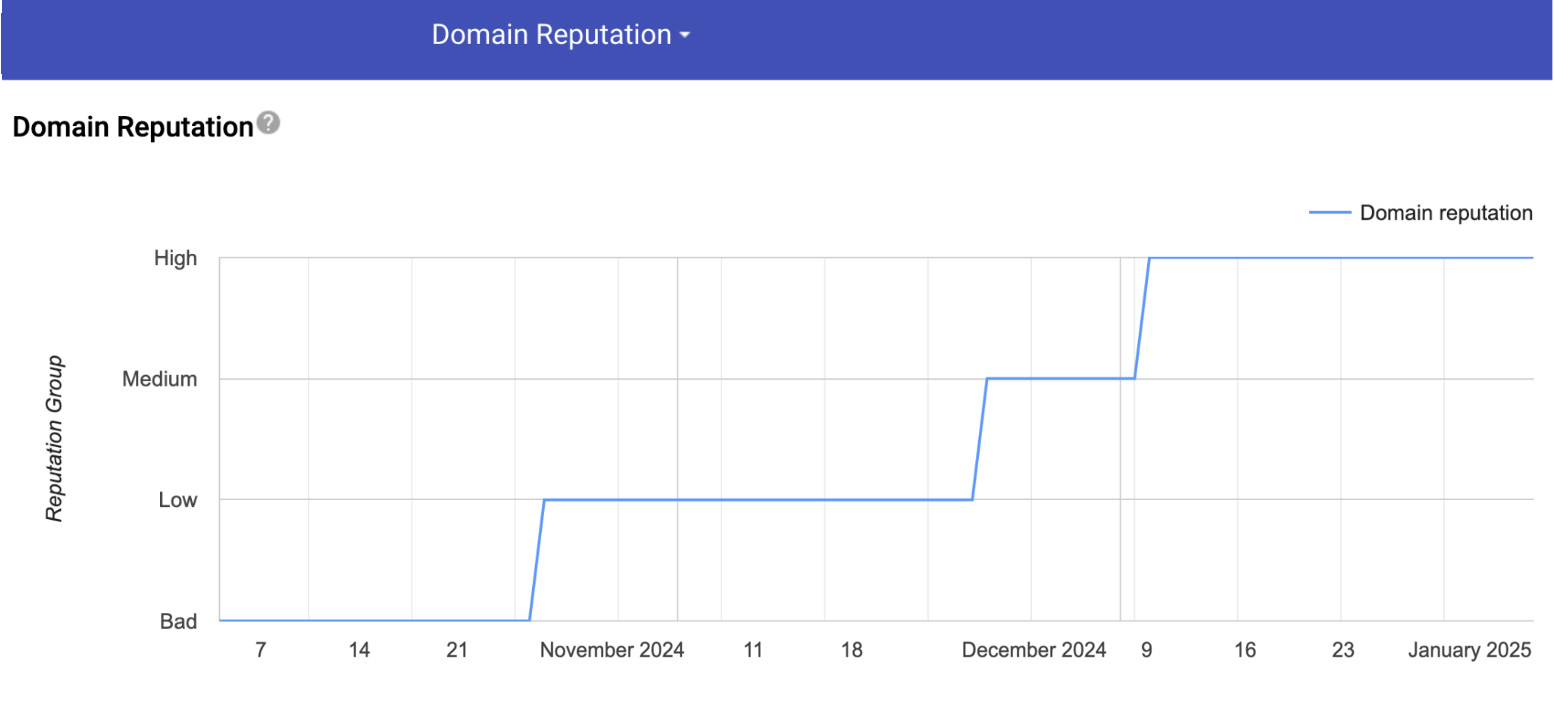
The re-warm playbook is deliberate and patient. Drop back to a small daily volume, send only to your most engaged, most deliverable contacts (the people most likely to open and reply and least likely to bounce or complain), and rebuild positive engagement signals before slowly ramping again. Prune every questionable address from the list before you resume, because sending to the same bad data that caused the collapse will simply recreate it. If the damage is severe (a pristine spam-trap hit that got you blocklisted, or a complaint rate far above the ceiling), the honest calculation is sometimes that re-warming the burned domain costs more than moving outreach to a fresh, properly isolated domain and starting the warm-up from scratch. That is a real and legitimate option, and it is far cheaper when your candidate outreach was isolated on its own domain to begin with, exactly as Section 5 recommended. The teams that recover fastest are the ones whose architecture contained the damage before it started.
14. The Future of Recruiting Deliverability
The trajectory is clear even if the exact timeline is not: deliverability is getting harder, more automated, and more concentrated around a single currency, which is genuine recipient engagement. Every trend in this guide points the same way. The sender mandates that began in 2024 will keep tightening, moving from p=none tolerance toward expectations of real DMARC enforcement, and the enforcement gap that leaves 58% of domains unprotected today will become a competitive disadvantage as providers increasingly favor senders who authenticate fully - Valimail. The providers have shown they will enforce with permanent rejections, and there is no sign of that reversing. Authentication, once a technical nicety, is becoming table stakes for reaching a candidate at all.
The deeper shift is that "reaching the inbox" is being replaced by "being chosen by the inbox's AI." As Gemini summaries, Apple Intelligence categories, and predictive ranking mediate more of what candidates actually see, the old game of maximizing volume and optimizing subject lines yields to a new game of maximizing relevance per message. An AI that summarizes your outreach into one line, or files it under Promotions, is making an editorial judgment about whether your message deserves the candidate's attention, and it makes that judgment on engagement patterns you cannot fake. This is why the warm-up-network arms race is quietly ending: simulated engagement is increasingly detected and discounted, and the only durable signal left is a real human choosing to reply. The future rewards senders who have something worth replying to.
For recruiters, that future favors a specific operating model, and it is the one the best teams are already adopting. Send less mail to better-targeted people, from properly authenticated and isolated domains, and measure success by replies and interested rates rather than raw sends. The tooling will keep improving (AI that finds genuinely relevant candidates, writes materially personalized outreach, and paces sending to protect reputation), but the tooling is in service of the same goal: relevance at a volume your reputation can sustain. Platforms built around autonomous sourcing, such as HeroHunt.ai, point at this model directly, using AI to raise the relevance of each message rather than the quantity, because in 2026 and beyond that is the only lever that reliably moves placement. The recruiters who win the inbox will be the ones who stopped trying to send more and started trying to matter more.
Written by Yuma Heymans (@yumahey), who built HeroHunt.ai, the world's first AI Recruiter, now used by 15,000+ recruiters to source from over a billion profiles and run candidate outreach on autopilot. He has spent years in the deliverability trenches of automated sourcing, where a single misconfigured DNS record is the difference between a full pipeline and an empty one.
If you want to go deeper on the messaging side of outreach, our companion guide to AI outreach sequences for recruiting covers cadence, channels, and personalization, and the guide to the best email finder tools for recruitment covers finding the addresses in the first place. Deliverability is what makes all of it actually arrive.
This guide reflects the recruiting email deliverability landscape as of August 2026. Sender requirements, tool pricing, and regulations change frequently, so verify current details before configuring your sending or committing to a platform.