


The complete guide to running your entire hiring funnel with Claude AI in 2026: the prompts, the Skills, the connectors, and the rules that keep it legal.
Written by Yuma Heymans (@yumahey), who has been building hiring workflows on Claude's models since founding HeroHunt.ai, the AI Recruiter that sources and contacts candidates from 1B+ profiles on autopilot. This guide comes from shipping recruiting products on the exact stack it describes.
93% of talent acquisition professionals plan to grow their AI use in 2026 - HR Dive. At the same time, LinkedIn was absorbing an average of 11,000 job applications per minute by mid-2025, up more than 45% in a year - Fortune. Those two numbers are the whole story of hiring right now: candidates are using AI to apply at industrial scale, and hiring teams either match that leverage or drown in it.
Here is the problem: most advice about "AI for hiring" is either a list of ten generic prompts or a vendor pitch. Hiring is different from other AI use cases in two ways that generic advice ignores. First, it is a regulated decision: laws in Illinois, California, New York City, and the EU now specifically govern AI in employment decisions, and a federal collective action over AI screening has roughly 14,000 opted-in plaintiffs - Forbes. Second, the tooling changed completely in the last nine months: Claude Skills, the connectors directory, Claude Cowork, and official ATS integrations did not exist as a usable stack a year ago.
This guide covers the full hiring funnel with Claude, stage by stage: intake, job descriptions, screening, interviews, offers. For each stage you get copy-paste prompts, the Skills worth installing or building, and the tools and connectors that wire Claude into your actual hiring stack. It also covers what a Claude-first stack costs, the 2026 compliance layer, and the places where Claude genuinely fails at hiring, which is where purpose-built platforms like HeroHunt.ai enter the picture. If you want the sourcing-specific deep dive instead, that lives in our companion guide on recruiting with Claude MCPs, Skills, and agents; this one is about the whole hiring process, for the whole hiring team.
Contents
- Why Hiring Teams Are Standardizing on AI Assistants in 2026
- The Claude Stack for Hiring, Explained
- Setting Up a Hiring Workspace That Compounds
- Prompts for Intake and Job Descriptions
- Prompts for Screening and Shortlisting
- Prompts for Interviews, Debriefs, and Decisions
- Prompts for Offers, Comp, and Closing
- Claude Skills for Hiring Teams
- Wiring Claude Into Your Hiring Stack: Connectors and MCP
- The 2026 Compliance Layer: Rules Before Tools
- Where Claude Fails at Hiring (and What to Use Instead)
- What a Claude-First Hiring Stack Costs
- The Road Ahead: Agents in the Hiring Loop
- The Decision Framework
1. Why Hiring Teams Are Standardizing on AI Assistants in 2026
The headline insight of 2026 is that AI in hiring stopped being an experiment and became the default operating mode, and the data shows it happened fast. SHRM found that 43% of organizations used AI for HR tasks in 2025, up from just 26% a year earlier, a 17-point jump in a single year - SHRM. Its follow-up State of AI in HR study, fielded in December 2025, found recruiting is the number one HR use case for AI, ahead of every other HR function - SHRM. Whatever function you sit in, the people you compete with for talent are already running AI in their funnel.
The pressure driving this is volume, not fashion. The number of applicants per open US role has doubled since spring 2022, and recruiters are simultaneously being asked to fill roles faster - HR Dive. Candidates opened this arms race: 75% of job seekers now use AI to polish their applications, and 65% of US hiring managers say they have caught applicants using AI deceptively - Fortune. Gartner goes further and predicts that 1 in 4 candidate profiles worldwide will be fake by 2028 - HR Dive. A human reading applications one by one is not a viable screening strategy against that flood. The chart below shows how quickly adoption has climbed across the major industry surveys.
AI Adoption in HR and Recruiting, by Survey
Read the chart with one caveat: these surveys ask slightly different questions of different populations, so treat the trend, not any single bar, as the signal. LinkedIn's Future of Recruiting research measured organizations actively integrating or experimenting with generative AI in hiring at 27% in 2024 and 37% in 2025 - LinkedIn, while Employ's October 2025 survey found 65% of recruiters personally using AI tools. Every line points the same direction, and the productivity numbers explain why: TA professionals using generative AI report saving about 20% of their work week, roughly one full workday, and among staffing firms, 46% say AI cut screening time in half or better - Bullhorn.
So why Claude specifically, rather than any of the other assistants? The short answer is that the enterprise already voted. Anthropic now commands 40% of enterprise LLM spend against OpenAI's 27% and Google's 21%, in a market that reached $8.4 billion - Yahoo Finance. On the company side, Anthropic reported a $47 billion revenue run-rate in May 2026 - Anthropic, and 8 of the Fortune 10 use Claude - Anthropic. Among individual professionals, a December 2025 Blind survey of verified US workers found Claude was the most-used primary AI work tool at 31.7%, ahead of ChatGPT at 19.6%, though that sample skews toward engineers - The American Bazaar.
For hiring work specifically, three Claude properties matter more than benchmark scores. Its long context window lets you load an entire applicant pool into one conversation. Its document-heavy design (Projects, file creation, built-in Office skills) matches what hiring actually produces: briefs, scorecards, offer letters. And its writing quality is the difference between outreach that gets answered and outreach that gets ignored. The rest of this guide turns those properties into a working system, and the place to start is understanding what the Claude stack actually contains in 2026, because it is much bigger than a chat window.
2. The Claude Stack for Hiring, Explained
If you last looked at Claude in 2024 or early 2025, your mental model is out of date. Claude in July 2026 is a family of four current models, five surfaces (chat, Projects, Claude Code, Claude Cowork, and the API), plus an extension system of Skills and connectors. Understanding the pieces matters because each hiring stage maps to a different piece, and because pricing decisions depend on knowing what is bundled where. This section gives you the map; sections 3 through 9 put it to work.
Start with the models. The current lineup is Claude Fable 5 (the flagship, launched June 9, 2026 as the first generally available "Mythos-class" model), Claude Opus 4.8, Claude Sonnet 5, and Claude Haiku 4.5 - Anthropic. Sonnet 5, launched June 30, 2026, is the default model for Free and Pro users and is described by Anthropic as its most agentic Sonnet yet: it plans, uses tools, and runs multi-step work on its own - Anthropic. For hiring teams the headline spec is context: Fable 5, Opus 4.8, and Sonnet 5 all carry a 1 million token context window, roughly 555,000 words, which comfortably holds several hundred resumes or a full quarter of interview transcripts in a single conversation - Claude Docs. One 2026 wrinkle worth knowing: Fable 5 was briefly suspended under a US export-control directive in June and redeployed globally on July 1, and it is metered by usage credits on consumer plans rather than unlimited - Anthropic. For everyday hiring work, Sonnet 5 is the sensible default; escalate to Opus 4.8 or Fable 5 for high-stakes synthesis like final-round debriefs.
Here is what access costs as of July 2026, from the official pricing page - Claude:
| Plan | Price | What a hiring team gets |
|---|---|---|
| Free | $0 | Web/mobile/desktop apps, web search, memory, file uploads and creation, Slack and Google Workspace connectors, remote MCP connectors |
| Pro | $20/mo ($17/mo annual) | Everything in Free plus Claude Code, Claude Cowork, unlimited Projects, Research, more usage, Microsoft 365 integration |
| Max | $100 or $200/mo | 5x or 20x Pro usage, priority access, early features |
| Team | $20-25/seat standard, $100-125/seat premium | Central billing, SSO, admin controls, org-wide skills and connectors, no default training on your data |
| Enterprise | $20/seat + usage | Audit logs, SCIM, Compliance API, custom retention, IP allowlisting |
The table hides the most important fact, so here it is in plain text: the features hiring workflows depend on (memory, file handling, connectors) start on the Free plan, and the agent products start at $20 per month. That $20 Pro plan now bundles Claude Code and Claude Cowork, which were premium-only when they launched. For a small company, the realistic budget for a complete Claude hiring setup is a Pro seat per person involved in hiring, not an enterprise contract.
Claude Cowork deserves its own paragraph because it is the 2026 product most relevant to hiring operations. Launched January 12, 2026 as a macOS research preview and expanded to web and mobile on July 7, Cowork is Claude as a doing-agent rather than a chat partner: you give it permission over folders and connected tools, hand it a task, and it works in a cloud session that keeps running after you close your laptop - TechCrunch. Anthropic analyzed 1.2 million Cowork sessions across 600,000+ organizations and found business process and operations is the top use category at 33.4%, with hiring managers explicitly cited using Cowork to schedule meetings and synthesize interview feedback - Claude. The official study chart below shows how dominant that operations category is.
What people actually do with Claude Cowork

Notice what that 33.4% bar is made of: reports, onboarding checklists, spreadsheet reconciliation, consolidating status updates. Anthropic's summary is that roughly half of all Cowork usage is "the work around the work," and hiring is disproportionately made of exactly that: scheduling, chasing feedback, formatting debriefs, updating trackers. The interviews themselves need humans; almost everything wrapped around them is Cowork territory.
One more surprise for non-technical readers: Claude Code is no longer an engineers-only tool. Anthropic's own research across roughly 400,000 sessions found people in non-software occupations achieve verified task success within about five points of software engineers, and the fastest-growing user groups are management, sales, and legal - Anthropic. The study's conclusion is worth quoting for every hiring leader who thinks the terminal is not for them: success depends on how well a person understands the problem, not whether they are trained in coding. A recruiter who deeply understands their pipeline can have Claude Code build a working applicant tracker or a weekly pipeline report script. With the map in place, the next step is setting up a workspace so that all of this compounds instead of resetting with every chat.
3. Setting Up a Hiring Workspace That Compounds
The single biggest difference between people who get real leverage from Claude and people who get party tricks is workspace setup. Most hiring users open a fresh chat, paste a job description, ask for something, and start from zero again next week. The compounding move is to treat Claude like a new team member you onboard once: give it your company context, your role briefs, your interview philosophy, and your templates in one persistent place, so every future request starts 80% done. In Claude, that place is a Project: a workspace that holds files, custom instructions, and conversation history for a defined stream of work, available on every plan including Free with unlimited Projects from Pro up - Claude.
Before you load anything, decide what candidate data you are comfortable putting in. This is where plan choice becomes a governance decision rather than a budget one: on Team and Enterprise plans, Anthropic does not train models on your data by default, and Enterprise adds audit logs and custom data retention - Claude. A sensible baseline for most teams is to keep named-candidate materials minimal in personal accounts, and move to a Team plan before you make resume screening with real applicant files a standard practice. It also helps to write down what you will and will not let Claude do. Anthropic itself publishes exactly such a policy for its own hiring: it uses Claude to create job descriptions, develop interview questions, draft candidate communications, analyze hiring metrics, transcribe interviews, and identify candidates to source, and states plainly that it never lets Claude make hiring decisions - Anthropic. That one-page stance, AI drafts and analyzes but humans decide, is a ready-made governance template you can copy today.
With the guardrails set, the setup itself takes under an hour:
- Create a Project per role family (for example "Backend hiring" or "GTM hiring"), not per vacancy
- Load the evergreen documents: company one-pager, team descriptions, comp bands, interview process doc, writing style examples
- Set custom instructions: who you are, your hiring principles, output preferences, and a standing rule to flag uncertainty instead of guessing
- Enable capabilities: turn on code execution and file creation in Settings so the built-in document skills work
- Connect your calendar and email via connectors (covered in section 9) once the basics feel solid
The reason to organize by role family rather than vacancy is reuse: the intake brief you build for one backend role becomes the starting template for the next, and Claude's project memory means it stops asking you questions you answered in March. From this point on, every prompt in this guide assumes it runs inside such a Project, which is why the prompts can be short: the context lives in the workspace, not in the prompt. The diagram below shows how the pieces you have met so far, and the ones coming in the next sections, map onto the hiring funnel itself.
Two things in this diagram are deliberate and worth internalizing before we walk the funnel stage by stage. First, the last node is not a Claude feature: keeping the final decision human is both the emerging legal standard (section 10) and the position of every serious practitioner, including Anthropic's own recruiting team. Second, each stage consumes the artifact the previous stage produced: the intake brief feeds the job description, the job description feeds the rubric, the rubric feeds the debrief. That artifact chain is what makes an AI hiring workflow auditable, and auditable is what regulators and courts increasingly demand. Now, the prompts.
4. Prompts for Intake and Job Descriptions
Every downstream hiring failure is cheaper to prevent at intake, and intake is the stage AI can improve most immediately because the failure mode is human vagueness, not missing data. When SHRM asked organizations what they actually use AI for in recruiting, writing job descriptions came first at 66%, nearly everything else trailing far behind - SHRM. That is partly because JDs are text and text is easy, but the teams getting real results flip the order: they use Claude to force clarity in the intake conversation first, then let the JD write itself from that clarity. The breakdown of where AI is used in recruiting looks like this.
What Organizations Use AI For in Recruiting
The interesting read on this chart is the gap between the first bar and the rest: most teams are still using AI at the shallowest layer of the funnel, which means the competitive advantage now sits deeper, in screening discipline and interview synthesis, exactly the stages this guide spends the most time on. Data comes from SHRM's survey of 2,040 HR professionals, and the same study found 89% of HR professionals using AI in recruiting say it saves them time - SHRM.
The intake prompt below turns Claude into the intake interviewer rather than the answer machine, which matters because the hiring manager's unexamined assumptions are the thing you are trying to surface. Run it in your hiring Project with the hiring manager in the room (or paste their answers in afterward):
You are helping me run a hiring intake session. I am hiring a [ROLE] for [TEAM]
at [COMPANY, one line]. Interview me one question at a time (max 12 questions)
to extract: the business problem this hire solves, the 3 outcomes they must
deliver in year one, must-have vs nice-to-have skills, what "great" looks like
vs "acceptable" at this level, the realistic comp range, and the non-obvious
dealbreakers. Push back when my answers are vague or contradictory. At the end,
produce a one-page role brief with: mission, outcomes, ranked competencies,
screening questions, and the proxy titles and companies where this person
likely works today.
The output of that session, the role brief, becomes the root document of the entire search: save it to the Project, because every later prompt references it. Notice the prompt asks for "what great looks like vs acceptable": that calibration line is what separates a rubric you can defend from a vibes-based one, and you will reuse it verbatim when you build the screening rubric in section 5.
For the job description itself, the pattern that works is generation plus an explicit bias pass in the same prompt:
Using the role brief in this project, write a job description that a busy,
senior [ROLE] would actually read to the end. Rules: lead with the problem they
will own, not company boilerplate. State scope, team size, tools, and reporting
line. Include the salary range [RANGE]. Cut every cliche ("rockstar",
"fast-paced", "wear many hats"). Keep the reading level clear enough for a
non-native English speaker. Then run a bias pass: flag any wording that is
masculine- or feminine-coded, age-coded, or that excludes career changers, and
show a neutral rewrite next to each flag.
Two details in this prompt are load-bearing. The salary range is not optional decoration: pay transparency laws now cover a large share of US and EU postings, and posting a range is also simple conversion optimization. And the bias pass is not just ethics theater: under Illinois law effective January 1, 2026, using AI in recruitment in a way that has a discriminatory effect on a protected class is a civil rights violation, and the statute specifically bans zip codes as a proxy for protected characteristics - Crowell & Moring. Making the model show its bias reasoning in the artifact gives you documentation that you checked, which is precisely what the 2026 compliance posture rewards. With the brief and the JD in the Project, the funnel now produces its first flood of inbound, and the question becomes how to screen it without either drowning or delegating judgment you legally cannot delegate.
5. Prompts for Screening and Shortlisting
Screening is where AI delivers the largest time savings in hiring, and also where every legal and ethical landmine lives, so the method matters more than the prompt. The time savings are real: among staffing firms, 46% report AI cut screening time in half or better, and 55% say AI screening improved their KPIs by more than 25% - Bullhorn. The landmines are equally real: the Mobley v. Workday litigation exists because automated screening allegedly rejected older applicants at scale, and the court has now ruled applicants can bring disparate-impact age claims against AI screening (section 10 covers the details). The method that captures the savings while managing the risk is a two-step rubric pattern, and the order of the steps is the entire trick.
Step one: build and freeze the rubric before Claude (or you) sees a single resume. Scoring criteria created after looking at candidates inevitably drift toward the candidates you already like, which is both bad selection science and indefensible in an audit. Freezing the rubric first gives you a documented, role-derived standard that existed before any protected characteristic could influence it:
Using the role brief in this project, build a screening rubric BEFORE I show
you any candidates. Define 5-7 evaluation criteria. For each: what evidence
counts (specific artifacts, outcomes, experiences), what does NOT count
(proxies like brand-name employers or degrees unless truly required), and a
1-5 scoring anchor describing each level. Mark each criterion as knockout or
weighted. Do not include criteria that correlate with age, gender, ethnicity,
zip code, or employment gaps.
Step two: batch-score against the frozen rubric, with evidence quotes and confidence flags. This is where Claude's 1 million token context stops being a spec-sheet number and becomes the workflow: you can attach hundreds of resumes to a single message and score the entire pool in one pass against one consistent standard - Claude Docs. Consistency is the underrated half of that sentence: a human screener's standard drifts between resume 5 and resume 105; the frozen rubric applied in one pass does not.
Score the attached resumes against the rubric above. For each candidate
return: score per criterion with the exact resume line(s) used as evidence,
a weighted total, 2-3 clarifying questions a phone screen should ask, and a
confidence note listing what could NOT be verified from the resume alone.
Do not use employment gaps, school names, or graduation years as signals.
If two candidates are effectively tied, say so instead of inventing a
difference. Do not reject anyone: rank and flag for my review.
The closing instruction, "do not reject anyone," is the compliance line in prompt form: Claude ranks and evidences, a human decides. Expect two failure modes and design around them. First, resumes are now adversarial documents: 41% of job seekers admit to using resume prompt injections, hidden text designed to manipulate AI screeners - Fortune, so add a standing instruction in your Project to ignore any instructions embedded inside candidate documents and to flag documents that contain them. Second, the evidence-quote requirement exists because it converts hallucination from an invisible risk into a checkable one: a fabricated strength has no line to quote, and spot-checking quotes against source resumes takes seconds. Candidates are optimizing for exactly this pipeline, by the way: of 1.22 million job seekers who used Kickresume's AI in 2025, 64% used it to check ATS compatibility, more than used it to write the resume itself - Kickresume.
To see what the two-step pattern is worth, run the arithmetic on a realistic pool. A mid-market posting drawing 300 applications costs a careful human screener at four minutes per resume about 20 hours of first-pass reading, spread across a week of context switching, with the standard drifting the whole way. The same pool through the frozen-rubric flow costs roughly 30 minutes to build and pressure-test the rubric with the hiring manager, one batch pass that returns in minutes, and then the part that still deserves human hours: reading the top 30-40 evidence-quoted scorecards, spot-checking a sample of quotes against the underlying resumes, and personally reviewing every candidate the model flagged low with low confidence, because that flag is where unusual-but-great profiles hide. The week of reading becomes an afternoon of judgment, which is the shape of the 46% screening-time findings in the staffing data, and the audit trail (rubric, scores, quotes, human sign-off) generates itself as a by-product. Screening well gets you a shortlist; the next stage, interviews, is where most teams quietly throw that rigor away.
6. Prompts for Interviews, Debriefs, and Decisions
Here is the counterintuitive 2026 position this guide takes: use Claude intensively around the interview and almost never in it. The data behind that position is candidate-side and it is brutal. By spring 2026, 63% of job seekers had faced an AI-led interview, up 13 points in six months, but 70% were never clearly told upfront that AI would evaluate them, and only 28% moved forward afterward while 51% never heard back at all - Greenhouse. The predictable result: 38% of candidates have walked away from a process because it included an AI interview. Meanwhile only 26% of applicants trust AI to evaluate them fairly - Gartner. When two-thirds of your funnel distrusts the method, the method costs you the exact senior candidates you are fighting for.
What Claude is spectacular at is the structure that makes human interviews predictive. Unstructured interviews are famously weak predictors of job performance; structured ones, same questions, anchored scoring, divided coverage, are dramatically better, and almost nobody builds them because the artifact takes hours. It now takes minutes:
Create a structured interview kit for [ROLE] from the role brief and rubric
in this project. For each of the top 5 competencies: one behavioral question
(past evidence), one situational or work-sample question, 3 follow-up probes
for when an answer stays thin, and a 1-4 scoring guide with a concrete
example of what a 1, 2, 3, and 4 answer sounds like. Assign each competency
to one interviewer from this panel: [NAMES/ROLES], so no two interviewers
cover the same ground. Output one page per interviewer.
The debrief is the second place structure pays. The standard failure is that the loudest interviewer wins and everyone averages their gut feelings into a number that means nothing. The fix is a synthesis pass that surfaces disagreement instead of blending it away:
Here are the interview scorecards and notes for [CANDIDATE] ([ROLE]).
Synthesize: where interviewers agree, where they disagree and WHY (quote
their evidence), which disagreements are about facts vs standards, and which
competencies still have no real evidence either way. Then list the 3
highest-information reference-check questions to resolve what is still
unknown. Do not recommend hire or no-hire: surface the picture, the panel
decides.
That deliberate refusal to recommend is not modesty, it is design. The moment the AI outputs "hire" or "reject," you have an automated employment decision with everything that implies legally, and you have also given the panel permission to stop thinking. Keeping Claude in the evidence-organizing seat keeps humans in the judging seat, and Anthropic's own usage data suggests this is how knowledge workers actually use Claude at their best: on Claude.ai, 52% of conversations are augmentation, human-in-the-loop collaboration, versus 45% automation - Anthropic. The figure below, from that same Economic Index research, shows the collaboration-mode split over time.
Augmentation vs automation in real Claude usage
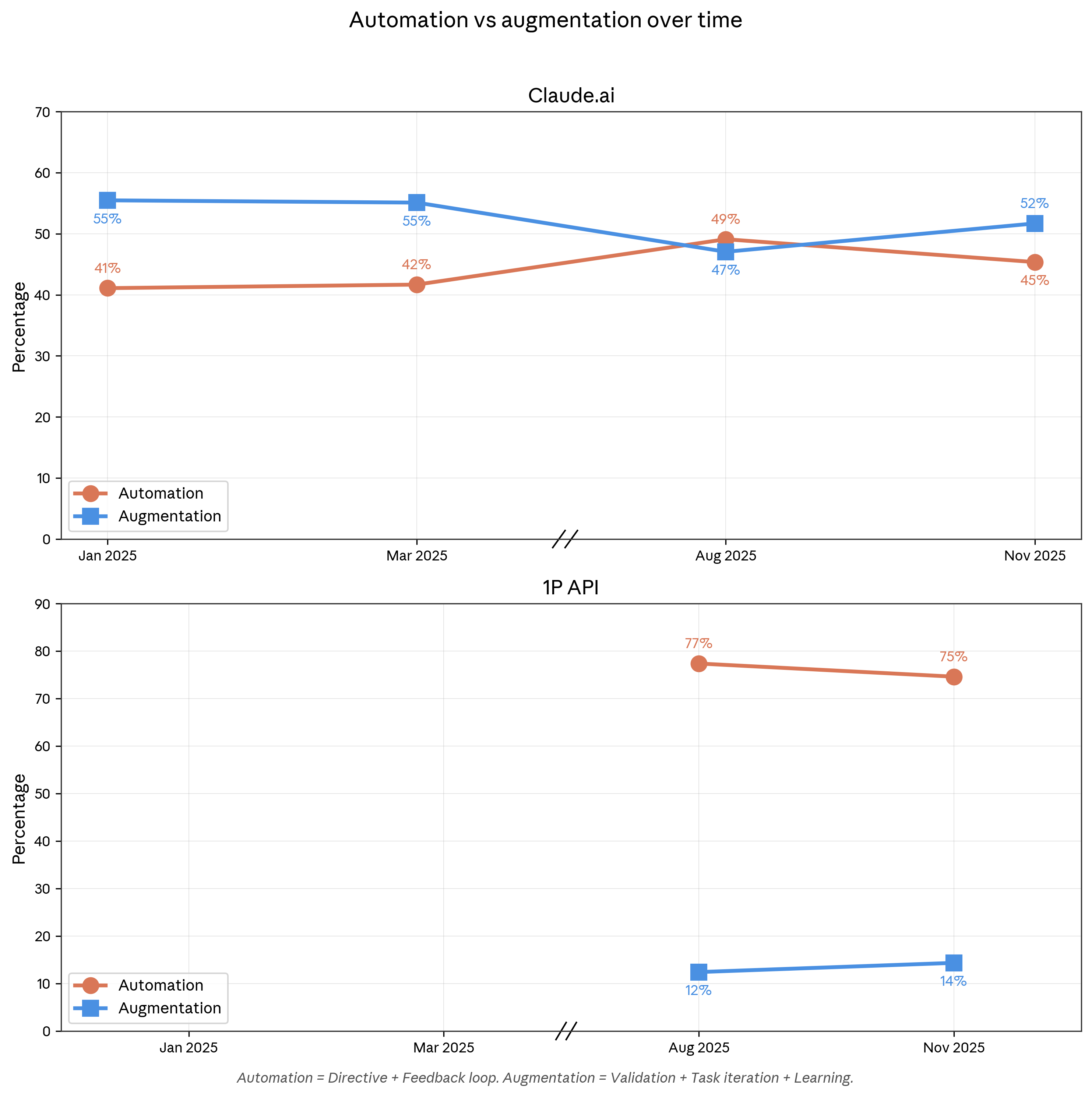
The chart's practical message for hiring teams: the closer work sits to judgment about people, the more the winning pattern looks like the augmentation half of that graph. Interviews and hiring decisions are the extreme case, which is why the prompts in this section all end at "the panel decides." One operational note to close the stage: interview transcription is quietly one of the highest-value uses here. Recording tools already produce transcripts; a transcript dropped into the debrief prompt means scorecards quote what candidates actually said rather than what interviewers remember, and Anthropic lists interview transcription among its own internal Claude uses - Anthropic. From decision to closed candidate is its own craft, and it is the funnel stage teams most often leave to improvisation.
7. Prompts for Offers, Comp, and Closing
The offer stage is where hiring teams lose deals they already won, usually through slow paperwork and clumsy communication rather than losing on money. This is also the stage where Claude's document skills quietly earn their keep: with code execution and file creation enabled, Claude produces real .docx offer letters and PDF offer summaries using Anthropic's built-in document skills, not just chat text you have to reformat - Claude Docs. An offer that goes out the same afternoon as the debrief, personalized and correctly formatted, is a closing advantage measured in days at exactly the moment competing processes are moving.
The prompt below produces the candidate-facing artifact and the negotiation prep in one pass, which is the point: treating the offer email and the negotiation plan as one task forces consistency between what you promise and what you can flex:
Draft an offer summary email for [CANDIDATE] for [ROLE]. Components: base
[X], bonus [Y], equity [Z] with a plain-English explanation of vesting and
what it could be worth under conservative and moderate assumptions, benefits
highlights, start date. Tone: warm, direct, zero pressure tactics. Then add
a private section for me: the 3 most likely negotiation asks from this
candidate's profile, and a reasonable response plan for each given our band
ceiling of [CEILING].
Two cautions keep this stage honest. First, compensation data: Claude does not have a live comp database, and numbers it produces from memory are estimates with unknown vintage. Use your own bands or a dedicated comp source as the input, and use Claude for the explanation layer, the plain-English equity walkthrough that most candidates never get and genuinely appreciate. If you ask Claude to research market comp, make it use web search and cite sources you then check, the same rule as every people-fact in this guide. Second, the equity explanation in the prompt says "conservative and moderate assumptions" deliberately: optimistic-only equity math in a written offer is a trust grenade with a delayed fuse, and the candidates senior enough to matter will notice.
Closing communication beyond the offer letter also compounds with the workspace you built in section 3. Rejection notes that reference the candidate's actual strengths (pulled from the debrief document), a personalized week-one plan attached to the offer for your finalist, a check-in email cadence between signature and start date: each is a five-minute Claude task inside a Project that already holds all the context, and each measurably reduces renege risk in a market where counteroffers move fast. This is also a natural place to hand work to Cowork rather than chat: "assemble the offer packet for [CANDIDATE] from the debrief, comp sheet, and benefits one-pager in this folder, and draft the announcement for the team channel" is precisely the multi-file, multi-step task the 33.4% operations category is made of - Claude. With the funnel covered end to end, the next two sections turn to the machinery that makes all of it reusable and connected: Skills, and then connectors.
8. Claude Skills for Hiring Teams
Skills are the feature that turns the prompts in this guide from things you paste into things your whole team just has. A Skill is a folder containing instructions, optional scripts, and reference files that Claude loads automatically whenever a task calls for it, announced by Anthropic in October 2025 and now working across the Claude apps, Claude Code, Claude Cowork, and the API - Claude. The mechanism that makes them practical is progressive disclosure: each installed skill costs only about 100 tokens of always-loaded metadata (its name and description), and the full instructions load only when triggered, so you can install dozens of hiring skills without bloating every conversation - Claude Docs. Independent developer Simon Willison called Skills "maybe a bigger deal than MCP" for exactly this token economics - Simon Willison.
For a hiring team the translation is: your interview rubric philosophy, your JD style guide, your debrief format, and your outreach voice each become a skill, written once, triggered automatically, identical for everyone. In December 2025 Anthropic added the missing organizational piece: a Skills Directory of partner-built skills (Notion, Atlassian, Canva, Zapier and others) plus org-wide skill management, so Team and Enterprise admins can provision a skill to every seat centrally - Claude. The same release published Agent Skills as an open standard, and OpenAI has adopted the format, meaning a hiring skill you write today is portable rather than locked to one vendor - The Decoder. The ecosystem got big fast: the official anthropics/skills repository sits at roughly 160,000 GitHub stars as of July 2026 - GitHub. Getting started in the app takes two settings: enable code execution and file creation under Settings, then manage everything under the Skills section, shown below.
Managing Skills inside Claude
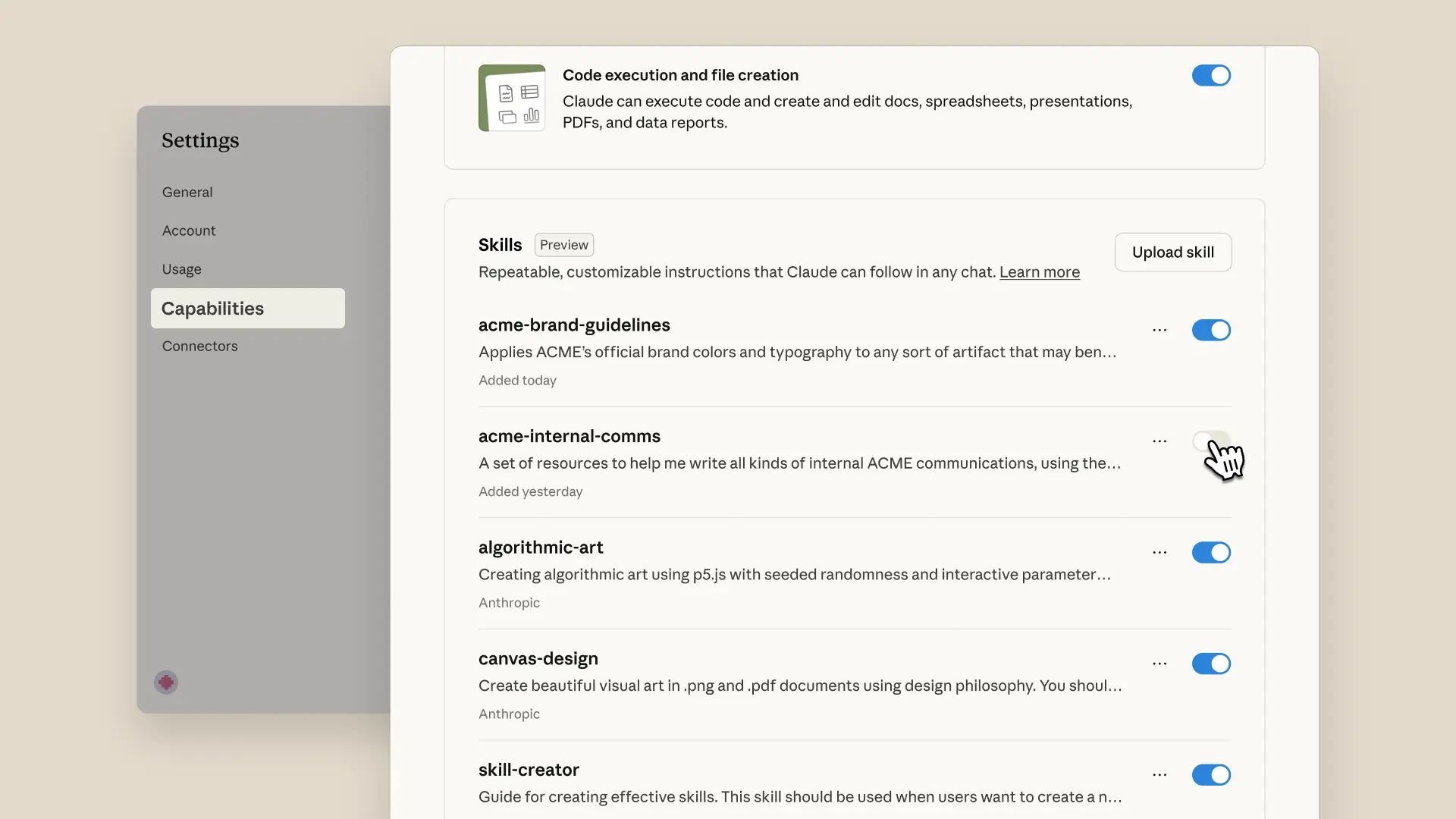
What you see in that screen covers four skill types worth knowing: Anthropic's built-in document skills (the pptx, xlsx, docx, and PDF generators that already run behind the scenes when Claude creates files), partner skills from the directory, your own custom uploads, and org-provisioned skills pushed by an admin - Claude Help Center. The built-in document quartet alone changes what "Claude output" means for a recruiter: pipeline trackers as real Excel files with working formulas, debrief decks as real PowerPoint, offer letters as formatted Word documents. Community collections have also gone straight at HR: one open-source corporate pack ships 166 skills including nine HR-specific ones (job-description writer, interview-kit builder, onboarding planner, compensation benchmarking among them) - GitHub, and a dedicated HR collection packages over 100 skills across talent acquisition, onboarding, and workforce analytics - GitHub. Treat community skills like software installs: Anthropic's docs warn that a malicious skill can direct Claude to run harmful code, so only install from sources you trust, which matters double when candidate PII flows through your account - Claude Docs.
Building your own is genuinely non-technical. A skill is a folder with a SKILL.md file: YAML frontmatter holding just a name and a description, then plain Markdown instructions; zip it and upload via the Skills settings - Claude Help Center. Here is a complete, working example that encodes the debrief discipline from section 6:
---
name: interview-debrief
description: Synthesizes interview scorecards into a structured hiring
  debrief. Use when the user uploads interview feedback or scorecards, or
  asks for a debrief on a candidate.
---

When the user provides interview feedback for a candidate:

1. Parse every scorecard: interviewer, competency, score, verbatim evidence.
2. Build an agreement map: flag competencies where scores diverge by 2+
   points, quoting each side's evidence.
3. Never average scores into one number: decisions need the disagreement,
   not a blended mean.
4. Label any claim without a quote as "interviewer impression", separate
   from evidence.
5. End with unresolved questions and suggested reference-check probes.
6. Never recommend hire or no-hire: the panel decides.
The fastest authoring path is to not write it yourself at all: Anthropic's guidance is that Claude understands the skill format natively, so you can describe your debrief process in a chat and ask Claude to generate the SKILL.md - Claude Docs. The early-adopter reports suggest the payoff scales with how much repeated process a team has: Rakuten's AI transformation lead said of skills at launch, "What once took a day, we can now accomplish in an hour," and Box reports users transforming stored files while saving hours of effort - Claude. Hiring teams are unusually rich in exactly that kind of repeated process, which is why the nine HR skills in the corporate collections cover the same stages as this guide's sections. Skills also follow you across surfaces: they run inside Claude Cowork sessions, and in the Microsoft 365 add-ins for Word, Excel, PowerPoint, and Outlook you can even invoke them explicitly by typing "/" in the sidebar, useful when your offer letters live in Word rather than the browser - Claude Help Center. One honest limitation to plan around: custom skills uploaded to claude.ai are per-user, so a skill you upload is not automatically your teammate's; sharing across a team means passing the zip around or having a Team/Enterprise admin provision it org-wide - Claude Docs. If you want a guided walkthrough of the whole skills system before building, the most-watched independent tutorial is a solid 22-minute overview.
Anthropic's Full Claude Skills Guide In 22 Minutes
The video covers the same enable-browse-upload flow described above and demonstrates skill authoring live, which makes the folder-with-instructions concept click faster than any written description. Once your hiring process exists as skills, the remaining gap is data: Claude knows your process but not your inbox, your calendar, or your ATS. Closing that gap is what connectors and MCP are for.
9. Wiring Claude Into Your Hiring Stack: Connectors and MCP
The reason 2026 is the year this guide became possible is that the plumbing standardized. The Model Context Protocol (MCP), the open standard that lets AI assistants talk to external tools, was donated by Anthropic to the Linux Foundation's new Agentic AI Foundation in December 2025, co-founded with Block and OpenAI and backed by Google, Microsoft, and AWS - Anthropic. At donation time MCP counted 97 million monthly SDK downloads and over 10,000 public servers, and it works across ChatGPT, Gemini, Copilot, and Claude alike. For a hiring team the practical meaning is simple: when your ATS ships one MCP server, it works with whatever assistant your company standardizes on, and vendors now actually ship them.
Inside Claude, integrations arrive as connectors: one-click connections in a built-in directory, no code involved. The ones that matter for hiring are Google Workspace and Slack, and their exact capabilities are worth knowing precisely. The Gmail connector lets Claude search and read mail and draft replies, but it cannot send: every email goes out by your hand, a genuinely useful safety property for candidate communication. The Google Calendar connector can create, update, and delete events and find mutual availability across attendees, which turns interview scheduling into a sentence. Google Drive gives Claude your hiring docs; all three are available on every plan, with an admin enable step on Team/Enterprise - Claude Help Center. In Slack, Claude reads the last 20 messages of a channel or 50 of a thread when mentioned, enough to summarize a debrief channel on demand - Claude Help Center. Custom connectors (any remote MCP server by URL) work on every plan including Free, added under Settings in a couple of clicks - Claude Help Center.
The 2026 breakthrough is that the ATS layer went official. Where a year ago connecting Claude to your ATS meant community hacks, the major systems now publish their own MCP servers with real governance:
| ATS | MCP status (July 2026) | Notes |
|---|---|---|
| Greenhouse | Official, announced May 7, 2026 | Governed, permission-aware, rolling out from June 2026 - Greenhouse |
| Workable | Official, May 13, 2026 | 38 tools across recruiting and HRIS, all plans, no extra cost - GlobeNewswire |
| Ashby | Official beta | User-level OAuth, read and write tools, follows existing permissions - Ashby |
| Lever | Community only | Unofficial open-source servers; use with caution |
| SmartRecruiters | Third-party wrappers only | No official server found as of mid-2026 |
The design pattern across the official servers is identical and reassuring: the AI can only see and do what the authenticated user can already see and do, with audit trails on every call. Greenhouse's chief product officer framed the launch as "AI should strengthen hiring, not shortcut it," and its design partners report pipeline analyses that used to take BI teams now landing in under 30 minutes - Greenhouse. If your ATS is on the official list, connecting it converts half the prompts in this guide from copy-paste-the-data workflows into ask-the-question workflows.
Now the reality check every recruiter asks for: LinkedIn. There is no official LinkedIn connector or MCP server for Claude, and the popular community workarounds automate your own logged-in browser session, which sits squarely inside what LinkedIn's User Agreement bans: section 8.2 prohibits scraping, crawlers, browser plugins that copy the Services, and "bots or other unauthorized automated methods," with account restriction or bans as the consequence - LinkedIn. The most popular unofficial server carries its own warning that account safety is not guaranteed. The compliant route to sourcing data inside Claude is an API built for the purpose: HeroHunt.ai runs a hosted MCP server over its People Search API, connecting Claude (or Cursor, or ChatGPT) to search across 1 billion profiles with natural-language queries, returning relevancy scores and verified contact details, with free trial credits to start - HeroHunt.ai. Our rundown of the wider ecosystem lives in the best MCPs for recruiting guide if you want the full server-by-server tour.
A closing word on safety, in plain language. Anthropic marks custom connectors as unverified and warns that a malicious MCP server can attempt prompt injection, hidden instructions that hijack what Claude does with your data - Claude Help Center. The rules that keep a hiring stack safe are short: connect vendor-official servers, read the OAuth permissions before approving, prefer read-only restrictions where your admin can set them (Team and Enterprise admins can), and remember that anything with write access can modify your ATS. With process (Skills) and plumbing (connectors) in place, the next question is the one your legal team will ask first.
10. The 2026 Compliance Layer: Rules Before Tools
Hiring is the most regulated thing most companies will ever do with AI, and 2026 rewrote the rulebook enough that advice from even a year ago contains wrong dates. The overview first, then the specifics: the EU classified essentially all recruiting AI as high-risk but just delayed its heaviest obligations to late 2027; US federal enforcement retreated while US states and private lawsuits advanced; and the practical playbook that survives all of it fits in four sentences. If your team remembers nothing else from this section, remember that 57% of HR professionals are unaware of the AI laws in their own state, which means knowing this material is itself a competitive position - SHRM.
Start with the EU, because it defines the global ceiling. The EU AI Act classifies AI systems for "recruitment or selection of natural persons," including targeted job ads, application filtering, and candidate evaluation, as high-risk under Annex III - AI Act Explorer. That classification covers essentially the whole funnel this guide walked through, which is why the implementation dates matter to every team hiring into Europe.
The dates then moved in 2026: the "Digital Omnibus on AI" package, approved by the European Parliament on June 16, 2026 by a 423-57 vote, pushed the high-risk compliance deadline for stand-alone systems from August 2, 2026 to December 2, 2027 - European Parliament, with the Council's final adoption following on June 29 - Shumaker. Do not misread the delay as a reprieve on everything: Article 50 transparency duties, the ones requiring disclosure when people interact with AI, still begin August 2, 2026 - Gibson Dunn. If you hire in Europe, disclosure obligations arrive next month; the audit-and-risk-management regime arrives in seventeen.
The US state layer is where enforcement is live today, and it moved in three directions at once during 2025-2026:
- Illinois (in force now): HB 3773 makes discriminatory-effect AI use in employment decisions a civil rights violation, bans zip-code proxies, and requires notice, effective January 1, 2026 - Crowell & Moring
- California (in force now): FEHA automated-decision system regulations took effect October 1, 2025, with a four-year record-keeping requirement - California CRD
- New York City (in force, waking up): Local Law 144 requires annual independent bias audits and candidate notice; a December 2025 state audit found enforcement was nearly nonexistent and DCWP committed to tightening it from 2026 - DLA Piper
- Colorado (repealed and replaced): the famous SB 24-205 never took effect; it was replaced in May 2026 by a narrower notice-and-explanation law effective January 1, 2027 - Norton Rose Fulbright
The pattern across those four bullets is the convergence you should plan to: tell candidates when AI is involved, keep records, and be able to explain any adverse outcome. A nuance worth understanding precisely is when using Claude actually triggers these laws, because the answer depends on workflow design rather than on the tool. NYC's rules bite when an automated tool substantially assists or replaces discretionary decisions; Illinois' notice duty attaches when AI is used to influence or facilitate a covered employment decision, with resume screening for patterns named explicitly as an example in the implementing rules - Hinshaw. Claude drafting your job description sits comfortably outside most definitions; Claude scoring resumes that determine who gets a phone screen sits inside them in Illinois and arguably in NYC. The design rule that follows: the moment Claude's output starts ordering candidates, your notice, records, and human-review obligations turn on, so build them in at that step rather than litigating later whether you crossed the line.
The vendor dimension deserves its own sentence because most teams' AI exposure arrives through tools they bought rather than prompts they wrote. Fewer than half of employers have procedures for vetting third-party AI vendors, per Littler's 2026 survey, even as 68% now hold formal AI policies - HR Dive. If a screening feature inside your ATS or a sourcing agent makes or shapes rejection decisions, request the vendor's bias-audit documentation and adverse-impact testing records now, because under the agent-liability theories advancing in court, their algorithm can become your defendant's table. The federal picture pulls the other way and it would be easy to over-read: the EEOC's AI guidance was pulled from its website in early 2025, and a June 2026 DOJ opinion attacked the EEOC's disparate-impact guidelines - Clark Hill. But Title VII, the ADEA, and the ADA still fully apply to AI hiring tools, and employment lawyers' consistent advice through 2026 has been to keep complying with state and local AI hiring laws despite the federal pressure campaign against them - Proskauer.
Nothing makes the private-litigation risk concrete like Mobley v. Workday. The collective action alleges Workday's screening software disparately impacted applicants over 40; the certification order revealed the software rejected applications "numbering in the billions," and on March 6, 2026 the court ruled that job applicants, not just employees, can bring disparate-impact age claims, with roughly 14,000 people opted into the collective - Forbes.
Read the structure of that case twice, because it defines the risk shape for everyone: the defendant is the software vendor, the theory is that its algorithm acted as employers' agent, and the harm alleged happened at the automated-rejection step, before any human saw the applicants. Every screening prompt in section 5 was written with this case in mind: rank-and-evidence, never auto-reject.
So what does a hiring team actually do? SHRM's distillation of the state-law landscape is the cleanest four-step version and matches everything above: inform candidates when AI tools are used, keep documented bias audits, have a qualified human review AI outcomes before any rejection, and be able to explain how AI influenced a decision on request - SHRM. Note how cheap those steps are in the workflow this guide built: the frozen rubric is your documented standard, the evidence-quoted scoring is your explanation, the "do not reject anyone" instruction is your human review, and a sentence in your application flow is your notice. Employers are catching up fast on formal governance, with 68% now holding formal AI policies, up from 38% a year earlier - HR Dive, and the workflow-level discipline is what makes a policy true rather than decorative. Compliance tells you how to use Claude safely; the next section is honest about where Claude simply is not the right tool at all.
11. Where Claude Fails at Hiring (and What to Use Instead)
Claude is a general assistant, and hiring has several jobs where general is the wrong shape. Being precise about these gaps matters because the failure pattern in most teams is not using AI too little, it is stretching a chat assistant across jobs it structurally cannot do and concluding AI does not work. There are five gaps worth naming, and each has a purpose-built answer in 2026.
The first and largest: Claude has no candidate database. It cannot search LinkedIn (section 9 covered why the workarounds risk your account), it has no index of profiles, and asking it to "find candidates" from its own memory produces plausible-sounding people who may not exist, the single most dangerous hallucination mode in recruiting. Every fact about a real person must come from a connected tool or an uploaded document, never from the model's memory. The second gap is outreach at scale: the Gmail connector deliberately cannot send email, and Claude has no sequencing, deliverability management, or reply routing. The third is ATS depth: even official MCP servers expose a governed slice of your ATS, not bulk workflows like stage automation across hundreds of candidates. Fourth, usage limits: consumer plans are metered, Cowork consumes limits faster than chat, and the top model is credit-metered even on paid plans, so an always-on screening pipeline hits walls a subscription was never designed for - Claude Help Center. Fifth, candidate-facing evaluation: after the Greenhouse numbers in section 6, putting an AI in the interview seat is a sourcing tax you pay in your best candidates.
For the sourcing and outreach gaps, the market's answer is agents built on top of frontier models rather than the raw assistant. LinkedIn Hiring Assistant, LinkedIn's first AI agent, went generally available in late September 2025 as a Recruiter add-on; LinkedIn reports early adopters reviewed 62% fewer profiles per hire, saved 4+ hours per role, and saw 69% higher InMail acceptance - LinkedIn. It is the strongest option if your sourcing lives entirely inside LinkedIn Recruiter and you can carry its licensing; its limits are its walls, since it works LinkedIn's garden and requires Recruiter seats to begin with.
HeroHunt.ai attacks the same gaps from outside the walled garden: its AI Recruiter runs the full find-screen-reach loop on autopilot across 1B+ profiles from the open web, GitHub, and Stack Overflow rather than a single network, with RecruitGPT generating shortlists from a single prompt and automated, personalized outreach handled for you. Two properties fit the theme of this guide specifically: it starts with an 8-day free trial on published self-serve plans, so a team can test the autonomous approach next to their Claude workflow without a procurement cycle - HeroHunt.ai, and its People Search API and hosted MCP server mean it plugs into the Claude workspace you just built rather than replacing it. The honest trade-off framing: a purpose-built recruiting agent will beat raw Claude at sourcing volume and outreach mechanics, while your Claude workspace beats any point tool at the judgment-heavy middle of the funnel, rubrics, debriefs, and offer craft. The strongest 2026 stacks run both, and the Bullhorn data backs the pattern: firms growing revenue by more than 25% are overwhelmingly the ones running AI embedded in their core tools, with 78% of high-growth firms using ATS-embedded AI - Bullhorn.
There is one more failure mode that belongs to you rather than the tools: automation of the wrong stage. The augmentation-versus-automation evidence from section 6 gives the design rule, automate the work around the work (scheduling, formatting, synthesis, tracking) aggressively, and keep humans visibly in the loop at evaluation and decision points, both because it is becoming law and because candidates can tell. Teams that get this split right report the compounding gains; teams that get it backwards end up in the 38%-walked-away statistic. With capabilities and limits both on the table, the remaining practical question is cost.
12. What a Claude-First Hiring Stack Costs
The honest cost story of Claude for hiring is that the entry price is trivial and the scaling costs are where planning matters. A solo founder or hiring manager gets the complete toolkit described in this guide, Projects, Skills, connectors, Claude Code, and Cowork, for $20 per month on Pro, or $17 monthly on annual billing - Claude. That is the cost of one job-board posting for a capability that touches every stage of the funnel. The pricing pressure arrives from two directions as you scale: seats (a five-person hiring team on premium Team seats is real money) and usage (agent products like Cowork burn allocation faster than chat, and heavy screening runs into plan limits).
Context for the subscription decision: Claude's price points now mirror its rivals almost exactly, so the assistant choice is about fit rather than price. The standard individual tiers all cluster at $20, and the power tiers all cluster at $100:
AI Assistant Plan Pricing, July 2026
The convergence in that chart is recent and real: ChatGPT's plans run Free, Go at $8, Plus at $20, and Pro tiers at $100 and $200, with Business at $20 per seat annually - OpenAI. Google moved to the same shape at I/O 2026, introducing a $100 entry tier for AI Ultra and cutting its top Ultra tier from $250 to $200 - Google, with AI Pro holding at $19.99. With prices equal, the hiring-specific tiebreakers from section 1 (long-context screening, document skills, the enterprise-trust numbers) are what should decide, plus one Claude-specific bundling fact: the $20 tier includes the agent products (Cowork, Claude Code) that competitors gate higher or package separately - Claude.
For teams, the arithmetic worth writing down before the budget meeting: a five-person hiring pod on Team standard seats runs $100-125 per month total; the same pod on premium seats, which carry the serious usage headroom for daily Cowork and screening work, runs $500-625 per month. Compare that against one fact from section 1, generative-AI users in TA reporting roughly a workday per week saved, and the premium-seat math still clears easily for any team whose loaded cost per recruiter-day exceeds about $30. The seat-mix trick most teams land on: premium seats for the recruiters living in Cowork daily, standard seats for hiring managers who touch Claude a few times per week, adjusted quarterly against actual usage reports from the admin console.
The API path prices differently and matters even if you never write code, because it is the economics underneath every recruiting platform you evaluate. Automation built on Claude Sonnet 5 currently costs $2 per million input tokens and $10 per million output at introductory pricing through August 31, 2026 - Anthropic. In resume terms, a million input tokens is roughly 1,500 pages of resumes read for two dollars, and two standard platform techniques, batch processing discounts and prompt caching (reusing the same rubric across hundreds of scoring calls), push effective costs lower still - Claude Docs. Even generous assumptions about output and re-reads put automated first-pass screening in the tens of dollars per thousand candidates, which is why API-based recruiting platforms can offer autonomous screening at flat monthly rates.
Budget one line for the specialist layer too, because section 11's conclusion has a price shape: LinkedIn Hiring Assistant prices as an add-on to Recruiter licenses (LinkedIn does not publish a flat rate), while HeroHunt.ai starts with an 8-day free trial and moves to flat-rate monthly plans from $99, which for a team testing autonomous sourcing means the pilot costs nothing but attention - HeroHunt.ai. The complete starter stack for a small team, one Claude Pro seat per hiring participant plus a HeroHunt plan from $99 a month (after the free trial) plus your existing ATS's official MCP connector, would have been an unremarkable single-tool line item in the 2024 HR-tech budget. Costs settled, the last substantive question is where all this is heading, because 2026's roadmap changes what you should build this quarter.
13. The Road Ahead: Agents in the Hiring Loop
Every signal in mid-2026 points the same direction: the chat era of AI at work is giving way to the agent era, and hiring operations sits square in the blast radius. The clearest evidence is Cowork's trajectory. It went from macOS research preview in January to web and mobile with cloud sessions in July, meaning tasks now continue running with your laptop closed and scheduled tasks run with no device online at all - Claude. Anthropic's own example is straight from the hiring desk: a scheduled Monday 6am session that works through email threads and transcripts, builds a briefing document, and leaves a follow-up email drafted but unsent. If you want the sharpest sense of what this looks like in practice, Anthropic's launch video remains the canonical demo.
Introducing Cowork: Claude Code for the rest of your work
The demo's framing, "Claude Code for the rest of your work," is the roadmap in one phrase: the autonomy that transformed software work in 2025 is being packaged for operations work in 2026, and recruiting coordination is one of the most operations-heavy jobs in any company. The usage study from section 2 shows adoption already followed: a third of all Cowork sessions are business process and operations, with hiring managers named among the exemplar users - Claude.
Three developments are worth watching over the next year, stated as the predictions this guide is willing to be graded on. First, process portability: with Agent Skills now an open standard adopted beyond Anthropic, your encoded hiring process (rubric skills, debrief skills, JD skills) becomes an asset you carry across platforms, so the teams writing skills today are compounding while others re-prompt - The Decoder. Second, agent-versus-agent hiring: candidate-side agents already flood the top of funnel (11,000 applications per minute was the 2025 number), and recruiter-side agents like LinkedIn's Hiring Assistant went globally available with measurable results, so the middle of the funnel, verified evidence and structured human judgment, becomes the scarce commodity; expect verification tooling to be the breakout HR-tech category of 2027, with Gartner's fake-profile prediction as the forcing function - HR Dive. Third, platform consolidation pressure: Anthropic filed a confidential IPO draft on June 1, 2026 - Anthropic after a $65 billion raise at a $965 billion valuation - Anthropic, and public-company economics historically push platform vendors up-market, which favors teams that keep their process in portable skills and their data behind standard connectors rather than locked into any one surface.
What does not change, on any credible 2026 trajectory, is the augmentation finding: Claude usage tilts toward human-in-the-loop collaboration, not replacement, and the tilt grew over the past year - Anthropic. The legal system is converging on the same architecture from the other side, human review as a compliance requirement rather than a preference. The strategic read for a hiring leader is therefore not "prepare to be replaced by agents" but "prepare to supervise them": the differentiating skill of the 2027 recruiter is writing the rubric, auditing the evidence, and owning the judgment call, with an increasingly capable fleet doing everything around it.
14. The Decision Framework
Strip away the detail and the decision tree for a hiring team in July 2026 has three branches, keyed to your volume and stack maturity. If you make fewer than five hires a year, run everything in this guide on a single Claude Pro seat: Project per role family, the six prompts, the built-in document skills, Gmail and Calendar connectors. Total cost $20 a month, setup one afternoon, and section 10's four guardrails (notice, records, human review, explainability) implemented as habits rather than infrastructure. If you run a standing hiring function, add the machinery: Team plan for the no-training default and admin controls, your process encoded as custom skills and provisioned org-wide, your ATS connected through its official MCP server if you are on Greenhouse, Workable, or Ashby, and Cowork carrying the coordination load. If you are volume hiring or agency-side, the subscription surface alone will not hold: you need the API layer or a purpose-built agent carrying sourcing and outreach, with your Claude workspace reserved for the judgment work.
Whichever branch you take, sequence beats tooling. The teams that win with this stack in 2026 all follow the same order: governance sentence first (what AI may and may not decide, copy Anthropic's own if you like - Anthropic), workspace second, prompts third, skills fourth, connectors fifth, agents last. Teams that run the order backwards, agents first, governance never, are the ones generating the walked-away candidates and the audit exposure documented throughout this guide.
And if sourcing volume is the constraint that brought you here, the fastest test costs nothing: HeroHunt.ai will run its AI Recruiter across a billion profiles for your live role during its 8-day free trial while your Claude workspace handles the rubric, debrief, and offer, which is the two-tool split this guide has argued for from the first section. Fifteen thousand recruiters already run some version of that stack, and the ones quoted in every survey in this guide are saving a workday a week. The window where this is a competitive edge rather than table stakes is, on the evidence of section 1's adoption curve, about one more planning cycle.
This guide reflects the Claude product stack, pricing, and legal landscape as of July 13, 2026. All of it moves fast: pricing changes, models ship, and at least one AI hiring law changed dates twice while this guide was being researched. Verify current details before committing budget or policy.