


The complete practical guide to automating LinkedIn recruiting in 2026: the real limits, the real prices, the playbooks that work, and the lines you should not cross.
LinkedIn's own AI recruiting agents passed a $450 million annualized revenue run rate this spring - The Motley Fool. In the same twelve months, LinkedIn sued one scraping company out of existence, settled with a second, and deleted the company pages of several automation vendors from its own platform. That contradiction is the defining fact of LinkedIn recruiting automation in 2026: the platform is simultaneously the most aggressive enforcer against third-party automation and the biggest seller of recruiting automation on earth.
For recruiters, this creates a genuinely confusing landscape. Automation is no longer optional: 93% of talent acquisition professionals say they plan to grow their AI use in 2026 - HR Dive. But the tools that promise to do the work range from officially blessed (LinkedIn's own Hiring Assistant) to explicitly banned (anything that sends connection requests on your behalf), and the difference between a thriving pipeline and a restricted account is a set of unwritten limits that LinkedIn refuses to publish.
This guide maps the whole territory. It covers what LinkedIn itself sells and what it really costs, the exact rules and limits that govern automation in 2026, the three tool architectures and their very different risk profiles, the major cloud outreach platforms, extensions and data tools, and the recruiting-native AI platforms that automate around LinkedIn instead of on it. Then it goes into the insider layer: warm-up schedules, safe daily action budgets, targeting tactics, message sequencing benchmarks, the failure modes that end campaigns, and how AI agents are rewriting all of it. Every number is from late 2025 or 2026, because in this field a two-year-old statistic is a fossil.
Written by Yuma Heymans (@yumahey), who has been building AI recruiting automation since 2021, including HeroHunt.ai's autonomous AI Recruiter, and writes here from the operator's side of the ban line rather than the marketing side.
Contents
- The State of Play: LinkedIn Recruiting Automation in 2026
- What LinkedIn Sells You: Recruiter, Sales Navigator, and Hiring Assistant
- The Rules of the Game: Limits, Restrictions, and the Legal Record
- Three Architectures, Three Risk Profiles
- The Cloud Outreach Engines
- Extensions, Desktop Apps, and the Data Layer
- Recruiting-Native Platforms: Automating Around LinkedIn
- The Playbook: Warm-Up, Budgets, Targeting, and Sequencing
- Where It Fails: Restrictions, Saturation, and AI Slop
- AI Agents and the 2026-2027 Outlook
- Choosing Your Stack: A Decision Framework
1. The State of Play: LinkedIn Recruiting Automation in 2026
The most important thing to understand before buying any tool is that LinkedIn recruiting automation in 2026 is not one market. It is two markets with opposite legal statuses, and most buying mistakes come from not knowing which one you are shopping in. The first market is automation that acts on LinkedIn itself: sending connection requests, messages, and profile visits through your account. Every tool in this market violates LinkedIn's User Agreement, without exception, and the vendors themselves quietly acknowledge it in their safety documentation. The second market is automation that works around LinkedIn: platforms with their own licensed profile databases that find candidates and contact them by email, plus LinkedIn's own paid AI. This market is compliant, and it is where most of the new money and the new AI agents are going.
The scale of what is being automated explains why this fight matters so much to LinkedIn. The platform now counts 1.3 billion members, with roughly 17,000 connections made per minute and about 8,200 job applications submitted every minute - LinkedIn Pressroom. LinkedIn's revenue crossed $5 billion in a quarter for the first time in the period ending December 2025 - Staffing Industry Analysts. Talent Solutions is the engine of that business, which is precisely why LinkedIn defends its data and its member experience with lawsuits, and why it built its own automation to sell instead.
On the recruiter side, adoption of AI has moved from experiment to expectation. LinkedIn's own research found 37% of talent professionals actively integrating or experimenting with generative AI, and reported that recruiters using AI-assisted messaging are 9% more likely to make a quality hire - LinkedIn Future of Recruiting. Meanwhile 52% of talent leaders plan to add autonomous AI agents to their teams in 2026 - Korn Ferry. The question recruiters actually face is no longer whether to automate, but which layer to automate and how much account risk to accept in exchange for reach.
What changed in the last twelve months is that the gray zone got smaller from both directions. LinkedIn's Hiring Assistant went globally available and became a nine-figure business, giving compliant automation a real product instead of a promise. At the same time, enforcement escalated from throttling individual accounts to eliminating vendors: the scraping API Proxycurl shut down after a LinkedIn lawsuit, a second scraper settled, and automation vendors watched their company pages vanish from the platform. Identity verification passed 100 million verified members, making burner accounts harder to operate - Social Media Today. If you want the wider context of how AI is reshaping the recruiter's job beyond LinkedIn, our companion piece covers it in depth - The Recruiter's Guide to the New AI Era.
None of this killed gray-zone automation. It professionalized it. The surviving vendors now ship warm-up modes, per-account action budgets, dedicated residential IPs, and auto-freeze features that hold users under LinkedIn's unpublished limits. The honest framing for 2026 is that on-platform automation is a managed risk, not a safe one, and the rest of this guide treats it that way: it explains how each layer works, what it costs, what the data says about results, and where the tripwires are, so you can make the trade-off deliberately instead of discovering it mid-campaign.
2. What LinkedIn Sells You: Recruiter, Sales Navigator, and Hiring Assistant
Before evaluating any third-party tool, you need to know what the official stack costs and includes, because every automation pitch is implicitly priced against it. LinkedIn's paid recruiting ladder runs from Premium Business at $69.90 per month with 15 InMail credits - LinkedIn Premium, through Sales Navigator Core at $119.99 per month with 50 InMails and 50+ search filters - LinkedIn Sales Solutions, up to the Recruiter products. Many recruiters underestimate how useful Sales Navigator is as a sourcing database: it is the cheapest seat that lifts the search caps meaningfully, which is why so many automation tools are built to sit on top of it.
The Recruiter tiers are where the real money starts, and LinkedIn only publishes the entry price. Recruiter Lite, the self-serve plan, costs about $170 per month or roughly $1,680 per year, and comes with 30 InMails per month and search limited to your third-degree network - Kanbox. The full products are sales-negotiated: Recruiter Professional Services runs roughly $6,000 to $10,000 per seat per year, and Recruiter Corporate lands between $8,999 and $15,000+ per seat per year with 150 InMails per month and full-network access - Pin. Real transaction data from thousands of purchases puts the median LinkedIn contract at $38,451 per year, with discounts of 15-30% off list being common in negotiation - Vendr. If you are questioning whether that seat is worth it at all, we have made the case for skipping it before - Why you don't need a LinkedIn Recruiter seat.
InMail mechanics matter more than most buyers realize, because InMail is the only messaging channel LinkedIn actually wants you to scale. Credits roll over month to month up to a cap of roughly three times the monthly allotment, and critically, any InMail that gets a response within 90 days is credited back - LinkedIn Help. High-acceptance outreach therefore effectively multiplies your InMail supply, which is the economic logic behind everything LinkedIn's AI features do. There is also a quality floor: recruiters sending 100 or more InMails in a 14-day window must keep response rates at or above 13%, or bulk InMail gets disabled for two weeks in what LinkedIn calls the InMail Improvement Period - LinkedIn Recruiter Help. LinkedIn quietly runs the same acceptance-rate discipline on its official channel that automation vendors preach for connection requests.
It is worth doing the arithmetic on what an InMail actually costs, because it reframes every tool decision downstream. A Recruiter Corporate seat at roughly $12,000 a year comes with 150 InMails a month, or 1,800 a year, which prices each InMail at about $6.67 before you send a single one. At the platform's typical recruiter response rates, somewhere between 10% and 25% depending on targeting, you are paying roughly $27 to $67 for each candidate conversation you start. That is not necessarily bad value for a senior engineering hire, and the credit-back rule on answered InMails softens it further. But it explains precisely why the multichannel and off-platform approaches in later sections exist: an email sequence that reaches the same person costs cents, and the recruiting-native platforms are built on exactly that arbitrage.
The AI layer on top of Recruiter has been expanding every quarter. AI-Assisted Search lets recruiters describe a candidate in plain language or paste a job description, and AI-Assisted Messages drafts personalized outreach for up to 25 candidates at once - LinkedIn Product Updates. The 2026 Hiring Release added AI applicant targeting, AI follow-ups, and a Verified Applicant Spotlight that leans on the identity-verification push - LinkedIn 2026 Hiring Release. We track these features in detail separately - LinkedIn Recruiter's AI features in 2026.
The flagship, though, is Hiring Assistant: LinkedIn's first true AI agent, announced in October 2024 and globally available since the end of September 2025 - LinkedIn Pressroom. It takes an intake conversation or a job description, builds and runs the sourcing searches, evaluates applicants against your criteria, drafts the outreach, and even pre-screens interested candidates over InMail. It is sold as an add-on to Recruiter Corporate, or to RPS+ for staffing firms, and is available in English, German, and French with more languages rolling out through 2026 - LinkedIn Hiring Assistant. LinkedIn does not publish its price; practitioner reports consistently place it in five-figure annual territory per seat on top of the Recruiter contract - Hootrecruit.
The two-minute official overview below shows the agent working through an intake conversation and producing a shortlist, which is worth watching because the interaction model (brief the agent, review its output) is the pattern every other vendor is now copying.
LinkedIn's official Hiring Assistant overview
LinkedIn's published results for Hiring Assistant are strong, though they are LinkedIn's own numbers and they have shifted between announcements. At global launch, early adopters reported reviewing 62% fewer profiles and a 69% improvement in InMail acceptance - LinkedIn Pressroom. The current product page claims 81% fewer profiles reviewed per qualified match, 66% higher InMail acceptance, and cites Expedia Group cutting time-to-hire by 30 days - Hiring Assistant product page. Both sets are vendor-reported and cohort-dependent, but the direction is consistent with what independent adopters describe: Singapore's Certis reported a 60-70% productivity boost for its recruiters, with analyst Josh Bersin calling the product "a miraculous solution for recruiters" - HRD Asia.
The screenshot below shows the intake side of the product: the recruiter briefs the agent in a chat interface, and the agent turns that brief into a running sourcing strategy.
Hiring Assistant's conversational intake

Notice what the chat intake replaces: not the recruiter's judgment, but the dozens of manual searches and filter permutations that used to produce a longlist. Microsoft now discloses that agentic products in LinkedIn Talent Solutions, led by Hiring Assistant, have passed a $450 million annualized revenue run rate, the first time a LinkedIn AI product line has been broken out in earnings - Staffing Industry Analysts. That number is the clearest signal of where LinkedIn is taking recruiting automation: it intends to own the category itself, at enterprise prices, while squeezing the unofficial alternatives. Whether that price premium is justified for your team depends on what the unofficial and adjacent alternatives deliver, which is what the rest of this guide covers.
3. The Rules of the Game: Limits, Restrictions, and the Legal Record
Every automation decision should start from what LinkedIn's contract actually says, because the marketing language of "safe automation" has no legal meaning. The User Agreement in force since November 3, 2025 is explicit in Section 8.2: members agree not to "develop, support or use software, devices, scripts, robots or any other means or processes (such as crawlers, browser plugins and add-ons or any other technology) to scrape or copy the Services," and not to "use bots or other unauthorized automated methods to access the Services, add or download contacts, send or redirect messages" - LinkedIn User Agreement. A separate clause bans bypassing "any access controls or use limits of the Services," which makes working around the weekly invite cap a violation in itself. Note that the ban covers using automation, not just building it, and explicitly names browser plugins. The popular claim that extension tools are fine "because it runs in your own browser" is a risk argument, not a compliance argument.
The help center spells out the consequences. LinkedIn bans "third party software, including 'crawlers', bots, browser plug-ins, or browser extensions that scrape, modify the appearance of, or automate activity," and warns that violators "risk having their accounts restricted or shut down" - LinkedIn Help. In practice there is a restriction ladder. It typically starts with soft warnings and temporary invitation blocks, escalates to 24-48 hour account restrictions, then to identity-verification demands, and in repeat or egregious cases ends in permanent closure. LinkedIn's own documentation says invitation restrictions trigger when someone has "sent many invitations within a short amount of time" or when "many of your invitations have been ignored, left pending, or marked as spam," and that most such restrictions lift automatically within a week - LinkedIn Help on invitation restrictions.
Then there are the numbers LinkedIn will not publish. The community-measured consensus for 2026 puts the connection request cap around 100 invitations per week for free and Premium accounts, operating on a rolling seven-day window, with Sales Navigator and high-trust accounts observed reaching 150-200 per week - PhantomBuster. A more nuanced model treats the limit as a continuous trust gradient rather than a fixed number: new accounts get roughly 50-75 per week, established accounts around 100, and long-standing accounts with strong acceptance rates the most headroom, with paid plans not automatically raising the cap - Linked API. Vendors disagree on whether premium subscriptions raise the invite ceiling at all, which is itself informative: nobody outside LinkedIn knows the algorithm, everyone is reverse-engineering it from account samples.
Acceptance quality is the other half of the enforcement equation, and it is the half recruiters control. Vendor telemetry consistently shows accounts getting throttled when acceptance rates sink: one major tool puts the danger floor at 15% acceptance, below which restriction risk rises sharply - Dux-Soup. Pending-invite hygiene feeds the same score. Practitioner guidance says keep outstanding invitations under roughly 500, and withdraw anything older than two to three weeks - Linked API's guide. Withdrawals have their own rule: once you withdraw an invitation, you cannot re-invite that person for up to three weeks, and the recipient is not notified - LinkedIn Help on withdrawals. Even a handful of "I don't know this person" responses, as few as five to seven by community observation, can trigger an invitation block - Konnector.
The legal record is where the stakes become concrete, and it has developed fast. The pattern across three cases is remarkably consistent: LinkedIn loses the headline, then wins the war on contract law.
The famous case is hiQ Labs. In April 2022 the Ninth Circuit held that scraping publicly accessible data generally does not violate the federal anti-hacking statute, a ruling automation vendors still quote in their marketing - Justia. What the marketing omits is the ending: months later the district court found hiQ had breached LinkedIn's User Agreement, and the case closed with a consent judgment, a permanent injunction, a requirement to delete all scraped data and derived code, and a $500,000 judgment against a company that was already effectively dead - Proskauer. Public-data scraping survived the hacking statute and still lost on contract.
The 2025-2026 sequels removed any doubt about LinkedIn's appetite. In January 2025 LinkedIn sued Proxycurl, a scraping API doing roughly $10 million in annual revenue that thousands of recruiting and sales tools quietly depended on; by July 2025 Proxycurl had settled under a permanent injunction, deleted its LinkedIn data, and shut down entirely, with its founder writing "there is no winning in fighting this" - Nubela's goodbye post. In October 2025 LinkedIn sued ProAPIs, alleging over one million fake accounts used to power a scraping API sold for up to $15,000 per month; the parties reached an agreement in principle in February 2026 - BleepingComputer. Alongside the courtroom, LinkedIn used its home-field advantage: it removed the company pages of Apollo.io and Seamless.ai in March 2025, and did the same to automation vendor HeyReach in March 2026, deleting its page and its founders' personal profiles while the product kept running for customers - Wonda.
Underneath the lawsuits sits a detection machine that has been scaling for years. LinkedIn's automated defenses now stop the overwhelming majority of fake accounts before a human ever reports them, with 99.7% caught proactively in the most recent reporting period - LinkedIn Community Report. The volume trend below explains why burner-account strategies keep getting more expensive.
Fake Accounts Stopped by LinkedIn per Half-Year
The takeaway from the chart is not the exact totals, which combine registration blocks and proactive takedowns compiled from LinkedIn's transparency reports - Fraud Blocker. It is the scale: LinkedIn removes fake accounts at a rate comparable to a mid-sized country's population every six months, and since December 2025 it can lean on more than 100 million ID-verified members to separate real humans from synthetic ones - TechCrunch. Every automation architecture in the next section operates inside this detection environment.
One more rulebook applies if you recruit in Europe: privacy law, which survives even where LinkedIn's own rules are ignored. Regulators from 17 jurisdictions have jointly stated that "personal information, even when it is publicly accessible, is subject to privacy laws" - OPC Canada. For sourcing, the standard lawful basis is legitimate interest, which requires a documented assessment, and GDPR's Article 14 requires telling sourced candidates you hold their data "at the latest within one month" of collecting it - GDPR Article 14. France's CNIL benchmark caps retention of unsuccessful-candidate data at two years from last contact - Claeys & Engels. The practical rule: if your tool exports candidate data, your process needs a privacy notice, a retention clock, and a deletion path, or the automation is building you a liability database.
4. Three Architectures, Three Risk Profiles
The single most useful mental model for shopping this market is architecture, because architecture determines both how a tool behaves and how likely it is to get your account restricted. Every LinkedIn automation tool falls into one of three technical designs, and vendors in each camp market the other two as the dangerous ones. Understanding the real trade-offs lets you cut through that noise and pick based on your actual risk tolerance rather than the last landing page you read.
The first architecture is the browser extension. Tools like Dux-Soup's browser editions, Octopus CRM, and the data extensions from Apollo and Lusha inject JavaScript into your own logged-in LinkedIn tab. Because everything runs in your real browser on your home IP with your genuine fingerprint, there is no session-cookie handoff and no datacenter address to flag. The downside is that LinkedIn's front-end code can see the injected page elements and the machine-speed interaction patterns, browser extensions depend on the Chrome Web Store staying friendly, and your browser has to stay open while the tool runs. The Chrome Web Store dependency is not theoretical: the popular Kleo extension was forced to shut down overnight in mid-2025 after a LinkedIn cease-and-desist and relaunched as a standalone web app - LiGo.
The second architecture is the desktop application, with an embedded browser, used by Linked Helper 2 and TexAu's desktop edition. These run a separate browser instance on your own machine and IP but as a standalone app rather than a page injection. Linked Helper markets exactly this distinction: "Desktop app, not a Chrome extension. No code injected into the LinkedIn page, safer by design," paired with one-proxy-per-account isolation and randomized human-like timing - Linked Helper. The design keeps the home-IP advantage of an extension while removing the DOM-injection footprint and the Chrome Web Store kill switch. The cost is convenience: a desktop app is one more program to run and manage, and the automation still stops if your machine is off.
The third architecture is the cloud platform, the model behind Expandi, HeyReach, and most of the well-known outreach engines. You hand the tool your LinkedIn session cookie and user-agent string, and a remote browser in a datacenter replays your session around the clock. PhantomBuster's own documentation describes the mechanism plainly: it "only uses your session cookie, never sees, stores, or requests your login credentials," needs your user agent to match your real environment, and "runs in the cloud and does not require your browser or computer to stay on" - PhantomBuster support. The upside is genuine always-on operation and no local software. The detection surface shifts to IP mismatch (a login from a datacenter or a different country than you usually use), always-on session anomalies, and cookie reuse across environments, which is exactly why the serious cloud vendors now assign each account a dedicated residential proxy to impersonate a stable home connection.
The diagram below lays out how the three architectures relate to LinkedIn and where each one's detection risk concentrates. It is worth internalizing before you read any pricing, because a $39 extension and a $99 cloud seat are not doing the same thing to your account.
The honest conclusion from this model is that no architecture is compliant and none is truly "safe," but they fail differently. Extensions and desktop apps keep you on your own IP, which removes the single most common cloud-tool flag, at the cost of convenience and, for extensions, platform dependency. Cloud tools buy you always-on scale and a unified inbox, at the cost of a session handoff that only a good dedicated proxy can disguise. A solo recruiter running modest volume from one account often has the lowest total risk on a desktop app; an agency running many accounts needs the cloud model's account rotation and central inbox and simply has to invest in proxy quality and conservative limits to survive. Match the architecture to your operation, not to the loudest safety claim.
5. The Cloud Outreach Engines
Cloud outreach platforms are the workhorses of LinkedIn automation, and in 2026 they have converged on a common feature set: multichannel sequences that mix LinkedIn steps with email, AI message drafting, dedicated IPs, and built-in safety throttles. The differences that matter now are pricing model, agency features, and how each vendor handles the account-safety problem. Prices below were pulled from live pricing pages in July 2026; treat every "safe limit" a vendor quotes as their interpretation of LinkedIn's unpublished caps, not gospel.
Expandi is the category's benchmark-setter, at $99 per month per seat monthly or $79 billed annually, with a dedicated country-based IP and a 7-day trial - Expandi pricing. Its real differentiator is campaign breadth (Messenger, Event, Group, and Open InMail campaigns, the last of which reaches Open Profiles without spending connection-request budget) plus the largest public outreach dataset in the industry, which we lean on heavily in the benchmarks section. Expandi's own guidance is conservative: warm up at a maximum of 20 requests a day, five days a week - Expandi limits guide. For recruiters who want to learn the strategy before buying, Expandi's own 2026 walkthrough is a genuinely useful primer on structuring a compliant-ish sequence.
The mechanics of a 2026 LinkedIn outreach sequence
HeyReach is the agency-first option and prices accordingly, with a per-sender model that becomes a flat fee at scale: Growth at $79 per sender per month, an Agency plan at $999 per month covering 25 senders, and an Unlimited plan at $2,999 per month for unlimited senders - HeyReach pricing. Its signature feature is sender rotation, running one campaign across many LinkedIn accounts through a unified inbox, which is why agencies with dozens of client accounts gravitate to it. On safety, HeyReach gives each account a dedicated static residential proxy, caps activity at 200 actions per day, and auto-freezes senders as they approach the weekly invite limit - HeyReach help. It is also the vendor whose company page LinkedIn deleted in March 2026, a reminder that even the most safety-engineered cloud tool operates against the platform's wishes.
The mid-market is crowded with capable all-in-one tools that differ mostly at the edges. Skylead bundles LinkedIn plus unlimited email automation at $100 per month per seat and is known for if/else "smart sequence" branching - Skylead pricing. Dripify, now on dripify.com after a quiet domain move, is the simplest to learn, ranging from $59 to $99 per month with an activity-control algorithm that auto-adjusts limits - Dripify pricing. We-Connect is the cheapest tool that still gives every tier a dedicated IP, at $49 to $79 per month on annual billing, and ships an autonomous AI reply agent - We-Connect pricing. lemlist comes at LinkedIn from the email-deliverability side, adding LinkedIn steps and voice messages to its sequences on the $109 per month Multichannel plan - lemlist pricing. Each of these has a warm-up mode and a published daily action budget in the same 15-25 requests-per-day range; the choice between them is mostly about whether you value email depth (Skylead, lemlist), simplicity (Dripify), or price-per-IP (We-Connect).
At the budget end, Waalaxy starts at just €19 per month but is extension-based rather than cloud, making it the entry-level option for solo users willing to keep a browser open - Waalaxy pricing. At the premium end, Zopto targets agencies at $197 to $297 per month with a GPT-powered campaign builder, though most reviews note it requires a Sales Navigator subscription and offers no self-serve trial, pushing the real entry cost near $296 per month - ConnectSafely. The spread from Waalaxy's €19 to Zopto's near-$300 reflects who each is built for, not a fourfold difference in capability; a solo recruiter and a 40-account agency are buying genuinely different products.
The market's churn is itself a data point recruiters should weigh. Beyond the HeyReach page removal, several vendors hit turbulence: Kennected rebranded to SalesAi after a LinkedIn cease-and-desist, and LeadGravity shut down in 2026 citing "formal warnings from LinkedIn" - Saylink. The lesson for buyers is to treat on-platform automation vendors as potentially impermanent, keep your candidate data exported and owned outside the tool, and never build a process so dependent on one vendor's continued existence that its shutdown would strand your pipeline. The tools are useful, but they are operating on borrowed time by design, and the smart operators plan for that from day one.
6. Extensions, Desktop Apps, and the Data Layer
The extension and desktop tier is where budget-conscious recruiters and technical sourcers live, and it splits into two jobs: tools that automate actions and tools that extract data. Both categories were hit hard by 2025-2026 enforcement, and both survive because they run on your own machine, but they carry distinct risks worth separating.
On the automation side, Dux-Soup is the veteran, a Chrome extension since 2015 that claims 300,000 users and ranges from $14.99 per month for the browser edition to $99 per month for its always-on Cloud Dux - Dux-Soup pricing. Its safety guidance is among the industry's most cautious: start at roughly 20 connection requests a day, keep acceptance above 20%, auto-withdraw pending invites after 28 days, and maintain an SSI of 50 or higher - Dux-Soup safety guide. Linked Helper 2 is the desktop-app standard-bearer, running $15 per month locally up to $59.90 for its cloud version, and it leans hard on the "no code injected into the page" architecture argument - Linked Helper pricing. Octopus CRM is the cheap entry point at $9.99 to $39.99 per month - Octopus CRM, and Botdog is a newer, simpler option at around $35 per month on annual billing - Botdog pricing.
The most interesting move in this tier is TexAu's 2026 restructuring, which perfectly illustrates where the whole market is heading. TexAu split its business in two: a credit-based cloud "GTM automation and enrichment" platform from $79 per month, and a one-time-license desktop app at $1,499 (rising to $1,999) that runs unlimited automation on your own IP, with its V2 cloud edition sunsetting in August 2026 - TexAu desktop. The message is unmistakable: the vendor is pushing risky action-automation onto the customer's own machine and IP while keeping the compliant data-enrichment work in its cloud. That division, automation on your IP, data in the cloud, is the shape of the post-enforcement market.
The data layer deserves its own risk assessment because it is the category LinkedIn attacked most directly. These tools do not send messages; they extract and enrich contact data from profiles and Sales Navigator searches, and it is exactly this activity, at industrial scale via fake accounts, that triggered the Proxycurl and ProAPIs lawsuits. The recruiter-facing tools in this space are more restrained but sit in the same gray zone. Apollo.io offers a large free tier and paid plans from $49 per user per month, though its LinkedIn company page was among those LinkedIn removed - Warmly. Lusha starts at $49.90 per month for 400 credits - Lusha pricing, Kaspr (owned by Cognism) from €45 per month - Kaspr pricing, and Wiza, a Sales Navigator export specialist, from $49 per month - Wiza pricing. If you want the deeper method here, we have a full walkthrough of X-ray and free-search sourcing that pairs well with these tools - The practical guide to X-raying LinkedIn.
A second squeeze is now coming from Google, not just LinkedIn. Chrome Web Store policy updates that take effect August 1, 2026 tighten the rule that any user data an extension collects "must be strictly necessary to the extension's disclosed single purpose," which directly pressures data-harvesting extensions from the browser side - Chrome for Developers. Combined with LinkedIn's own detection and litigation, the data-extraction category faces two independent kill switches. The practical guidance for recruiters is to use these tools for targeted, low-volume enrichment of candidates you are genuinely pursuing rather than bulk list-building, to keep volumes well under the ~80-100 profiles per day that community testing flags as a soft ceiling - Evaboot, and to assume any given extension could stop working without notice. The data is useful; the dependency is fragile.
7. Recruiting-Native Platforms: Automating Around LinkedIn
There is a whole class of platforms that solves the LinkedIn automation problem by refusing to play the game on LinkedIn's turf. Instead of driving your LinkedIn account with a bot, they maintain their own profile databases built from public web data and licensed sources, run AI search over them, and automate outreach by email. The candidates are often the same people you would have found on LinkedIn. The channel and the legal exposure are completely different, and for most in-house teams this is now the more sensible default.
The architectural distinction matters enough to state plainly: these tools do not send connection requests or automate InMail. Where LinkedIn messaging is involved, it stays manual. Gem is explicit about this, letting sequences include InMail stages while requiring the actual send to happen from your own LinkedIn seat, with its extension tracking the activity afterward - Gem support. That design is not a limitation the vendors failed to solve. It is a deliberate compliance line, and it is the single clearest signal that a platform intends to still exist in three years.
Gem itself has grown from a sourcing CRM into a full applicant tracking system with an AI agent layer, publishing startup pricing at $270 per month for teams of 1-10 (or $130 monthly on annual billing), with larger contracts custom-priced and a median annual contract around $24,900 - Gem pricing. Its AI Sourcing Agent searches 800 million profiles plus your own ATS, and its Application Review Agent scores inbound applicants with plain-language reasoning. Gem reports teams using agents handling 40% more jobs and twice as many applications, and its database rediscovery work is quietly one of the highest-ROI automations in recruiting: 46% of sourced hires now come from candidates already in the company's database, up from 26% in 2021 - Gem. The screenshot below shows what the agent layer actually looks like in a recruiter's workflow.
Agents assigned to distinct pipeline jobs
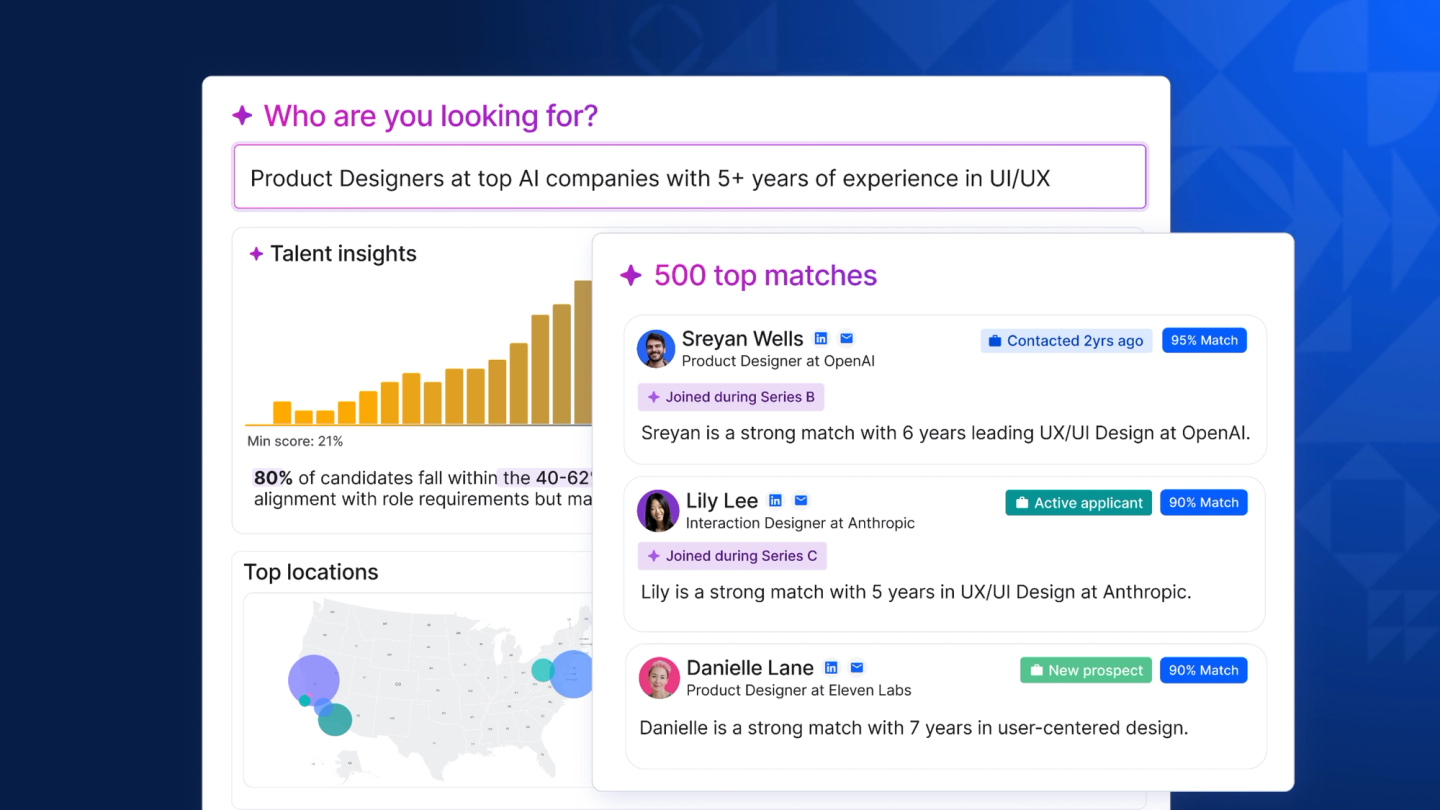
What that interface communicates is the current design consensus: not one all-knowing recruiter-bot, but several narrow agents each owning a stage (search, rediscovery, application review), with the recruiter reviewing between stages. Every serious platform in this category has converged on that pattern.
Juicebox is the fastest-rising name, built around natural-language people search across 800 million profiles. Pricing starts free, with Starter at $139 per month, Growth at $199 per seat, and an Agents add-on at $199 per agent per month that runs searching, screening, and personalized outreach continuously - Juicebox pricing. Its trajectory tells you where investor conviction sits: a $30 million Series A from Sequoia in September 2025, followed by an $80 million Series B at an $850 million valuation in May 2026 alongside its autonomous agents launch - BusinessWire. hireEZ takes the enterprise route, sourcing across 45+ platforms with agentic screening and outreach, at a median contract around $13,000 per year - Vendr. Loxo is the agency favorite, an all-in-one ATS, CRM, and sourcing platform with a genuinely free tier and Basic at $169 per user per month - Loxo pricing. SourceWhale dominates agency outreach sequencing with no public pricing but an average contract near $11,600 per year - Vendr. Fetcher takes the done-for-you approach, blending AI sourcing with human curation from $115 per month - Fetcher pricing, while Findem serves enterprise talent-intelligence buyers at roughly $6,000 per seat per year - Pin.
HeroHunt.ai belongs in this group as the autonomous end of the spectrum: rather than giving you a faster search box, its AI Recruiter takes a role brief, searches across more than 1 billion profiles spanning LinkedIn, GitHub, Xing, and Stack Overflow, screens the results, and runs personalized email outreach on autopilot, with RecruitGPT generating shortlists from a single prompt. Plans run $99 per month for Starter, $199 for Pro, and $399 for a 3-user Team, each with unlimited positions and an 8-day free trial - HeroHunt.ai plans. Like the others in this category, it does not send messages from your LinkedIn account, which is precisely why it sidesteps the restriction risk that governs everything in sections 5 and 6. For a solo recruiter or small team, that pricing sits in the same band as a Recruiter Lite seat while covering search, screening, and outreach rather than search alone.
The price ladder across this category is worth internalizing because it reframes the LinkedIn Recruiter decision entirely. A single Recruiter Corporate seat at $9,000-$13,000 per year buys you LinkedIn's database and 150 InMails a month. For a fraction of that, a recruiting-native platform buys you a comparable or larger profile universe, AI search, screening, and automated email outreach, with no account-restriction exposure. What you give up is real: LinkedIn's data is fresher on job changes, InMail lands in a channel candidates actually check, and Hiring Assistant is the only agent that can legally act inside LinkedIn. The right answer for most teams under 20 recruiters is not either-or but a deliberate split: one or two LinkedIn seats for InMail and verification, plus a recruiting-native platform doing the volume sourcing and outreach.
8. The Playbook: Warm-Up, Budgets, Targeting, and Sequencing
This is the section that separates recruiters who run automation successfully from those who lose an account in week two. The operating principles are not secret, but they are unintuitive, because the instinct with any new tool is to run it at full volume immediately, and that instinct is precisely what gets accounts flagged. The single highest-leverage decision in LinkedIn automation is how slowly you start.
Account warm-up is non-negotiable, and every major vendor's guidance converges on the same shape. PhantomBuster's ramp for an existing but previously inactive account targets roughly 20 connection requests a day and gets there in a month: week one at 25% of target (five requests and two or three messages a day), week two at 35-40%, week three at 50-60%, then 10-20% weekly increases until you hold at baseline - PhantomBuster. Brand-new accounts should start at 10% of target and stretch warm-up across six to eight weeks, building 50-100 organic connections before any automation touches the account. Expandi's built-in warm-up encodes the same philosophy mechanically: begin at five actions a day and add three every two days, reaching a 21-per-day ceiling in about two working weeks - Expandi Help Center.
The horror stories in vendor documentation are all violations of this one rule. Linked Helper's 2026 guide reports accounts restricted "after just 2-3 days" of creation, notes that "sending 80 connection requests on day one of a new account is a guaranteed flag," and describes 200 profile visits in a machine-like pattern producing a restriction within 48 hours - Linked Helper. What LinkedIn's systems appear to detect is not volume in isolation but the derivative: a sudden change in behavior. An account that has never sent 20 invitations in a week and suddenly sends 100 is anomalous in a way that an account that climbed there over a month is not.
Once warmed, the steady-state budgets in 2026 cluster tightly across vendors, which is itself evidence they are all measuring the same underlying system. Aged accounts run roughly 15-25 connection requests per day (60-100 per week), with new or reactivated accounts at 10-15 a day during their first 90 days; direct messages to existing connections run 20-40 a day for new accounts and up to 80 for aged ones; profile views can run into the low hundreds - PhantomBuster's 2026 limits guide. A useful overall ceiling from the desktop-tool side is about 150 total actions per 24 hours across all types. The most important nuance, and the one most likely to save you an account: premium subscriptions do not reliably raise the weekly invitation cap. Buying Sales Navigator to send more invites is a common and expensive misunderstanding.
Before any of that volume goes out, the profile itself has to be able to carry it. Acceptance rate is the metric LinkedIn appears to score you on, and acceptance is driven by who you are as much as what you send. The checklist that matters is short: a professional photo, a headline that speaks to the candidate rather than listing your job title, a summary that reads as a value proposition, some recent activity so the profile is not a ghost town, and expertise that visibly matches the people you are contacting - HeyReach. Practitioners commonly recommend reaching an SSI (Social Selling Index, LinkedIn's 0-100 engagement metric) of 70 or above before scaling aggressive automation, though LinkedIn has never confirmed any SSI-to-limits relationship, so treat it as a health dashboard rather than a lever - LinkedIn Sales Solutions.
Targeting is where automation quality is actually decided, because a perfectly warmed account sending to the wrong people will still tank its acceptance rate and get throttled. The highest-yield lists are not search results at all: they are behavior-based. People who commented on a relevant post, attended a relevant event, joined a relevant group, or changed jobs in the last 90 days accept at dramatically higher rates than a cold title-and-location search, and their comment text hands you the personalization for free. The discipline that works is micro-segmentation: build three to five small, tightly-defined lists rather than one monolithic one, and prioritize people who have posted in the last month. Search caps push you the same direction anyway, since Sales Navigator only exposes the first 2,500 results of any search and free LinkedIn about 1,000, meaning broad searches are literally unusable past a point and must be sliced by geography, company size, or seniority - Evaboot.
Sequencing is where the benchmark data gets genuinely useful, because it settles arguments recruiters have been having for years. The largest current dataset comes from Expandi's analysis of 13.2 million connection requests sent between May 2025 and April 2026: average acceptance across all industries was 28.5%, average reply to the connection note 3.0%, and average reply to messages after connecting 10.4% - Expandi benchmarks. The number recruiters should tattoo somewhere is the industry cut: Staffing and Recruiting is the best-performing industry in the entire dataset, at 36.5% acceptance, 6.6% note reply, and 18.9% message reply. Recruiters have a structural advantage on LinkedIn that salespeople do not, because being contacted about a job is welcome in a way that being pitched software is not.
Now the argument the data settles. Should a connection request carry a note? Multiple large studies find that no-note requests are accepted at equal or higher rates: one 80,000-request analysis put no-note acceptance at 55-68% versus 28-45% with notes - ReactIn, and a 16,492-invitation study found blank requests outperforming - Botdog. But the fuller picture comes from Belkins' analysis of 11.5 million connection requests: acceptance was 27.6% without a note versus 25.3% with one, essentially a wash, while reply rate ran 8.2% with a note versus 5.3% without, a 55% lift - Belkins. Notes do not buy acceptances. They buy conversations. Use no-note for volume list-building, and a genuinely personalized note when you actually want the person to write back.
The channel data is even more decisive for recruiters, and it comes from the only benchmark study built on recruiting rather than sales. Pin analyzed 4 million messages sent by 1,500+ recruiting organizations to 1.5 million candidates between June 2025 and May 2026, and the channel gap is enormous: automated email replied at 4.96%, recruiter-written email at 6.31%, and LinkedIn messages at 17.08%, roughly 3.4 times the automated-email rate - Pin benchmark report. This is the single strongest argument for keeping LinkedIn in your sequence at all, despite the compliance headaches, and it explains why so many recruiters accept the risk.
Candidate Reply Rate by Outreach Channel
The last bar in that chart is the practical takeaway, and it is the one most teams miss. The same study found a three-step sequence combining email and LinkedIn replied at 22.74% versus 5.77% for email alone, nearly a fourfold lift, and a two-step email-plus-LinkedIn sequence hit 45.76% against 19.73% for email-only. Multichannel is not a marginal optimization; it is the difference between a pipeline and a trickle. That is why the tools in section 5 all built email into their LinkedIn sequences, and why the recruiting-native platforms in section 7 all integrate LinkedIn as a manual step rather than ignoring it.
It is worth grounding all of this in a campaign that actually ran, because the abstract percentages hide how quickly the mechanics compound. A content agency using Expandi to recruit freelance SaaS writers built a tightly-defined list, sent connection requests to 104 people, and got 62 acceptances, 47 replies, 24 portfolio submissions, and 4 hires in a single week, with a setup that took under fifteen minutes - Expandi. Expandi's own SDR hiring campaign, using Sales Navigator targeting and a four-message sequence spaced two and five days apart, reported a 74.2% reply rate in London. These are vendor-published numbers and should be read with the appropriate skepticism, but the structural lesson survives the discount: a hundred well-chosen people, contacted in the right channel with a short sequence, outperforms a thousand poorly-chosen ones by a margin that no amount of extra volume can close.
The reason those campaigns worked is visible in what they did not do. Neither blasted a broad title search. Both defined a narrow, high-intent population (people who were plausibly available and plausibly interested), and both kept the sequence short enough to stay inside the window where replies actually arrive. That window is narrower than most recruiters believe: half of all candidate replies land within four hours of the message and 74.8% within 24 hours, which means a candidate who has not answered by day two is unlikely to answer at all, and the follow-up you send on day nine is mostly noise - Pin. Designing around that reality (front-load the value, keep touches tight, then move on) is worth more than any tool feature you can buy.
Sequence length has an answer too, and it is shorter than most recruiters assume. Three touches capture 93.2% of all replies a sequence will ever generate (first message 5.52%, second 5.40%, third 4.21%), with a fourth touch bringing the cumulative total to 97.7% - Pin. Everything past the fourth message is annoying people for statistically nothing. On copy, LinkedIn's own analysis of tens of millions of recruiter InMails still holds: messages under 400 characters get 22% more responses than average while those over 1,200 characters run 11% below, individually-sent InMails beat bulk sends by about 15%, and candidates with the "Open to Work" signal respond 37% more often - LinkedIn Talent Blog. Personalization still pays, but the bar has moved: simply including the candidate's first name doubles reply rates on paper (5.13% versus 2.61%), yet since nearly every message now does that, first-name personalization has stopped being a differentiator and depth is the only thing left that works.
9. Where It Fails: Restrictions, Saturation, and AI Slop
Every honest guide to automation has to spend real time on failure, because the failure modes are common, predictable, and mostly self-inflicted. There are three that end campaigns: the account restriction, the saturation of the channel itself, and the quiet collapse of results when automation is pointed at the wrong people.
The account restriction is the acute failure, and the good news is that most are survivable. The overwhelming majority of restrictions are temporary, triggered by excessive connection requests, an acceptance rate that has fallen through the floor, a cluster of "I don't know this person" reports, or detected extension activity. The recovery protocol that vendors converge on is specific and worth memorizing: disconnect every automation tool immediately, complete any identity verification LinkedIn asks for, appeal through the official form, and never, under any circumstances, create a second account, because that reliably converts a temporary restriction into a permanent ban - Expandi's restriction guide. After reinstatement, do not resume where you left off. Pause for two weeks, then re-warm from 5-20 requests a day at roughly half your prior volume. Typical restrictions last two to fourteen days, and LinkedIn's own documentation confirms that most invitation restrictions lift automatically within a week and that withdrawing pending invites will not shorten them.
The chronic failure is subtler and, in 2026, more dangerous: the channel is saturating. The clearest evidence is in the same Expandi dataset that shows recruiters outperforming: connection-note reply rates fell from 3.5% to 2.2% between May 2025 and April 2026, a 37% relative decline in twelve months, while acceptance rates and post-connection message replies held steady - Expandi benchmarks. Read that carefully, because it is a precise diagnosis: people still accept connections at the same rate, they just increasingly ignore the pitch attached. The same decay is visible in cold email, where platform-wide reply rates dropped from 5.1% in 2024 to 3.43% in 2026 across a 20-million-email dataset - Woodpecker.
The cause is not mysterious. Roughly 29% of outreach senders now use AI to write their messages, and nearly all the rest do basic personalization, which means the personalization arms race has reached its terminal state where everyone does it and it therefore signals nothing - Expandi's state of outreach. The volume side is worse: LinkedIn now receives roughly 11,000 job applications per minute, up 45% year over year, with 45% of applicants using AI to complete them - eWeek. Hung Lee, whose Recruiting Brainfood newsletter is the closest thing the industry has to a shared brain, describes AI slop as "rapidly colonising LinkedIn," noting that people have "figured out how to viralise, and now, how to automate viralisation" - Recruiting Brainfood. LinkedIn is fighting back on its own terms, claiming its detection catches generic AI content 94% of the time and limiting the distribution of repetitive AI posts - TechRound.
The strategic implication of saturation is counterintuitive and it is the most important idea in this guide: automation's value is shifting from volume to precision. When reply rates decay under generic volume, the winning move is not to send more, it is to send to better-chosen people with something genuinely specific to say. The data supports this directly. Small, targeted campaigns of fewer than 50 contacts reply at 5.8% versus 2.1% for blasts to 1,000+ contacts, and advanced personalization runs at 17-18% against 7-9% for basic - Woodpecker. Automation is still the right answer, but the thing it should automate is the research and the targeting, not the sending of more undifferentiated messages into a channel that has stopped listening to them.
The third failure mode is organizational rather than technical, and agencies hit it constantly: two recruiters unknowingly contacting the same candidate, or a campaign pointed at a list that never matched the role. Duplicate outreach is a solved problem if you use the tooling, since the serious platforms support workspace-level suppression lists so that a candidate never receives two touches from different teammates - HeyReach. Wrong-audience campaigns are the one that quietly kills accounts, because they push acceptance below the throttle threshold and drag account health down with them. The early-warning signals are worth watching weekly: acceptance rates declining while volume stays flat, and an "accepted but silent" ratio climbing above 60-70%. Both mean the list, not the message, is broken, and the correct response is to stop the campaign rather than to add another follow-up step.
10. AI Agents and the 2026-2027 Outlook
The defining shift of the past eighteen months is that LinkedIn automation stopped being about faster clicking and started being about delegating judgment. The old tools did what you told them: send this message to these 200 people. The new agents are given a goal and work out the steps themselves: find people who fit this role, evaluate them, decide who is worth contacting, write something specific to each one, and follow up. That is a categorical change, and it is reorganizing the entire market around a single question: whose agent is allowed to act inside LinkedIn?
LinkedIn's answer is unambiguous, and it is written in both its product roadmap and its litigation record. Its own agent may act inside LinkedIn. Yours may not. The $450 million annualized run rate for Talent Solutions' agentic products is not a side business; it is the reason LinkedIn will never open an outreach API to third parties - Staffing Industry Analysts. Every incentive points the same way: monetize agents itself, litigate against anyone who builds a competing path to the data, and use identity verification to close the fake-account escape hatch. Recruiters planning a 2027 stack should assume the platform gets more closed, not less, and should treat any vendor whose roadmap depends on LinkedIn loosening up as a bad bet.
Outside LinkedIn's walls, the agentic sourcing market has matured fast and is now well-funded enough to be durable. The timeline of the last eighteen months tells the story: hireEZ shipped agentic AI in March 2025, LinkedIn's Hiring Assistant reached general availability in September 2025, Juicebox raised from Sequoia the same month, Findem raised $51 million in October, Gem expanded its agent suite in December, and Juicebox launched continuous sourcing agents alongside an $80 million round in May 2026. Adjacent to recruiting, Mercor's trajectory shows how much capital is chasing AI-mediated talent matching: it hit a $10 billion valuation in October 2025 and by July 2026 was in talks at roughly $20 billion with annualized revenue past $2 billion - TechCrunch.
The obvious caution is that most of what is marketed as "agentic" in 2026 is not. Fosway's assessment of talent acquisition vendors found that only 27% of the AI features vendors claim are actually live with customers, and Gartner has a name for the phenomenon: "agent washing," estimating that only about 130 of the thousands of self-described agentic AI vendors are real - Gartner. The same analysis predicts that over 40% of agentic AI projects will be cancelled by the end of 2027, undone by costs, unclear value, and weak controls. The buying discipline this implies is simple and worth applying to every demo you take: ask what the agent does without a human in the loop, ask to see it run on your actual role, and ask what happens when it is wrong.
The most interesting structural development, though, is that automation is now running on both sides of the table. Candidates are automating applications at scale (45% use AI to complete them), employers are automating screening, and the middle is filling with noise that neither side wants. Gartner projects that as many as 25% of job candidates could be fake by 2028 - eWeek. The counterintuitive consequence is that verification and human contact are becoming premium goods. The scarce thing in 2027 is not the ability to contact a thousand people; anyone can do that for $79 a month. The scarce thing is confidence that the person on the other end is real, qualified, and actually interested, and that is exactly where LinkedIn is investing (100 million verified members) and where the smartest recruiting teams are re-allocating their human hours.
There is real evidence that well-built agents outperform the manual baseline rather than merely being cheaper. A field experiment covering roughly 70,000 applicants found that AI voice-agent interviews raised job offers by about 12%, job starts by 18%, and 30-day retention by 17%, with 78% of applicants choosing the AI interviewer when given the choice - SSRN. That result should reframe the debate. The question is not whether agents can match human throughput, which they obviously can, but where they produce better outcomes because they are more consistent, more available, and less prone to fatigue. Sourcing and first-touch outreach, the two functions this entire guide is about, are the clearest cases.
Analyst consensus for the next 18 months converges on a few concrete expectations. 82% of HR leaders plan to use some form of agentic AI within their functions by mid-2026 - Gartner via Eightfold, and the Josh Bersin Company projects up to a 30% reduction in core HR headcount as agents absorb process work, calling 2026 "the most dramatic transformation of HR in my career" - PR Newswire. For the LinkedIn-specific stack, the practical forecast is a widening of the gap between the two markets described at the top of this guide. On-platform automation gets riskier, more expensive to operate safely, and increasingly niche. Off-platform agentic sourcing gets better, cheaper, and more autonomous, while LinkedIn's own agent becomes the premium compliant option for teams that can afford the Recruiter contract underneath it. The recruiters who prosper will be the ones who put the volume work off-platform, kept LinkedIn for the high-value human touches it is still uniquely good at, and spent the reclaimed hours on the judgment calls no agent makes well.
11. Choosing Your Stack: A Decision Framework
The decision comes down to three questions, in this order, and answering them honestly matters more than picking the "best" tool in any category. First, how much account risk can you actually afford? Second, is your bottleneck finding people or contacting them? Third, are you one recruiter or an operation with many accounts and clients? Almost every stack that works in 2026 falls out of those answers.
If you cannot afford to lose your LinkedIn account, and most in-house recruiters cannot because their network and their employer's brand live there, then do not run on-platform automation at all. Build your stack from the recruiting-native platforms in section 7, using AI search over an independent profile database and email as the primary channel, and keep LinkedIn for manual InMail on your top candidates. This is the highest-floor strategy: no restriction risk, no vendor that might get sued out of existence, and full ownership of your candidate data. A solo recruiter can assemble this for a low-hundreds monthly budget with a tool such as Juicebox, HeroHunt.ai, or Loxo, which is less than a Recruiter Corporate seat costs per month and covers search, screening, and outreach rather than search alone.
If your bottleneck is genuinely contact rather than discovery, and you accept the risk with clear eyes, the cloud outreach engines in section 5 remain the most effective way to reach candidates in the channel they actually read: the 17.08% LinkedIn reply rate against 4.96% for automated email is too large a gap to ignore - Pin. Run it on a warmed account, at 15-25 connection requests a day, with sharply segmented lists, three touches maximum, and email as the fallback channel. Accept that you may lose the account, and structure so that losing it is survivable: export your data continuously, never run automation on the account that holds your professional network if you can run it on a dedicated sourcing account instead, and monitor acceptance rate weekly as your early-warning system.
Agencies and staffing firms are a different business with different economics. Multi-account operation is the whole model, one campaign has to run across many sender accounts, and a unified inbox is not a luxury. That points squarely at HeyReach's per-sender or flat-fee model for outreach, SourceWhale or Loxo for the sequencing and CRM layer, and, if the budget supports it, Recruiter Professional Services Plus so that Hiring Assistant can do compliant sourcing inside LinkedIn alongside it. The economics work at agency scale precisely because the cost of a restricted account is lower: sender accounts are replaceable in a way that a corporate recruiter's ten-year network is not.
Enterprise teams with real compliance obligations should think about this differently again. The relevant question is not which tool is fastest, but which one survives an audit. That means LinkedIn's own stack (Recruiter plus Hiring Assistant plus Recruiter System Connect into your ATS, which LinkedIn says saves up to 3.5 hours a week per recruiter - LinkedIn), supplemented by a compliant sourcing platform like Gem, hireEZ, or Findem. The premium is real, and so is what it buys: a defensible answer when a candidate, a regulator, or your own legal team asks how you found and evaluated someone.
Whatever stack you choose, the operating discipline is the same, and it is what separates the recruiters who compound from those who churn through tools. Warm up slowly and hold your budgets. Segment tightly, because targeting beats volume in a saturating channel and the data now proves it. Keep sequences to three or four touches. Watch your acceptance rate as the single leading indicator of account health. Own your candidate data outside whichever vendor you are using, because that vendor may not exist in two years. And spend the hours automation gives you back on the parts of recruiting that are still stubbornly, valuably human: reading between the lines of a hiring manager's brief, convincing a hesitant candidate, and knowing when the resume in front of you is wrong about the person behind it.
The deeper point, and the one worth carrying out of this guide, is that LinkedIn recruiting automation in 2026 is not a technology problem. The technology works. It is a judgment problem: knowing which parts of your funnel to hand to a machine, which channel each candidate deserves, how much platform risk to hold, and when to stop optimizing a message and go have a conversation. The recruiters who win the next two years are not the ones with the biggest send volume. They are the ones who automated the search and the busywork, kept the human touches human, and stayed on the right side of a line that is getting brighter every quarter.
This guide reflects the LinkedIn recruiting automation landscape as of July 2026. Pricing, platform limits, product features, and enforcement practices in this field change quickly, and LinkedIn does not publish its automation limits, so verify current details before purchasing a tool or scaling a campaign.