



LinkedIn InMails are used to reach people on LinkedIn that you haven’t connected with yet.
On LinkedIn, only when you are connected to someone (called a 1st connection), you can send unlimited free messages to that person.
If you’re not connected, you have to send a connection invite or make use of InMails to send direct messages.
InMails are a paid LinkedIn feature, and the real price surprises most recruiters: on a Recruiter Lite seat, each InMail works out at roughly $4.67. Below is what every plan actually costs per message, how to send some for free, and which channels are cheaper.
Cost of InMails
You cannot buy InMails on their own. They are bundled into a LinkedIn premium subscription, and each plan comes with its own monthly credit allowance.
That makes the interesting number not the sticker price but the price per InMail: divide the plan by the credits it includes and you can see what a single message to a candidate really costs you.
| Plan | InMails per month | List price | Effective cost per InMail |
|---|---|---|---|
| Premium Career | 5 | $29.99 to $39.99/mo | $6.00 to $8.00 |
| Premium Business | 15 | $69.99/mo, or $539.88/yr | $4.67 monthly, $3.00 annual |
| Sales Navigator Core | 50 | $119.99/mo, or $1,079.88/yr | $2.40 monthly, $1.80 annual |
| Sales Navigator Advanced | 50 | $159.99/mo, or $1,799.88/yr | $3.20 monthly, $3.00 annual |
| Recruiter Lite | 30 | ~$170/mo, or ~$1,680/yr | $5.67 monthly, $4.67 annual |
| Recruiter Corporate | 150 | ~$10,800 to $12,960 per seat/yr | $6.00 to $7.20 |
The credit counts come from LinkedIn itself: Recruiter Lite lists 30 InMails per license - LinkedIn Talent Solutions, both Sales Navigator tiers list 50 - Sales Navigator compare plans, and Premium Business lists 15 - LinkedIn Premium. Recruiter and Recruiter Lite prices are not published by LinkedIn at all, so those are the indications we track with our recruiter network in our LinkedIn Recruiter pricing breakdown.
Two things stand out.
Sales Navigator Core is the cheapest source of InMail credits on the whole list, at about $1.80 a message billed annually, roughly a third of what the same message costs on Recruiter Lite. It is a sales product, so you give up the recruiting filters, the candidate projects and the ATS-style pipeline. But if credits are genuinely the thing you are short of, that is where they are cheapest.
Recruiter Corporate is the most expensive per message, despite giving you the most. You are not buying InMails there, you are buying the search index, unlimited profile views and shared team seats. Which is the honest caveat on this whole table: no plan is only a credit bundle, so treat the per-InMail figure as what the outreach costs you, not as a full product comparison.
Credits you get back, and credits you lose
Two LinkedIn rules decide how far your monthly allowance really goes, and most recruiters only know one of them.
You get a credit back for every InMail that gets a reaction. Every InMail that is accepted, declined, or responded to within 90 days is credited back to your account - LinkedIn Help. A decline still refunds you. Only silence actually costs you the credit, which means a recruiter with a 40% response rate is effectively paying about 40% less per delivered message than the table above suggests. Better targeting is literally cheaper.
Unused credits roll over, but only to a ceiling. Recruiter credits accumulate up to four times your monthly allotment, and anything above that ceiling expires rather than banking. So hoarding does not work: a Recruiter Lite seat tops out at 120 credits and then starts throwing the new ones away. On Premium plans, credits roll over for three months.
If you do run dry on Recruiter Lite, a Purchaser Admin can buy more, but the cap is tight: they are sold in packs of 10, with a maximum of 70 additional InMails per seat, and no contract can exceed 120 InMails per seat - LinkedIn Help. Past that point LinkedIn simply will not sell you more reach.
How to send free InMails: Open profiles
If you have no credits left, or you are on a free account, you can still message any premium member who has the Open Profile setting switched on. Those messages are free and cost you nothing from your balance.
Premium users can be recognized by the golden badge on their profile.
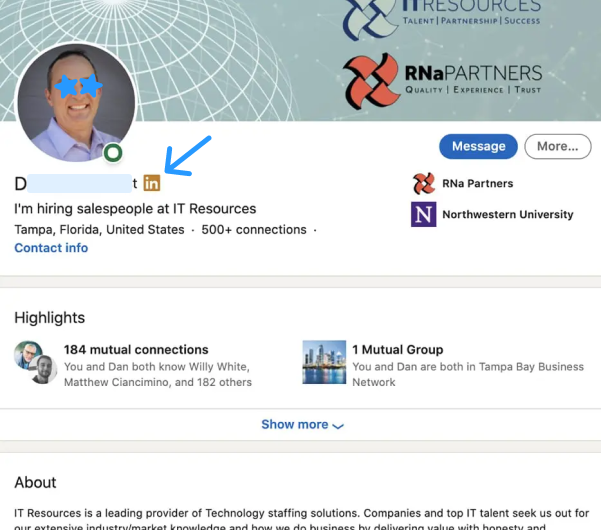
Golden LinkedIn premium badge
But the golden badge doesn’t necessarily mean that the profile is also open.
Users have the option to disable the Open setting, making their account closed off from free InMails.
Many premium users however leave the Open setting enabled because they simply don’t know they can disable it or because they are actually open to outreach from 2nd and 3rd degree connections.
The reliable tell is the button, not the badge. Click Message on a 2nd or 3rd degree profile: if it says Free Message instead of prompting you for an InMail credit, the profile is open and the message is free. This works on any account type, including a free one.
What you cannot do is search for open profiles. There is no Open Profile filter in Sales Navigator or anywhere else in LinkedIn, and that is deliberate on LinkedIn’s side, since a filter would make open profiles trivially spammable. Older guides that tell you Sales Navigator can filter for this are out of date.
So it stays a one-by-one check, or a trial and error approach at scale with a tool like Linked Helper, which attempts free messages across a list and lets the closed profiles fail. That approach works, but treat vendor claims about how many premium profiles are open as marketing rather than measurement, and pace yourself: bulk messaging is exactly the behaviour LinkedIn restricts accounts for.
Alternatives to InMails
InMails might be too expensive for you and sending free InMails might be too much of a hassle.
You can use these three alternative way of reaching candidates:
1. Send connection invites
Any LinkedIn user can send connection invites. When a user accepts your connection invite, you are what LinkedIn calls ‘1st connections’.
The additional benefit of sending a connection invite over sending an InMail is that you also have the people you connected with on your timeline, and you can follow each other's updates.
When you send the connection invite you can add a message to the invite to introduce yourself and why you are connecting.
The catch on a free account: you get about 5 personalized invites per month. Beyond that you can keep inviting, but only without a note, which for recruiting purposes is close to useless. Premium, Sales Navigator and Recruiter seats do not have that monthly note cap. On top of that, everyone lives under a weekly invite ceiling of roughly 100 to 200 invites, which LinkedIn does not publish exactly and adjusts per account.
2. Use other outreach methods
You can use other outreach methods like email, phone or Twitter to reach the candidate.
Depending on the candidate, other contact methods can even give higher response rates.
Take software engineers for example, they might respond on email, but might not on an InMail.
You can use email finders or sourcing engines to find email addresses of candidates.
Apollo.io is one example of an email finder that can surface a candidate's work email. Weigh it against the table above: a $49 Apollo seat and a $170 Recruiter Lite seat are not the same product, but if the seat exists purely to deliver 30 messages a month, the email route is the cheaper way to deliver them.
Apollo.io
Before you make that swap, price the alternative properly, because the $49 above is the annual rate: Apollo.io Basic is $49 per user per month billed annually but $65 month to month, so against a 30-credit Recruiter Lite seat the saving only really lands if you commit for a year. Test it on the free plan first, but know where free stops: 900 credits per seat per year released monthly, and only about 10 export credits a month, so you can look people up all day and still pull just 10 contacts out to a CSV or your ATS. Two honest caveats. Apollo is a B2B sales database, so coverage is strong for desk jobs at companies it maps and thin for trades, healthcare and hourly roles. And a work email lands in an inbox your candidate’s current employer administers, which is the last place a passive candidate wants a recruiter pitch.
3. Use a talent search engine
A talent search engine finds LinkedIn profiles, just like you can find them in LinkedIn itself.
If you use an advanced talent search engine, it also finds contact details for you so you can reach out.
An example of a talent search engine that finds LinkedIn and other profiles and contact details like email, phone and social links, is HeroHunt.ai.
HeroHunt.ai
This is the route that takes the InMail ceiling out of the equation entirely. The sections above show exactly where LinkedIn stops selling you reach: 30 InMails a month on a Recruiter Lite license, extra packs of 10 up to a maximum of 70 more per seat, and no contract past 120 InMails per seat. HeroHunt.ai searches LinkedIn and other public profiles and returns contact details (email, phone, social links) alongside them, so the outreach happens on channels LinkedIn does not meter, and a non-reply costs you nothing rather than an InMail credit. The honest caveat: it is our own product, and it is a sourcing and outreach tool, not an ATS. If your projects, pipeline stages and shared team seats live inside LinkedIn Recruiter, this replaces the search and contact half of that seat, not the rest of it.