



Quick answer: LinkedIn Recruiter Lite is LinkedIn's entry-level recruiting tool: 20+ search filters and 30 InMail credits a month, limited to your 1st, 2nd and 3rd-degree network. LinkedIn does not publish the price, but Leonar reports about $170 per month or $1,680 per year. The free trial lasts one month, needs a credit card and turns into a paid subscription unless you cancel at least one day before it ends.
As the name suggests, LinkedIn Recruiter Lite is a plain (or limited) version of the LinkedIn Recruiter product.
LinkedIn Recruiter exists to let recruiters find and reach candidates directly on the LinkedIn platform.
LinkedIn Recruiter Lite does exactly that, but with some limitations and therefore at a lower price: roughly $170 per month month to month, or $1,680 per year billed annually.
The two limitations that decide whether that money is well spent are the ones to understand before you buy: Recruiter Lite only unlocks people inside your own network, and it gives you 30 InMails a month.
In this guide you will learn the following:
- Is LinkedIn Recruiter Lite the right product for you
- How to work with LinkedIn Recruiter Lite
- Which alternatives to LinkedIn Recruiter Lite there are
1. Is LinkedIn Recruiter Lite the right product for you
Start with the price, because the price is the entire reason Recruiter Lite exists. A single license is about $170 per month paid month to month, or $1,680 per year billed annually, which works out at roughly $140 per month (Leonar, August 2026). LinkedIn does not print that number on the product page (you get a "Try now for $0" button instead), so most people first see it at checkout.
Compare that to the full product. Recruiter Corporate is sales quoted, but LinkedIn's UK G-Cloud 14 price sheet lists it at £8,925 per seat per year for 1 to 2 licenses, excluding VAT - G-Cloud 14. That is the gap Lite is built to fill: the same underlying search index, at a fraction of the cost, with the reach turned down. Our full breakdown of LinkedIn Recruiter pricing covers every tier.
That affordability comes with some strong limitations that you have to be aware of before considering paying for it.
The most important limitation is that the Lite version will only let you open people who are within your network.
That means that LinkedIn Recruiter Lite subscription only lets you find:
- 1st degree connections: people who you're directly connected with
- 2nd degree connections: people who are connected with your own 1st connections
- 3rd degree connections: people who are connected with your own 2nd connections
What happens to everyone else is worth getting exactly right, because it is more frustrating than a simple blackout. Out of network profiles still show up in your search results, but you cannot see their profile details and you cannot InMail them, per LinkedIn's own Recruiter search help. You get to watch a locked profile that matches your search perfectly and do nothing about it. If you are sourcing in a market where you have few connections, that describes most of your result list, which is why Lite works far better for a recruiter with a deep niche network than for someone opening a new vertical.
Other things to consider in regards to limits:
- InMails: maximum of 30 InMails every month (as opposed to 150 with LinkedIn Recruiter)
- Search: LinkedIn advertises 20+ filters on Lite against 40+ on Recruiter, and its plan comparison confirms Lite has no Open to contract work filter
- Results: you can view a maximum of 1,000 results per search, on Lite and on full Recruiter alike
- Collaboration: up to five seats with shared projects, but no free collaborator licenses for hiring managers and no ATS integration (LinkedIn Help)
- Reports: only the InMail and Job analytics reports
The InMail cap is softer than 30 sounds, and knowing the mechanics is worth real money. Unused credits roll over, but only up to four times your monthly allotment (so 120 for a Lite seat), after which they expire - LinkedIn Help. More importantly, you get a credit back for every InMail that gets a response within 90 days, and a reply, an accept and a "Not interested" all count. Write well and your effective monthly budget is well above 30. Write badly and it bites: drop below a 13% response rate over a 14 day window and LinkedIn warns you, and repeat offenders get put into an InMail Improvement Period (policy). Recruiter Lite quietly punishes spray and pray.
2. How to work with LinkedIn Recruiter Lite
Once you’re aware of who you can find and who you can’t find in LinkedIn Recruiter Lite, you can decide on if you want to give the product a try.
If you’re eligible, you can get a one month trial for LinkedIn Recruiter Lite, and LinkedIn requires a credit card to start it. Set a reminder when you start it: LinkedIn states that the card you signed up with is charged automatically at the end of the trial, that you only get a reminder email seven days beforehand, and that you have to cancel at least one day before the renewal date to avoid the charge - LinkedIn Help. A forgotten trial is a $170 month.
Here is how to cancel LinkedIn Recruiter Lite, step by step.
See here more information on the LinkedIn Recruiter Lite free trial.
Once you started your free trial (or already have an account) these are the steps to recruit talent:
- Create your search
- Screen candidates
- Reach out
1. Create your search
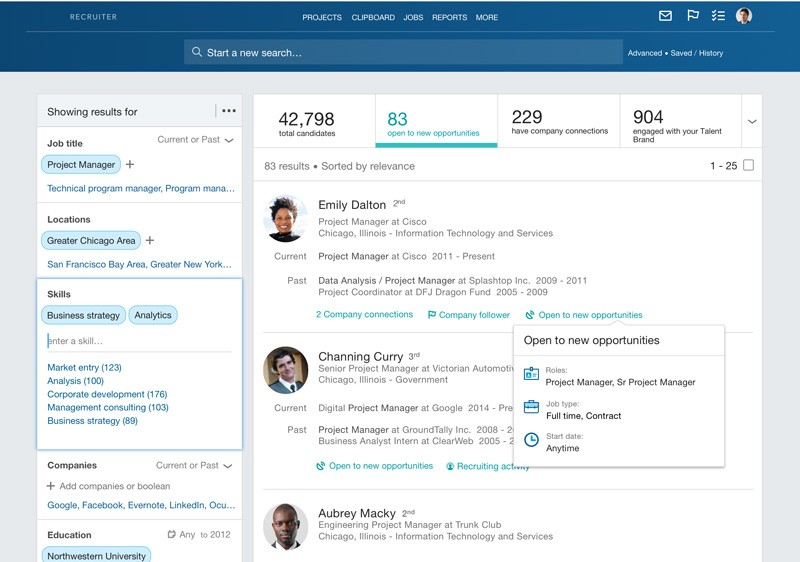
To start finding people you need to manually build your search.
These are the most important things to include in your search and how they impact your search:
Skills and keywords
Skills are searched for in the entire LinkedIn profile.
When you include ‘Data’ as a skill, the candidates who appear in your results are likely to have the word ‘Data’ somewhere on their profile.
However, this is not always the case. Even though it seems that LinkedIn lets you look for profiles with that keyword only, in many cases profiles are found in the search results which do not contain all the keywords included in the search.
Also important to realize here is that minor changes in how you spell keywords can change your results entirely.
Here’s a full guide on using keywords in LinkedIn Recruiter (Lite).
Job title
The job title filter searches in the current and previous job title section of LinkedIn profiles.
Using a job title for some roles can be a very helpful way of finding the right people, but it can also seriously limit your search results. You can test this by comparing results of a search that includes only back-end related keywords and no job title with a search that has the same keywords but also the job title Back-end engineer included. You see the results change significantly.
Here’s what to take into account when it comes to job title synonyms and search strings.
Location
The location filter can be added to look for talent based in certain locations. The location filter searches in the main location field (for example Amsterdam, the Netherlands) and in the location of the current job of the candidate.
If you want to further narrow down your search, you can include filters like education and companies. Remember that Recruiter Lite gives you the advertised 20+ filters, not the full Recruiter set, so some of the narrowing you may have read about elsewhere is simply not in your account.
3. Which alternatives to LinkedIn Recruiter Lite there are
There is no single replacement for Recruiter Lite, and anyone selling you one is overselling. Lite is two things in one seat, a search index and an outreach channel, and each is deliberately metered. So the useful question is not "what replaces it" but which of its limits is actually costing you hires. Fix that one.
In practice there are three failure points, and each has a different answer. If reach is the problem (your results are full of locked out of network profiles), you need a source that is not your connection graph. If outreach volume is the problem (you burn 30 InMails by the 10th), you need a channel LinkedIn does not meter. If collaboration and reporting are the problem (Lite stops at five seats and two basic reports), you do not need a better sourcing tool at all, you need somewhere to put the candidates.
If reach is the problem
HeroHunt.ai is an AI recruiter that searches candidates across the open web rather than only your LinkedIn connections, so the 1st, 2nd and 3rd degree wall does not apply and there is no locked profile problem. It has an 8-day free trial (a card is needed to start and is charged when the trial ends unless you cancel), with paid plans from $99 per month. The trade-off is honest: profiles assembled from public web data are not identical to a maintained LinkedIn profile, so you verify more and trust the résumé section less.
HeroHunt.ai
The Lite wall is structural, not a setting you can raise: out of network profiles still appear in your results and stay locked, so if you are opening a vertical where you have few connections, most of the list you are looking at is unreachable at any InMail budget. HeroHunt.ai searches the open web rather than your connection graph, so degree of connection never decides who you can open, and it screens and writes outreach on top of that search rather than handing you a result page. The honest caveat: a profile assembled from public web sources is not a maintained LinkedIn profile, so titles and dates can lag and you should verify seniority before you reach out. And if your actual bottleneck is the 30 InMails rather than the network wall, a different source does not fix it.
If outreach volume is the problem
This is where most Lite subscribers actually get stuck, because 30 InMails is roughly one week of serious sourcing. Apollo finds work email addresses, which sidesteps both the InMail meter and the network wall in one move: you can email someone LinkedIn will show you but not let you message. At $49 per user per month billed annually it is also cheaper than the Lite seat it is patching. Just be clear about what you are buying: Apollo is built for B2B sales, so its sweet spot is corporate desk jobs, and its email is a work address, which is the wrong door for a genuinely passive candidate.
If collaboration and reporting are the problem
Notice that two of the limits in section 1 are not sourcing limits at all: a five seat cap with no ATS integration, and only two basic reports. If those are what hurt, no sourcing tool fixes them, because what you have outgrown is not LinkedIn, it is having no ATS. Manatal is the cheapest credible option here at $15 per user per month billed annually ($19 month to month), with a 14 day trial and unlimited hiring manager seats, which is the part that matters when the real complaint is that nobody else can see your pipeline. The caveat is important though: this is a complement, not an alternative. Manatal does not source your LinkedIn network for you, and its entry tier caps at 15 open jobs and 10,000 candidates, so an agency running more than 15 live reqs is really pricing the $35 Enterprise tier.
Whichever option you pick, choose the one that solves the limitation that matters most to you, whether that is search reach, outreach volume, or team collaboration.
Frequently asked questions
How much does LinkedIn Recruiter Lite cost?
LinkedIn does not publish a price for Recruiter Lite, but Leonar reports about $170 per month for a single license, or $1,680 per year billed annually. A purchaser admin can add up to 70 extra InMail credits a month (LinkedIn Help). Our LinkedIn Recruiting pricing guide covers the full Recruiter tiers.
How do I buy or try LinkedIn Recruiter Lite?
In LinkedIn open Settings & Privacy, then Account preferences, then Subscriptions & payments, and choose Recruiter Lite. The one month trial needs a credit card (LinkedIn Help).
How do I use LinkedIn Recruiter Lite effectively?
Build a search from skills, job title and location, save it for alerts (up to 10 per seat, per LinkedIn Help), and check the daily candidate recommendations. Spend your 30 InMails on close matches inside your network, because every response within 90 days returns a credit.
Can Recruiter Lite find people outside my network?
No. Lite covers your 1st, 2nd and 3rd-degree connections, and members beyond that show up with details hidden and no InMail option (LinkedIn Help). To reach further you need another source, such as a LinkedIn X-ray search or an AI recruiter like HeroHunt.ai.