



Recruit'em (formerly Recruitin, still at recruitin.net) is a free X-ray search generator. You enter a job title and keywords, and it builds a Google or Bing query that finds public profiles on eleven networks, from LinkedIn and GitHub to Doximity. It is built by Clever Biscuit and, according to its about page, was renamed after LinkedIn's lawyers objected to "RecruitIn". Treat its strings as drafts: they skip brackets around OR groups, and the "Show similar jobs?" box does nothing. X-ray returns profile URLs only, never emails.
Recruitin (also called Recruit’em) is a Boolean and X-ray search generator.
It helps recruiters to quickly build an X-ray search string so they can find the right profiles in web search engines like Google. That way they can for example find all LinkedIn profiles without having to pay for LinkedIn.
It is completely free and needs no registration: the homepage still says "No registration & totally free". There is now an optional sign-in (email link or Google) to save searches and build a candidate pipeline, but the generator works without it. It is built by Clever Biscuit, a small team that maintains it as a free tool, and it is still actively updated (five new networks were added in February 2026).
One thing to know up front: X-ray gives you profiles, not contact details. Google returns public profile URLs, never an email address or a phone number. So whatever generator you use, you still need a separate email finder to actually reach the people you surface.
What is Boolean logic and X-raying
Boolean search strings are a set of keywords combined with AND, OR and NOT statements to generate searches in search engines with very specific results.
An example of a very basic Boolean string is:
developer (Angular OR Typescript)
When you combine these kind of search strings with what we call site: operators, you can search within specific websites so you can find for example LinkedIn profiles in Google.
In that case we’re talking about X-raying.
X-raying is searching for profiles using a web search engine (like Google).
An example of an X-ray search string is:
site:linkedin.com/in developer (Angular OR Typescript)
How Recruitin works
There is quite some logic involved in building X-ray search strings. Most recruiters experience quite a steep learning curve to really get the hang of search strings.
That’s why Recruitin build a tool to automatically build X-ray searches based on your input.
1. Select the platform from which you want to find profiles
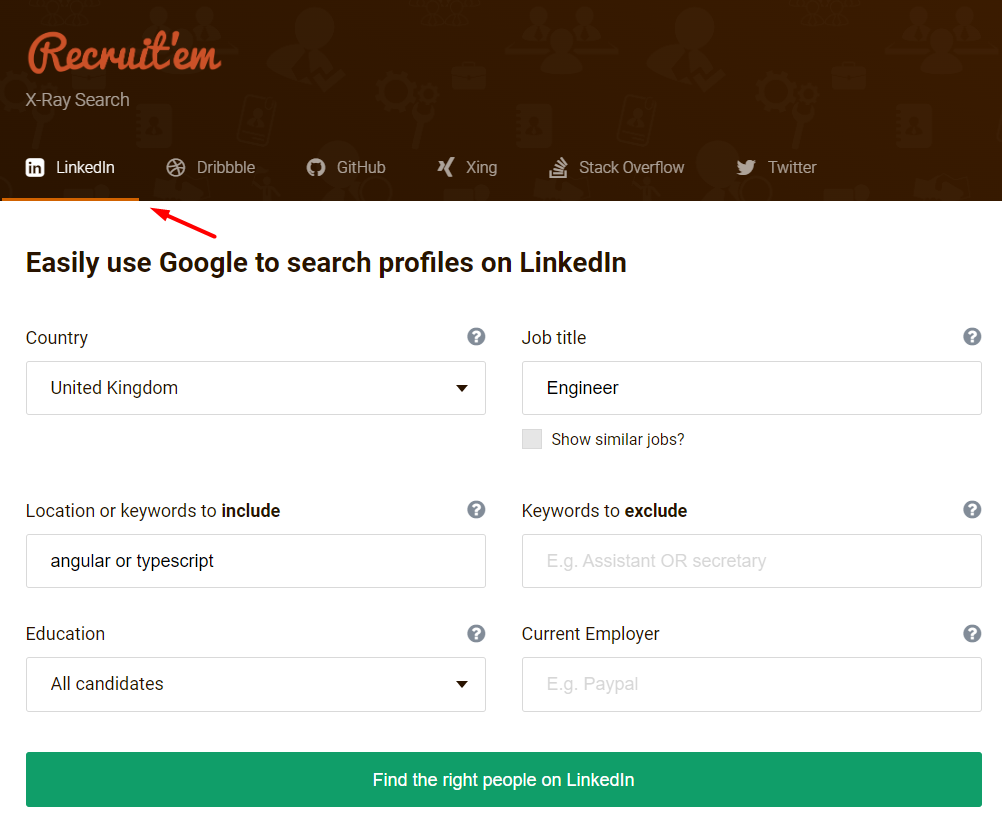
You can select one of the platforms from which you want to find candidates.
As of September 2026 you can choose from eleven platforms:
- GitHub
- Stack Overflow
- X (formerly Twitter)
- Dribbble
- Wellfound
- Coroflot
- Toptal
- Doximity
- Culinary Agents
The last five (Wellfound, Coroflot, Toptal, Doximity and Culinary Agents) were added on 17 February 2026, which is what turned Recruit'em from a purely tech-and-design tool into something a healthcare or hospitality recruiter can also use. The screenshots below predate that change, so the tab strip you see on the live site is wider than the one pictured here.
Unfortunately, you can only find profiles from one platform at the time.
There are other tools that help you find profiles from all platforms at the same time.
2. Complete the fields relevant to your search
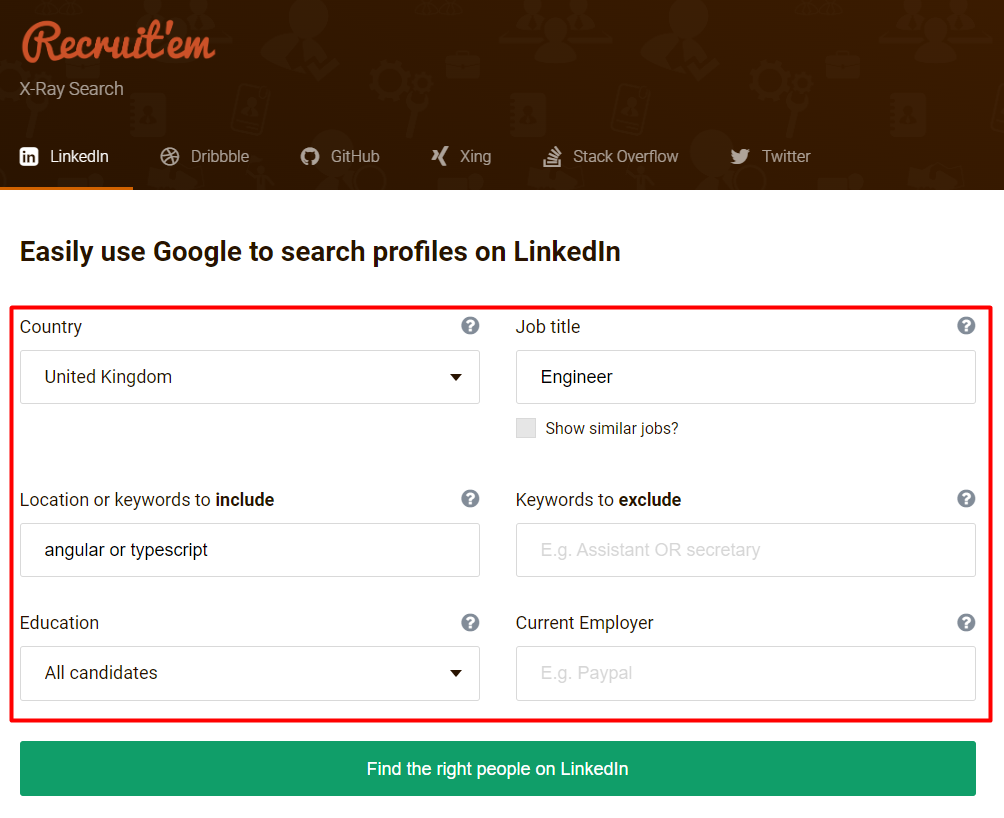
Complete the fields to specify your search. You can include country, job title, location, keywords, keywords to exclude, education and current employer.
Two additions are worth knowing about. There is a ‘Show similar jobs?’ checkbox next to the job title, which claims to pull in synonyms automatically. And there is a magic wand icon next to the same field that suggests related titles you can add yourself (shipped 31 December 2025). The wand works. The checkbox does not, and we get into why below.
3. Click the green button and click ‘Open in Google’
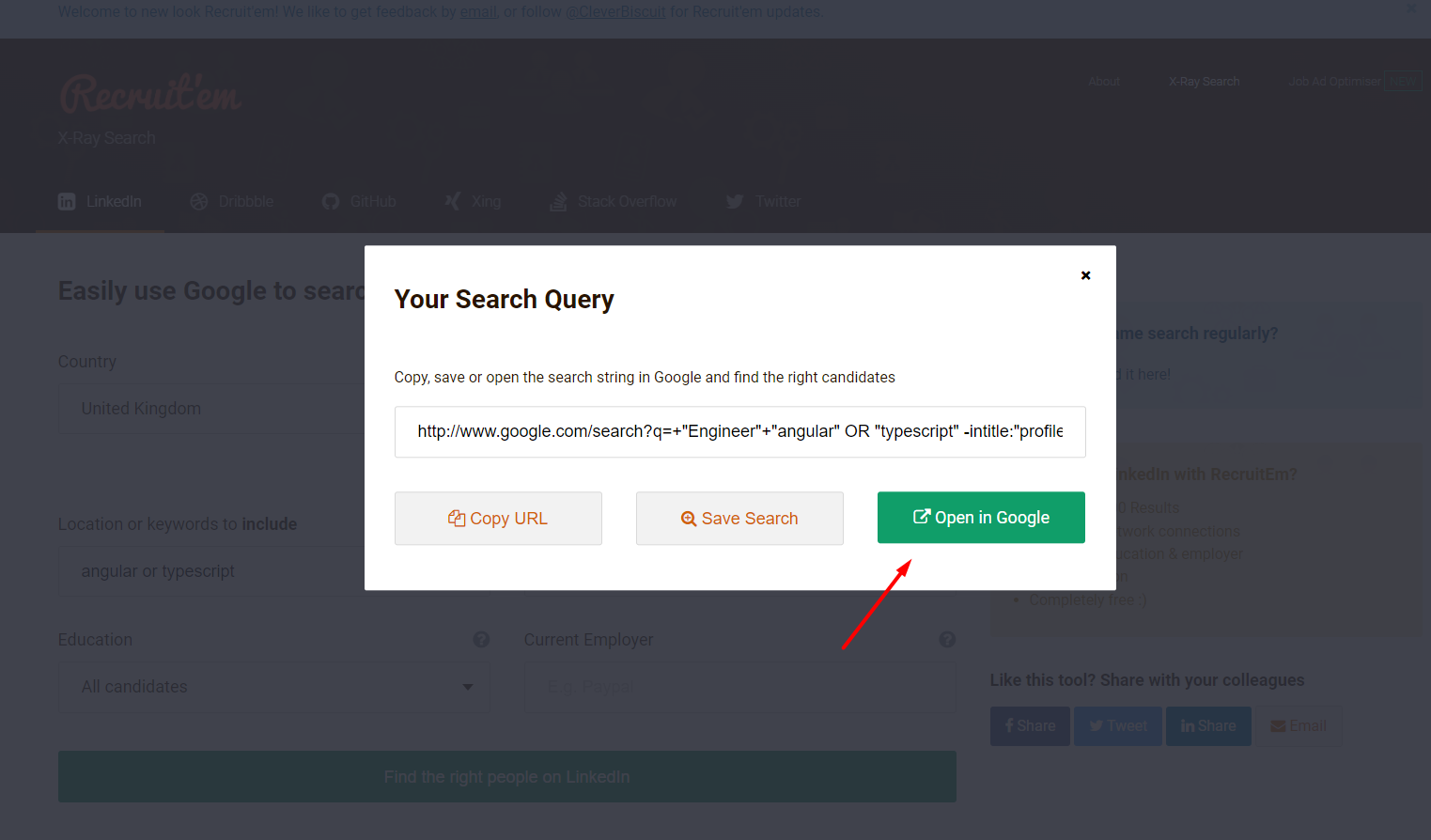
By clicking ‘Open in Google’ the automatically generated search string based on your input fields will appear in Google. Since July 2025 there is also an ‘Open in Bing’ button next to it, plus ‘Copy URL’ and ‘Save Search’. The Bing button is a genuinely useful addition, if only as a fallback for when Google starts serving you CAPTCHAs after a run of operator-heavy searches from the same IP.
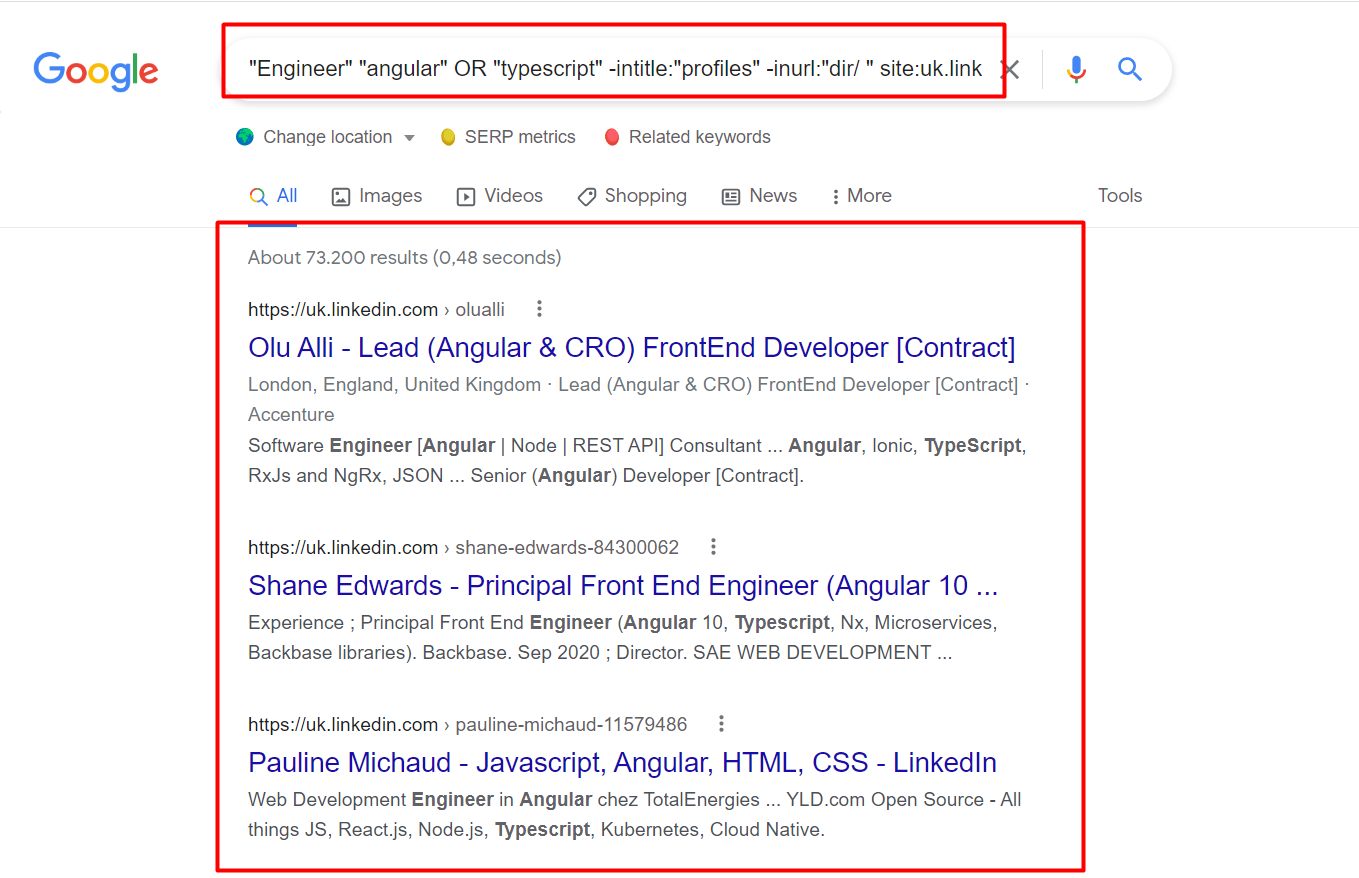
In Google, you will find the profile results and you can start screening the profiles and reach out if they are interesting.
This is where the free lunch ends. X-ray results are just public profile URLs. There is no email address and no phone number anywhere in a Google result, so the moment you find someone good you are stuck. You need an email finder to bridge that gap, and Apollo.io is the pragmatic default here: you paste in a name and company (or the LinkedIn URL) and it returns a verified work email and, on paid plans, a direct dial. It has a free forever plan, which matters when the whole point of X-raying is avoiding a LinkedIn Recruiter licence. It is a B2B sales database first, so coverage is strongest on people who work at companies with a web presence and weakest on freelancers, students and public sector.
Apollo.io
If you go the email finder route above, know how the free plan is metered before you plan a sourcing week around it, because Apollo runs two separate pools and people routinely confuse them. General credits are 900 per seat per year, released monthly, which is roughly 75 lookups a month. Email credits on the free plan are governed separately by the Fair Use Policy: nominally unlimited, in practice about 10,000 a month if you signed up on a verified corporate domain and only 100 a month on a Gmail address. Paid starts at $49 per seat per month billed annually, $65 month to month. Honest caveat: that 100-a-month Gmail ceiling is the one that catches people out, because a solo recruiter without a company domain gets a hundredth of the allowance the free plan appears to promise, and the gap only shows up mid-search.
Where the generated strings still break
Unfortunately, the search strings generated are often not correct. We re-ran the generator in July 2026 to check whether the old complaints had been fixed. They have not. Searching for a developer in any country with the keywords ‘Angular OR Typescript’ produces exactly this:
"developer" "Angular" OR "Typescript" -intitle:"profiles" -inurl:"dir/+" site:linkedin.com/in/ OR site:linkedin.com/pub/
There are four problems in that one line.
1. No brackets around the OR group. It should read (Angular OR Typescript). Google is not a strict Boolean engine, so with a single OR group it usually resolves the way you intended. The trouble starts when you OR two fields at once. Put ‘developer OR engineer’ in the title and ‘Angular OR Typescript’ in the keywords and you get "developer" OR "engineer" "Angular" OR "Typescript", where the grouping is genuinely ambiguous and the result set stops matching what you asked for. Brackets are the fix, and you have to add them yourself in the Google bar.
2. Every keyword is force-quoted. The tool wraps every single term in quotes, including the ones you never asked it to. "developer" pins Google to that literal token. It will not reach ‘programmer’, ‘software engineer’ or ‘development’, which is exactly the synonym expansion an unquoted query would have given you for free. Quotes are the right call for a multi-word phrase like a company name. They are the wrong call for a job title, which is the one field where you most want the net widened.
3. The ‘Show similar jobs?’ checkbox does nothing. Ticking it changes the query in exactly one way: it prepends a tilde. The output becomes ~ "developer" ... instead of "developer" .... The tilde was Google’s synonym operator, and Google retired it in June 2013. It is a dead operator, it is not even attached to a word the way the operator required, and Google now ignores it entirely. The checkbox is decoration. If you want synonyms, use the magic wand (or HeroHunt's job title synonym expander) to get suggested titles and OR them in by hand.
4. Education and current employer quietly cancel each other out. This is the one that will actually cost you. Type ‘Paypal’ into current employer on its own and it is appended to the query as "Paypal", which is correct: every result must mention PayPal. But the moment you also pick an education level, both values get moved into Google’s as_oq parameter, which means ‘any of these words’. Ask for a Masters degree and PayPal and Google returns anyone matching Masters or PayPal. Your employer filter silently stops being a requirement at the exact moment you tighten the search.
One smaller thing: half of the site: clause points at linkedin.com/pub/, the legacy public profile path LinkedIn moved away from years ago in favour of the /in/ format. It is harmless, but it is dead weight, and it is a decent signal of how long that part of the logic has gone untouched.
None of this makes Recruit'em useless. It is a fast way to get a 90% string into the Google bar without memorising operators. Just treat its output as a draft, not an answer. If you want to learn how to build correct search strings yourself, refer to this guide:
The AI job description to Boolean builder
The most useful thing Recruit'em shipped recently is the job description to Boolean generator (launched November 2025, still labelled BETA). You paste in a job ad, up to 10,000 characters, and it extracts a normalised job title, the required skills, industry keywords and a location, then fills the form for you.
It is free and it saves the annoying part, which is reading a 900-word job ad and deciding which five words actually matter. It also inherits every flaw above, because it feeds the same string builder. So it is a faster way to reach the same draft, not a better draft. Review what it pulled out before you run it, and expect to fix the brackets.
Making things even more easy for yourself
As described, Recruitin builds search strings automatically. But what if there’s a way of creating not only search strings automatically, but have one single tool in which you receive relevant candidates, including their contact details and an automatic way of reaching out to those candidates?
Here’s a profile finder that finds profiles across all platforms and lets you reach out:
HeroHunt.ai
This is the structural limit of any X-ray generator, not a Recruit'em bug. Recruit'em searches one platform at a time across its eleven networks, so a LinkedIn string and a GitHub string are two separate runs you merge by hand, and neither returns a way to contact anyone. HeroHunt.ai runs the search across sources in one go, screens the profiles against your requirements and returns contact details, so the string building, the deduping and the email lookup collapse into one step. Honest caveat: it is a paid product and Recruit'em is free with no registration, so if you write a couple of strings a month, the generator plus a manual lookup is the cheaper answer. The case for switching is volume, when the manual merging and enriching starts costing more hours than the tool.
Frequently asked questions
What is Recruit'em (Recruitin)?
Recruit'em, formerly RecruitIn and still hosted at recruitin.net, is a free Boolean and X-ray search generator from Clever Biscuit. You fill in a job title, keywords and location, and it builds a Google or Bing query that finds public profiles on eleven networks, including LinkedIn, GitHub, Xing and Stack Overflow, as listed on its about page.
Is Recruitin free, and do I need an account?
Yes, it is free, and the generator works without an account: the homepage says "No registration & totally free". A separate optional sign-in by email link or Google saves your searches and builds a candidate pipeline. What it cannot give you is contact details, which need a separate email finder.
How do I run a Recruitin X-ray search on LinkedIn?
Open recruitin.net with LinkedIn selected, choose a country, enter the job title and keywords to include or exclude, click the green button, then choose Open in Google or Open in Bing. Check the string before you trust it and add brackets around OR groups. The user guide suggests opening results in a private window to see full profiles.
What is X-ray search, and is there a Recruit'em alternative?
X-ray search means using search operators such as site: to search inside one website from Google, for example site:linkedin.com/in developer (Angular OR Typescript). Recruit'em builds these strings for you. HeroHunt has its own LinkedIn X-ray search tool and Boolean search string builder, and our X-ray search guide explains the syntax.
Does an X-ray search give me email addresses?
No. Google returns public profile URLs, never an email address or phone number, so you need an email finder afterwards. HeroHunt.ai combines search, AI screening and outreach by email and LinkedIn in one product. Plans start at $99 a month with an 8-day free trial (a card is needed to start and is charged when the trial ends unless you cancel).